1. Overview
| Industry | Online sellers and service businesses that receive inquiries through boards, email, and chat |
| Purpose | A screen that shows each inquiry with its type, priority, supporting policy, and a draft reply, and collects and exports only replies a person has edited and that passed the checks |
| Scope | Inquiry list and inquiry detail (#/q/number) · 1 manual entry dialog · 10 inquiries · 7 operating policies · 6 types |
| Main flow | List by priority → open inquiry → check type, priority, and supporting policy → edit reply → rule check → mark reviewed → CSV of reviewed replies |
Changed types and priorities, chosen policies, edited replies, review status, manually entered inquiries, and filter settings are saved in the browser. They stay in place after a refresh or a later visit.
Connected at rollout: real AI — no real AI is connected; the types and draft replies for the 10 prepared inquiries are results entered in advance, and manually entered inquiries are classified by keyword rules. Real AI is connected at rollout. Order lookup integration, sending replies to customers, and server storage for sharing records across devices are also connected at rollout.
2. Challenges
1. Urgent inquiries get pushed down the line.
When inquiries about damage or double charges are mixed in with "size questions", they get seen late. High-priority inquiries need to rise to the top.
2. Drafts promise things that differ from policy.
If a reply contains a number that differs from the actual policy (7 days), such as "returns accepted within 14 days", it becomes a problem once sent. Numbers and promises not in the supporting policy must be flagged.
3. Replies a person hasn't checked must not go out.
Replies with blanks still to fill (such as {입고일}, restock date) or that fail checks must not be marked reviewed, and only reviewed replies are exported.
3. Structure
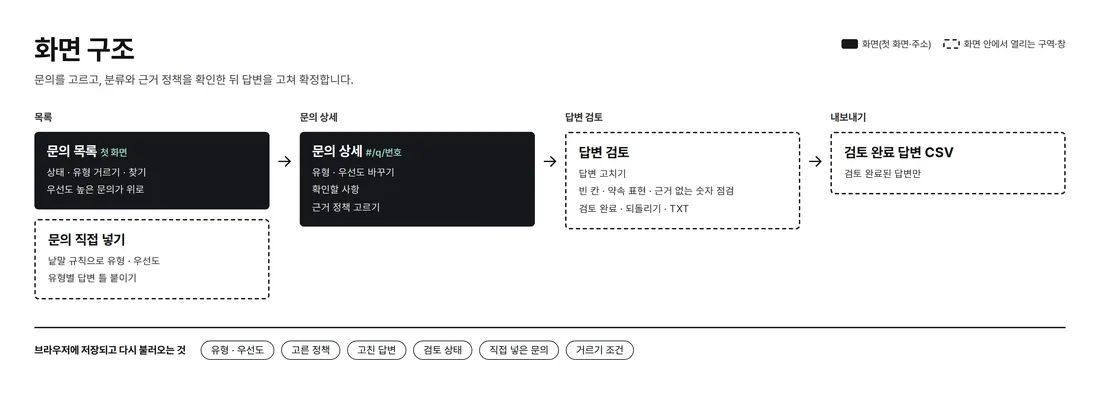
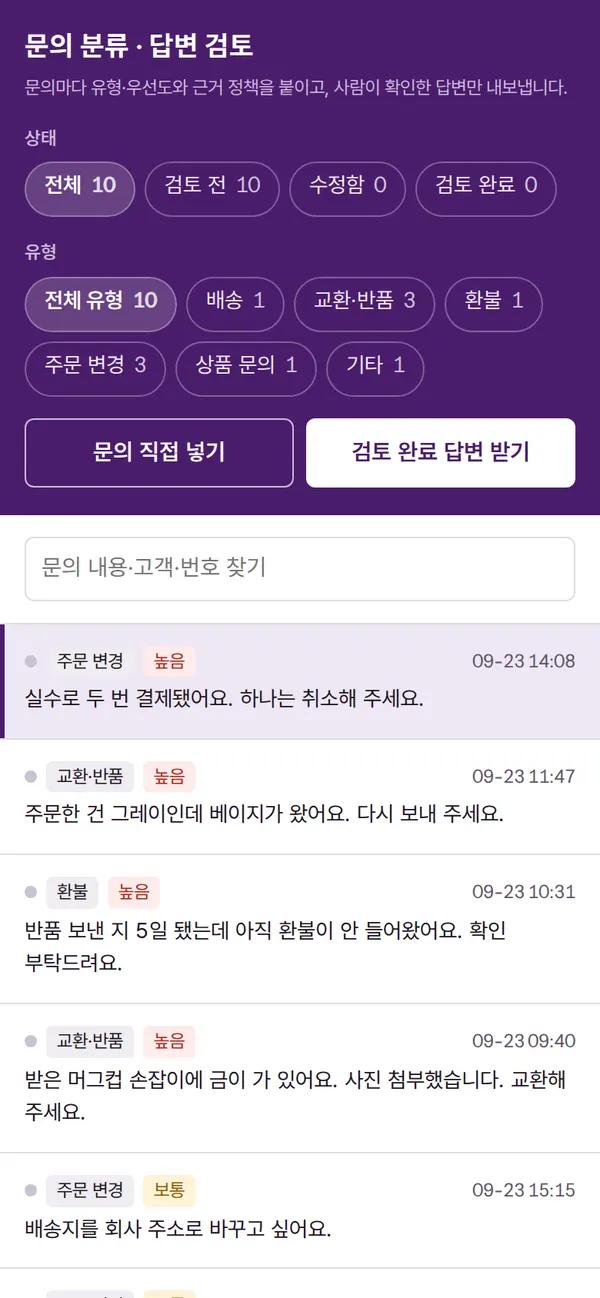
Filters on the left, the inquiry list in the middle, and inquiry details on the right sit side by side on one screen. Opening an inquiry changes the address to #/q/number, so the back button returns to the list. On mobile, the list and details are shown one screen at a time.
4. Key Features
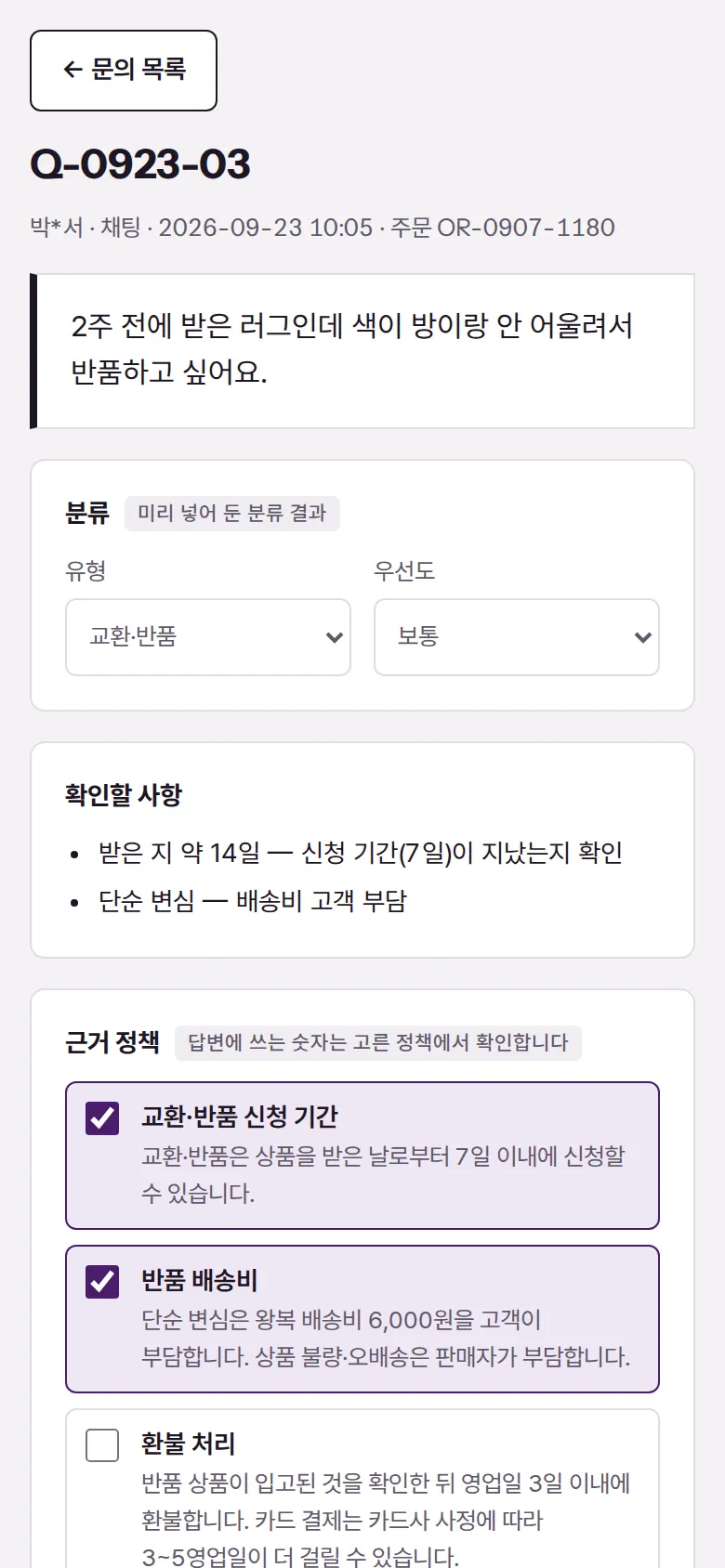
Inquiry Detail — Classification, Points to Check, Supporting Policy
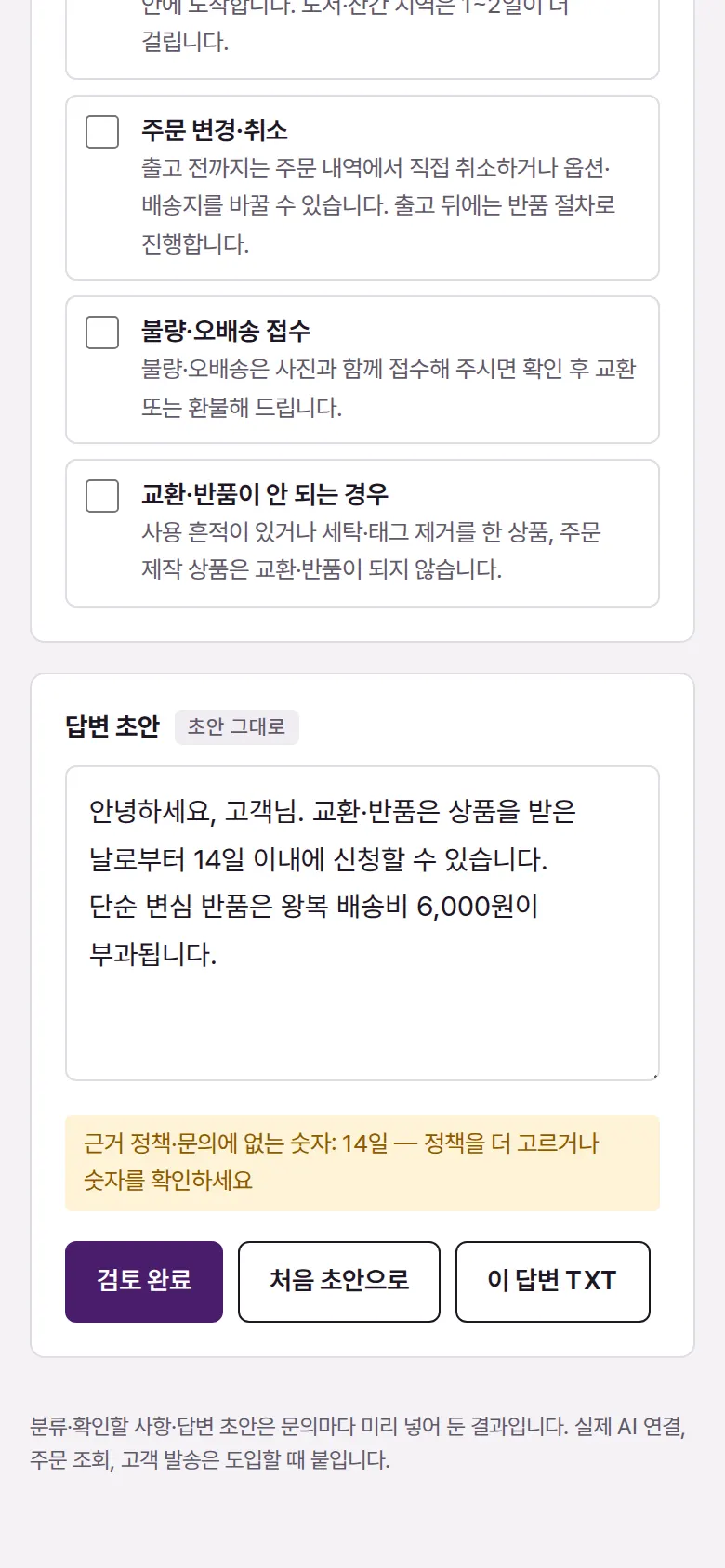
Reply Rule Check
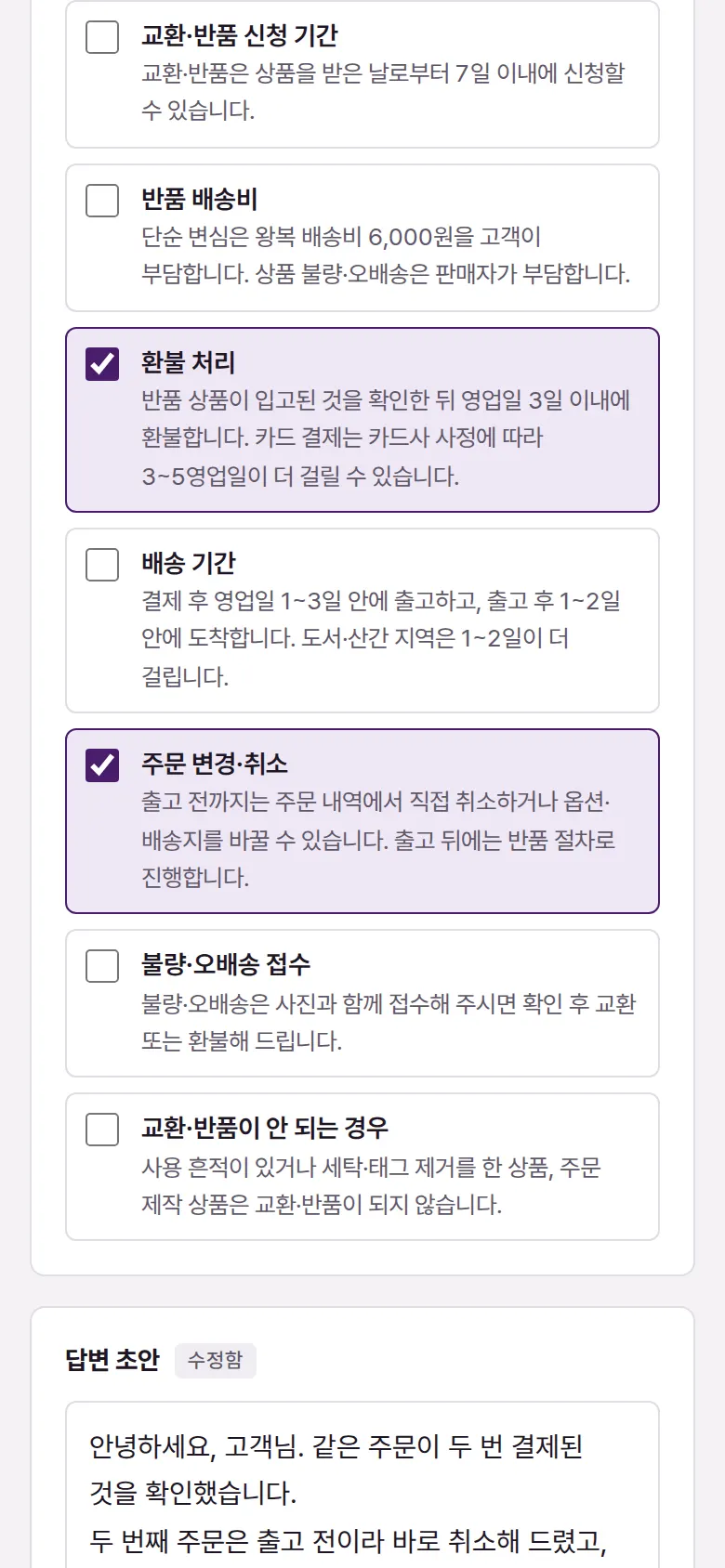
Choosing Supporting Policies
Choose the basis for the reply from 7 operating policies, such as exchange and return periods, return shipping fees, and refund processing. Numbers found in the chosen policies clear their warning when used in the reply.
Filter by Status and Type
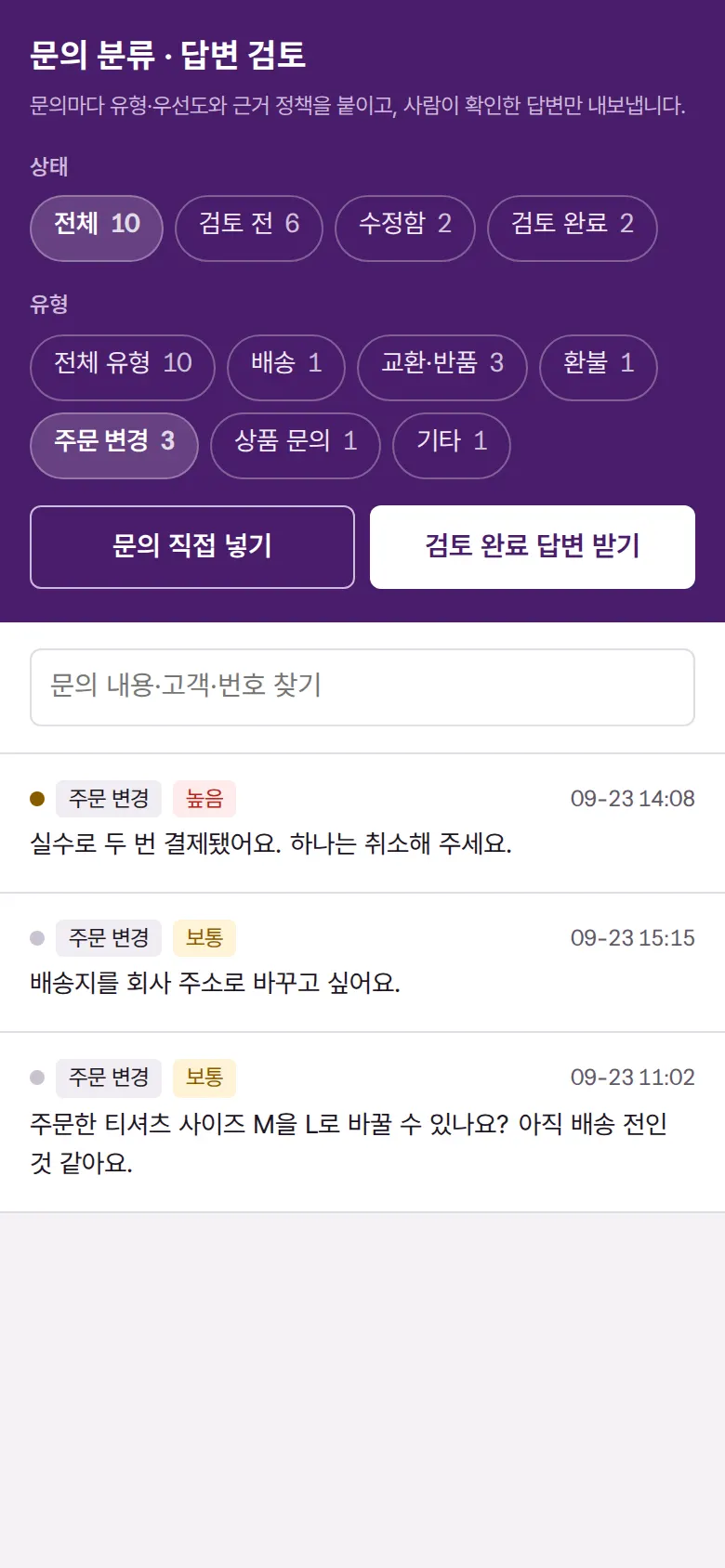
Filter by Not reviewed · Edited · Reviewed, and by shipping · exchange · return · refund · order change · product question · other, and search by content, customer, or number. The list starts with the highest-priority inquiries.
- Entering an Inquiry Manually
Paste an inquiry and keyword rules such as " 깨져서·교환 " (broken · exchange) set its type and priority,then attach a reply template and supporting policy for that type. The matched keywords are listed under points to check.
5. Build Notes
Show details
| Responsive | Layout changes at 1300 · 900px. At 1300px and above, filters, list, and details take three columns; inside the details, the customer inquiry and reply bubbles are on the left, and classification, points to check, and supporting policy on the right. Narrower than that, details stack in order: inquiry → reply → classification → policy; below 900px, filters become a row of buttons at the top, and list and details are shown one screen at a time. |
| Fonts | Gowun Dodum, a rounded sans-serif (a free open font). Trimmed to only the characters used on this screen, 41KB in total. |
| Images | A business screen with no photos. Status dots and priority marks are drawn with CSS. |
| Motion | No motion except notification text that briefly appears and fades. |
| Accessibility | Filter buttons announce their pressed state, and every input has a label. Check results are shown with both color and a sentence. Accessibility score 100. |
| Tech | HTML, CSS, JavaScript (no external libraries). Classification rules and reply checks run inside the browser. Review results are stored in browser storage (localStorage); reviewed replies download as CSV and a single reply as TXT. Entered text is rendered as plain text only. |
6. QA
Results from running the pages on PC 1440 and mobile 390 screens and clicking through in the order a real user would. We also checked that data is still there after saving and refreshing. (2026-09-23)
| Item | PC 1440 | Mobile 390 |
|---|---|---|
| Screen errors | 0 | 0 |
| Broken files | 0 | 0 |
| Horizontal overflow · clipped text | 0 | 0 |
| Function tests (Chrome) | 15 / 15 passed | 15 / 15 passed |
| Function tests (Safari engine) | 15 / 15 passed | 15 / 15 passed |
The 15 function tests: first screen display · high-priority inquiries on top · opening an inquiry — classification, points to check, policy, draft · choosing another policy to clear a number warning · review locked while blanks remain · changing type and priority · editing a reply and marking it reviewed · review results kept after refresh · filtering by status and type · searching inquiries · entering an inquiry manually — keyword rule classification · this reply as TXT · resetting to the original draft · back button · CSV of reviewed replies
Speed and quality scores (out of 100; mobile measured three times on a slow connection, same result each time)
| Performance | Accessibility | Best Practices | SEO | |
|---|---|---|---|---|
| Mobile | 100 | 100 | 100 | 100 |
| PC | 100 | 100 | 100 | 100 |
Mobile: First Contentful Paint 0.9s · Largest Contentful Paint 1.1s · Layout Shift 0.000 · Blocking Time 40ms PC: First Contentful Paint 0.3s · Largest Contentful Paint 0.3s · Layout Shift 0.000 · Blocking Time 0ms
7. Result
Try it live ↗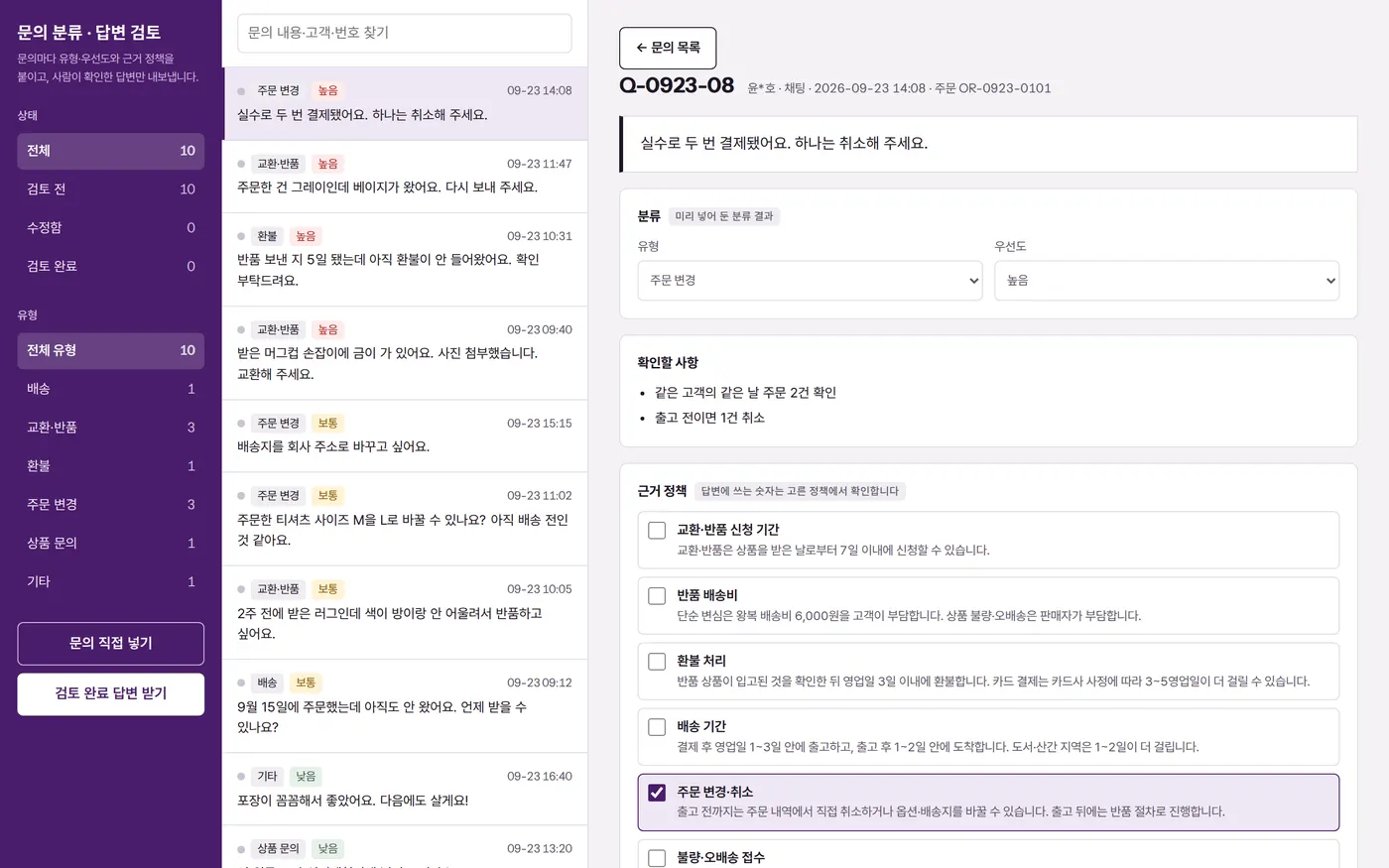
Privacy Policy