1. Overview
| Industry | A small architecture practice in Hackney (E8), East London (2 architects · 2 designers) — an English website for an architecture practice in London, UK. It designs house extensions and loft conversions, mews house conversions, energy retrofits and small community buildings, and follows them through on site. |
| Purpose | Let visitors look through 8 projects → work out a guide design fee themselves → send an enquiry with details of their house or site → check, change or cancel it by its reference number |
| Scope | 9 pages (Index (home) · Work (project list) · Project (detail, 8 projects in one page layout) · Practice (the studio and how we work) · Fees (fee guide) · Enquire · Your enquiry (lookup) · Journal (site notes) · 404) · responsive for PC, tablet and phone · English for UK clients (British spelling, en-GB), dates DD/MM/YYYY, pounds (£), m², phone numbers with the 020 area code |
| Main flow | Work list (type and status filters, list/grid view) → project detail (info table, floor-by-floor plans) → fee guide → "Enquire with these details" (type, area and scope filled into the enquiry form) → reference OC-YYMMDD-XXXX → check stages, change the preferred consultation date or cancel in Your enquiry |
The "course" in "One Course" is a single row of bricks. The name carries the idea of "only what is needed, layer by layer".
Enquiries are saved in the browser and loaded again in the same browser.
Connected at rollout: real text and email messages, file uploads (only file names and sizes are sent with the enquiry), and server storage.
2. Challenges
1. "What would the fee be for our extension?" is the first question.
In the UK the design fee is usually a percentage of the estimated build cost. But the amount changes a lot depending on how far the practice is engaged (RIBA Stages 0–3 / 0–4 / 0–6). So most practice websites end with "please get in touch".
2. There are photos, but no size or status.
Clients want to know whether the practice has done a terrace extension or loft conversion of a similar size. They also want to see whether a project is on site now and how the plan is laid out.
3. The details an enquiry needs never arrive in one go.
Location, floor area, budget and start date have to be asked again on the phone. Once clients send an enquiry, they have no way of knowing how far it has got.
3. Structure
                 ┌──────────────── index.html Index ──────────────────┐
                 │ Opening photo → two lines of giant type → photo opens│
                 │ → intro + key facts → 4 recent projects → enquiry band│
                 └──┬────────────┬────────────┬────────────┬─────────┘
                    │            │            │            │
               work.html   practice.html  journal.html   fees.html
               8 projects    3 ideas ·      6 site notes    fee guide
               filters ·     RIBA Stages    (open on the    how it is
               list/grid     0–7 · 4 people  same page)     worked out
                    │                           │ View project   │ Enquire with these details
                    ▼                           │                ▼
           project.html?id=…  ◀─────────────────┘   enquire.html ── reference ──▶ status.html
           large photo · info table · text ·        site · type · budget ·         stages · change date ·
           photo sequence · SVG plans               contact · attachments          cancel
           (floor tabs, room areas)
           previous/next · unknown id → project list

  Every page: comma-separated text menu (current page underlined) · full-screen phone menu · footer · 404.html
From the home page the site splits into work, practice, journal and fees, and the work list and journal lead into project details. The conditions worked out in the fee guide carry straight into the enquiry form, and after the reference is issued, progress is checked in Your enquiry.
4. Key Features
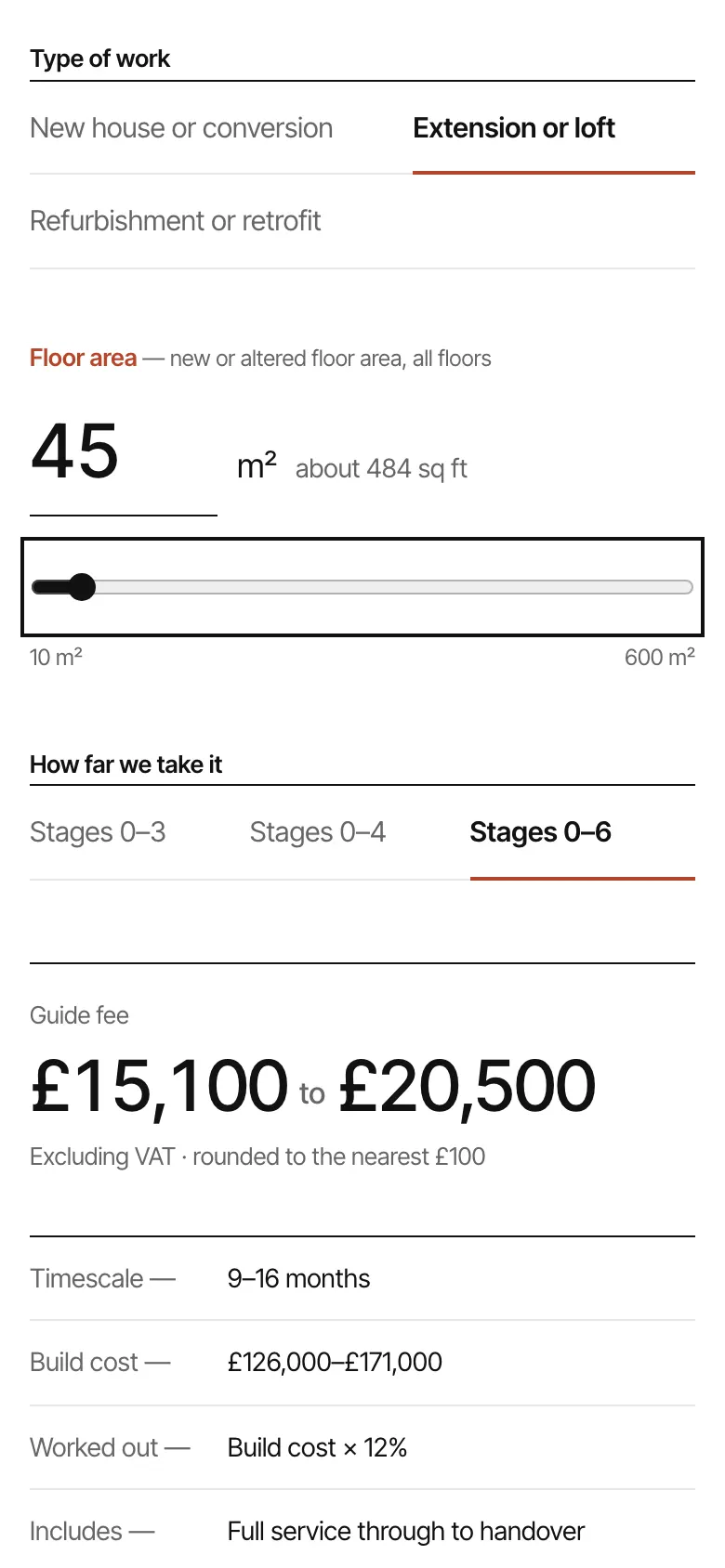
Fee guide
The build cost range per m² for the type (New house or conversion / Extension or loft / Refurbishment or retrofit) is multiplied by the floor area, then by the fee percentage for the scope (RIBA Stages 0–3 / 0–4 / 0–6). A size adjustment (under 40 m² ×1.15, over 250 m² ×0.9) and the minimum fee are applied, and the result is rounded to the nearest £100 to give a guide fee range and a timescale in months. The working is shown on screen as it is, followed by "This is a guide only. We send a written fee proposal after a site visit." Rates and percentages live in one place only, data.js.
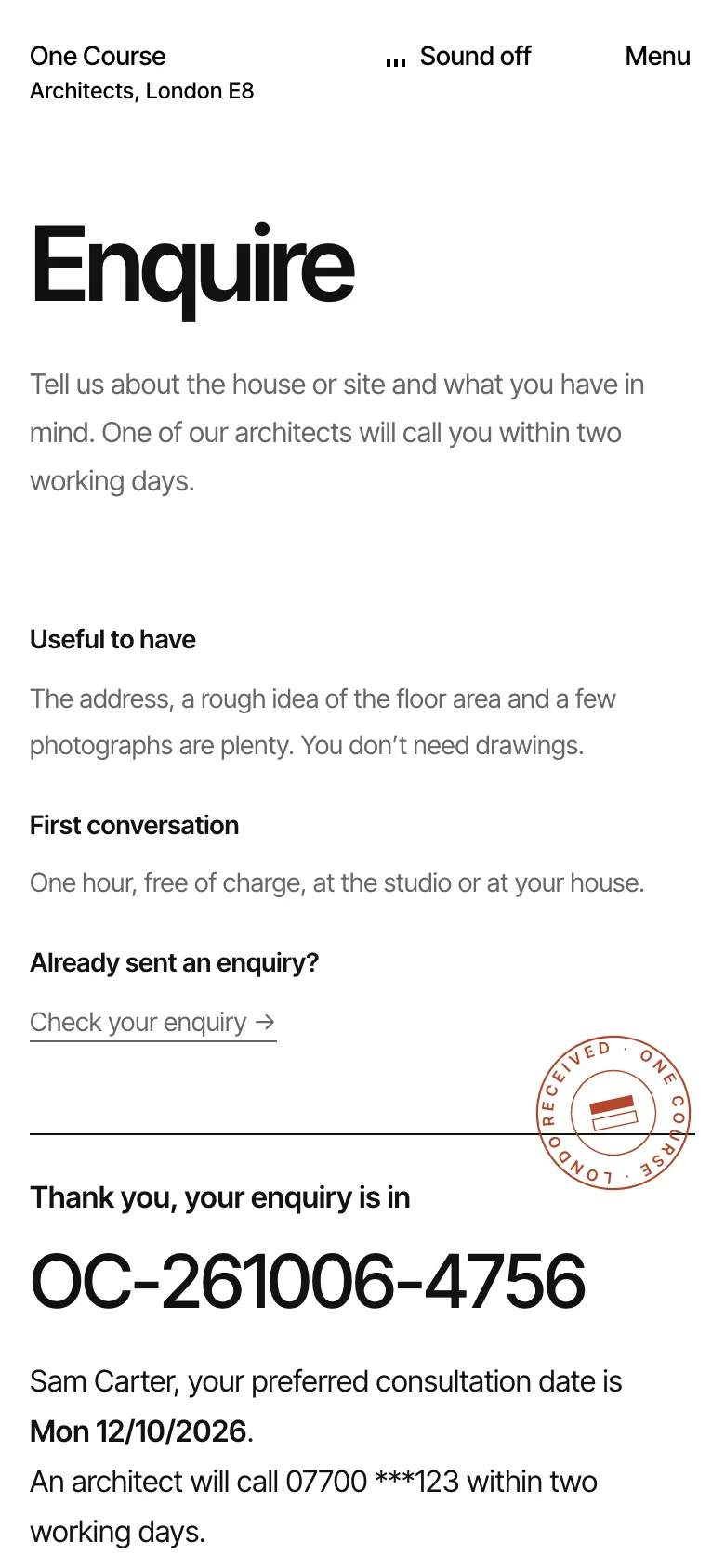
Enquiry reference
On sending, an OC-date-4-digit reference is created and saved. The preferred consultation date (in the form Tue 06/10/2026) and the contact number (partly hidden) are shown back. For attachments, only file names and sizes are saved.
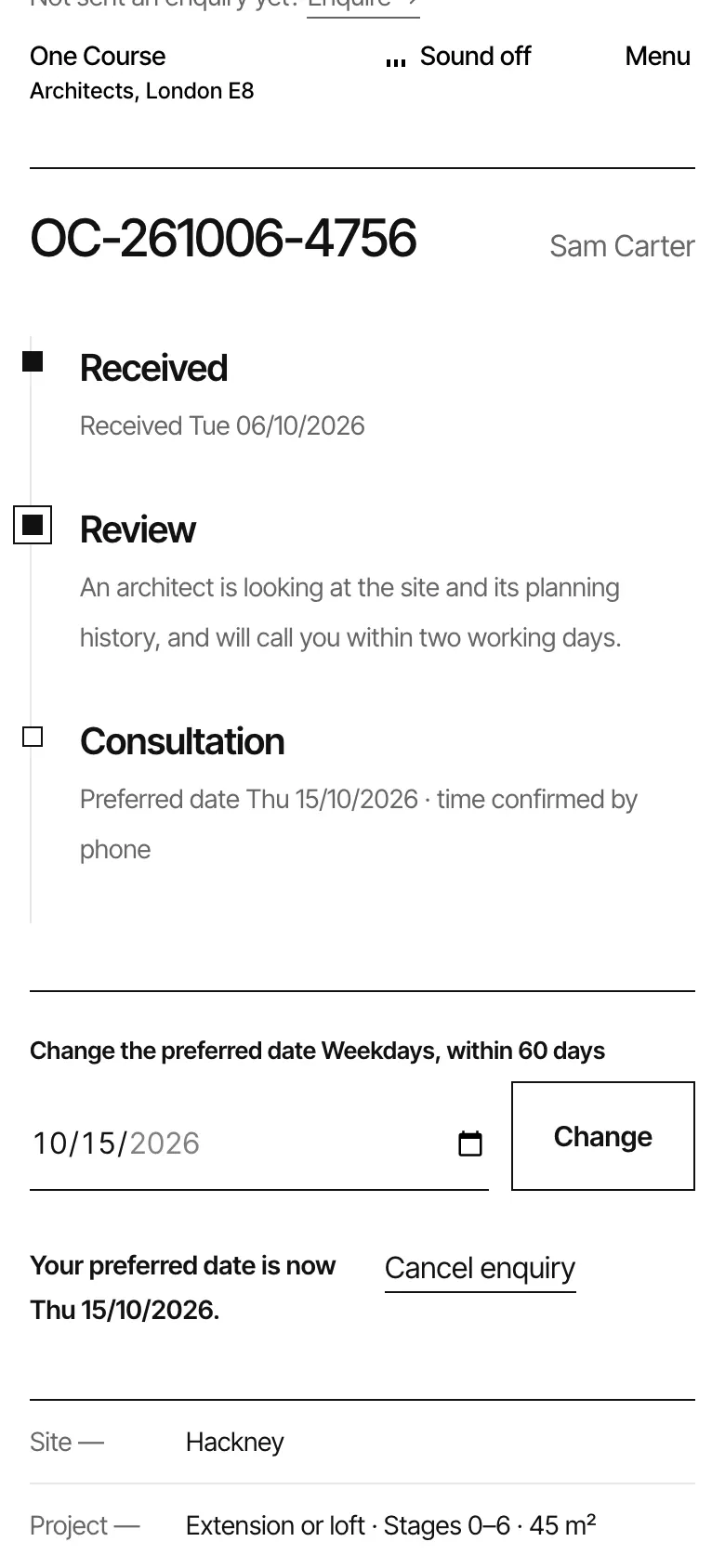
Enquiry lookup and date change
The enquiry opens only when both the reference and the last 4 digits of the mobile number match. It shows the Received → Review → Consultation stages, and the preferred consultation date can be changed (weekends and past dates are blocked). Each change is logged with a DD/MM/YYYY date and time.
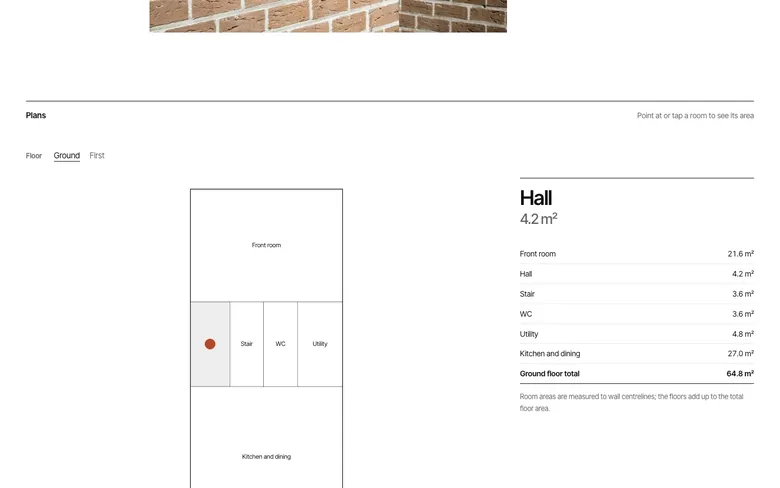
Floor plans
For each project, plans are drawn as SVG from room-size data for every floor. The Ground/First/Loft floor tabs can also be moved with the arrow keys. Pointing at or tapping a room shows its name and area (m²) in large type, and the table beside it lists each room and the floor total. For all 8 projects the floor totals match the Floor area in the info table.
- Owner adminNew enquiries appear at once and join the list of people to call within two working days, and setting the status, lead and consultation time changes the stage and time on the client’s enquiry status page. The practice also edits project status, descriptions and lead photos, journal posts, build cost rates and fee percentages, information PDFs, the notice and office hours, and the fee calculator works from those values. In this case study the owner and customer screens share the browser’s storage; in a real rollout this becomes an owner login with server storage.
- Giant type rising line by lineAfter the opening photo, "Layer by layer, / precisely." sits on white. The type size is calculated per line to fit the width of the screen, and each line rises from a mask below with a slight delay, tied to scroll. If the font arrives late, the size is fitted again. On phones, both lines are in place from the start.
- Photo opening upA photo pinned to the screen starts as a rectangle inset 72px from the edges and widens to the edges of the screen as you scroll (clip-path inset 72px → 0). On phones and with reduced motion, the photo is full from the start.
- Work filters and countType (Houses · Extensions · Workspace · Community) and status (Completed · On site · In design) filters combine, and the count shows at once, as in "3 of 8 projects". If nothing matches, a message and "Clear filters" appear.
- Photo following the pointerOn the PC list, hovering over a row makes that project's main photo follow small beside the pointer. Moving to another row changes the photo, and leaving the list hides it. On phones, each row carries a small photo instead.
- List ↔ gridSwitch between a one-line list (number · name · area · year · type) and a photo grid. The chosen view is saved and kept after a refresh. Filters apply the same way to both views.
- Unknown projectIf the id in the address does not exist, "We can't find that project." appears with the list of 8 projects and a link to the work list. Previous/next links wrap around from the last project to the first.
- Enquiry required fieldsLocation, type, budget, name, a UK mobile number (07… and +44 7… both accepted, landlines blocked), preferred consultation date (a weekday from tomorrow up to 60 days ahead) and consent are checked. If anything is missing or wrong, the reason appears under the field and nothing is saved. Coming from the fee guide, the conditions and guide fee are shown at the top.
- Enquiry cancellationAfter one more confirmation, the enquiry is saved as cancelled. A cancelled enquiry shows a note to send a new enquiry instead of the change button.
- JournalIn the list of 6 notes (date · title · project), selecting a title opens its photo and text in place, with a link to the project.
- Phone menu"Menu" opens a white full-screen menu with the address and phone number. It closes with the Close button or Esc, and the page behind stops scrolling while it is open.
5. Build Notes
Show details
| Responsive | Based on PC 1440 · tablet 900 and below · phone 390. On phones the work list becomes a small photo + name, area and year row, wide plans sit in a box you swipe sideways, and the detail info table and text go into one column. |
| UK localisation | British spelling (neighbourhood, centreline, metre, storey), lang="en-GB". Dates DD/MM/YYYY (with weekday abbreviations), £ with thousands separators, m² (with square feet alongside), UK mobile number check. The way of working follows the RIBA Plan of Work Stages 0–7, and approvals (planning permission, building regulations) are only described as "we help apply if needed". There is not a single Korean character on the site. |
| Text and line breaks | Headings use balanced lines (text-wrap: balance), and body text avoids a single word on the last line (pretty). Each sentence of the large intro paragraph is balanced on its own, and the header is kept on one line. |
| Fonts | Giant type, headings and body are all Inter Tight (300 · 400 · 500 · 600), with one intro phrase in Newsreader italic (all free, openly licensed fonts). Areas, years and amounts use fixed-width figures. Fonts load from files inside the site, so there are no external font requests. As an English site it carries no Korean font; of the 4 Latin-only font files (231KB in total), the first visit to the home page downloads 2 (106KB). |
| Colour | White #FFFFFF · ink #111111 · grey #8A8A8A · rule #E6E6E6. There are no other colours; colour comes only from the photos. |
| Images | 30 free real photos (JPG up to 1600px wide, 2000px for the opening, 9,095KB in total). 4 of the 8 projects have 4 photos and 4 have 3. Phones get separate 800px-wide photos (31, 2,610KB in total), and photos outside the first screen load as they come into view. Every image has width, height and English alt text, and no photo shows a number plate, shop sign or logo. A first visit to the home page on a phone transfers 0.6MB. |
| Motion | Two main effects: lines rising from masks (GSAP ScrollTrigger scrub, staggered per line) and the photo opening (clip-path). When moving between pages, a white panel rises from below, covers the page and lifts away (0.5s). The header menu moves out of the way while reading down and comes back on scrolling up. No cursor effects, loading screen, counting numbers, shadows or cards. |
| Accessibility | Skip to content, alt text on every image, buttons are button and fields have label. Floor tabs use the tab role and move with the arrow keys, and rooms on the plan show their area from the keyboard (Tab · Enter). Error messages are linked to their fields. With reduced motion, smooth scrolling, reveals, the opening photo and transitions are all turned off and content shows at once. |
| Technology | HTML · CSS · JavaScript, GSAP 3.12 + ScrollTrigger, Lenis (smooth scrolling) — all inside the site, with no external scripts. Projects, plans, fee rates and journal notes are in one file (data.js), and the screens and the function tests use the same calculation functions. Enquiries go through a single save function wrapping browser storage (localStorage) in try/catch. |
6. QA
These results come from opening all 9 pages on PC 1440, phone 390 and phone 360 screens, and tapping through on PC and phone 390 in the order a real person would. We also checked that a saved enquiry can be looked up, changed and cancelled again after opening a fresh page, and external requests and broken links are 0. (2026-10-03)
| Item | PC 1440 | Phone 390 | Phone 360 |
|---|---|---|---|
| Screen errors | 0 | 0 | 0 |
| Broken files | 0 | 0 | 0 |
| Horizontal overflow | 0 | 0 | 0 |
| Function tests | 16 / 16 passed | 16 / 16 passed | — |
The 17 function tests (photo following the pointer and reduced motion on PC only, phone menu on phones only): giant type rising with a stagger (on phones: in place, fitted to the screen) · photo opening (on phones: full photo) · work filters, count and empty state · photo following the pointer · list/grid kept after refresh · detail content, info table and previous/next · plan floor tabs, room areas and floor totals for all 8 projects · unknown id message · 5 fee checks, minimum fee and passing values to the enquiry · enquiry required fields, UK mobile, reference and attachments · lookup, date change (DD/MM/YYYY) and cancellation · journal opening · page transition and RIBA Stages 0–7 · en-GB on every page and no Korean text · reduced motion · phone menu · no script errors
Speed and quality scores (out of 100, measured on the public site on 2026-10-03; phone on a slow connection, median of three runs; PC on PC settings)
| Performance | Accessibility | Best practices | SEO | |
|---|---|---|---|---|
| Phone | 100 | 100 | 100 | 66 |
| PC | 100 | 100 | 100 | 66 |
Phone: first paint 0.8 s · largest element 1.4 s · layout shift 0 · input blocking 0 ms PC: first paint 0.2 s · largest element 0.3 s · layout shift 0 · input blocking 0 ms
The SEO score is low because the live demos are deliberately kept out of search results.
7. Result
Try it live ↗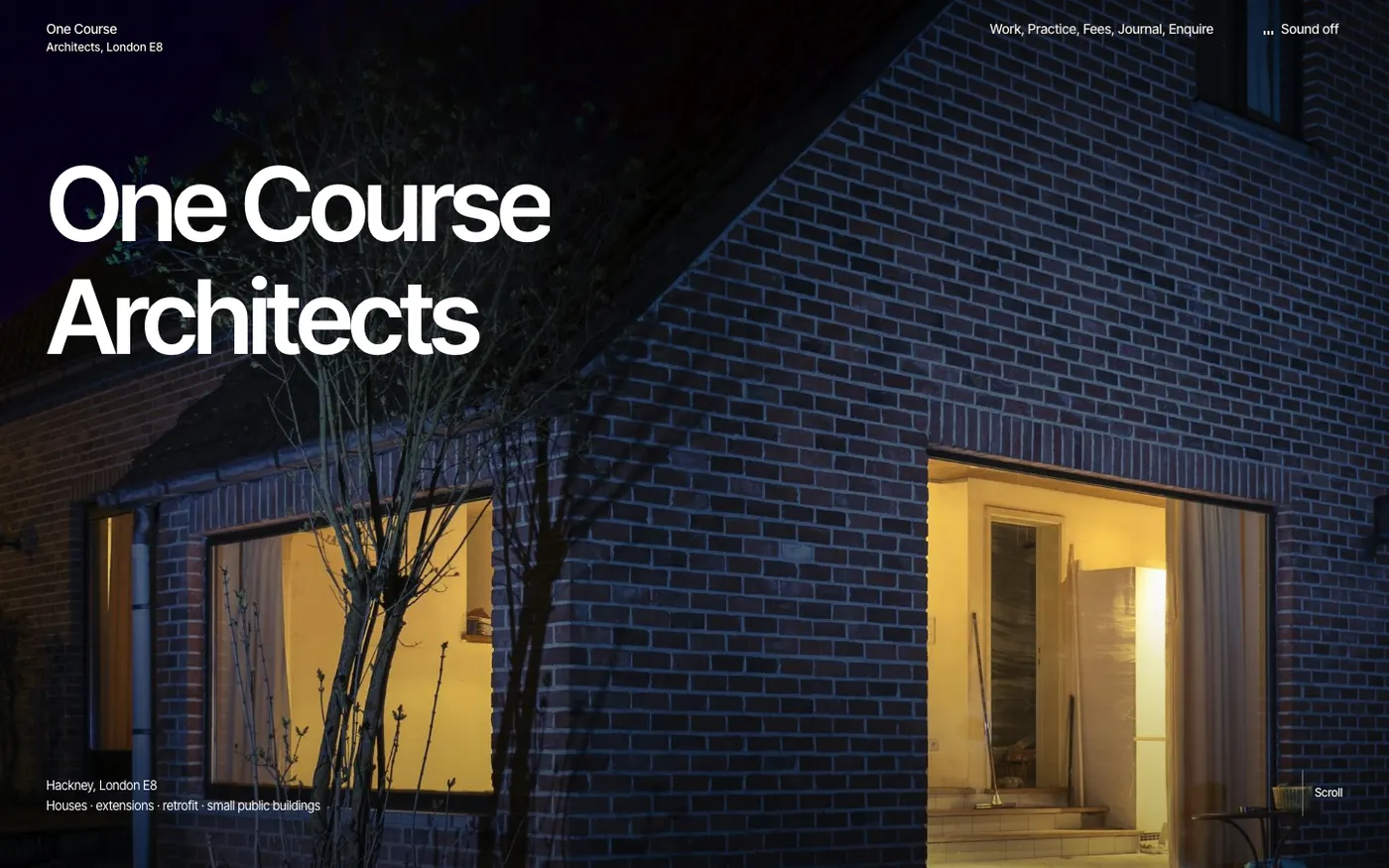
Privacy Policy