1. Overview
| Industry | A bedding brand that makes and sells everyday blankets |
| Purpose | Help customers choose with photos that show the texture, and show the multi-piece discount the moment items are added, leading on to the order |
| Scope | One page (8 sections) · 7 overlay windows (shop drawer, search, blanket finder, product details, cart and checkout, order history, sign-up) · 8 products (2 collections) |
| Main flow | Browse or use the blanket finder → details (single, queen) → cart (quantity discount) → checkout → order number → order history and cancellation |
Cart, orders and their status, recipient details and sign-up email are saved in the browser. They stay in place after a refresh or a return visit.
Connected at rollout: payments, inventory, applying the sign-up discount code at payment, an admin screen, member login (only the email sign-up is recorded), and server storage to see the same order on several devices.
2. Challenges
1. Customers hesitate between similar colors and patterns.
Photos alone make it hard to judge texture and size. There should be a way to choose by where the blanket goes and the feel customers want.
2. Customers don't know the discount for several pieces.
Each time a second or third piece is added, the amount taken off and the benefit of "add one more" should be visible right away.
3. There is nowhere to look at an order afterwards.
Which color, how many pieces and to which address — customers should be able to find this themselves and cancel if needed.
3. Structure
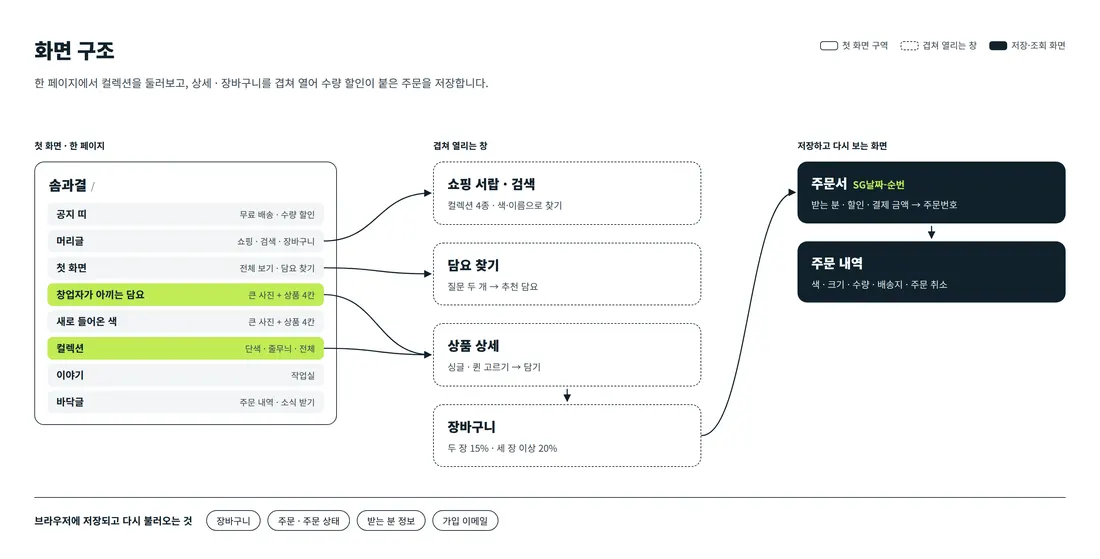
Visitors browse blankets by scrolling one page, from the first screen down to the brand story. A section with a large photo next to four product boxes appears twice, and the collection tabs below offer another way to choose. The shop drawer, search, blanket finder, product details, cart and order history open over the page without leaving it.
4. Key Features
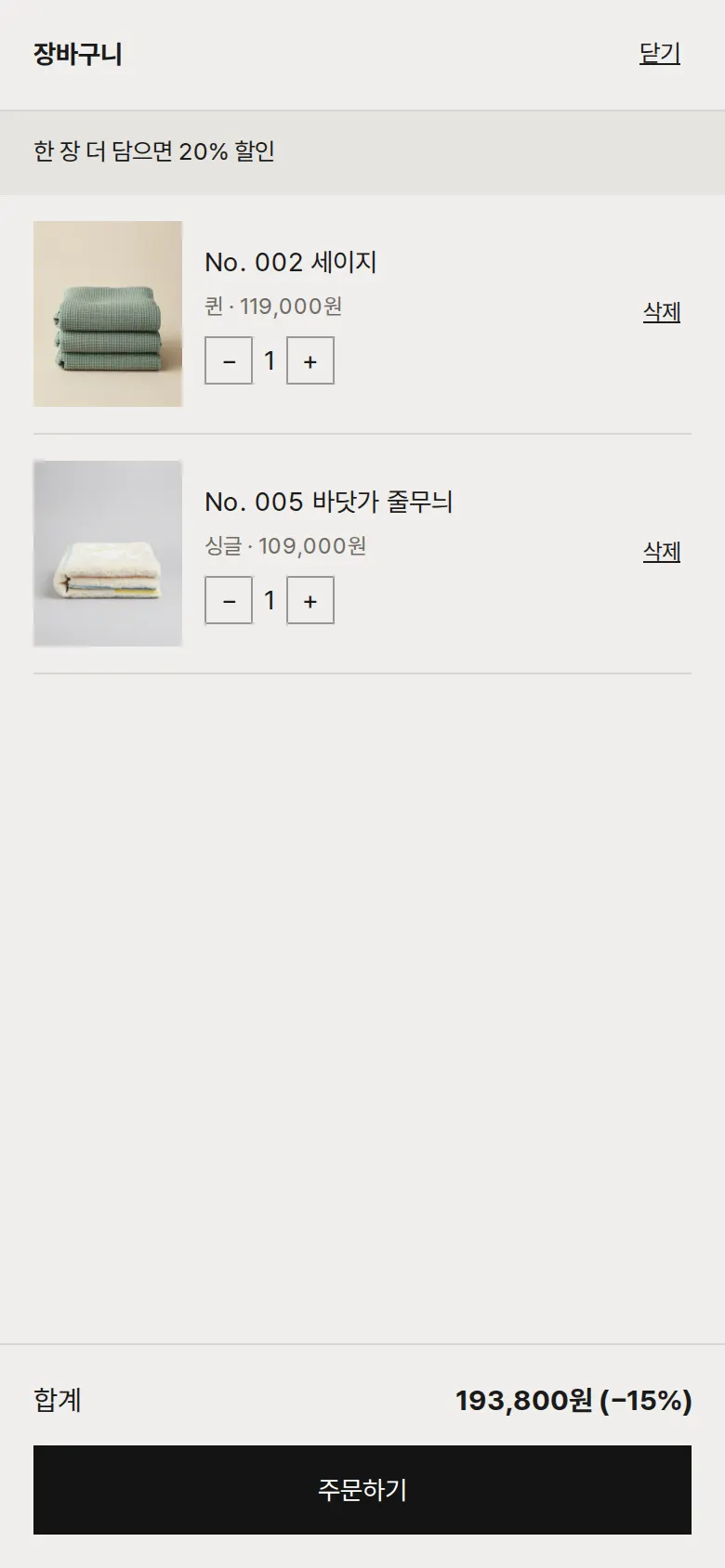
Cart with quantity discount
Two pieces take 15% off and three or more take 20% off automatically. The notice at the top changes with the number of items to show the discount for "add one more". Items, sizes and quantities in the cart stay after a refresh.
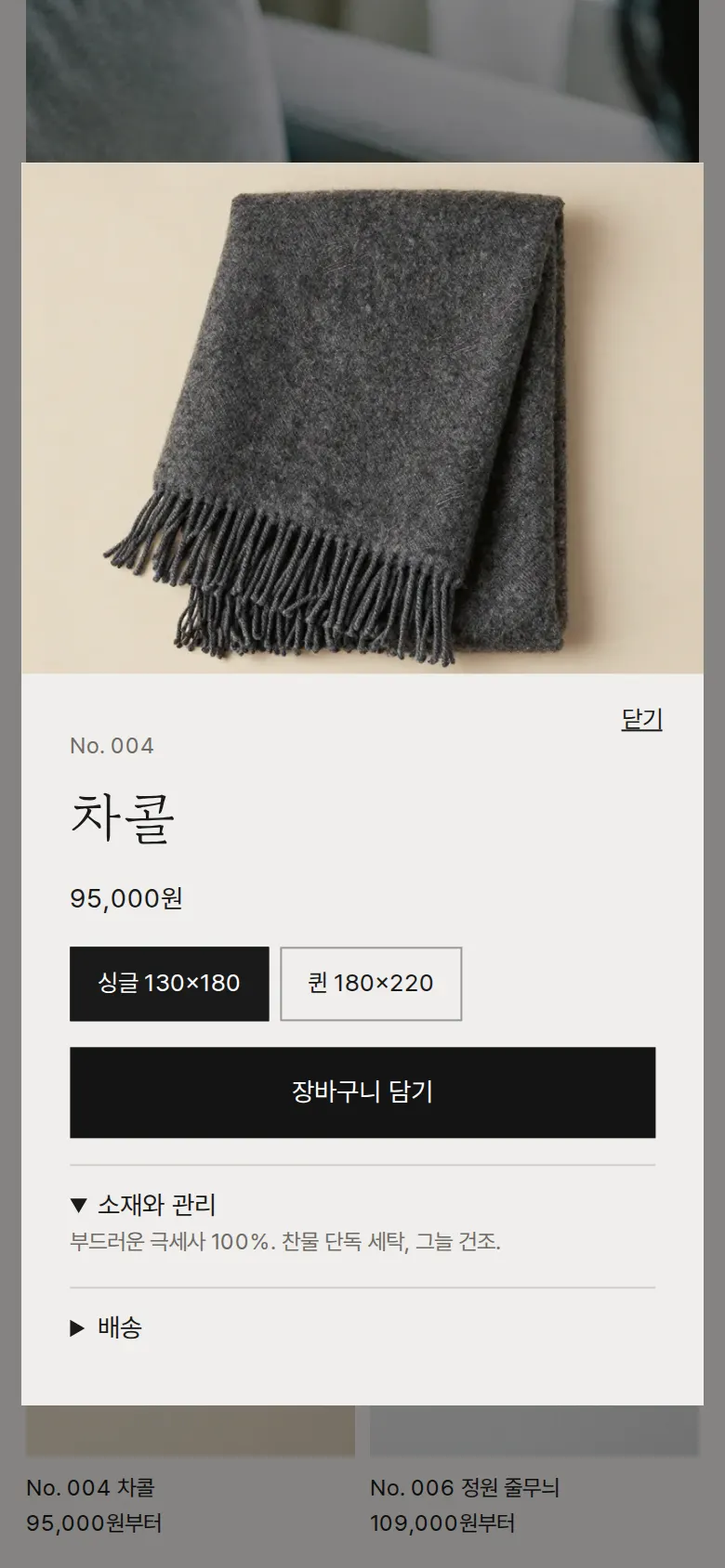
Product details — choosing a size
Tapping a product opens its details, with a choice of single (130×180) or queen (180×220). Changing the size updates the price right away. Material, care and shipping notes fold open and closed.
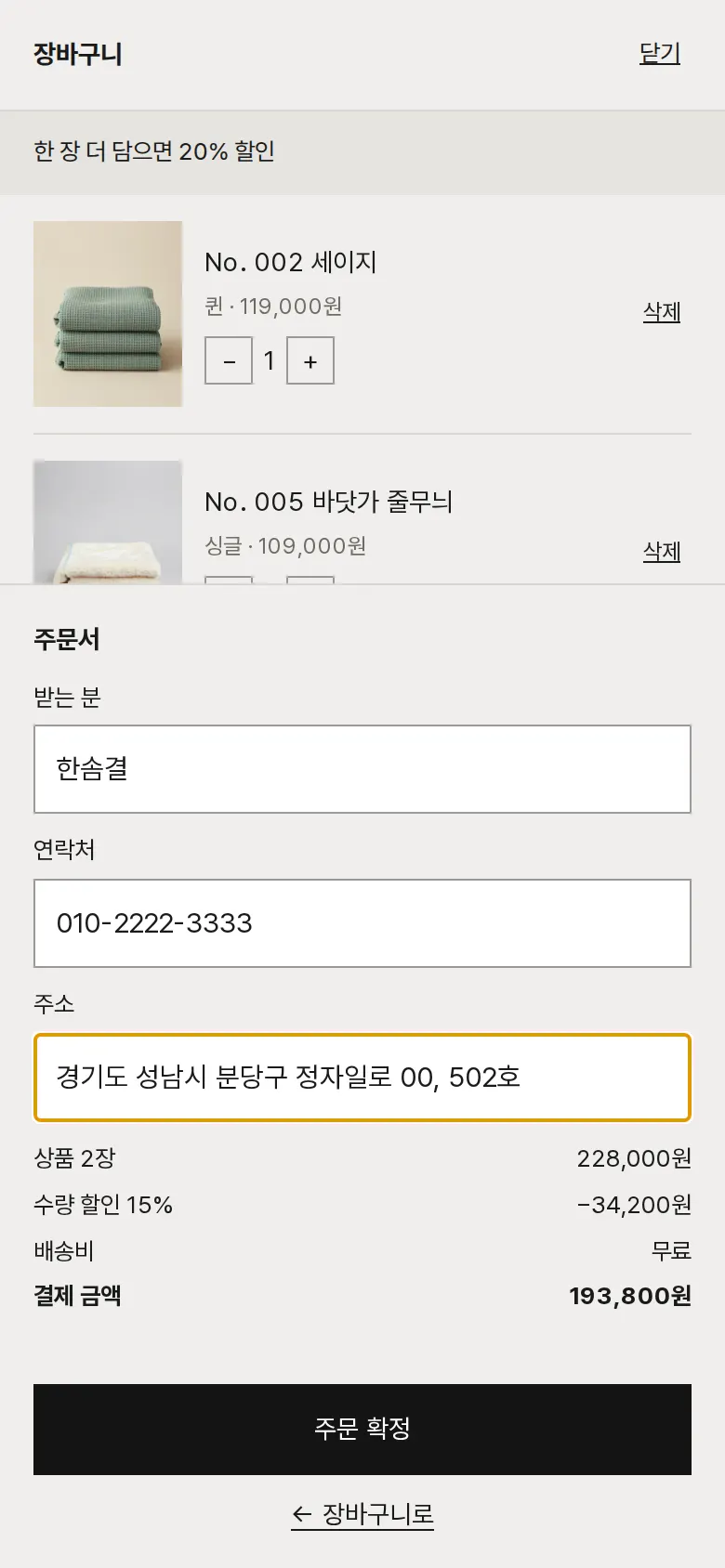
Checkout and order number
Checkout collects recipient, contact and address, and shows item total, quantity discount, shipping and total separately. Saving issues an order number (BL + date + sequence) and empties the cart.
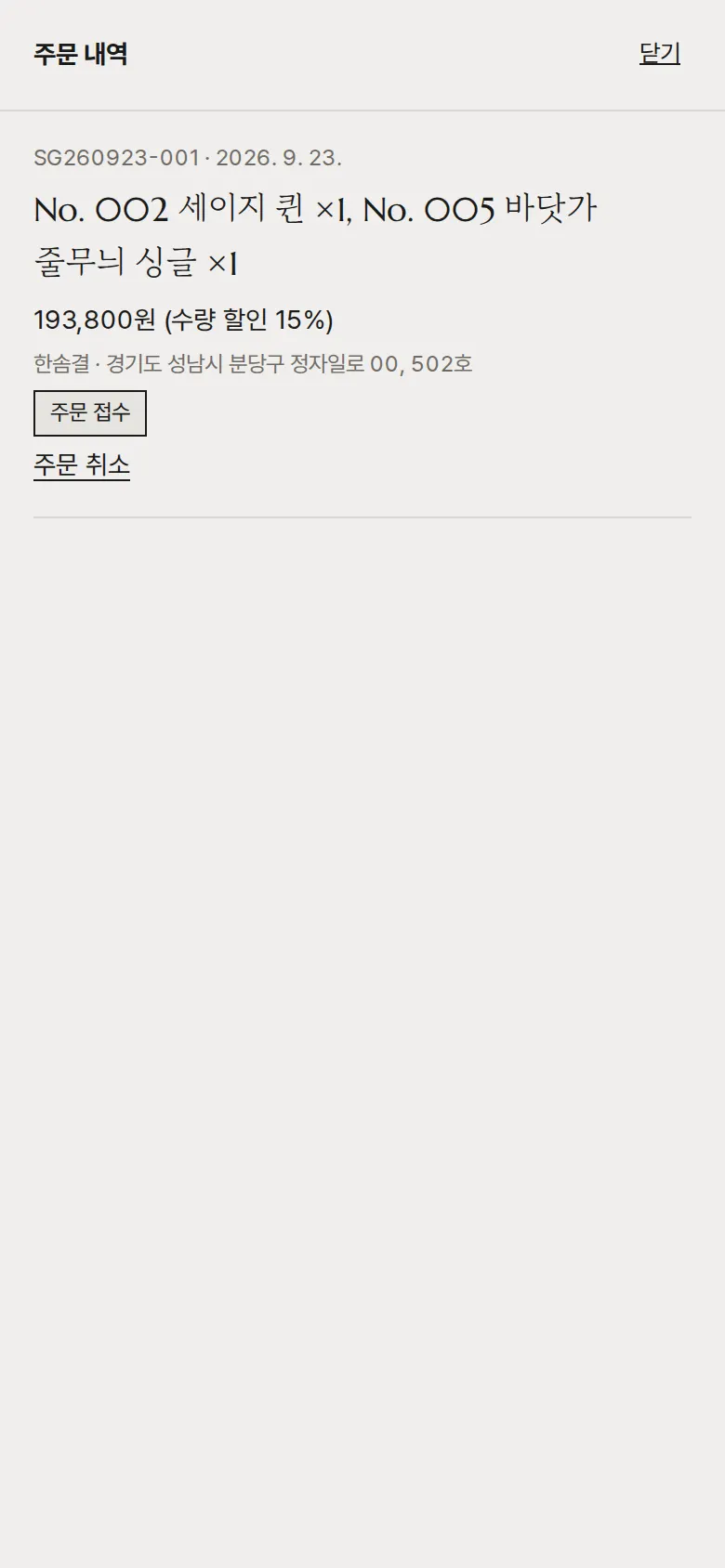
Order history and cancellation
Shows the number, color, size and quantity of ordered products, with amount and delivery address. A cancelled order changes to "Cancelled" and keeps that status after a refresh.
- Find your blanketCustomers answer two questions — "Where will it go?" (bed, sofa, outdoors) and "What feel do you like?" (bright, calm, warm) — and the site recommends a matching blanket.
- Collection tabsThe solid, stripe and all tabs show only the blankets in that collection.
- Sign up for newsOn a first visit a sign-up window opens after a short delay, and the email format is checked before saving. After signing up, the window does not appear again on later visits.
- Shop drawerA side drawer jumps straight to all, solid, stripe, new colors and order history.
- SearchTyping a color or name (for example, sage) into the search in the PC header shows matching blankets right away.
5. Build Notes
Show details
| Responsive | The layout changes at 900px and 520px. On PC, the large photo and four product boxes sit side by side. Below 900px, two product boxes sit under the photo, and below 520px text size and spacing are reset for phones. |
| Fonts | Body text in Pretendard, Korean headings in Gowun Batang, English headings in Marcellus (all free open fonts). They are bundled with the site and load without external requests. Every font keeps only the characters used on this site; the body font was cut from 2,010KB to 84KB, and Gowun Batang to a single 42KB file. |
| Images | 15 webp files, 791KB in total. Widths range from 700 to 1,344px depending on use. The first-screen photo loads first, and the rest load as they come into view. |
| Motion | Built with CSS animation and transitions, no library. The first-screen photo slowly zooms in, product photos grow slightly on mouse hover, and the header changes color after the first screen. Animations stop when the device's reduce-motion setting is on. |
| Accessibility | Every icon button has a label, and Esc closes windows. Every input has a label, and input errors are explained in a sentence. Accessibility score: 95. |
| Stack | HTML, CSS and JavaScript (no external libraries). Cart, orders, recipient details and sign-up email are saved to and read from browser storage (localStorage). If a browser blocks storage, the site says it cannot save. |
6. QA
These results come from running the site on PC 1440 and phone 390 screens and tapping through in the order a real person would. We also checked that a saved order can be looked up again after a refresh. (2026-09-23)
| Item | PC 1440 | Phone 390 |
|---|---|---|
| Screen errors | 0 | 0 |
| Broken files | 0 | 0 |
| Horizontal overflow or clipped text | 0 | 0 |
| Function tests | 12 / 12 passed | 12 / 12 passed |
The 12 function tests: stripe collection · choose queen in details · add to cart and open the cart · add two more and apply the discount · keep the cart after refresh · block orders with missing details · save an order · view order history after refresh · cancel an order and keep the status · save sign-up and no sign-up window again · blanket finder · search
Speed and quality scores (out of 100; phone measured on a slow connection, PC on PC settings, three runs each, sign-up window closed)
| Performance | Accessibility | Best Practices | SEO | |
|---|---|---|---|---|
| Phone | 94–95 | 95 | 100 | 91 |
| PC | 100 | 95 | 100 | 91 |
Phone: first content 0.8s · largest content 3.0–3.2s · layout shift 0 · input blocking 0ms PC: first content 0.2s · largest content 0.6s · layout shift 0 · input blocking 0ms
7. Result
Try it live ↗

Privacy Policy