1. Overview
| Industry | Order, shipping and returns staff at an online store selling stationery such as notebooks, pens and ink |
| Purpose | An operations screen that imports store orders and processes them through shipping, then manages returns and exchanges for delivered orders from pickup to refund |
| Scope | 3 screens with their own URLs · 2 overlay panels (order detail, return detail) · 8 products · 16 sample orders · 1 sample order file |
| Main flow | Import orders → Check priority items → Prepare items → Enter tracking number and ship → Delivered / Return or exchange received → Pickup → Inspection → Refund completed or exchange shipped |
Order status, recipient details, tracking numbers, activity history, return and exchange requests, refund amounts and imported orders are saved in the browser. They stay after a refresh or a return visit.
Connected at rollout: automatic links to the store and courier (automatic order collection, tracking number sending, delivery tracking), actual refund payments, customer text and email notifications, login and staff permissions, and server storage shared across devices.
2. Challenges
1. Staff should not have to hunt for delayed orders.
Orders not shipped two days after payment, or orders missing an address, get buried in the list. Problem orders should gather at the top with the reason, so none are missed.
2. Stop shipping mistakes at the input step.
If a tracking number has the wrong number of digits or belongs to another order, the customer cannot track the delivery. Accidentally canceling an order that has already shipped must also be blocked.
3. Stop working out return refunds on a calculator every time.
For a change of mind, the return shipping fee is deducted. If a free-shipping order falls below the threshold after the return, the original shipping fee is deducted too. For defects, nothing is deducted. These rules should be calculated on screen and recalculated based on the inspection result.
3. Structure
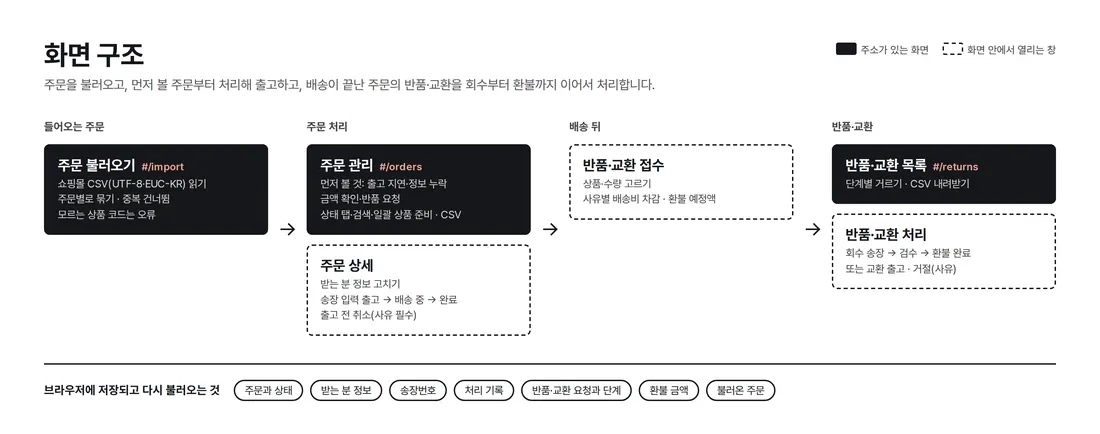
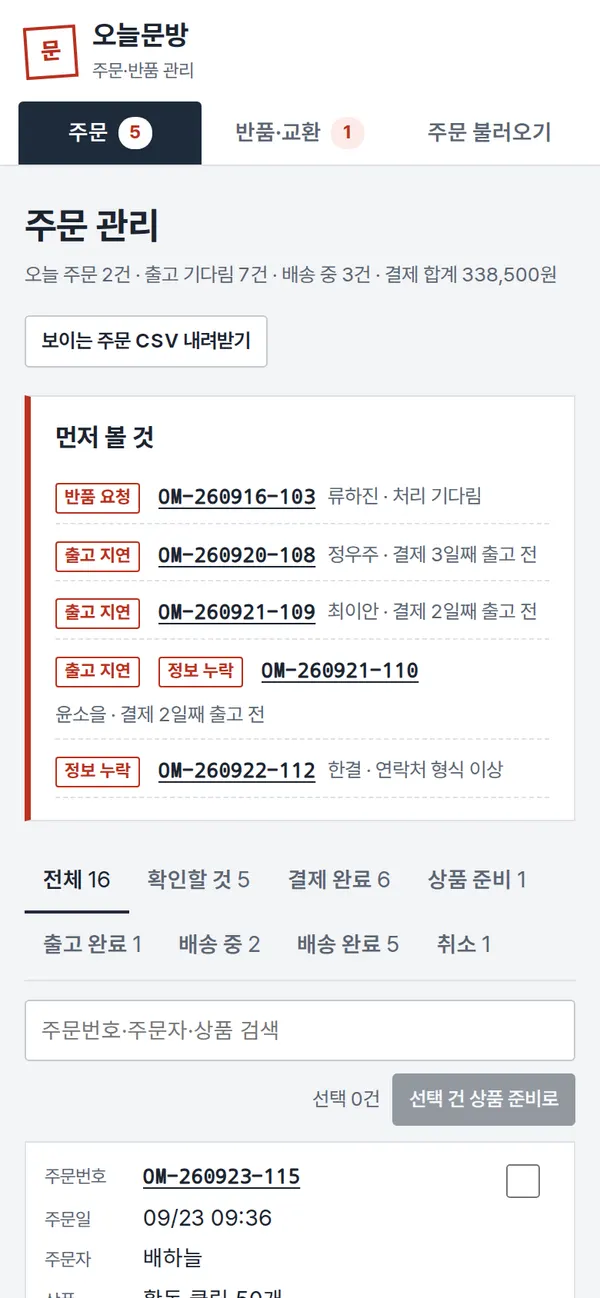
You move between screens with colored index tabs on the side of a notebook (orders, returns, exchanges, import orders). Orders and return requests open in a panel that slides in over the list, and you move through the steps inside that one panel. The number on each tab is the count of priority orders and returns waiting to be processed.
4. Key Features
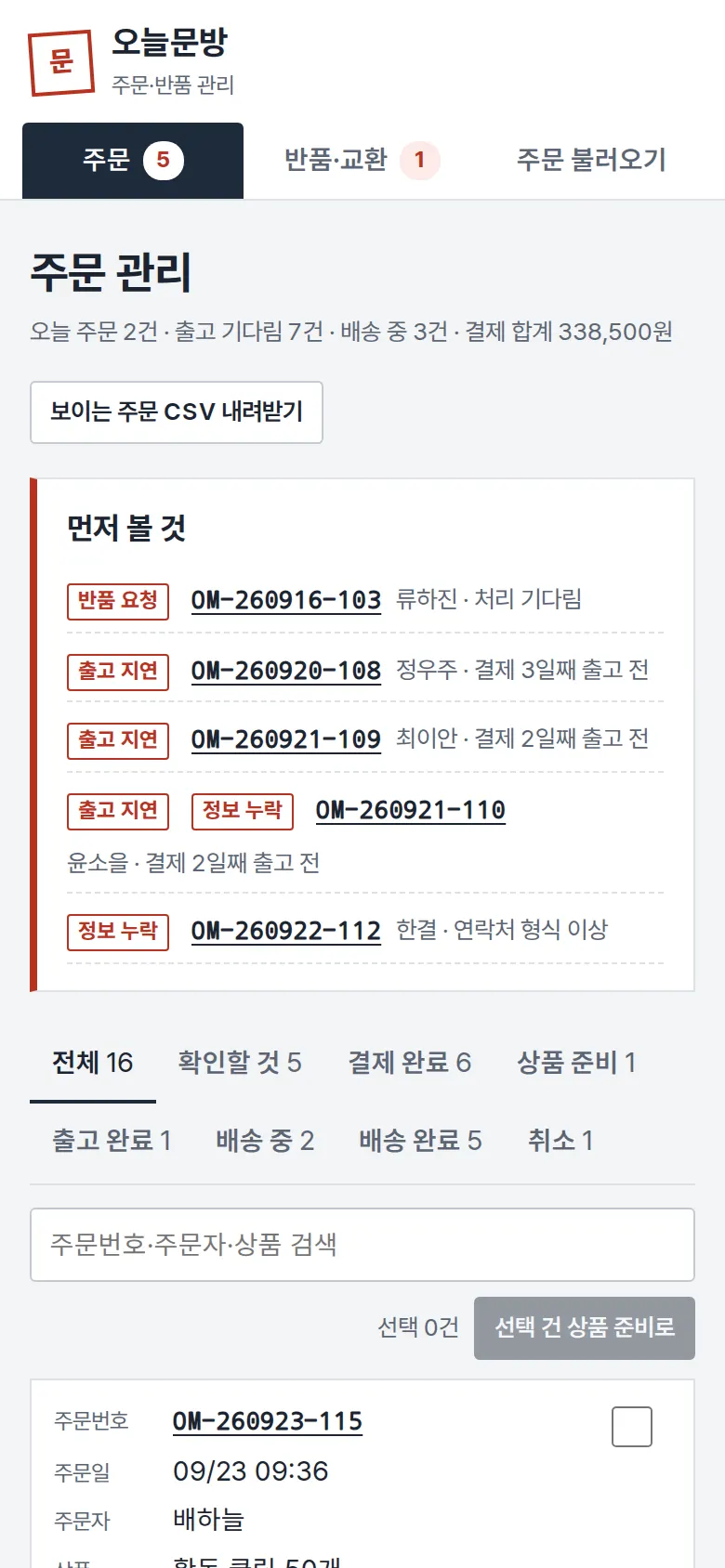
Priority Items — Late Shipments, Missing Details, Amount Checks
Orders still not shipped two days after payment, orders with no address or an invalid phone format, orders where item total and payment amount do not match, and orders with a return request gather at the top with the reason. Once the problem is fixed, the order drops off the list right away.
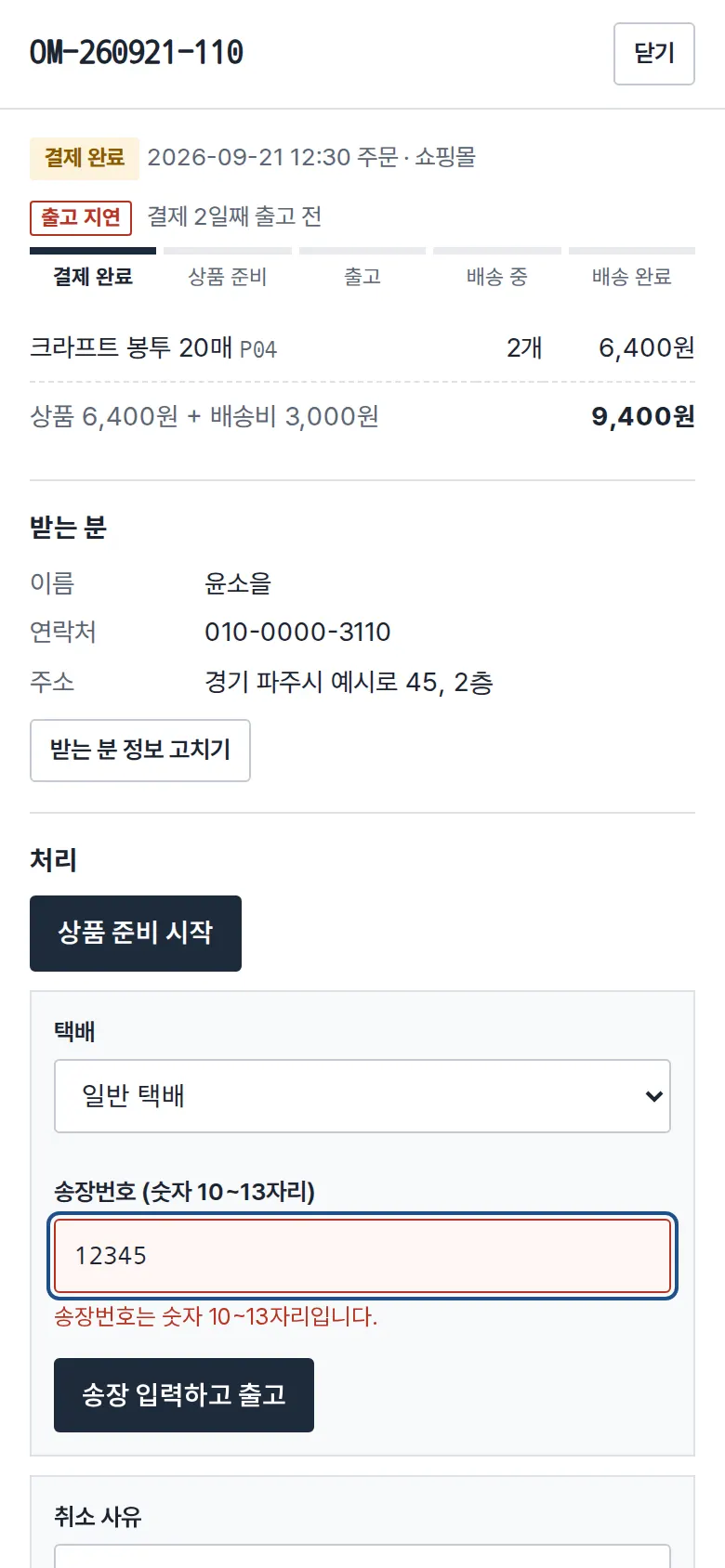
Tracking Number Entry and Shipping
In the order panel, move through Preparing → Enter tracking number and ship → In transit → Delivered. Tracking numbers accept only 10–13 digits. Numbers already used on another order, and orders missing recipient details, cannot be shipped. Orders can be canceled only before shipping, and a reason must be selected.
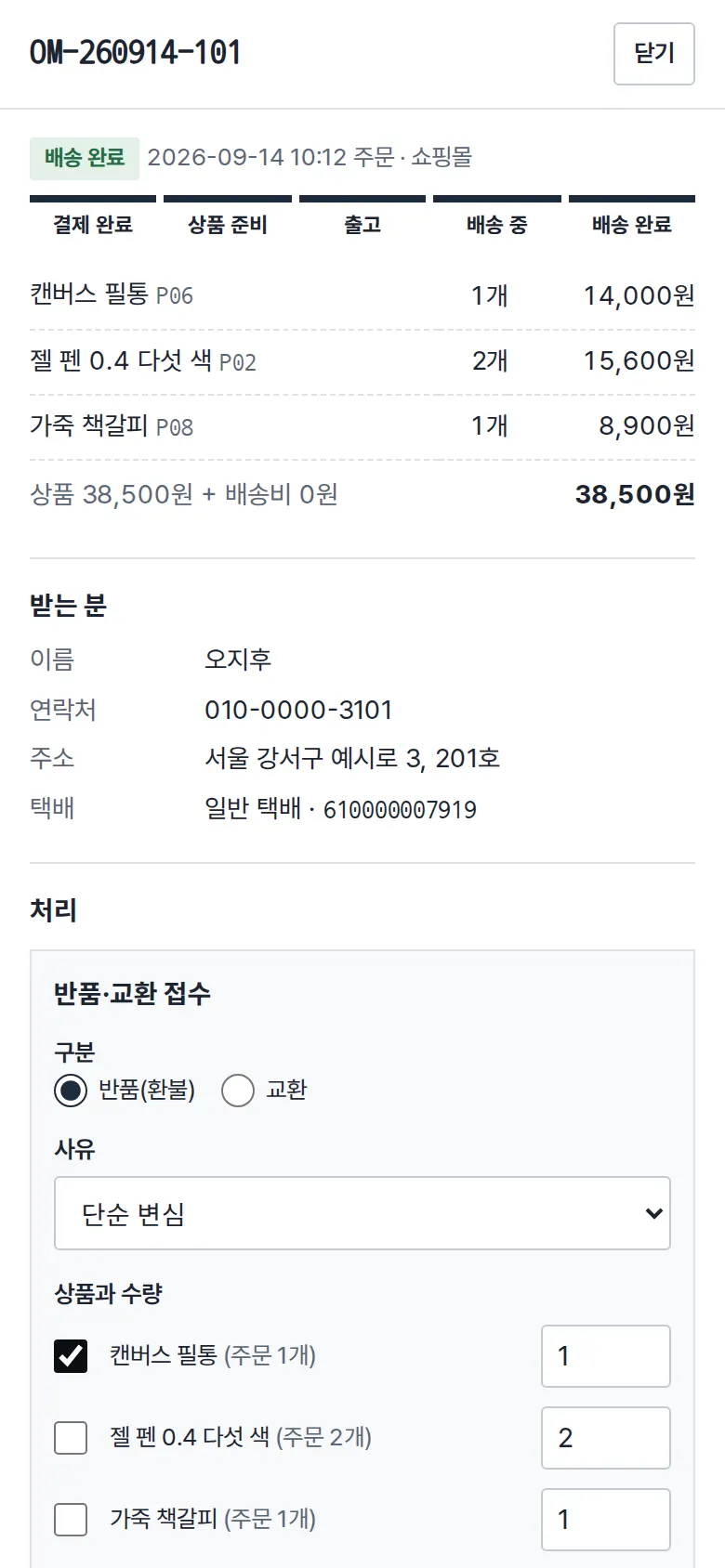
Return & Exchange Intake and Refund Calculation
For a delivered order, choose the items and quantity to register a return. The expected refund updates as you choose. For a change of mind, a ₩3,000 (Korean won) return shipping fee is deducted. If a free-shipping order falls below ₩30,000 after the return, the original ₩3,000 shipping fee is deducted too. Defects and wrong items have no deduction. For exchanges due to a change of mind, round-trip shipping is shown as paid by the customer.
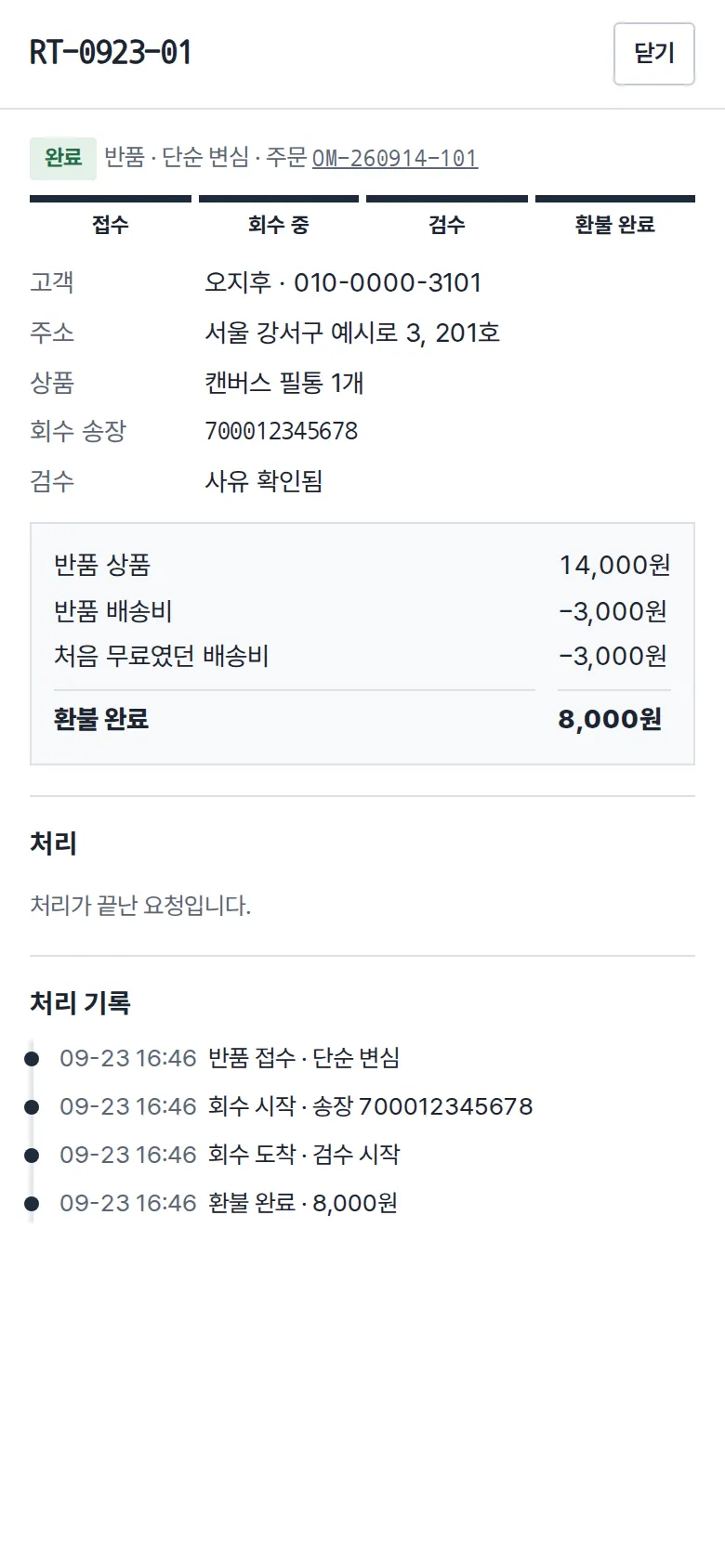
Return Processing — Pickup → Inspection → Refund
Entering the pickup tracking number moves the return to "picking up," and arrival moves it to inspection. If inspection finds no defect, the reason changes to change of mind and shipping fees are recalculated. An exchange is finished only when the replacement's tracking number is entered. Rejecting requires a reason, and every step is recorded on both the return and the original order.
- Order File ImportUpload a CSV downloaded from the store admin, and rows with the same order number are grouped into one order for preview. Existing orders are skipped, unknown product codes are set aside as errors, and missing addresses or amount mismatches are added with a "to check" flag. Korean files saved from Excel (EUC-KR) are also read without broken characters.
- Order List — Status Tabs, Search, Bulk ActionsEach order is a card, and the color of the card header shows its status (paid, preparing, in transit, delivered). Orders that need checking get a red shadow. Filter with status tabs and search by order number, customer or product, and move several paid orders to "preparing" at once. Visible orders can be downloaded as a CSV with one row per item. The CSV is saved so Korean text does not break in Excel.
- Return & Exchange ListFilter by in progress, received, picking up, inspection, completed or rejected, and see type, reason, item and expected refund for each request in one row. All requests can be downloaded as a CSV that includes shipping deductions and refund amounts.
5. Build Notes
Show details
| Responsive | Layout changes at 900px. On PC, vertical index tabs sit on the right of a grid-paper notebook, and orders are laid out as several cards per row. Below 900px, the index tabs move to the top of the notebook, order cards show one per row, and return and import table rows turn into cards with field labels. The detail panel opens at 560px on the right on PC and full screen on mobile. |
| Fonts | Body in Gothic A1, order and tracking numbers in Nanum Gothic Coding (both free, open fonts). Subset to only the characters used: 140KB for all four files. |
| Images | No photos or illustrations, only text and lines. The grid lines and index tabs are drawn in CSS. |
| Motion | The only motion is the detail panel sliding in and notices. It stops when the device's reduce-motion setting is on. |
| Accessibility | When the detail panel opens, focus moves into it. Esc closes it, and focus returns to where you clicked. Every input has a label, and errors are shown with both a border and a sentence. Status uses color and text together. |
| Technology | HTML, CSS and JavaScript (no external libraries). Order and return records are saved to and read back from browser storage (localStorage). The CSV reader handles quoted fields with commas, and re-reads the file as EUC-KR if it is not valid UTF-8. Screens are split by URL (#/orders etc.) so the back button works, and user input is rendered as plain text so tags never run. |
6. QA
Results from opening the site on PC 1440 and mobile 390 screens and clicking through in the order a real user would. We also checked that saved data is still there after a refresh. (2026-09-23)
| Item | PC 1440 | Mobile 390 |
|---|---|---|
| Screen errors | 0 | 0 |
| Broken files | 0 | 0 |
| Horizontal overflow / clipped text | 0 | 0 |
| Function tests | 17 / 17 passed | 17 / 17 passed |
The 17 function tests: priority items (late shipment, missing details, return request) · status tabs and product search · order leaves the check list once the address is filled · invalid tracking number blocked · ship → in transit → delivered, and cancel after shipping blocked · bulk move to preparing · cancel without reason blocked, and order cancellation · status and history kept after refresh · return shipping deduction for change of mind · pickup → inspection → refund completed · exchange shipping recalculated when no defect is found · return rejected with a reason · sample order file check (added, skipped, errors) · refresh after adding orders, and amount-check flag · reading an EUC-KR Korean file · order CSV download · return and exchange CSV download, and back button
Speed & quality scores (out of 100; mobile measured three times on a slow connection, median shown · runs: 97, 96, 96)
| Performance | Accessibility | Best Practices | SEO | |
|---|---|---|---|---|
| Mobile | 96 | 100 | 100 | 100 |
| PC | 99 | 100 | 100 | 100 |
Mobile: First Contentful Paint 1.8s · Largest Contentful Paint 2.0s · Layout shift 0 · Blocking time 0ms PC: First Contentful Paint 0.4s · Largest Contentful Paint 0.5s · Layout shift 0.072 · Blocking time 10ms
7. Result
Try it live ↗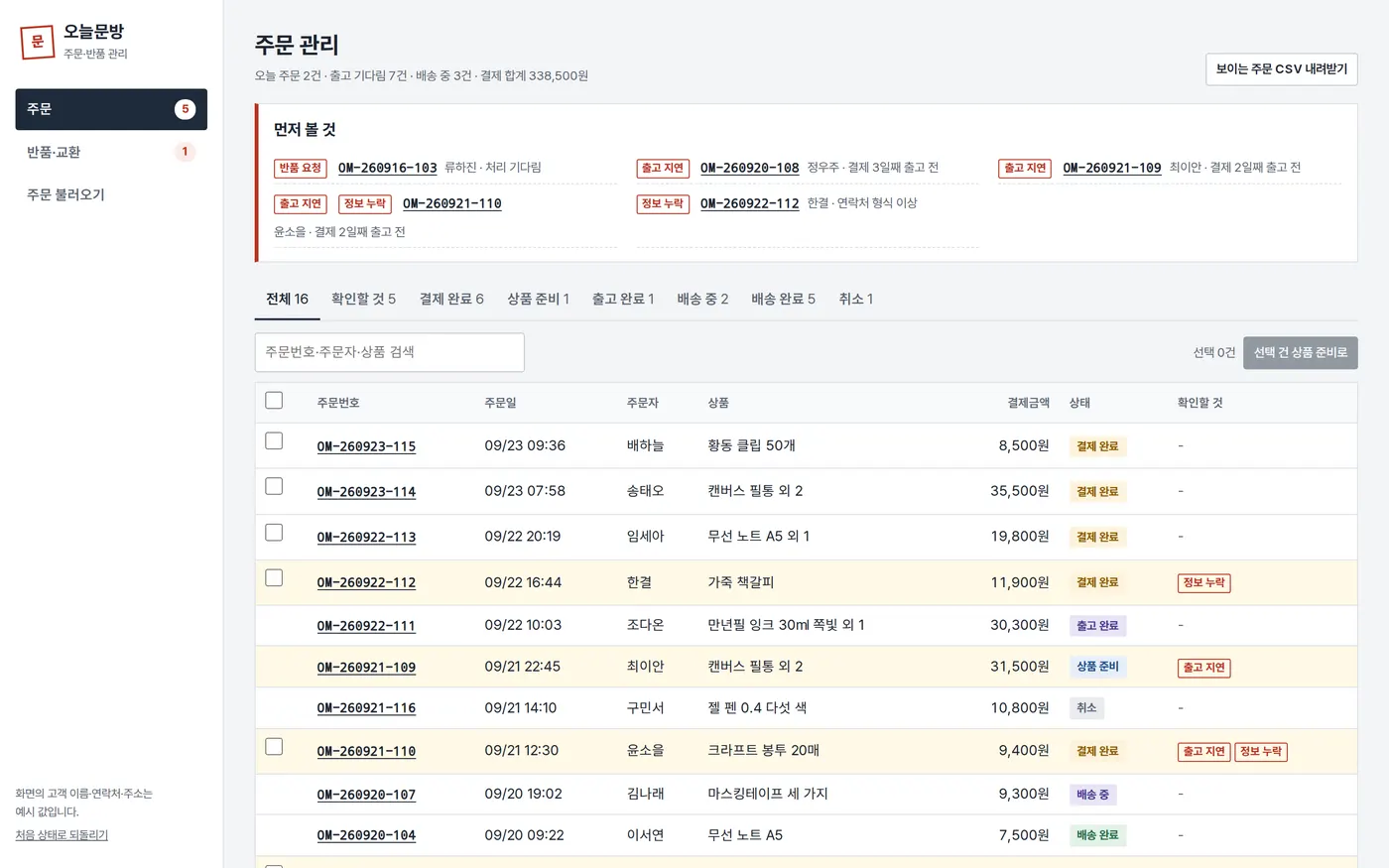
Privacy Policy