1. Overview
| Industry | A production team making 30-second to 3-minute promo videos for small businesses such as shops, studios and clinics |
| Purpose | A work management screen where producers, designers, voice actors and editors move the same project through script → scene work → review → delivery |
| Scope | 5 screen types with their own URLs (board, plus script, scenes, review and delivery for each project) · 5 sample projects · 5 video formats · 5 team members |
| Main flow | Register project → Split script into scenes → Image, voice and subtitle work per scene → Approve or request changes per scene → Deliver with subtitle file (v1, v2) |
Projects and stages, scripts, scenes and shot descriptions, scene work status, scene images, review results and change requests, delivery versions and activity history are saved in the browser. They stay after a refresh or a return visit.
Connected at rollout: editing, compositing and playing the video files themselves, voice recording, a review link the client can open directly, login and permissions, messenger and email notifications, and server storage shared across devices.
2. Challenges
1. Fix the length at the script stage.
When a 45-second script comes in for a 30-second video, it gets cut only at the edit, and the voice-over has to be recorded again. While writing, the team should see how many seconds each scene runs and how far over the target it is.
2. Show who is holding which scene.
One scene has separate people for image, voice and subtitles. To meet deadlines, the team needs to filter on one screen what is left for each scene and what is on their own plate.
3. Review comments must stay attached to scenes.
A message like "please change the third scene" gets confusing once review rounds pile up. Approvals and change requests with details should be kept per scene, and delivery should be blocked until every scene is approved.
3. Structure
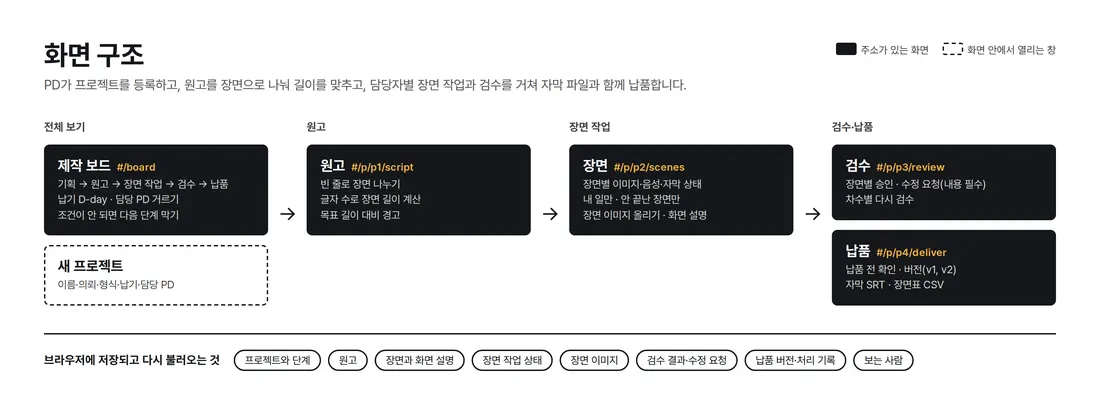
Pick a project on the board to enter the script, scenes, review and delivery tabs. Each tab has its own URL, so back and refresh keep you in place. Stages can be advanced from both the board card and the project screen. If conditions are not met, the reason is shown and the move is blocked.
4. Key Features
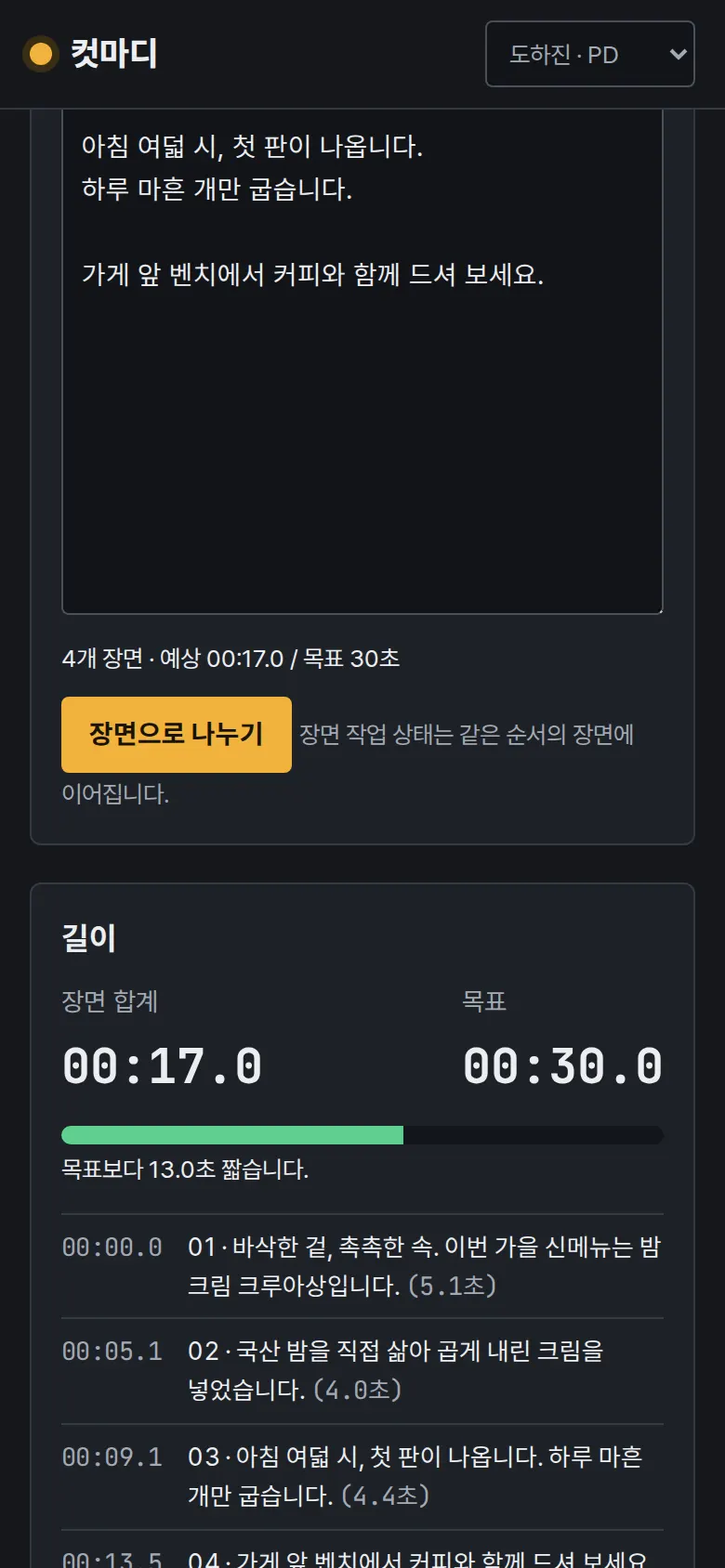
Script → Scene Split and Length Calculation
Each paragraph separated by a blank line becomes a scene. Scene length and start time are calculated from the character count, excluding spaces and punctuation, read at 5.5 characters per second. If the script runs more than 10% over the target length, a red bar shows how many seconds over it is, and the project cannot move to the next stage. If you edit the script and split it again, work status carries over to scenes in the same position.
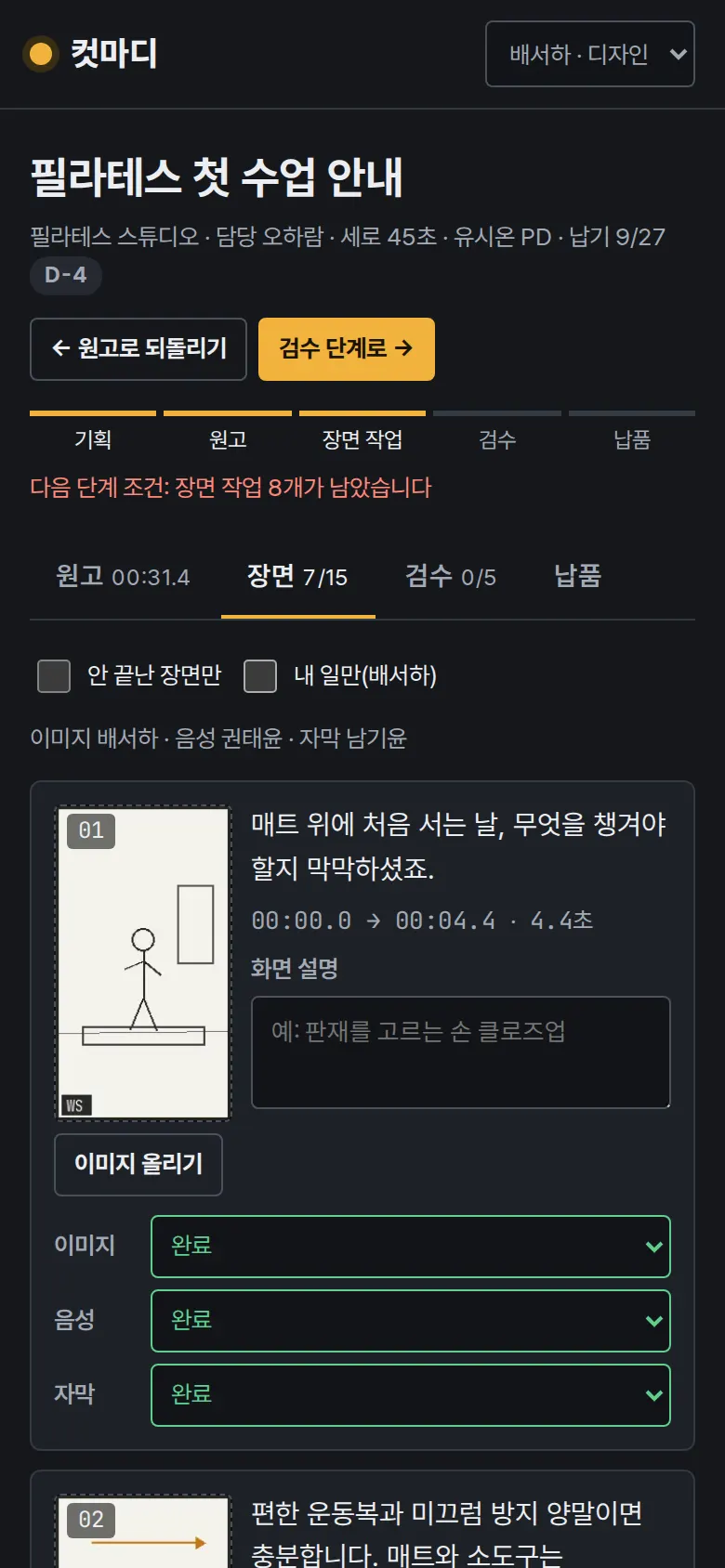
Per-Scene Work — Image, Voice, Subtitles
At the top of the project screen are three tracks, image, voice and subtitles, like an editing timeline. Each scene is a block as long as the scene, colored by work status (done, in progress, waiting). The target length is shown as a dotted line. Each scene has its line, start and end time, shot description, storyboard image, and three work statuses for image, voice and subtitles (waiting, in progress, done). "My tasks only" shows only scenes with work left for the viewer; "Unfinished only" shows only scenes with work left. Uploaded storyboard images are resized to 320px wide before saving, and the project moves to review only when all work is done.
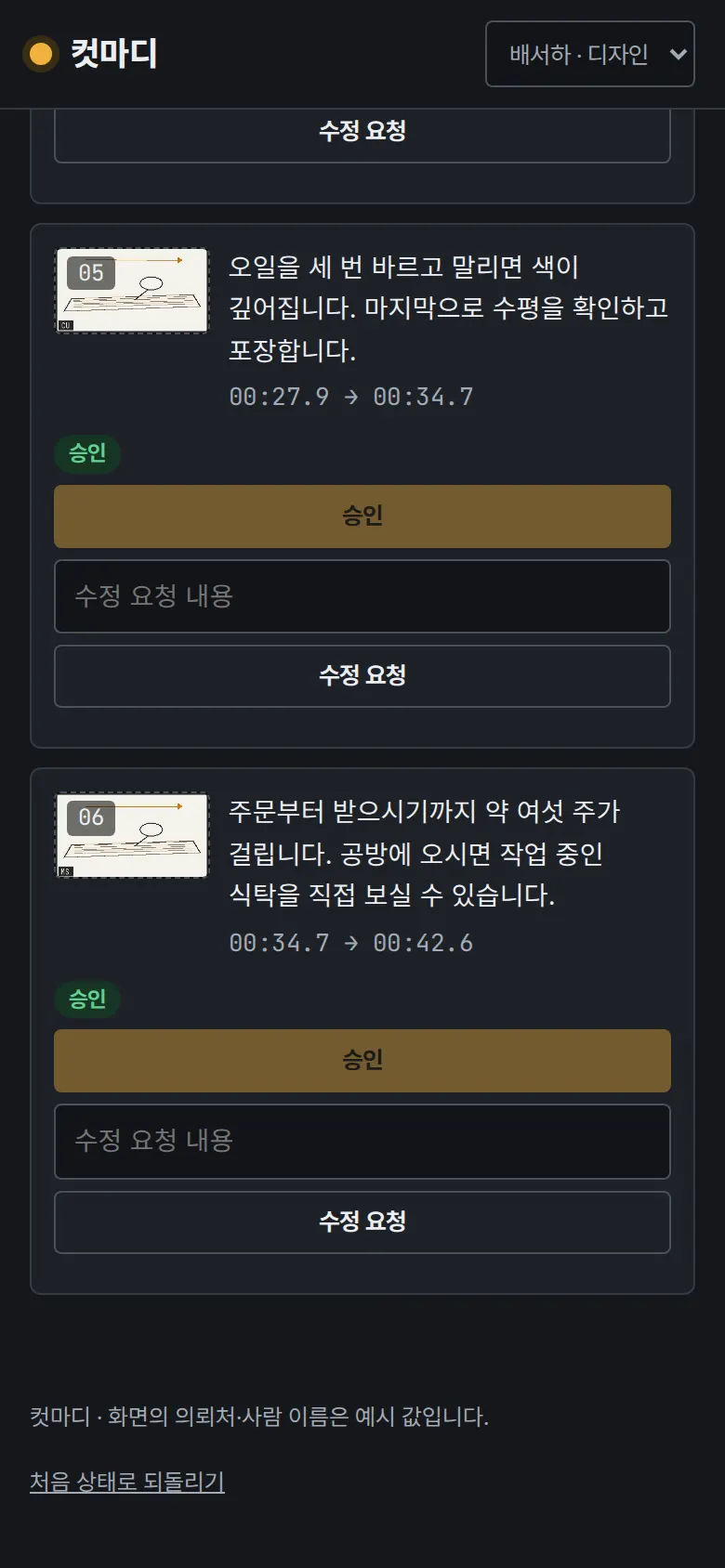
Review — Per-Scene Approval and Change Requests
Approve each scene, or leave a change request describing what to fix. A request with no details is blocked. Change requests stack under the scene with date and requester. After "changes applied," the next review round starts. The project moves to delivery only when every scene is approved.
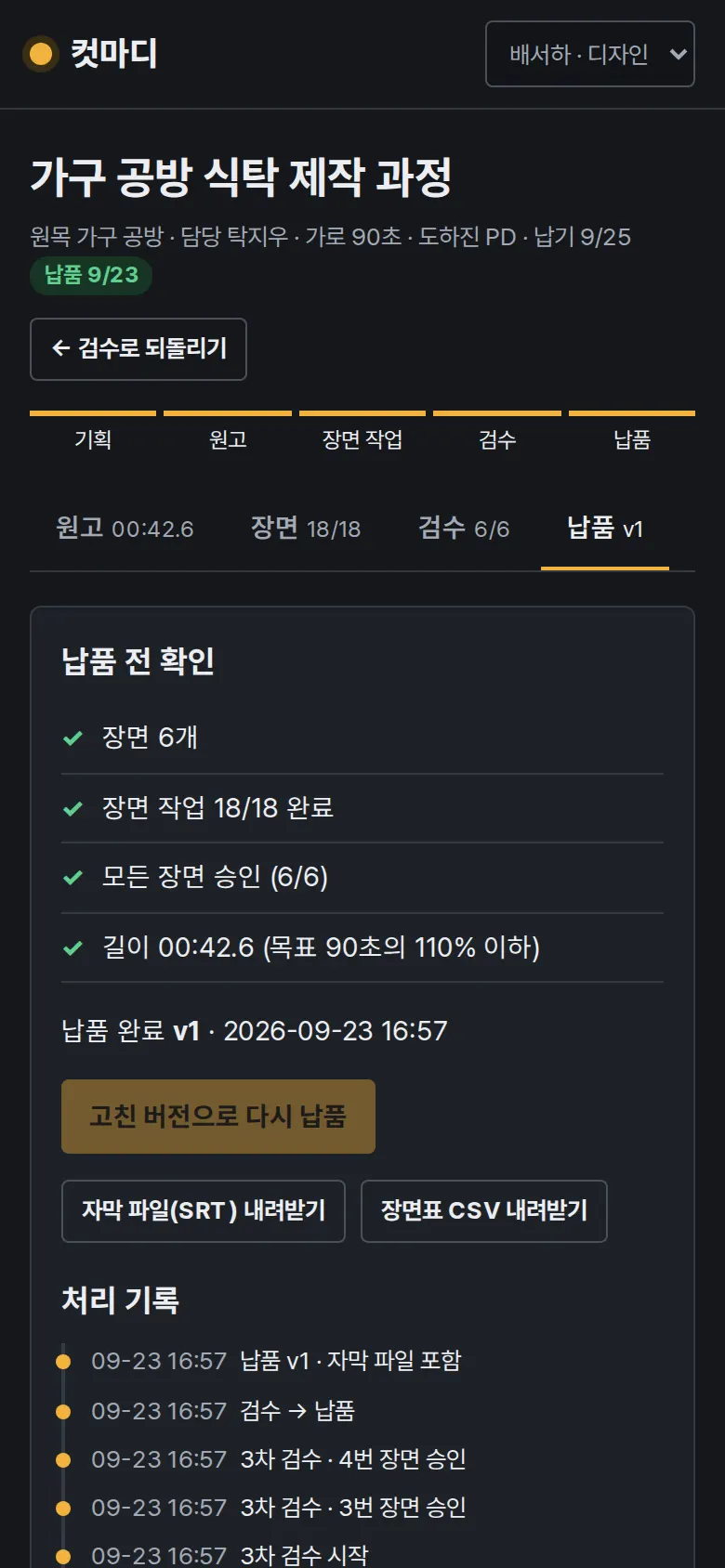
Delivery — Subtitle File and Scene Sheet
A checklist shows scene count, work completion, full approval and length. Delivery goes through only when all items pass. A subtitle file (SRT) is built from the scene times, previewed and downloaded. The scene sheet downloads as a CSV. If a delivery is reverted, fixed and delivered again, the version goes up to v2.
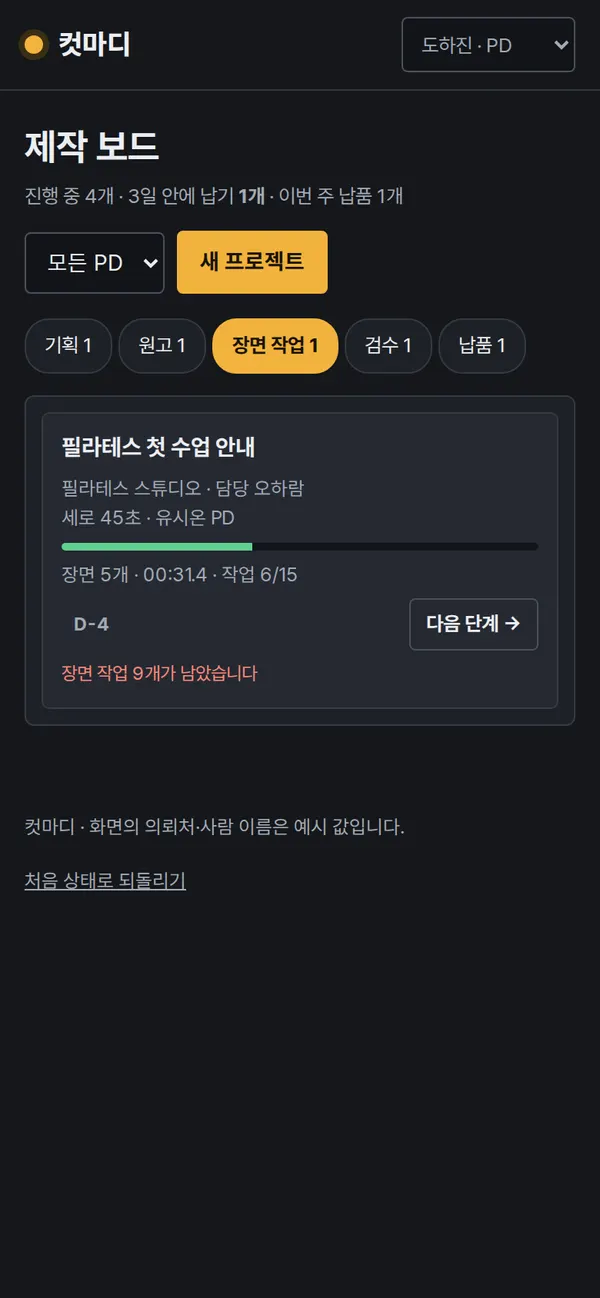
- Production BoardLike tracks in an editing program, projects sit across five lanes: planning → script → scene work → review → delivery. Each card shows a progress bar, scene count and length, and the deadline as D-day. Filter by producer and register new projects. Cards that cannot move to the next stage state the reason. On mobile, you pick a stage and view one lane at a time.
5. Build Notes
Show details
| Responsive | Layout changes at 1180px and 760px. On PC the board shows five lanes. Below 1180px the scene work column moves down, and below 760px you pick a stage to view one lane at a time, with input fields one per row. |
| Fonts | Body in SUIT, times and scene numbers in JetBrains Mono (both free, open fonts). Subset to only the characters used: 113KB for all four files. |
| Images | The 15 storyboard images in the sample projects total 28KB as webp. Uploaded images are resized to 320px-wide JPEG before saving. The timeline tracks and film-strip borders are drawn in CSS. |
| Motion | The only motion is notices that fade in and out. It stops when the device's reduce-motion setting is on. |
| Accessibility | Text and background contrast meets the standard even on the dark screen. Work status uses color and text together, and every select field has a label. Stage headings hidden on mobile are still read by screen readers. |
| Technology | HTML, CSS and JavaScript (no external libraries). All records are saved to and read back from browser storage (localStorage). The subtitle file is built by converting scene times to SRT format (00:00:04,400). Screens are split by URL (#/p/p2/scenes etc.) so the back button works, and user input is rendered as plain text so tags never run. |
6. QA
Results from opening the site on PC 1440 and mobile 390 screens and clicking through in the order a real user would. We also checked that saved data is still there after a refresh. (2026-09-23)
| Item | PC 1440 | Mobile 390 |
|---|---|---|
| Screen errors | 0 | 0 |
| Broken files | 0 | 0 |
| Horizontal overflow / clipped text | 0 | 0 |
| Function tests | 16 / 16 passed | 16 / 16 passed |
The 16 function tests: stage and deadline display on the board · next stage blocked when conditions are not met · new project input checks and registration · split script into scenes and check the total length · long-script warning and stage block · my tasks only, and changing work status · upload storyboard image and keep it after refresh · review only after all work is done · change request without details blocked, and scene approval · all approved in the next review round · pre-delivery check and delivery · subtitle file (SRT) format check · scene sheet CSV · stage and review history kept after refresh · revert and deliver again (v2) · back button
Speed & quality scores (out of 100; mobile measured three times on a slow connection, median shown · runs: 100, 100, 99)
| Performance | Accessibility | Best Practices | SEO | |
|---|---|---|---|---|
| Mobile | 100 | 100 | 100 | 100 |
| PC | 100 | 100 | 100 | 100 |
Mobile: First Contentful Paint 1.4s · Largest Contentful Paint 1.5s · Layout shift 0.001 · Blocking time 0ms PC: First Contentful Paint 0.4s · Largest Contentful Paint 0.4s · Layout shift 0 · Blocking time 0ms
7. Result
Try it live ↗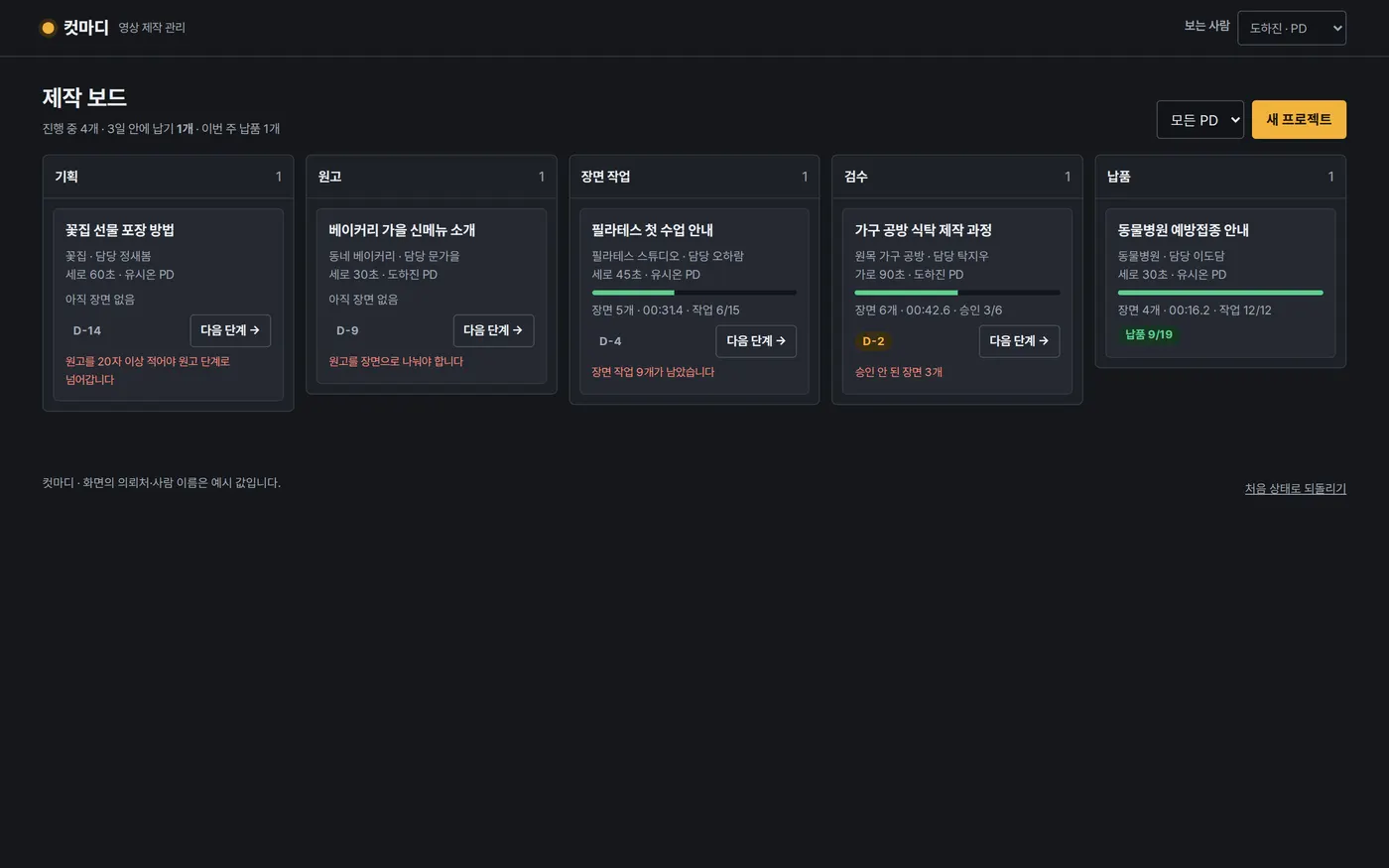
Privacy Policy