1. Overview
| Industry | Any business moving member or customer data to a new online store, booking, or customer management program |
| Purpose | A checking tool that compares the customer file against existing customer IDs, separates format errors and ID conflicts, and allows downloading clean new records only after the counts are confirmed |
| Scope | 2 screens with their own addresses (Check · Check History) · 4 steps (add files → map columns → trial migration → review and download) · 8 check rules · sample customer file of 36 rows and 103 existing IDs |
| Main flow | Add two files → auto-map columns → trial migration → review clean, auto-fixed, error, and conflict rows → confirm counts → clean new-record CSV and error-row CSV → reopen check history |
Uploaded files, column mapping, trial migration results, count confirmation, and check history (last 20 runs) are saved in the browser. They stay in place after a refresh or a later visit.
Connected at rollout: loading directly into the new system (this tool builds the file to load), editing or overwriting existing records, reading Excel (xlsx) files directly, and server storage for sharing the same history across devices.
2. Challenges
1. Mistakes found after migration are hard to undo.
If you find members with inconsistent phone formats or blank names after loading them into the new system, you have to find and fix them one by one. You need to know which rows are problems before loading.
2. Existing customers must not be overwritten.
If the same customer ID already exists in the new system, existing data can be lost. Conflicting IDs must be collected separately so they don't mix with clean records.
3. The job is done only when the numbers add up.
You need to confirm in numbers how many of the total rows move and how many are left out before moving to the next step. Nothing should be downloaded without looking at the numbers.
3. Structure
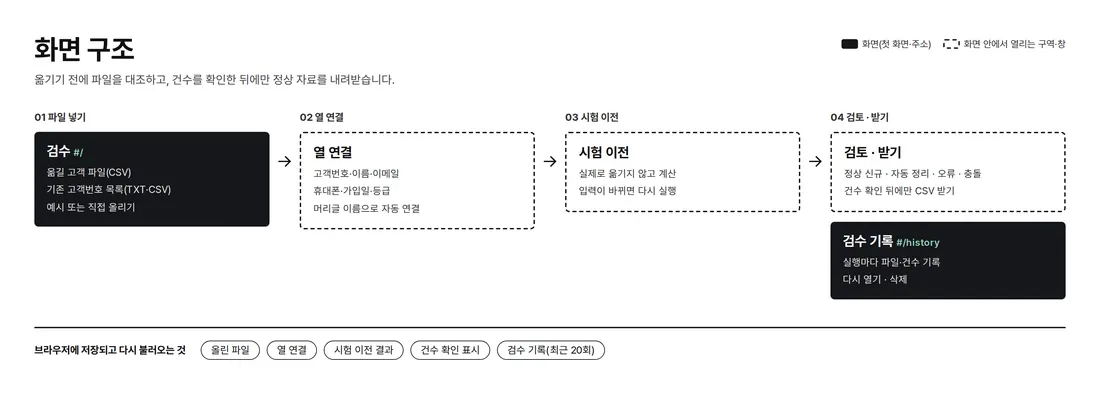
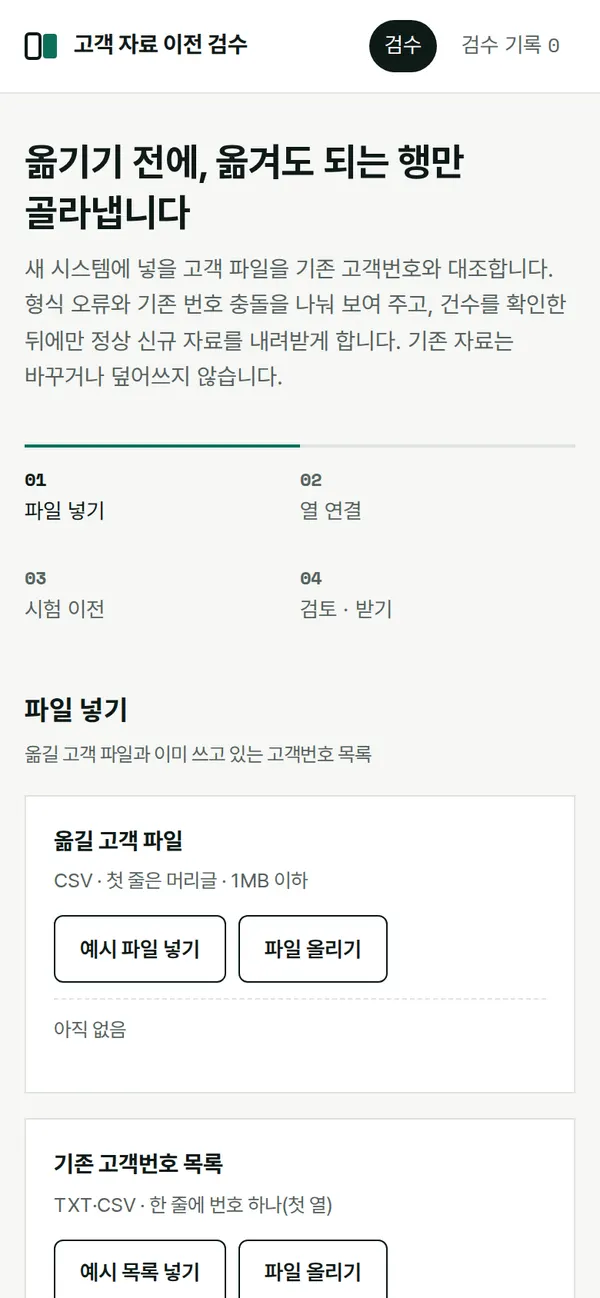
The check runs on the first screen in order, steps 01 to 04. Each step opens only after the previous one is done; if the input changes, the trial migration must run again before review and download open. Check History has its own address, so past runs can be reopened.
4. Key Features
Trial Migration and Four Counts
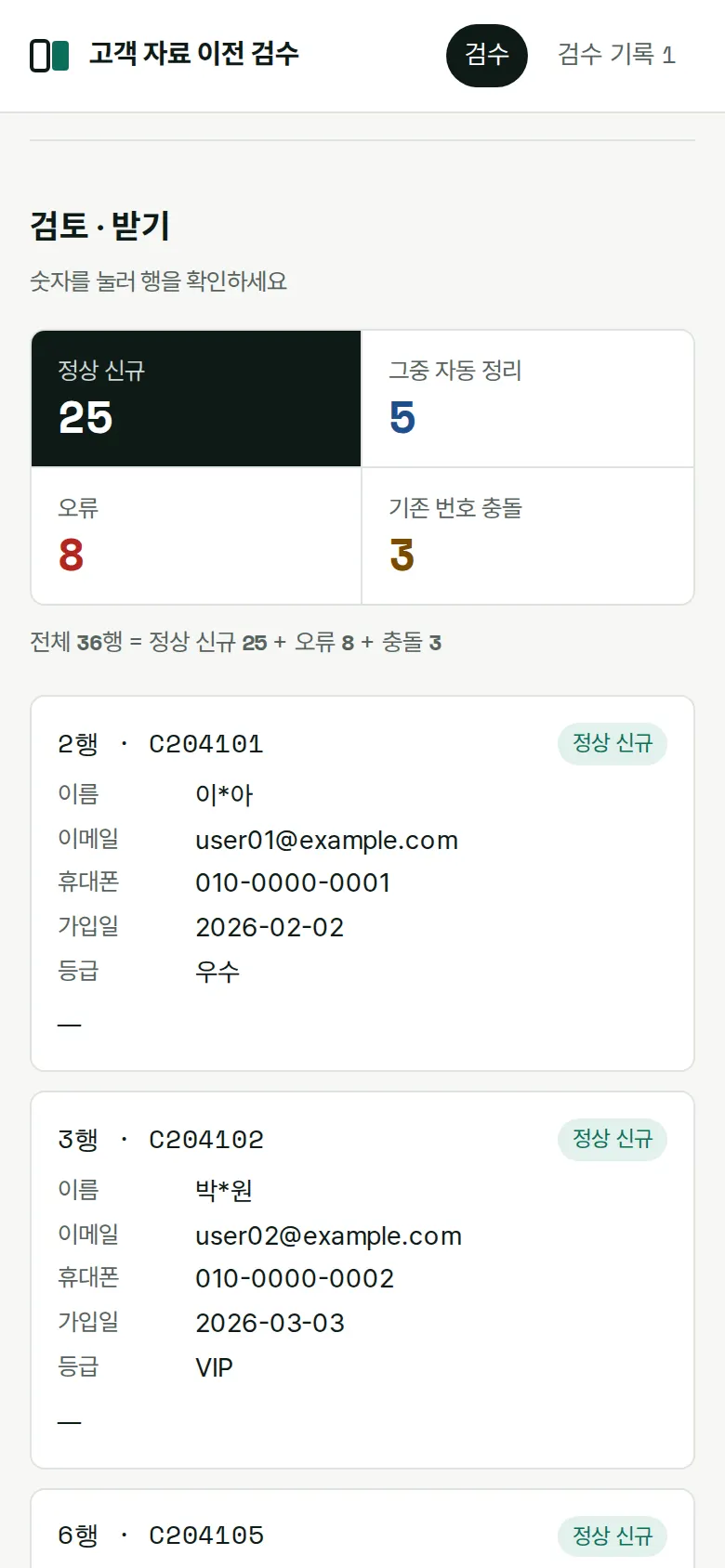
Without actually moving anything, it calculates the result and splits rows into clean new · auto-fixed · error · existing-ID conflict. The 36-row sample file splits into 25 clean (5 of them auto-fixed) · 8 errors · 3 conflicts. Tap a number to see only those rows in the table.
Error Rows and Reasons
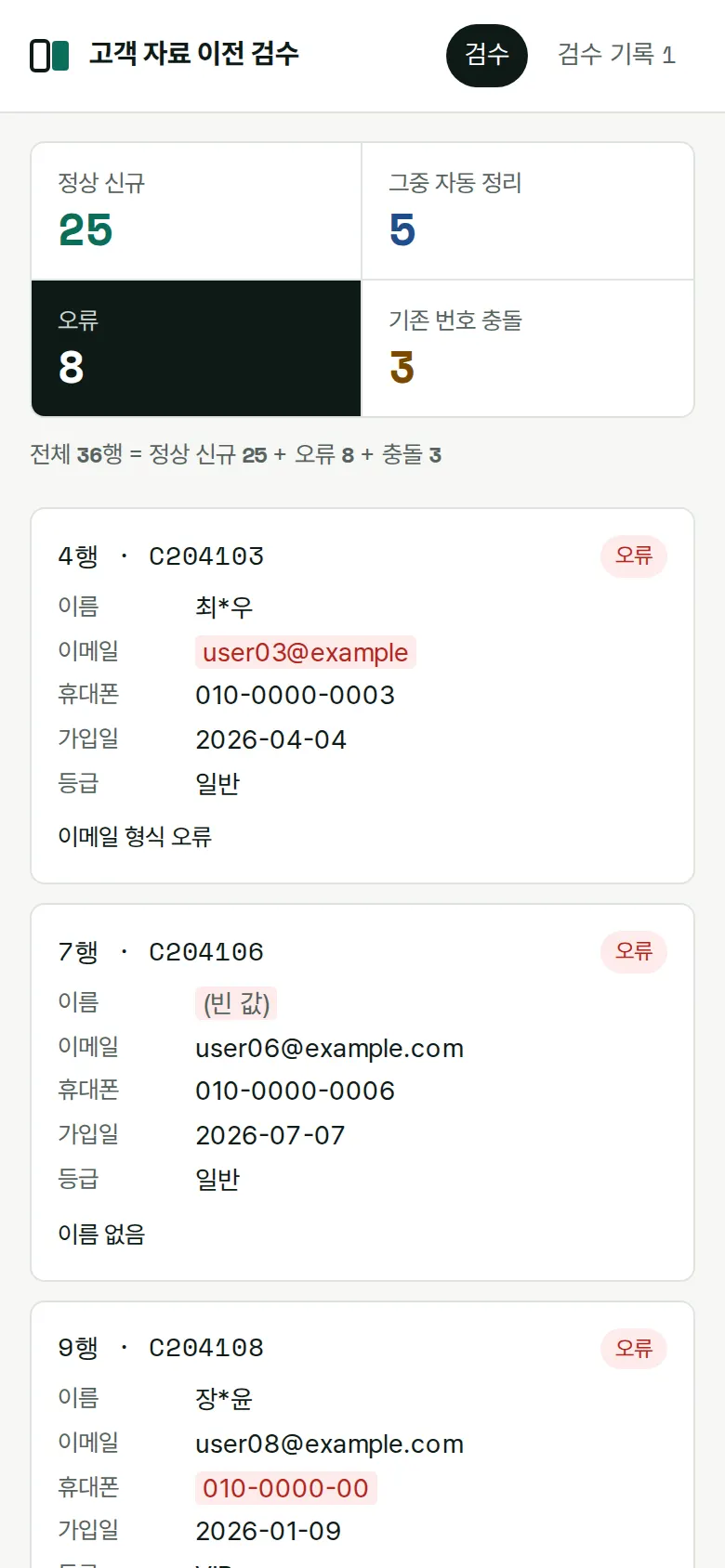
Each row marks the failing cells in red and adds a reason. It separately flags invalid email format, missing name, wrong mobile number length, impossible dates (February 30), duplicate IDs within the file, membership levels not on the list, no contact details at all, and invalid customer ID format.
Download Opens Only After Confirming Counts
Reopen Check History
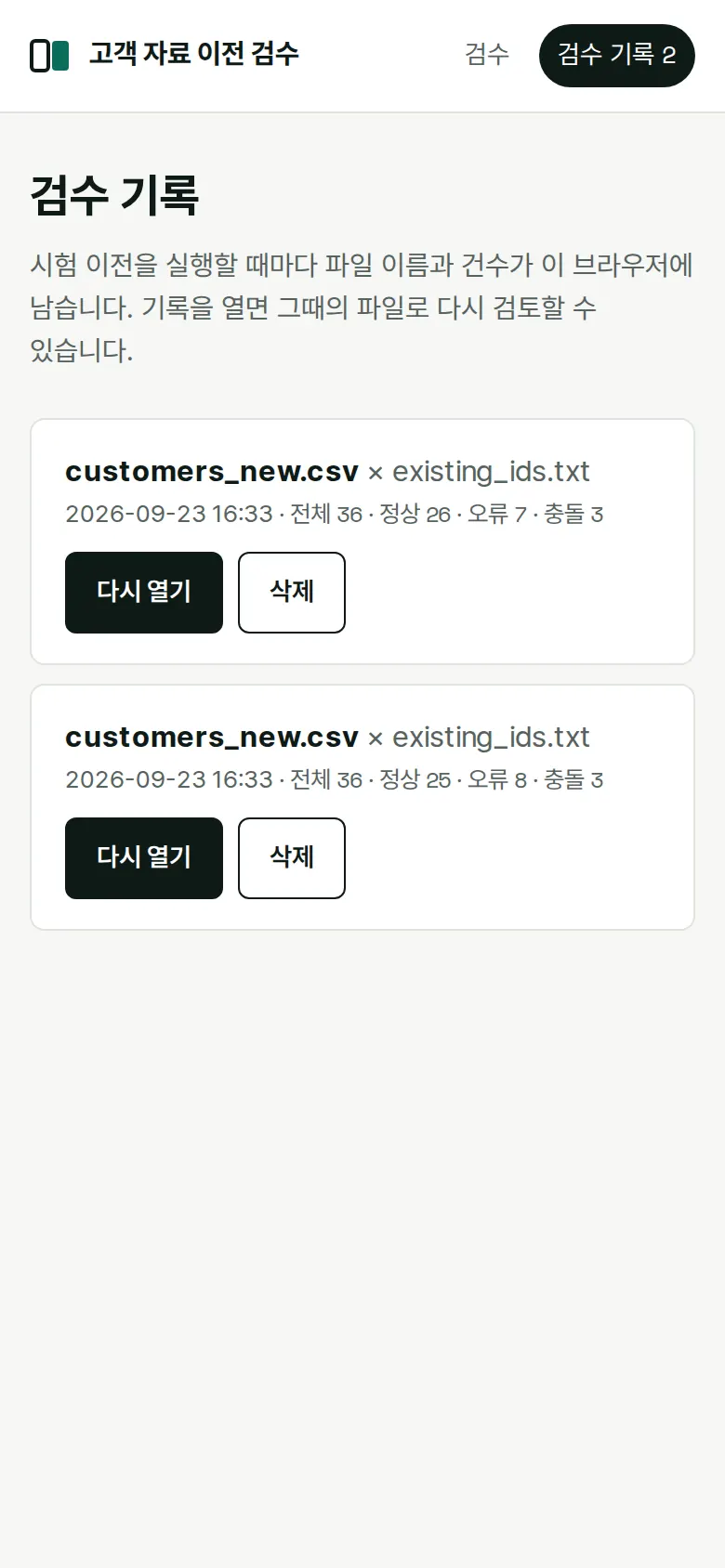
Every trial migration run is recorded with its time, file names, and counts. Opening a record lets you review again with that run's files and column mapping; records you no longer need can be deleted.
- Existing-ID ConflictsIDs already in the existing customer ID list are collected as conflicts even if they have no errors. They are left out of the clean new records so nothing is overwritten.
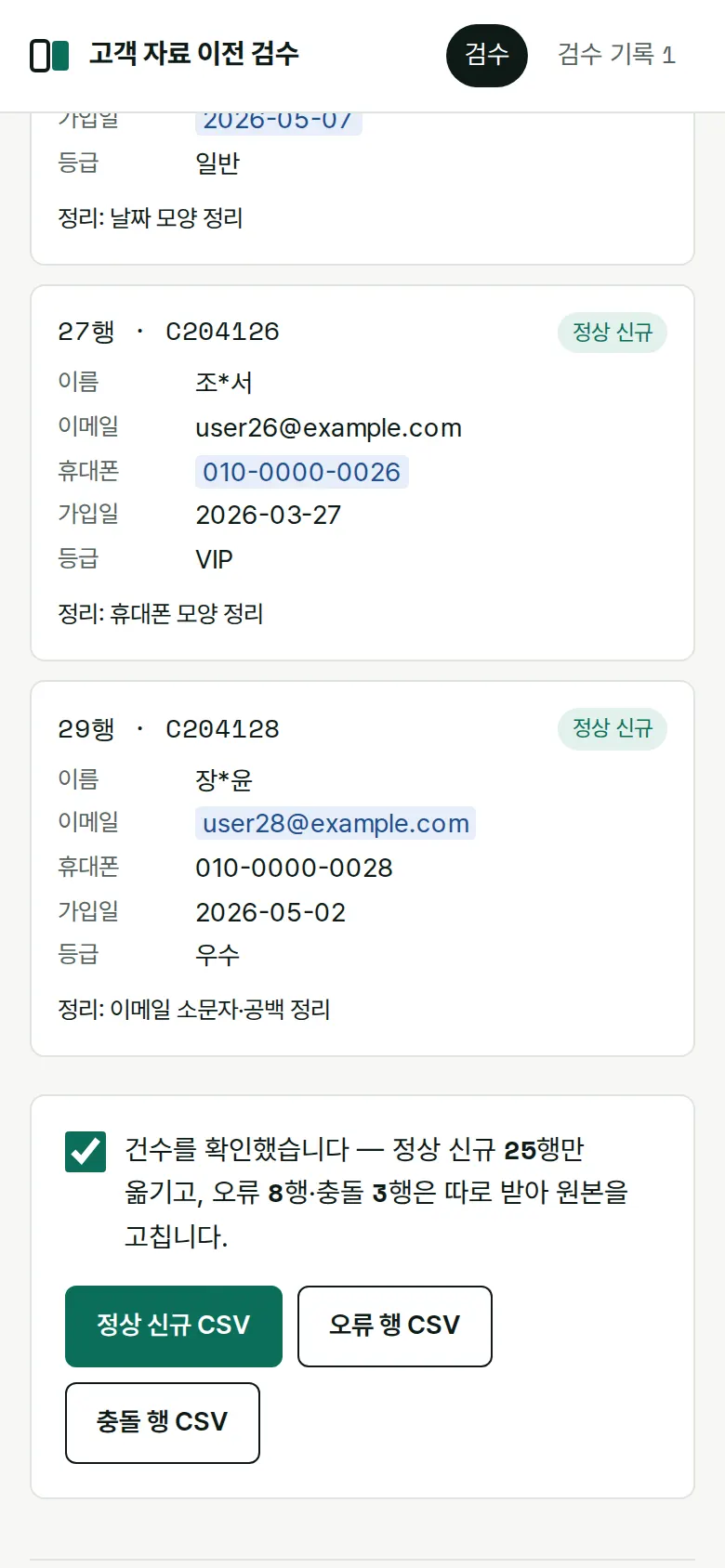
- Values That Differ Only in Format Are Fixed AutomaticallyPhone numbers like 01000000010 become 010-0000-0010, dates like 2026.3.12 become 2026-03-12, and emails with capitals or spaces become lowercase — with the changed cells marked. Even when headers differ (member number, full name, contact, and so on), columns are mapped automatically by name.
5. Build Notes
Show details
| Responsive | Layout changes at 900 · 640px. On PC, step titles and content sit side by side, the source → destination file boxes sit next to each other with an arrow between them, and the four result boxes share one row. Below 900px, titles move above content and result boxes split into two rows; below 640px file boxes stack vertically, the arrow points down, and the result table turns each row into a card. |
| Fonts | IBM Plex Sans KR for body text, Space Mono for numbers and dates (all free open fonts). Trimmed to only the characters used on this screen, 165KB in total. |
| Images | A business screen with no photos. Step markers and count tables are drawn with CSS. |
| Motion | No motion except a smooth scroll down to results and notification text. |
| Accessibility | Every file box and column-mapping field has a label, and error cells use both color and reason text. Accessibility score 100. |
| Tech | HTML, CSS, JavaScript (no external libraries). Files are read and compared only inside the browser and never sent anywhere. Korean CSVs (EUC-KR) are also read. Downloaded CSVs are saved so Korean text doesn't break in Excel, and values starting with = or + are blocked from running as formulas in Excel. |
6. QA
Results from running the pages on PC 1440 and mobile 390 screens and clicking through in the order a real user would. We also checked that data is still there after saving and refreshing. (2026-09-23)
| Item | PC 1440 | Mobile 390 |
|---|---|---|
| Screen errors | 0 | 0 |
| Broken files | 0 | 0 |
| Horizontal overflow · clipped text | 0 | 0 |
| Function tests (Chrome) | 14 / 14 passed | 14 / 14 passed |
| Function tests (Safari engine) | 14 / 14 passed | 14 / 14 passed |
The 14 function tests: first screen display · adding the two sample files and auto column mapping · running the trial migration and counts · error row reasons · existing-ID conflicts · auto-fix marking · download locked before confirming counts · clean new-record CSV after confirming · error-row CSV (original + reason) · re-run required when input changes · results kept after refresh · viewing and reopening check history · uploading a file with different headers · deleting a history record
Speed and quality scores (out of 100; mobile measured three times on a slow connection, same result each time)
| Performance | Accessibility | Best Practices | SEO | |
|---|---|---|---|---|
| Mobile | 99 | 100 | 100 | 100 |
| PC | 100 | 100 | 100 | 100 |
Mobile: First Contentful Paint 1.7s · Largest Contentful Paint 1.8s · Layout Shift 0.001 · Blocking Time 0ms PC: First Contentful Paint 0.4s · Largest Contentful Paint 0.4s · Layout Shift 0.001 · Blocking Time 0ms
7. Result
Try it live ↗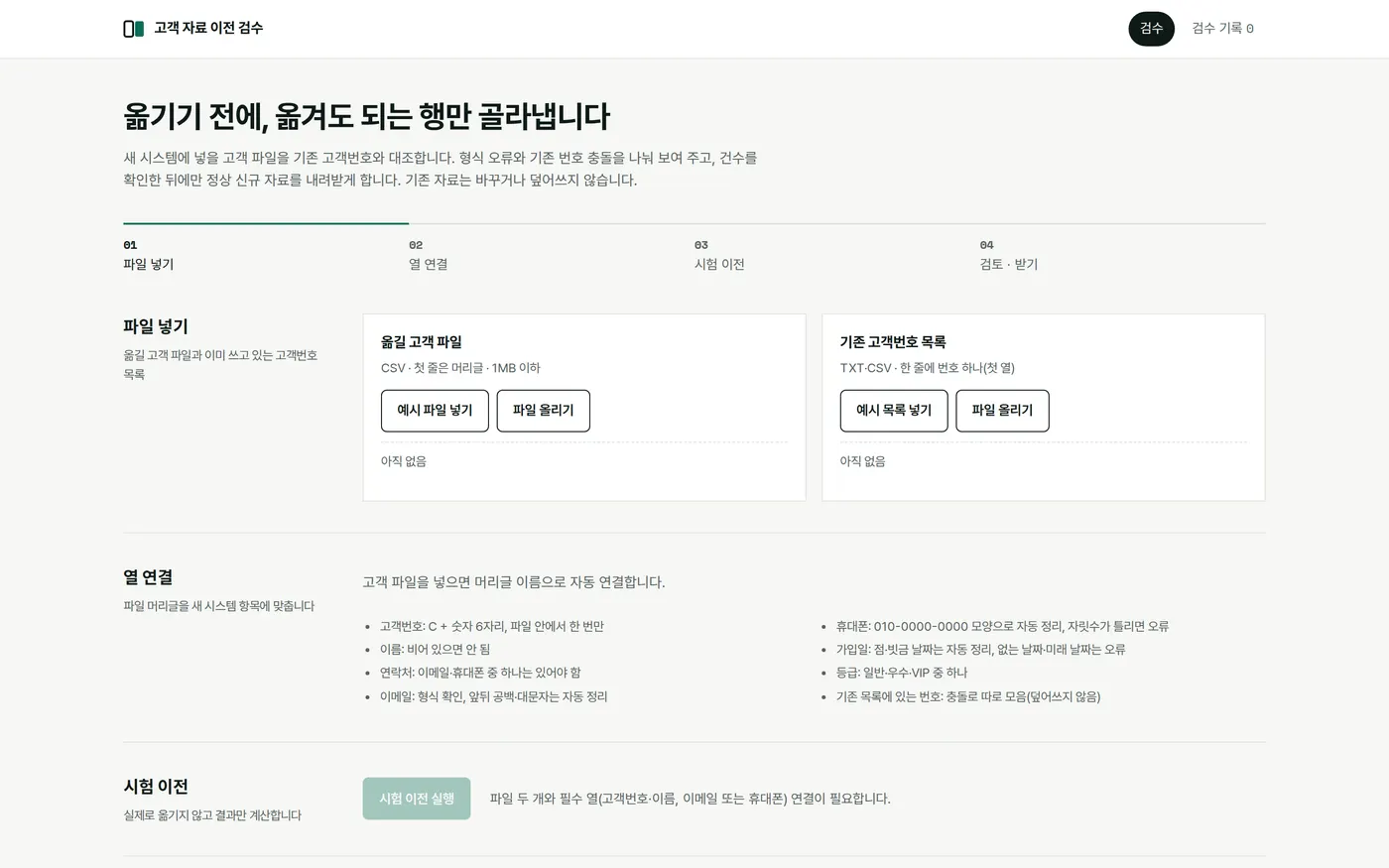
Privacy Policy