1. Overview
| Industry | A freight and delivery business that revises the daily dispatch schedule several times and re-notifies drivers |
| Site goal | A work tool that finds what changed with each revision, catches overlapping runs and notifies drivers, all on one screen |
| Scope | 2 screens (compare · check records) · 2 views (change list · schedule by vehicle) · 2 sample schedules (confirmed 19 runs, revised 22 runs) |
| Main flows | Upload old and new schedules → compare → check change list and timeline → set check status and notes → copy driver notices → download CSV / save check → reopen from check records |
The current comparison, per-run check status and notes, and the list of check records are saved in the browser. They stay in place after a refresh or a return visit. Uploaded files are read only inside this browser and are never sent anywhere.
Connected at rollout: automatic text or messenger sending (notices are currently copied and pasted), linking to transport management software, server storage so several people can view the same check.
2. Challenges
1. A revised schedule doesn't show where it changed.
A new file shows everything again. Only the changed cells — time, vehicle, driver, pickup and drop-off — need to be seen next to their old values.
2. Overlapping runs lead to accidents.
Quick edits can book the same vehicle or driver twice at the same time. These must be caught before the schedule goes out.
3. Each driver has to be told about their own changes.
A driver only needs to know their own runs. Changed runs should be grouped per driver, sent as a message, and marked once confirmed.
3. Structure
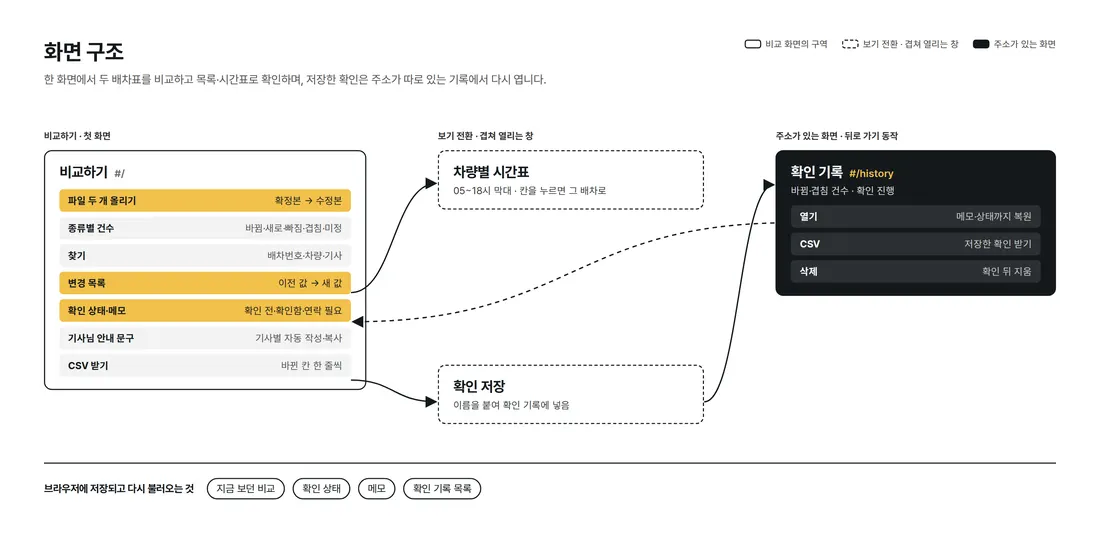
Comparison runs in one place on the first screen, from uploading two files to results, switching between the change list and the schedule by vehicle. Check records have their own address, so they stay in place on back navigation and refresh.
4. Key Features
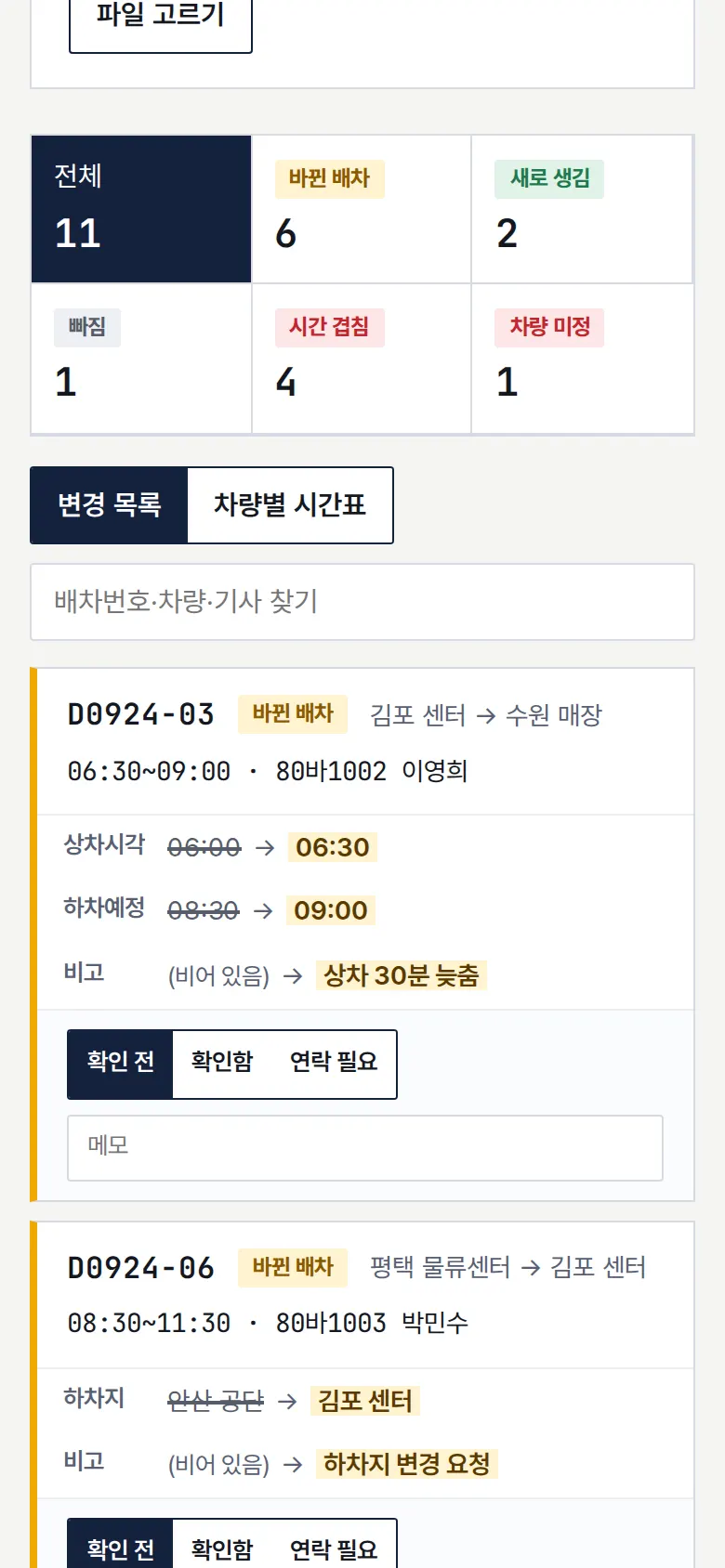
Change list — old value → new value
The two files are matched by dispatch number, and only changed cells are shown as old value → new value. Runs are split into changed · new · removed · time overlap · vehicle unassigned, each with a count.
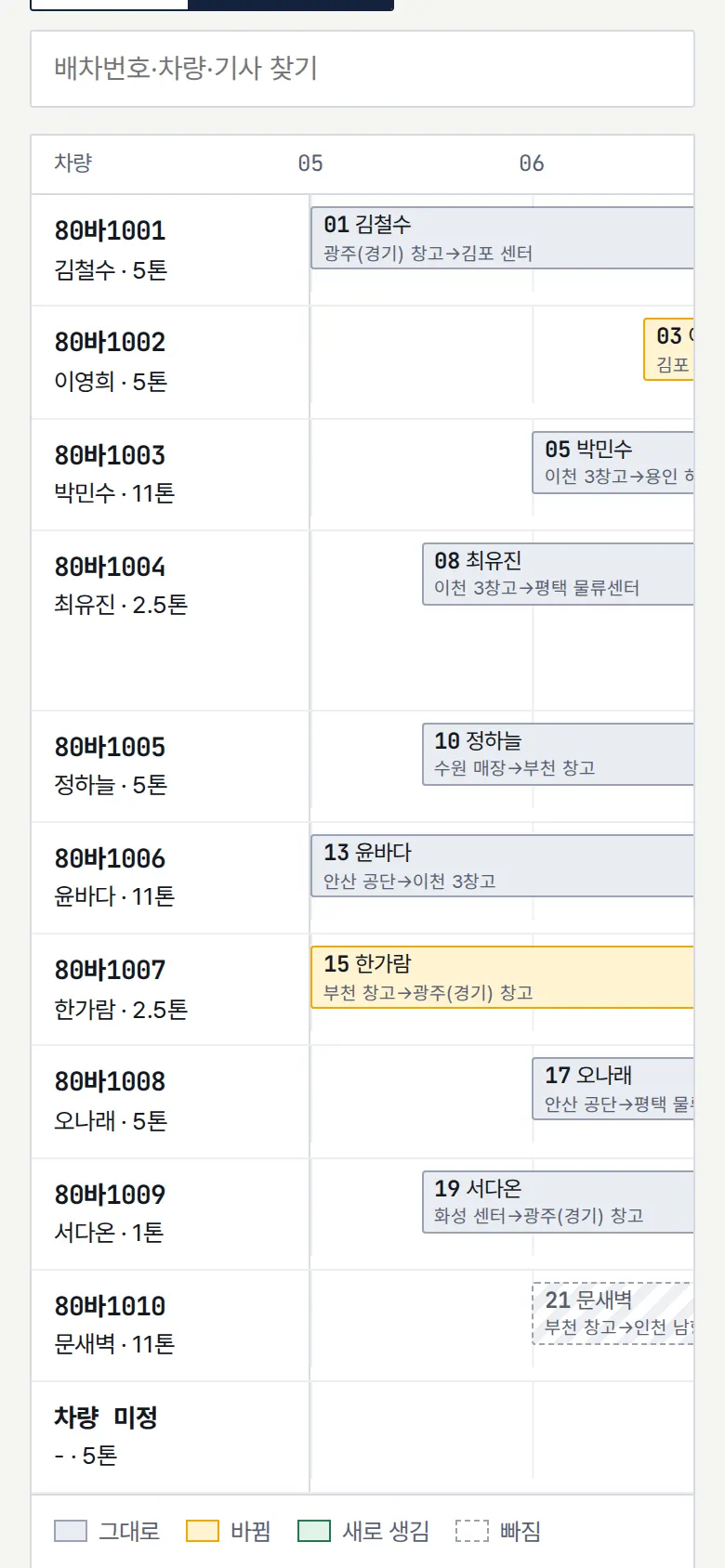
Schedule by vehicle
Each vehicle's runs are drawn as bars from 05:00 to 18:00, colored by type. Tapping a bar jumps to that run in the change list.
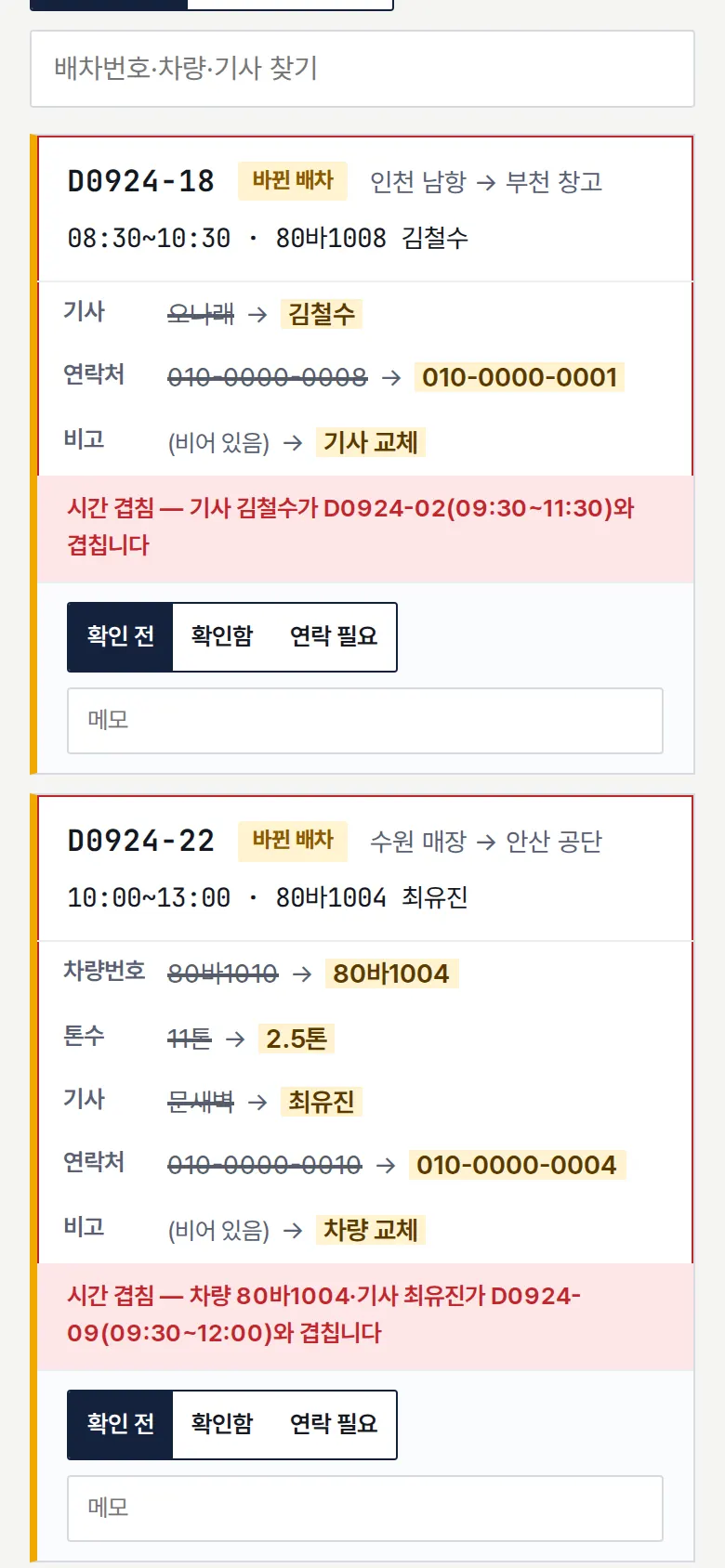
Find time overlaps
When the same vehicle or driver has overlapping pickup-to-drop-off times, both runs are flagged together. They also show with a red outline on the timeline.
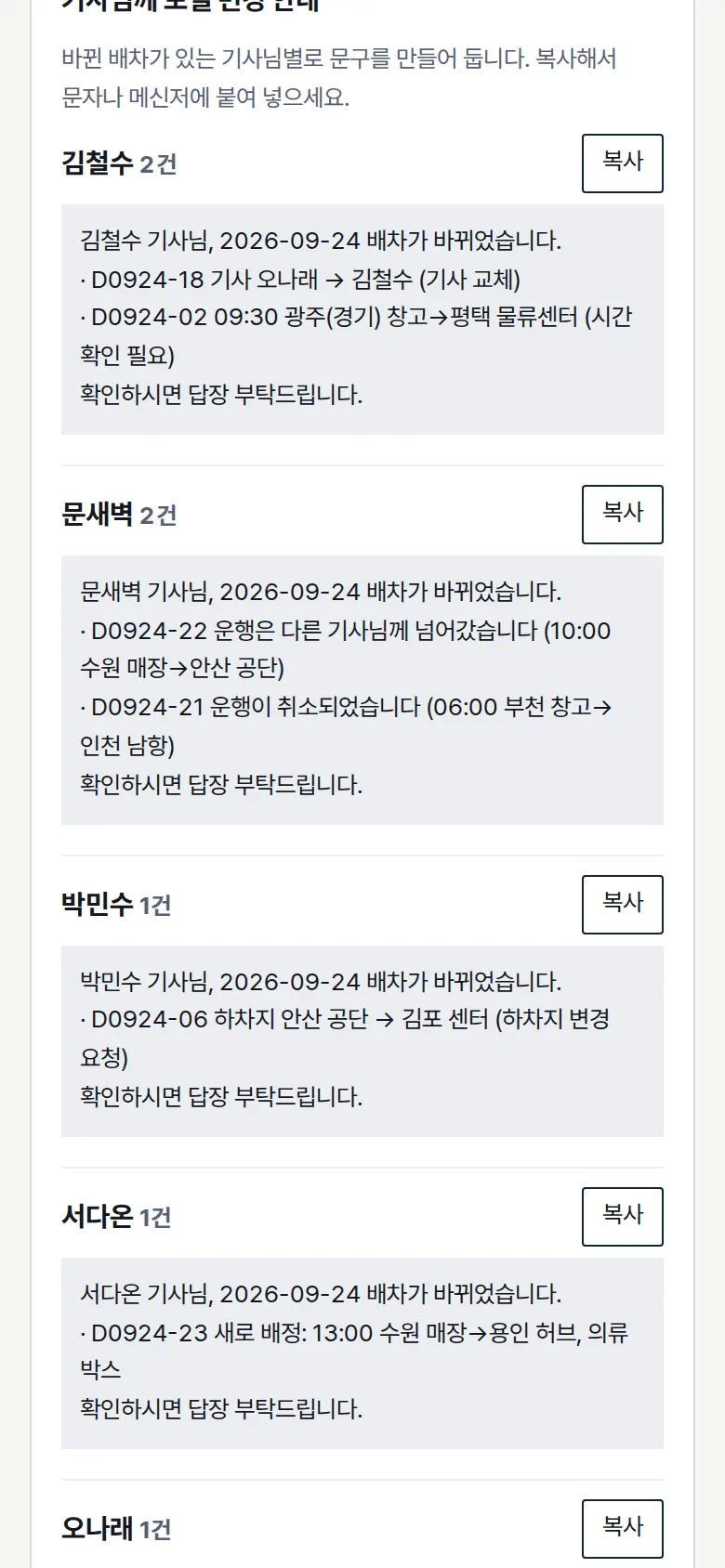
Change notice per driver
For each driver with changed runs, a message is written with date, dispatch number and what changed. The copy button lets you paste it straight into a text or messenger.
- Check status and check recordsEach run can be marked not checked · checked · needs contact, with a note, and it is saved immediately. Checks saved under a name can be reopened from the records to continue.
5. Build Notes
Show details
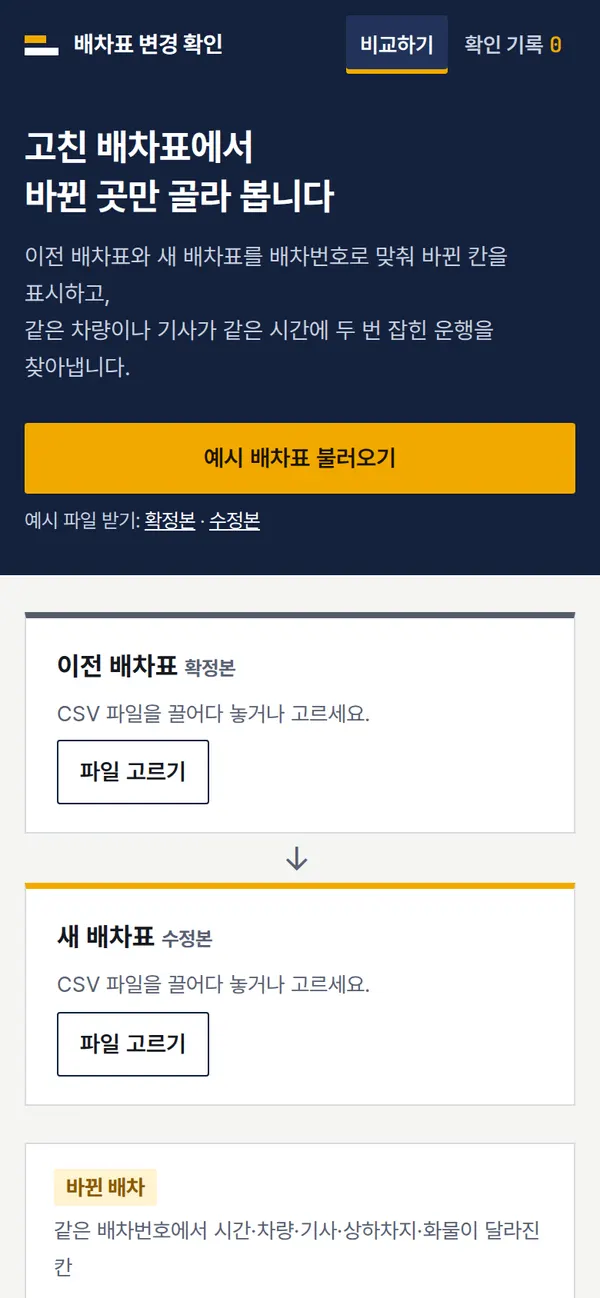
| Responsive | Layout changes at 1000 and 640px. On PC: 2 columns, the list and a check panel on the right. Below 1000px: 1 column. Below 640px: the change list becomes one card per run. The timeline scrolls sideways only inside its own box, so the page never overflows. |
| Fonts | Monospaced even for Korean, like a control-room screen — Nanum Gothic Coding, with JetBrains Mono for times and numbers (all free, open fonts). Bundled with the site, so no external requests. The Korean font first loads only the characters used on this screen (105KB); Korean characters that appear only in a user's uploaded file are fetched when needed from a separate 2,350-character file (745KB). Number font 42KB. |
| Images | Built without photos. Icons are drawn in SVG and stay sharp on any screen. Charts are also SVG drawn directly from the computed values. |
| Motion | CSS transitions only, no libraries. Kept to notices sliding up from the bottom; with reduced motion turned on in the device, transitions stop. |
| Accessibility | Every input has a name, and main buttons are 44px tall for easy tapping. Status is shown with both color and text, and notices are marked for screen readers. Buttons and inputs also work by keyboard. Accessibility score 100 on mobile · 100 on PC. |
| Tech | HTML, CSS, JavaScript (no external libraries). 70KB for screens and scripts combined. Files are opened with the browser's file reader, and EUC-KR files saved from Excel are detected and re-read in the right encoding. Results are saved to and read from browser storage (localStorage), and downloaded CSVs open directly in Excel. Screens use separate addresses (#/…), so back navigation works. |
6. QA
These are results from running the tool on PC 1440 and mobile 390 screens and tapping through in the order a real user would. We also checked that saved data is still found after a refresh. (2026-09-23)
| Item | PC 1440 | Mobile 390 |
|---|---|---|
| Screen errors | 0 | 0 |
| Broken files | 0 | 0 |
| Horizontal overflow · clipped text | 0 | 0 |
| Function tests | 14 / 14 passed | 14 / 14 passed |
The 14 function tests: load sample schedules → compare · show only changed cells as old → new · show time overlaps only · schedule by vehicle · tapping a timeline cell jumps to that run · check status and note → kept after refresh · write and copy per-driver change notices · download change list as CSV · save check → check records · view check records after refresh · open a record → back navigation · upload your own files (revised file in EUC-KR) · reject a file with no dispatch number column · delete a check record
Speed and quality scores (out of 100; mobile measured three times on a slow connection, same result each time)
| Performance | Accessibility | Best Practices | SEO | |
|---|---|---|---|---|
| Mobile | 99 | 100 | 100 | 100 |
| PC | 100 | 100 | 100 | 100 |
Mobile: First Contentful Paint 1.7s · Largest Contentful Paint 2.0s · Layout shift 0.00 · Blocking time 0ms PC: First Contentful Paint 0.4s · Largest Contentful Paint 0.4s · Layout shift 0.00 · Blocking time 0ms
7. Result
Try it live ↗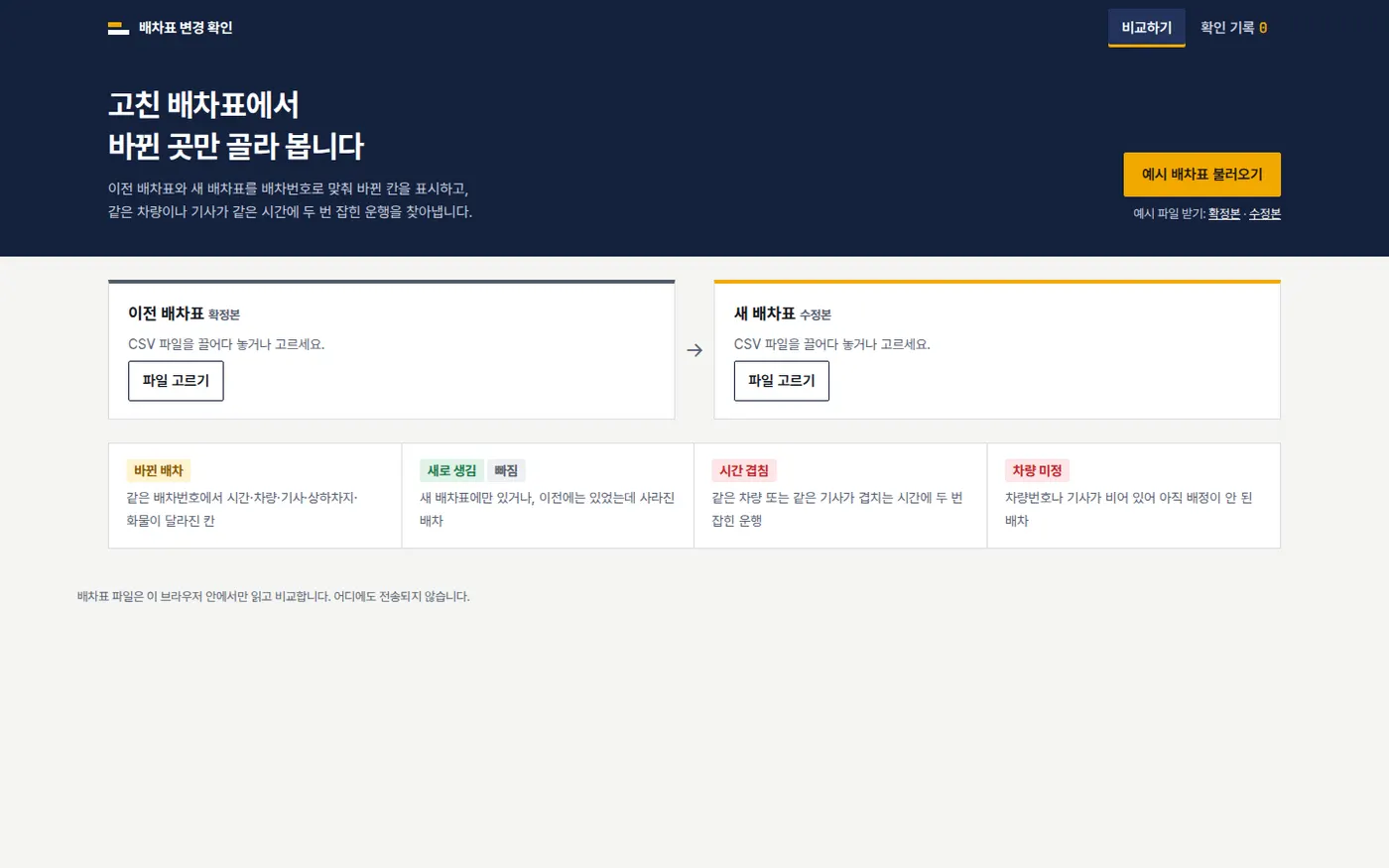
Privacy Policy