1. Overview
| Industry | A business that receives transaction statements, tax invoices and quotes from suppliers by email and file, and copies them into a ledger |
| Site goal | A work tool that replaces finding the same fields in every document, copying them and recalculating totals with upload → check → add to ledger |
| Scope | 3 screens (document check · ledger · finding rules) · 8 fields found · 6 sample documents (3 transaction statements, 2 tax invoices, 1 quote) |
| Main flows | Upload or paste documents → check fields found in the original text → verify the math → fix wrong fields → add to ledger → download ledger CSV / fields not found → add a label to the finding rules |
Uploaded documents, corrected values, the ledger, finding rules and your company details are saved in the browser. They stay in place after a refresh or a return visit. Uploaded files are read only inside this browser and are never sent anywhere.
Connected at rollout: reading PDF and photo (scanned) documents, AI-based document reading (currently read only by rules that look for the label before each field), linking to Hometax (Korea's tax portal) and accounting software, server storage for shared team use.
2. Challenges
1. Each document calls the same field by a different name.
2. A number mistyped while copying only surfaces later.
One wrong digit in a business number or total goes straight into the ledger. Before adding, the check digit and supply amount + tax = total need to be verified.
3. You need to see where each value was read from.
Showing only the found value makes it hard to trust. Showing which characters in the original it came from makes checking fast.
3. Structure
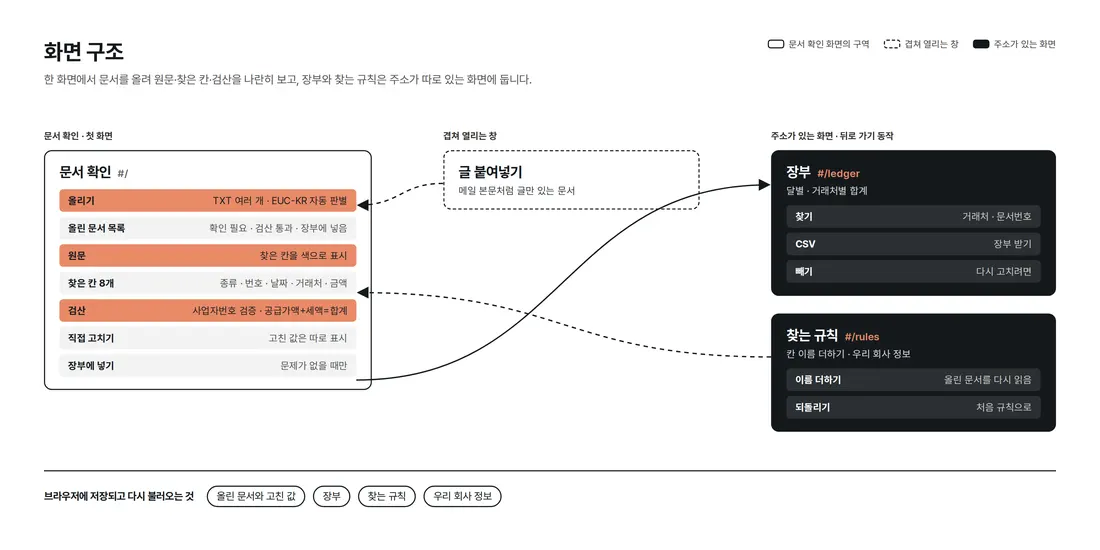
Document check shows the document list, original text and found fields side by side in one place on the first screen. The ledger and finding rules have their own addresses, so they stay in place on back navigation and refresh.
4. Key Features
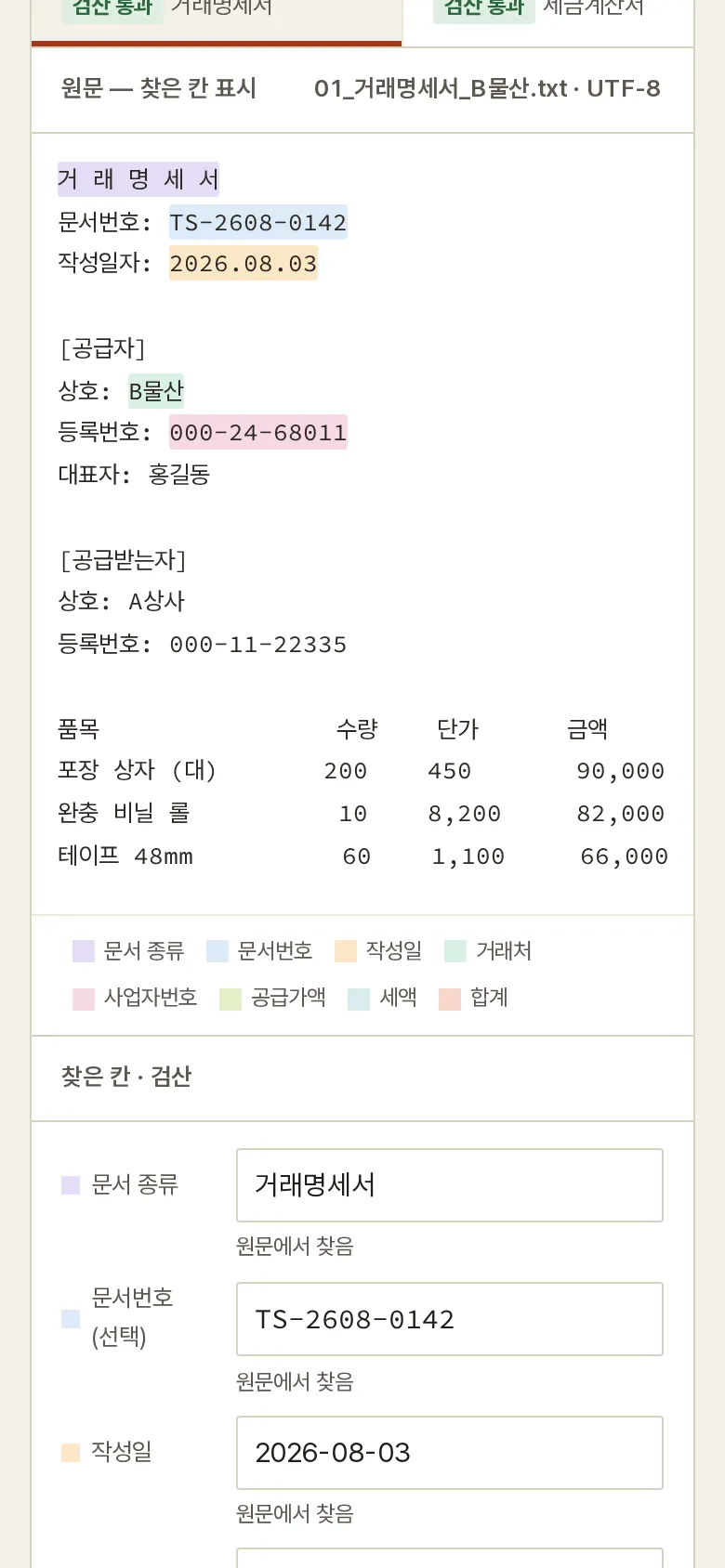
Found fields highlighted in the original
Eight fields — document type, document number, issue date, supplier, business number, supply amount, tax and total — are found, and the matching characters in the original are shaded in a different color per field. Dates are normalized to the 2026-08-03 format. When two companies appear, the one that isn't your company is taken as the supplier.
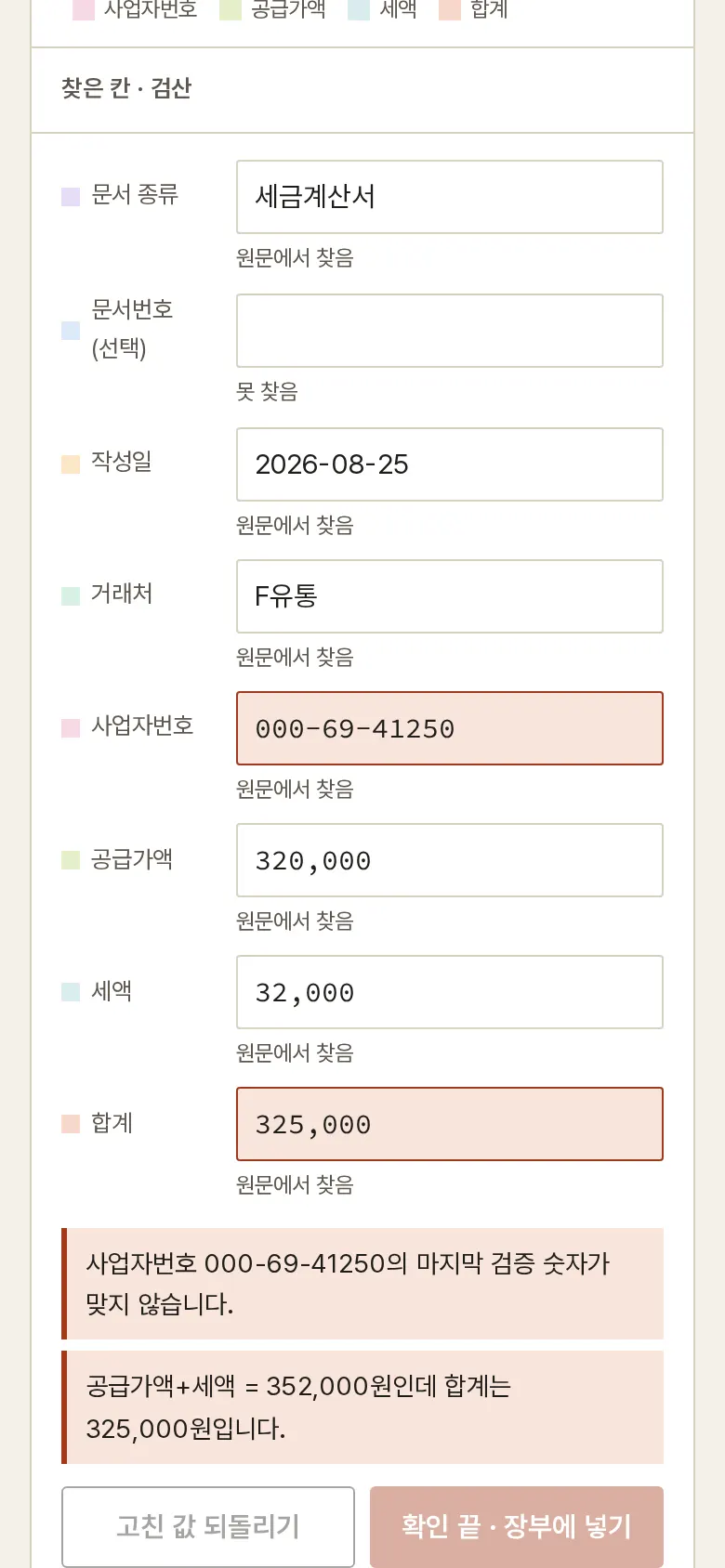
Math check — business number and total
It checks the business number's final check digit, supply amount + tax = total, and whether tax is 10% of the supply amount. While a problem remains, the add-to-ledger button is locked; fixing a field reruns the check right away.
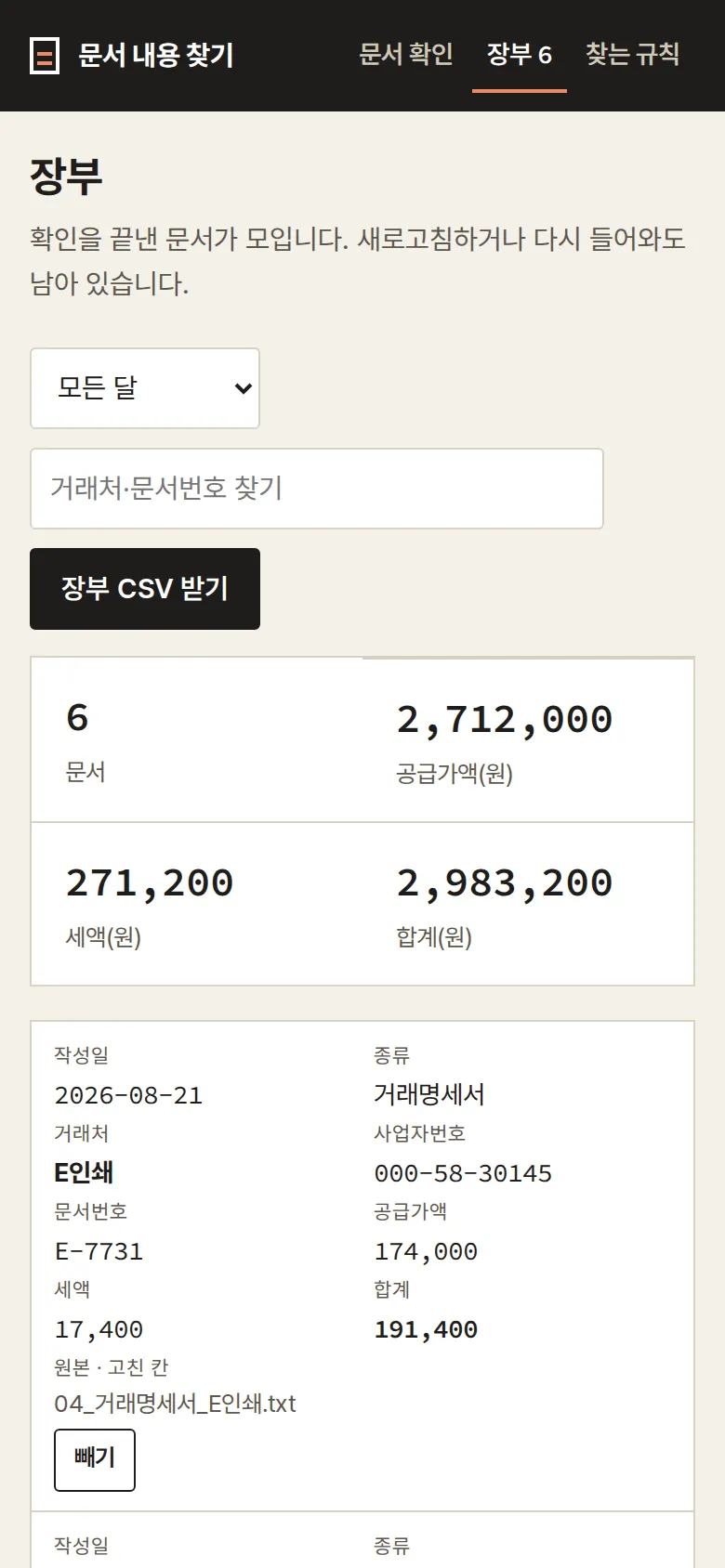
Ledger — totals by month and supplier
Checked documents are added to the ledger and can be searched by month, supplier or document number. Counts and totals per supplier are shown, and the same supplier and document number can't be added twice. The CSV download also records which fields were corrected by hand.
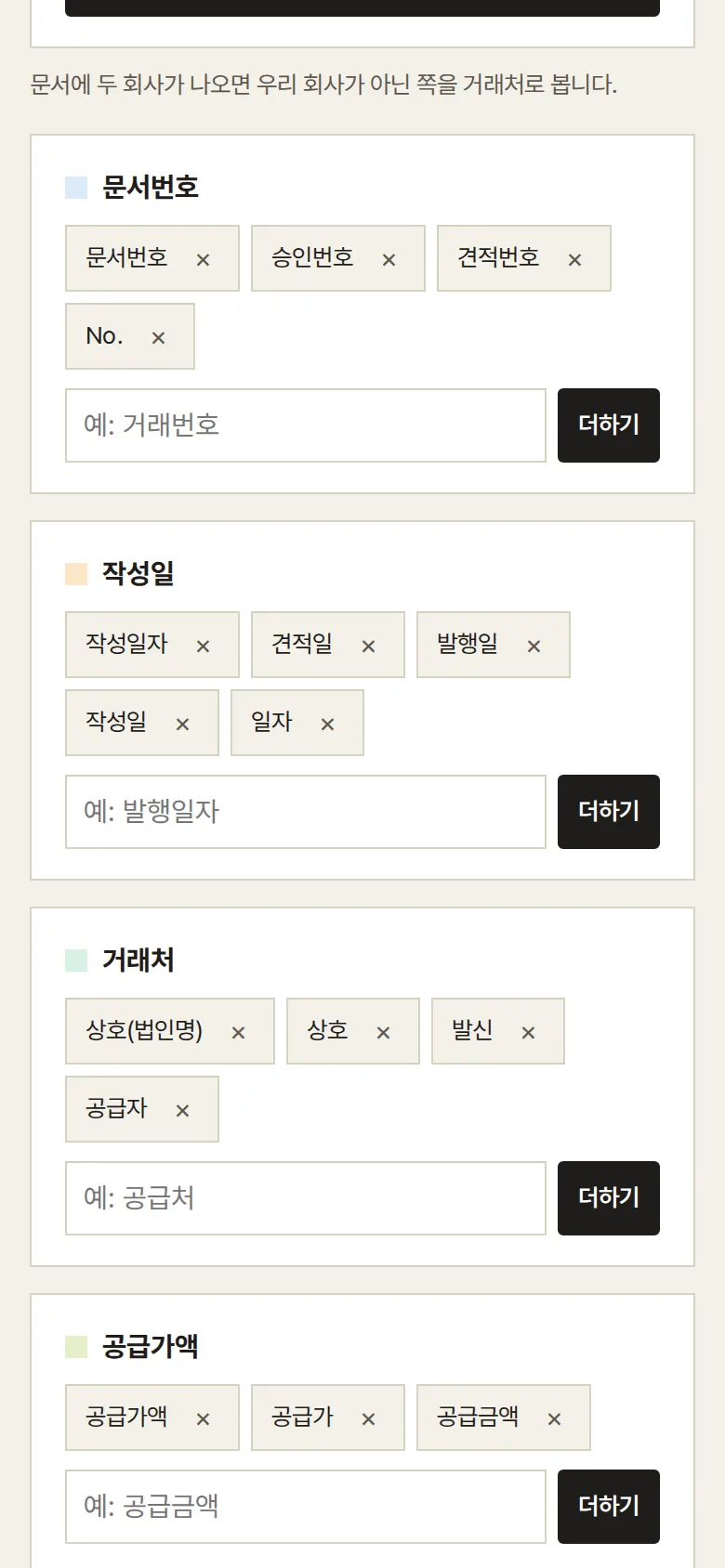
Add finding rules
- Pasted text and EUC-KR filesDocuments with no file, such as an email body, can be read by pasting the text. EUC-KR files saved from Excel or Notepad are read without broken characters.
5. Build Notes
Show details
| Responsive | Layout changes at 1180, 960 and 640px. On PC: document tabs on top, the original text spread wide on the left, found fields and the check note on the right. Below 960px: original and note stacked top to bottom. Below 640px: the original scrolls sideways and the ledger table becomes cards. |
| Fonts | The original shown like a paper document — Gowun Batang (serif) for body, and monospaced Source Code Pro for numbers and amounts (all free, open fonts). Bundled with the site, so no external requests. The Korean font first loads only the characters used on this screen (79KB); Korean characters that appear only in a user's uploaded file are fetched when needed from a separate 2,350-character file (315KB). Number font 23KB. |
| Images | Built without photos. Icons are drawn in SVG and stay sharp on any screen. |
| Motion | CSS transitions only, no libraries. Kept to notices sliding up from the bottom; with reduced motion turned on in the device, transitions stop. |
| Accessibility | Every input has a name, and main buttons are 44px tall for easy tapping. Status is shown with both color and text, and notices are marked for screen readers. Buttons and inputs also work by keyboard. Accessibility score 100 on mobile · 100 on PC. |
| Tech | HTML, CSS, JavaScript (no external libraries). 69KB for screens and scripts combined. Files are opened with the browser's file reader, and EUC-KR files saved from Excel are detected and re-read in the right encoding. Results are saved to and read from browser storage (localStorage), and downloaded CSVs open directly in Excel. Screens use separate addresses (#/…), so back navigation works. |
6. QA
These are results from running the tool on PC 1440 and mobile 390 screens and tapping through in the order a real user would. We also checked that saved data is still found after a refresh. (2026-09-23)
| Item | PC 1440 | Mobile 390 |
|---|---|---|
| Screen errors | 0 | 0 |
| Broken files | 0 | 0 |
| Horizontal overflow · clipped text | 0 | 0 |
| Function tests | 17 / 17 passed | 17 / 17 passed |
The 17 function tests: load 6 sample documents (including EUC-KR) · highlight found fields in the original (8 fields) · read a document in a different format (quote, 26-08-19) · math check: business number check digit and total mismatch · fix a wrong field → check again · add to ledger · type a missing date by hand (2026.08.28) → ledger · add the remaining passing documents · block duplicates when the same document is uploaded again (your own file) · read your own EUC-KR file · view ledger after refresh · search ledger and totals per supplier · download ledger CSV · remove from ledger → kept after refresh · paste text → add a rule for a field not found · rule kept after refresh → reread and found · back navigation
Speed and quality scores (out of 100; mobile measured three times on a slow connection, median shown)
| Performance | Accessibility | Best Practices | SEO | |
|---|---|---|---|---|
| Mobile | 99 | 100 | 100 | 100 |
| PC | 100 | 100 | 100 | 100 |
Mobile: First Contentful Paint 1.5s · Largest Contentful Paint 1.8s · Layout shift 0.00 · Blocking time 0ms PC: First Contentful Paint 0.4s · Largest Contentful Paint 0.4s · Layout shift 0.00 · Blocking time 0ms
7. Result
Try it live ↗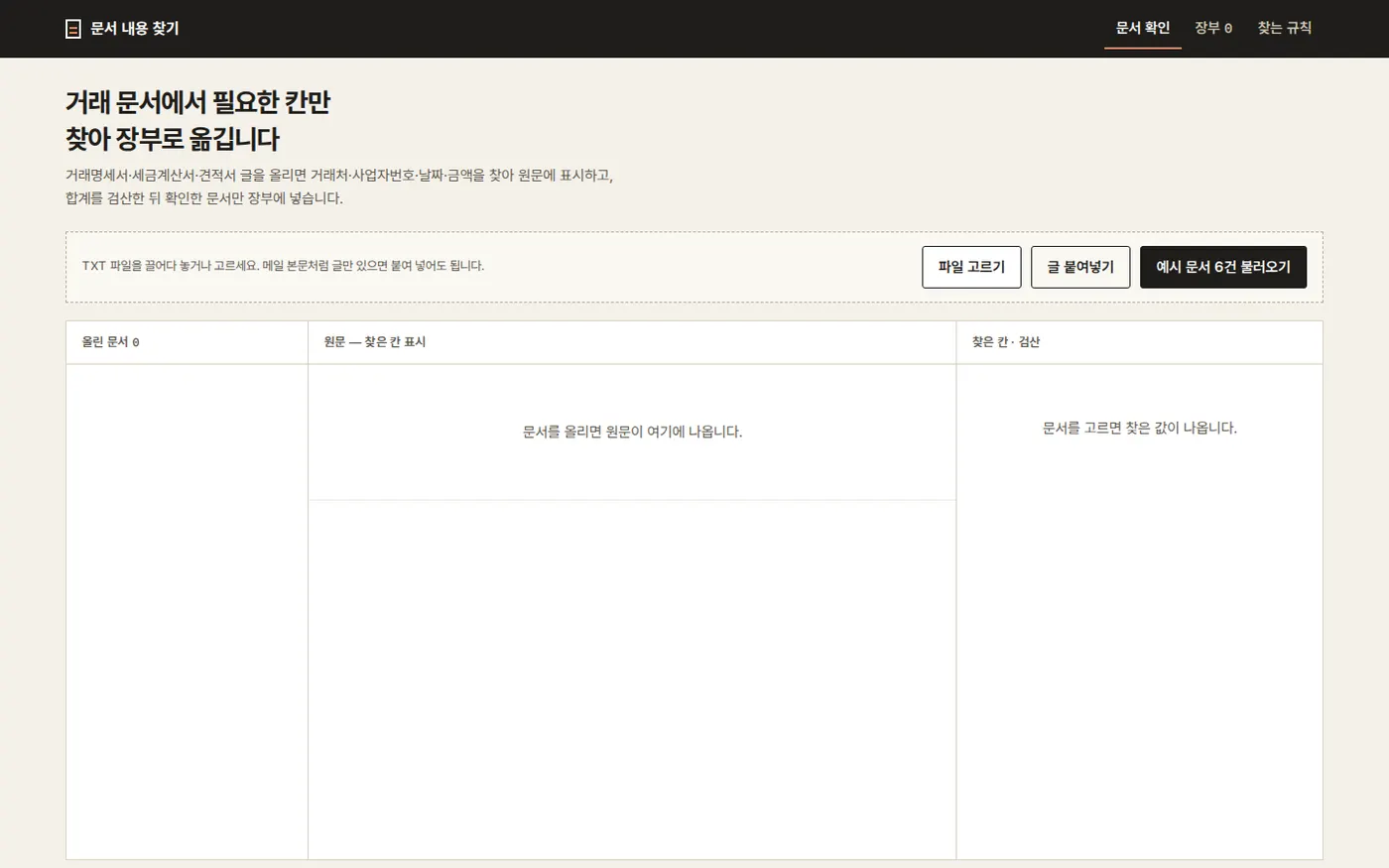
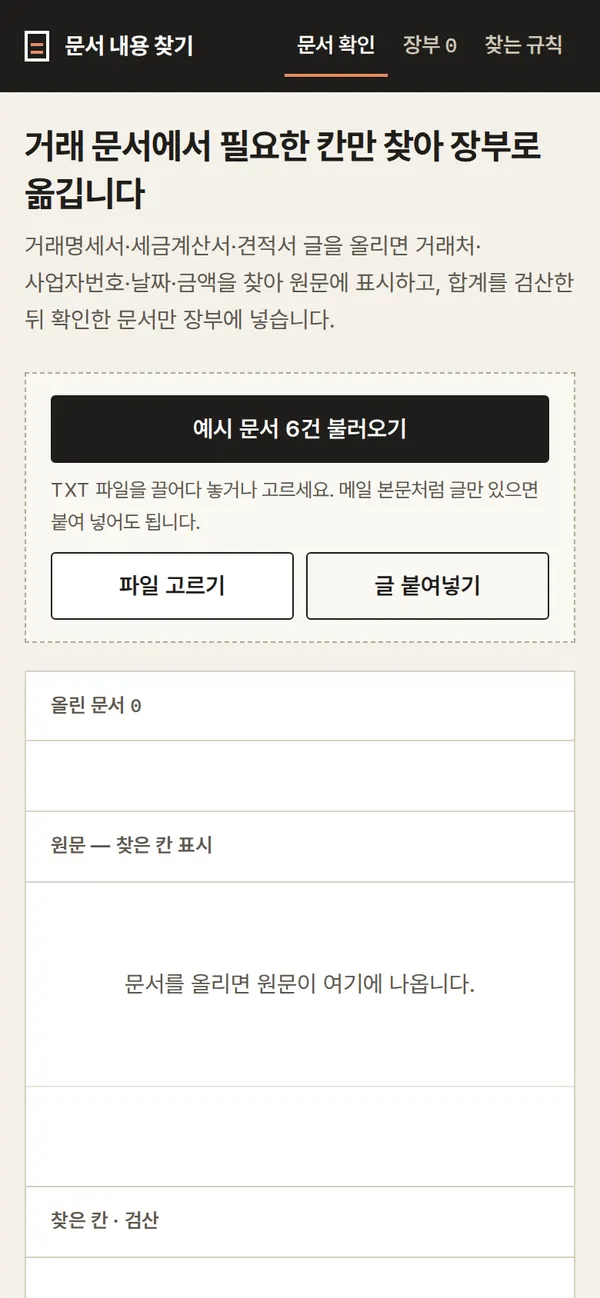
Privacy Policy