1. Overview
| Industry | A small womenswear label in Amsterdam, the Netherlands (FW26 season 「SECOND FOLD」) — an English online store for European customers |
| Purpose | Show clothes defined by folds, tucks and wraps through photos, and let shoppers add to bag and order without worrying about size |
| Scope | 10 pages (home · all products · product detail · lookbook · bag · checkout · order lookup · brand · help · 404) · 14 products (6 categories — 12 garments · 2 accessories) · British English, prices in euros, sizes XS–L with EU 34–42, dates DD/MM/YYYY |
| Main flow | Browse products (filter, sort) → find a size → add (drawer) → discount code → checkout (delivery country) → order number → order lookup |
The bag, orders and newsletter sign-ups are saved in the browser and loaded again on the order lookup screen.
Connected at rollout: real payment integration, order confirmation and delivery quote emails, and server storage to see the same order on several devices.
2. Challenges
1. Shoppers hesitate over size and leave.
A roomy coat and a close-fitting knit fit different people even in the same "S", and size labels differ from country to country. Every product needs a measurement chart, EU sizes and a "find my size" tool.
2. One photo does not show the detail.
Designs that appear in movement, like a back tuck or a folded sleeve, need to be felt right on the first screen.
3. Delivery costs and return terms revealed at the end drive people away.
Delivery costs differ for the Netherlands, the EU and the UK, and EU customers check their 14-day right of withdrawal first. Sold-out sizes should be blocked before they are picked, and the free-delivery threshold and discount should stay visible from the moment something is added.
3. Structure
home index ─┬─ 01 NEW IN ─────────────┐
            ├─ 02 CAMPAIGN → products (coat)
            ├─ 03 CATEGORIES → products (?cat=)
            ├─ 04 LOOKBOOK → lookbook   │
            └─ 05 LETTER (newsletter saved)
all products shop (?cat=·size=·price=·sort=) ──→ product detail product?id=
product detail ─ size window (measurements · find my size · how to measure) ─ worn with
lookbook ─ open a look → add directly
[every page] header: SHOP · LOOKBOOK · ABOUT · HELP · ORDERS · BAG (drawer)
bag cart → checkout (delivery country) → order complete (order number) → order lookup orders
brand about(#showroom) · help (#faq #ship #return #measure) · 404
Below the folding lookbook on the first screen, the home page continues with new arrivals, campaign, categories, lookbook and newsletter. Filters chosen on the all-products page stay in the address, and the size window on the product page settles the size. Added items can be checked from any page in the bag drawer on the right, and the flow runs bag → checkout → order complete → order lookup.
4. Key Features
Size window · find my size
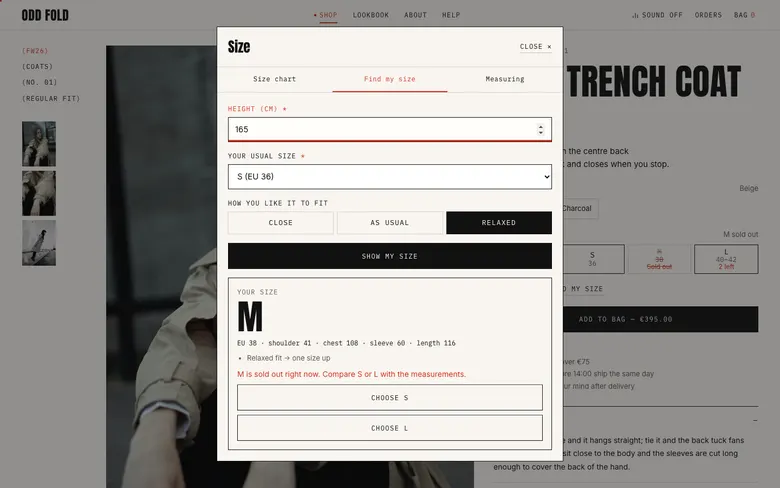
Size buttons show the EU size too, sold-out sizes cannot be pressed, and adding without a size shows a prompt. Entering height, usual size and preferred fit recommends a size based on that product's fit (roomy, regular, close) and length. With many tall customers in mind, coats, dresses and trousers go one size up from 178cm, and if the recommended size is sold out, the nearest size is suggested instead.
Bag drawer
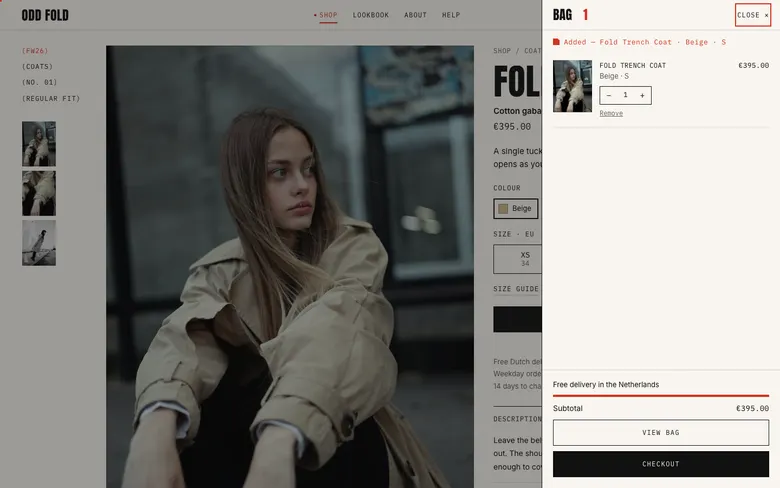
Adding an item slides a drawer in from the right and updates the number in the header. Quantity and removal work right inside the drawer, and everything stays after a refresh.
Delivery country · order number
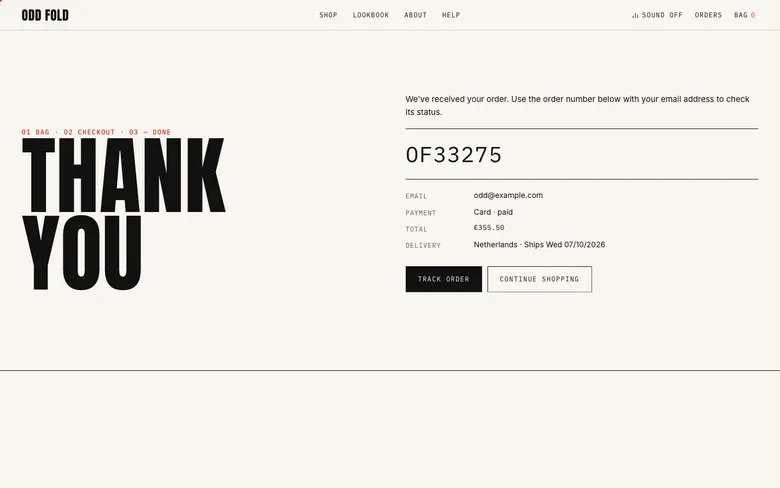
Choosing the delivery country changes the delivery cost at once: the Netherlands free from €75 (€4.95 below), the EU free from €150 (€12.50 below), and the UK and elsewhere quoted separately, with the total marked "excl. delivery". Name, phone with country code, email, address and postcode (Dutch ones tidied to the 1017 AB format) are checked, and placing an order saves an order number and shows the expected dispatch date in DD/MM/YYYY from a 2pm weekday cut-off.
Order lookup
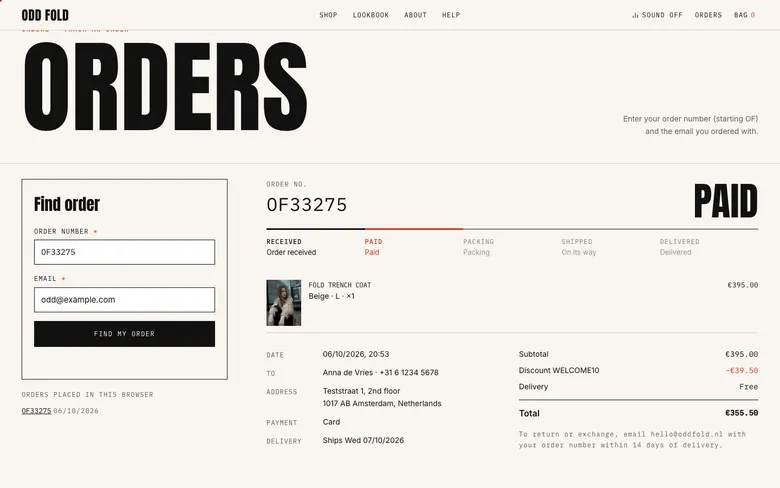
The order opens only when both the order number and email match. It shows the stages Order received → Paid → Packing → On its way → Delivered, along with the items, delivery address, amount paid and order time (24-hour clock).
- Owner adminOrder status and tracking numbers entered in the back office appear on the customer’s order lookup, and stock per size goes down with each order until that size is sold out. Return and exchange requests are approved, refunded or declined with a reply the customer can read, and the owner also edits prices, hides products, adds new ones, sets the free-shipping threshold and updates the campaign photos and policy pages. In this case study the owner and customer screens share the browser’s storage; in a real rollout this becomes an owner login with server storage.
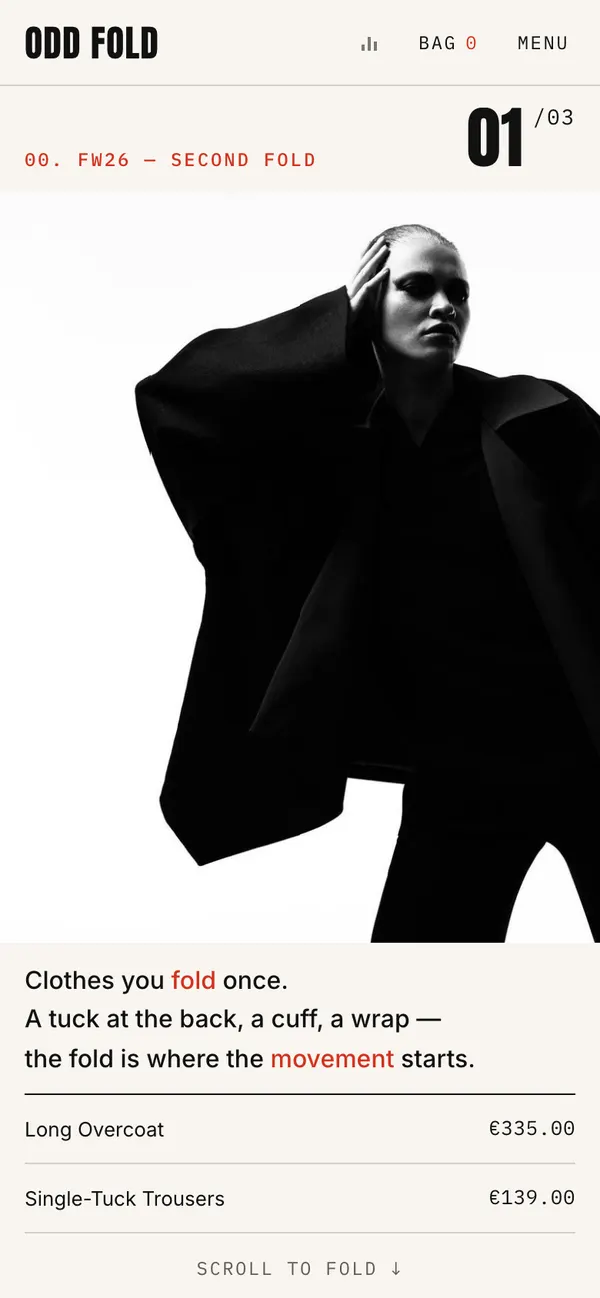
- First screen — folding lookbookThree black-and-white look photos are cut into 8 vertical strips (4 on phones), and as you scroll the strips fold in pairs like paper to reveal the next look. When the last look folds, 「ODD FOLD / FW26 SECOND FOLD」 rises letter by letter.
- Product list — filters and sortingFilters for category, size (in-stock only) and price (under €150 · €150–250 · over €250), and sorting by newest or price. The result count changes instantly, and the conditions stay in the address (?cat=outer&size=M) so they can be shared as they are. On PC, hovering over a card switches to a detail photo and raises size chips for adding straight away.
- Bag — discount code · free-delivery barChanging quantity, colour or size recalculates the amount to the cent, and lines with the same options merge into one. The code WELCOME10 (10%) applies, and a bar shows how much is left to free delivery in the Netherlands (€75), counted after the discount. With only one belt (€45.00), "€30.00 away from free delivery" and a €4.95 delivery cost appear, and adding one more switches to free delivery.
- Lookbook — add directlyPressing one of the 9 looks opens the pieces worn in it, and an in-stock size can be chosen and added on the spot.
- Returns · newsletter · phone menuThe help page explains the EU 14-day right of withdrawal (from delivery, no reason needed), what is refunded and the return delivery cost. The newsletter checks the email format and consent before saving, and an address already registered is not saved twice. On phones, the MENU button opens and closes a full-screen menu (Esc too).
5. Build Notes
Show details
| Responsive | The layout is set for PC 1440, tablet (single-column product detail at 1000px and below) and phone 390. Below 900px the header menu becomes a MENU button, and on phones the product photos become a swipeable gallery. |
| European formats | Prices in euros (€395.00, VAT included), sizes XS–L + EU 34–42, measurements in cm, dates DD/MM/YYYY, 24-hour clock. All text on the site is English and every page is lang="en-GB". |
| Fonts | Headings in Anton (narrow, tall capitals), prices and numbers in IBM Plex Mono, body text in Inter (all free open fonts). Only the Latin character sets are bundled on the site, with no external font requests. |
| Images | 24 campaign photos resized to 1200–1800px wide, with a detail crop for each product. Phones get separate 800px-wide photos, and photos outside the first screen load as they come into view. |
| Motion | GSAP 3.12 + ScrollTrigger + Lenis (smooth scrolling). Over a pinned stretch 3.2 screens long, the first screen plays each strip's 90° fold in time with scrolling. Page changes fold the screen into 6 vertical strips and open it again (0.3s), and menu and button text scrambles then settles (0.4s). |
| Accessibility | Skip-to-content link, buttons as button and inputs with label, size buttons read as "S, EU 36". The menu, drawer and size window announce their open state and close with Esc, and the reduce-motion setting switches off the pinned stretch, transitions and text effects. |
| Stack | HTML, CSS and JavaScript, with the motion libraries above bundled on the site, no external scripts. Delivery zones (NL, EU, elsewhere) are defined in one place, and storage is unified in one prefixed browser storage (localStorage). |
6. QA
These results come from running all 10 pages on PC 1440 and phone 390 screens and tapping through in the order a real person would. We also checked that bag items stay after a refresh and that a saved order opens again in order lookup. (2026-10-04)
| Item | PC 1440 | Phone 390 |
|---|---|---|
| Screen errors | 0 | 0 |
| Broken files | 0 | 0 |
| Horizontal overflow | 0 | 0 |
Core flow tests 29 / 29 passed: filter and sort counts · sold-out blocking · size recommendation · EU size labels · one-size accessories · add and keep after refresh · euro recalculation · discount code · amount left to free delivery → free · NL, EU and UK delivery costs · required fields and Dutch postcode check · order number and dispatch date · order lookup · lookbook add · newsletter · phone menu · no Korean text on the site, and more
7. Result
Try it live ↗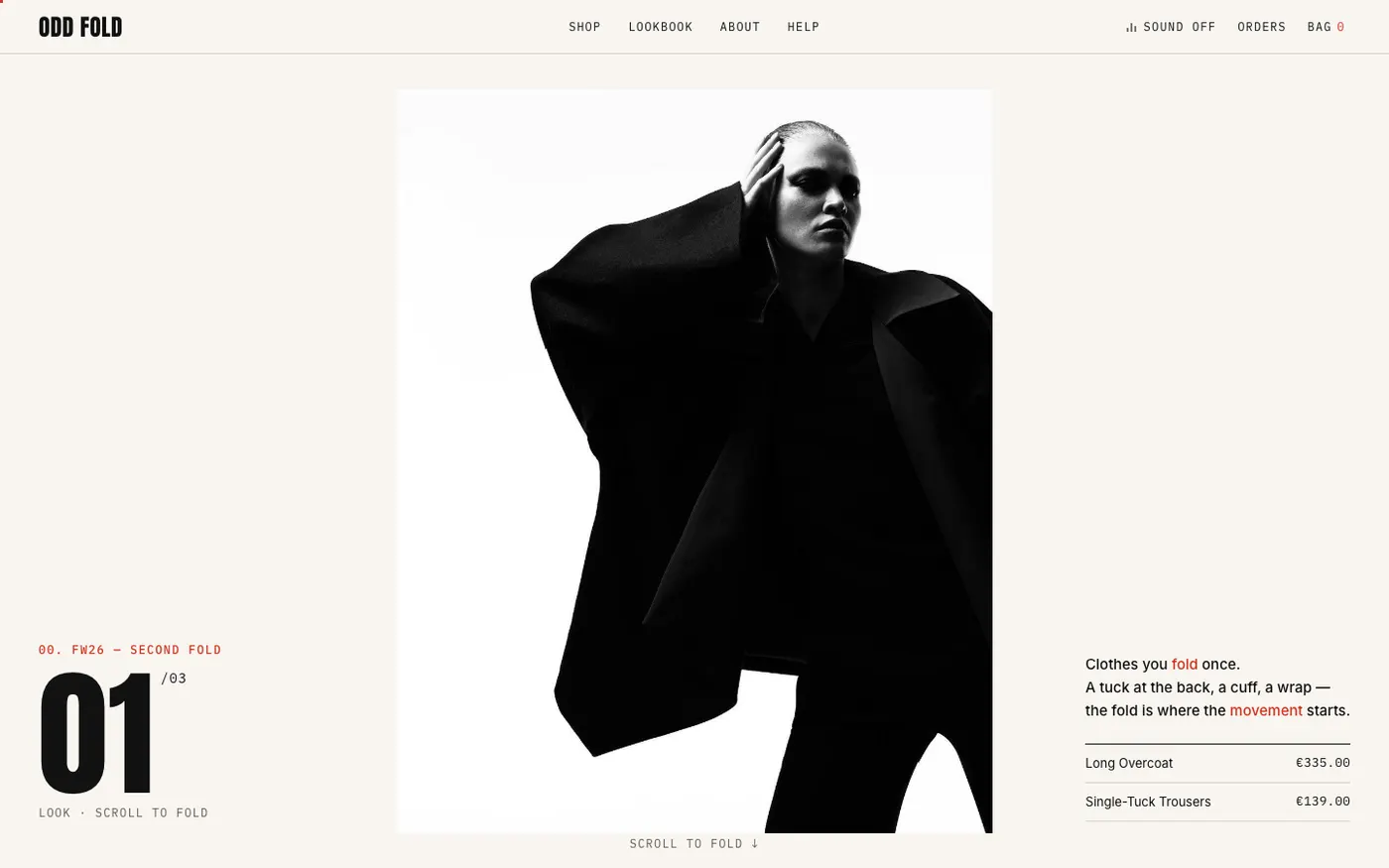
Privacy Policy