1. Overview
| Industry | A solid wood furniture workshop and showroom in Paju Book City, Gyeonggi · made to order in 3–5 weeks |
| Purpose | An online store that answers "will it fit in my home?" before purchase — something photos alone cannot — and shows how the price changes with wood, finish and size on the spot, leading to orders and showroom visits |
| Scope | 10 pages (home · all products · product detail · room planner · cart · checkout · materials · lookbook · showroom · 404) · 14 products · 10 screens each on PC 1440 / phone 390 |
| Main flow | ① Browse products (category, search, sort) → choose wood, finish, size → cart → order (preferred installation date) → order number lookup ② Product → "Place it in my room" → floor plan and walkway check ③ Showroom visit booking → check and cancel |
The cart, orders, room layout and showroom bookings are saved in browser storage (localStorage) and loaded again in the same browser.
Connected at rollout: real payments, text messages, and server storage to see the same order on several devices.
2. Challenges
1. "Will it fit in my home?" cannot be answered from a photo.
With an 1800 dining table, is there room to pull out a chair and walk past? How many cm are left in front of the cabinet? If the screen cannot answer, the question goes to the phone.
2. The same piece costs different amounts by wood, finish and size.
People know walnut costs more and ash less, but "so how much?" needs a quote. The price should be visible the moment they choose.
3. Made to order means waiting and visiting are part of buying.
When the piece can be installed, and when they can visit the showroom to sit on it, should be settled right on the screen.
3. Structure
                         ┌──────────── index home ────────────┐
                         │ first screen → featured pieces →    │
                         │ three woods → "place it in your     │
                         │ room" scene → workshop → showroom   │
                         └──┬──────┬──────┬──────┬──────┬────┘
                            │      │      │      │      │
   shop all products ◀──────┘      │      │      │      └──▶ showroom visit booking
     │ (category, search, sort)    │      │      │               (date → time → book, cancel)
     ▼                             │      │      └──▶ material woods, finishes, care
   product detail ──"Place it in my room"──▶ planner room planner
     │ (wood, finish, size, drawing) ▲    │
     ▼                             │      └──▶ lookbook (dots on photos → product)
   cart ──▶ checkout order ──▶ order number → order lookup (#lookup)

   Shared: header (MORTA · MENU · SHOP · CART) / full menu of 7 / footer / 404
The home page shows the featured pieces and the three woods, previews the planner with the "place it in your room" scene, and continues to the workshop and showroom. On a product page, choosing wood, finish and size leads to cart and order, and "Place it in my room" goes straight to a floor plan with that piece in it.
4. Key Features
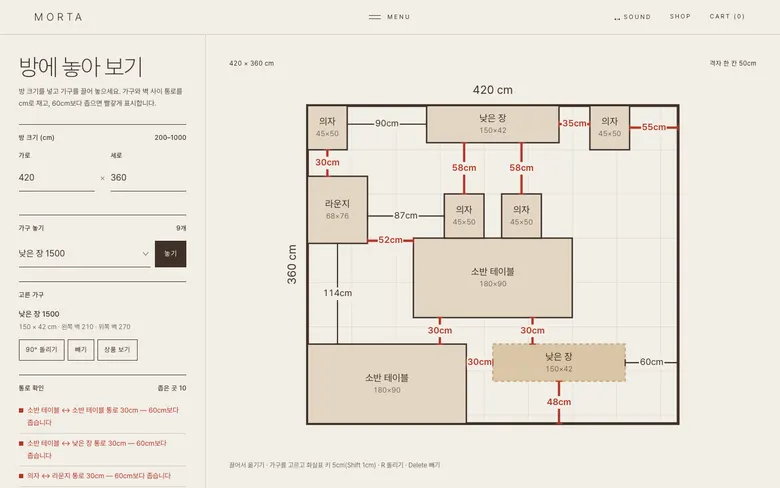
Place it in my room (planner)
Entering the room's width and depth (200–1000cm) draws a true-to-scale floor plan with a 50cm grid. 12 pieces can be placed at real size and dragged, rotated 90° or removed, also by keyboard (arrows move 5cm, R, Delete). Walkways between furniture and walls or other furniture are shown in cm automatically; under 60cm they get a red line and a warning list, and overlapping pieces turn red. Every change is saved automatically and is still there when reopened.
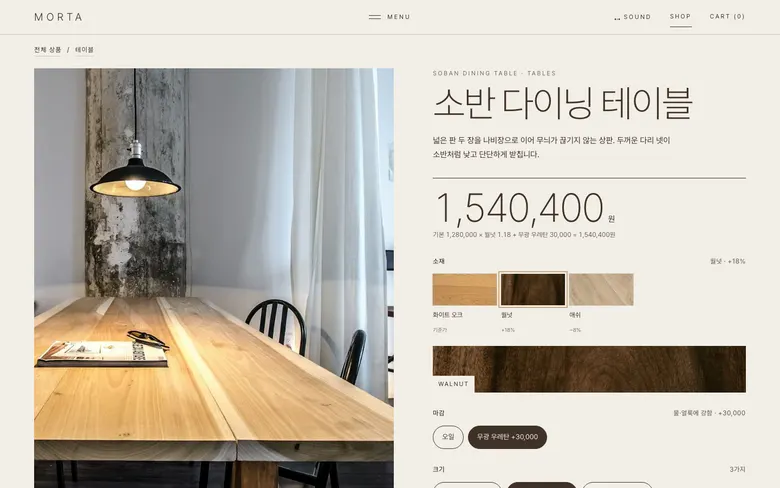
Price by wood, finish and size
The price and its formula (base price × walnut 1.18 + matte urethane 30,000) change the instant a choice is made, and the wood grain sample switches. Ash is × 0.92.
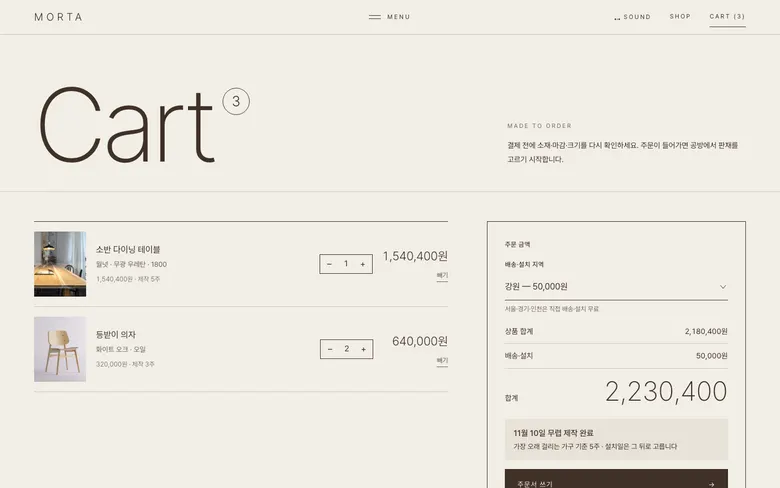
Cart
Lines are split by option, with quantity controls and removal. Choosing a region updates the delivery and installation fee (free in the capital area, 50,000 won elsewhere) and the total, and the expected completion date is shown based on the piece that takes longest. It stays after a refresh.
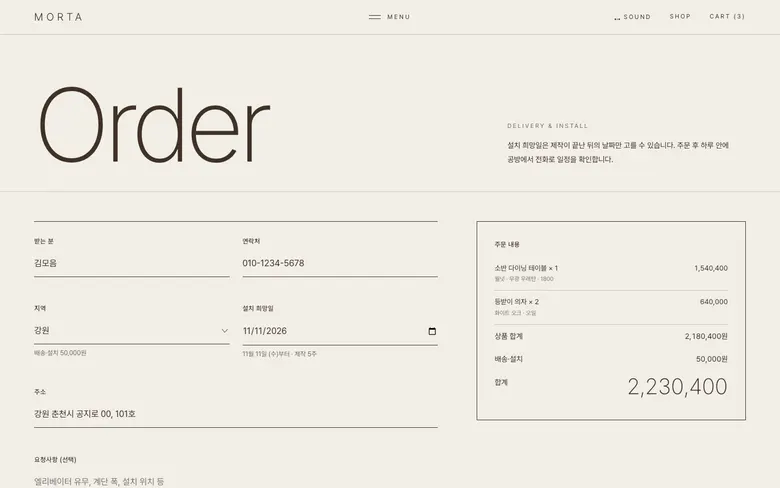
Order · order lookup
The preferred installation date can only be chosen from the day after the making period ends, up to 90 days ahead, and earlier dates are blocked with a note. Placing an order saves an order number (MT-YYMMDD-XXXX) and empties the cart, and the saved order can be loaded again with the order number and the last 4 digits of the contact number. A mismatch shows a message.
- Owner adminOrders move from waiting to in the workshop, delivery booked and installed, and the confirmed installation date and note appear on the customer’s order lookup. Showroom visits are confirmed, and blocking a time slot shows it as full on the customer’s booking screen at once; the workshop also edits base prices by size, pauses orders, sets regional delivery fees, answers installation and repair questions and changes the home photos. In this case study the owner and customer screens share the browser’s storage; in a real rollout this becomes an owner login with server storage.
- Place it in your room (home scene)Midway down the home page the screen holds, and as you scroll the empty room photo lifts away, plan lines are drawn, and furniture rectangles settle into place one by one. At the end the walkway widths appear in cm, and the 58cm walkway is marked with a red line.
- Shop filtersThe circled number beside the huge "ALL" title follows the result count. There are category pills (with counts), search and sorting (price, making time), and the filter bar sticks to the top while scrolling. Choosing a size on a card switches its price and link to that size.
- Dimension drawingsFront and top drawings are drawn in fine lines as they come into view. Changing the size redraws them at those dimensions.
- Showroom bookingOnly Thursday to Sunday dates in the next 4 weeks appear, and 1-hour slots from 11am to 5pm that are already taken are blocked. Booking blocks that slot and adds it to "My visits"; cancelling opens it again.
- LookbookPhotos of different sizes are scattered in a staggered layout, each moving slowly at its own speed. Hovering over a dot on a photo shows the piece's name and price, and clicking it opens the detail page.
- Material comparisonColour, grain, hardness (Janka) and price differences of oak, walnut and ash, a comparison table of oil and matte urethane, and five care tips.
- Menu · page transitionsPressing MENU in the centre opens the full menu from the top, and Esc closes it. When moving between pages, a dark brown curtain covers from the bottom and lifts upward on the next page.
5. Build Notes
Show details
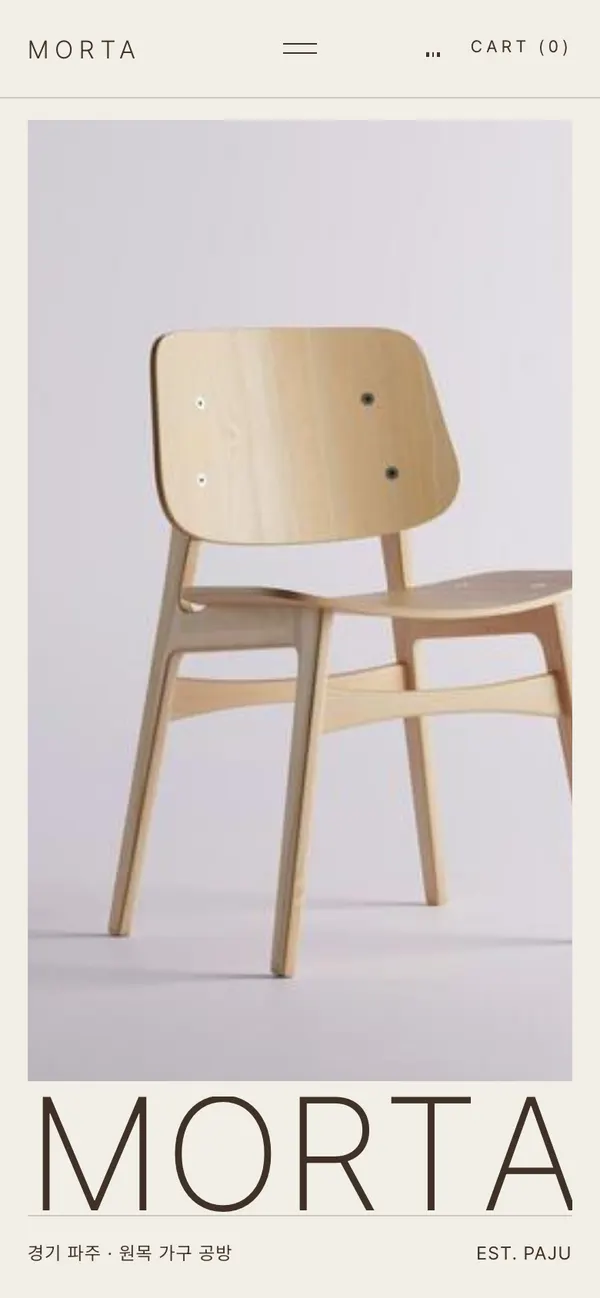
| Responsive | Based on PC 1440, the number of columns drops at 900 / 760 / 600px, and every feature works the same down to phone 390. On phones the planner puts the plan on top and the tools below, with larger plan text. |
| Fonts | Body in Pretendard Variable, large English headings in Inter Tight |
| Images | 21 free real photos (JPG up to 1,600px wide, 2,000px for the first screen, 4,460KB in total). Phones get separate 800px-wide photos (21 files, 1,204KB in total), and photos outside the first screen load as they come into view. Every photo has its width and height set, so the page does not shift while images load. First phone visit to the home page: 1.1MB. |
| Motion | GSAP 3.12 + ScrollTrigger (pinned, scroll-linked home scene; lookbook parallax), Lenis smooth scrolling. Line-by-line text and entrance effects use in-view detection with CSS transitions, and the drawings use SVG line drawing. With the device's reduce-motion setting on, pinning, parallax and transitions are all switched off and content shows at once. |
| Accessibility | Alt text on every image, buttons as button, inputs with label, wood/finish/size as radio groups (fieldset, legend), skip-to-content link, Esc closes the menu. The planner works by keyboard with a position description for each piece, and result counts, prices and warnings are read by screen readers (aria-live). |
| Stack | HTML, CSS and JavaScript (no framework), no external scripts or CDN. Data for the 14 products sits in one place, and price = base price by size × wood multiplier + finish surcharge. The planner drags on an SVG floor plan in cm and measures the distance from each piece to the nearest wall or piece in four directions to show walkways (dining table and chairs are excluded). Storage goes through one try/catch-wrapped function, with keys prefixed `morta.`. |
6. QA
These results come from running all 10 pages on PC 1440 and phone 390 screens and tapping through in the order a real person would. We also checked that the cart, room layout and showroom bookings load again after a refresh. External requests and broken links: 0. (2026-10-03)
| Item | PC 1440 | Phone 390 |
|---|---|---|
| Screen errors | 0 | 0 |
| Broken files | 0 | 0 |
| Horizontal overflow | 0 | 0 |
| Function tests | 10 / 10 passed | 11 / 11 passed |
The 11 function tests (phone menu runs on phones only): result counts for category, search and sort · card size changes price and link · wood, finish and size pricing with grain and drawing · add → kept after refresh → delivery fee by region → quantity · installation date limit → order number saved → lookup · planner (room size, add, drag, rotate, walkway cm, 60cm warning, kept after reopening) · product → place it in my room · showroom booking → slot blocked → reopened on cancel · page transition · no script errors during the flow · phone menu
Speed and quality scores (out of 100, measured on the public site on 2026-10-03; phone on a slow connection, median of three runs; PC on PC settings)
| Performance | Accessibility | Best practices | SEO | |
|---|---|---|---|---|
| Phone | 99 | 96 | 100 | 66 |
| PC | 100 | 96 | 100 | 66 |
Phone: first paint 1.4 s · largest element 1.5 s · layout shift 0 · input blocking 10 ms PC: first paint 0.3 s · largest element 0.7 s · layout shift 0 · input blocking 0 ms
The SEO score is low because the live demos are deliberately kept out of search results.
7. Result
Try it live ↗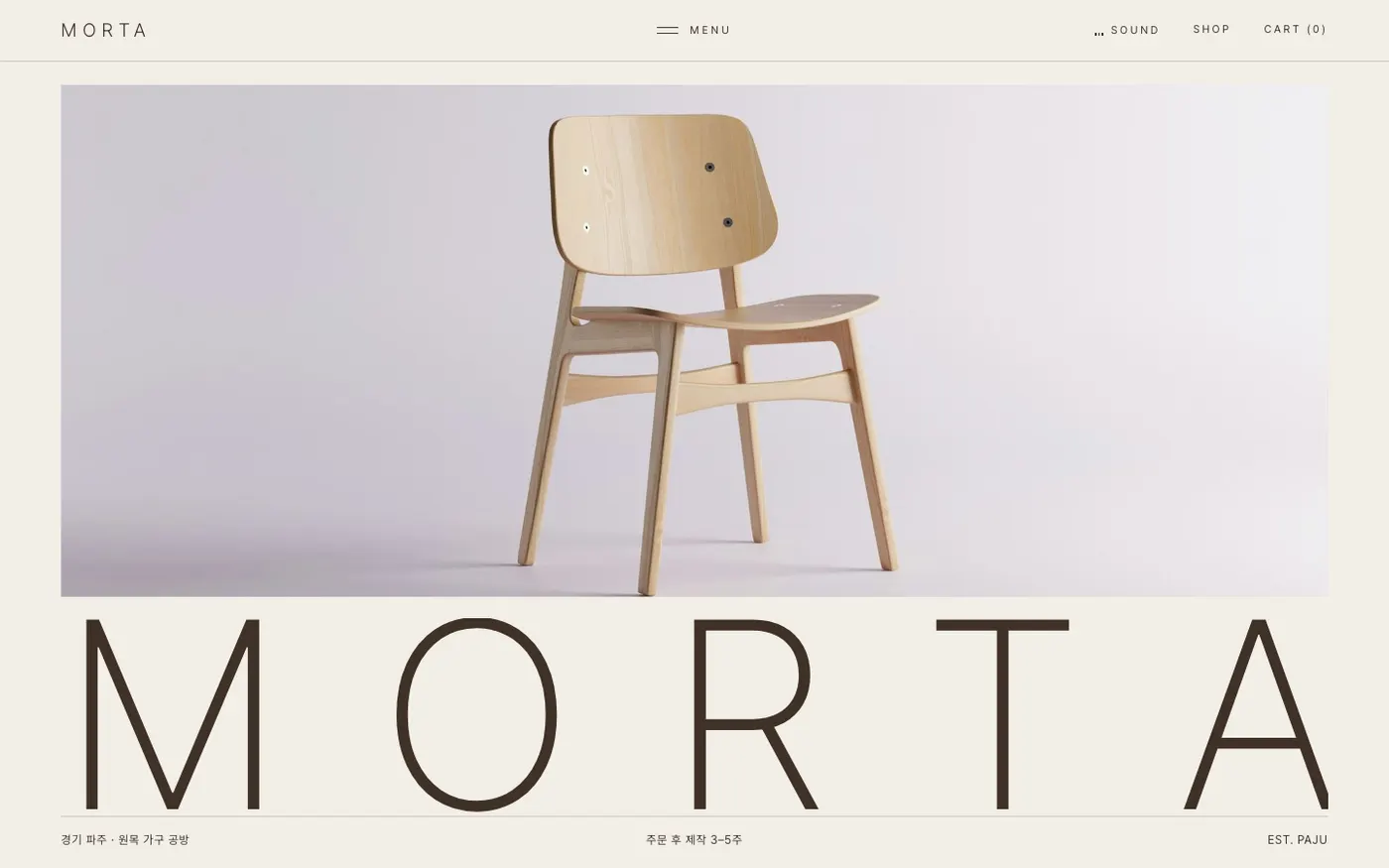
Privacy Policy