1. Overview
| Industry | A cliff-top hotel and resort on the coast of Namhae, South Gyeongsang (18 rooms · 3 types) |
| Purpose | Let guests see the rooms, check which room fits their dates and party and what it costs, and get a booking number on the spot. Dinner seat booking and booking lookup and cancellation are handled on the same site. |
| Scope | 11 pages (home · rooms · 3 room details · dining · experiences · location · booking · booking lookup · 404) · responsive for PC, tablet and phone |
| Main flow | Room detail → "Book this room" → 4-step booking (calendar → guests → room → guest details) → review → booking number issued → lookup and cancel / dinner seat booking |
Room and dinner bookings are saved in the browser and loaded again in the same browser.
Connected at rollout: real payments, text and email messages, and server storage to see the same booking on several devices.
2. Challenges
1. "Is a room free on that date, and how much?" is hard to answer without a phone call.
When weekday, weekend and peak-season rates mix with extra-guest charges, guests try to add it up themselves and end up calling.
2. With only 18 rooms, the photos and the mood are the product.
If the difference between the three room types (size, guests, view) is not clear at a glance, people compare only the cheapest room and leave.
3. Nothing happens after the booking.
Losing a booking number or changing plans means another call, and dinner seats have to be asked about separately.
3. Structure
                         ┌──────────── index.html home ──────────┐
                         │ sea-fog first screen · large statement │
                         │ · 3 room panels · dining · experiences │
                         │ · location summary · booking band      │
                         └───┬────────┬────────┬────────┬────────┘
            ┌────────────────┘        │        │        └──────────────┐
      rooms.html rooms           dining.html  experience.html     location.html
      side panels · comparison   8 courses    4 programs          hand-drawn map · transport
      ├ room-cliff.html                │
      ├ room-suite.html                │ seat booking
      └ room-villa.html                ▼
            │ Book this room    reserve.html#dining
            ▼
      reserve.html?room=…  ── ①calendar ②guests ③room ④details → review → booking number
            │
            ▼
      mybooking.html lookup and cancel (rooms MM- / dining MD-)

  Every page: header menu · phone menu · fixed "Book" tab on the right · footer · 404.html
From the home page, visitors branch into rooms, dining, experiences and location, and every path leads to the booking page. Tapping "Book this room" on a room detail page starts the booking with that room already chosen, and once booked, the lookup page finds both room and dinner bookings. The "Book" tab on the right of every page goes straight to booking.
4. Key Features
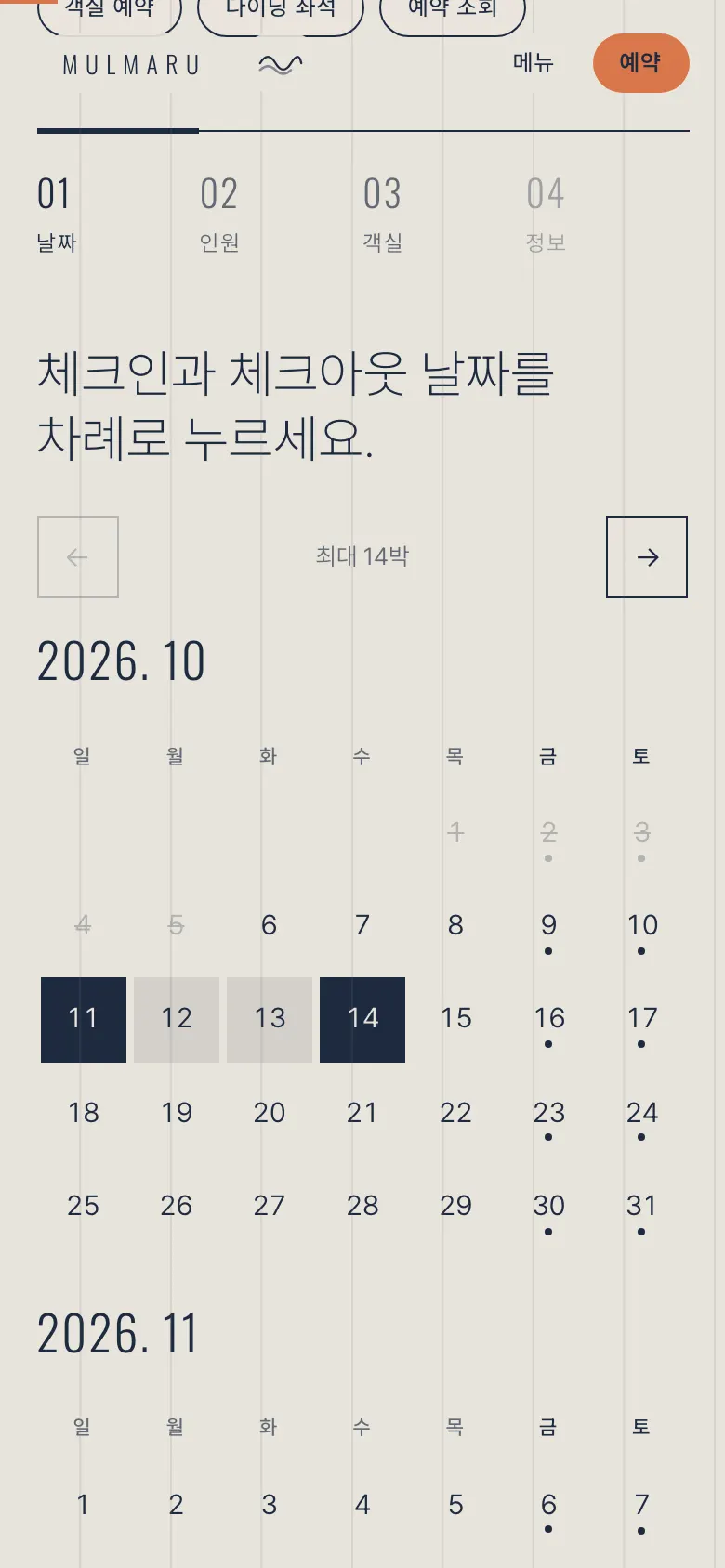
Two-month booking calendar
Two months sit side by side, and past dates cannot be tapped. Weekends (Friday and Saturday nights) are marked with a dot, peak season with a dotted line. Tapping check-in then check-out fills the days in between and shows the number of nights (up to 14).
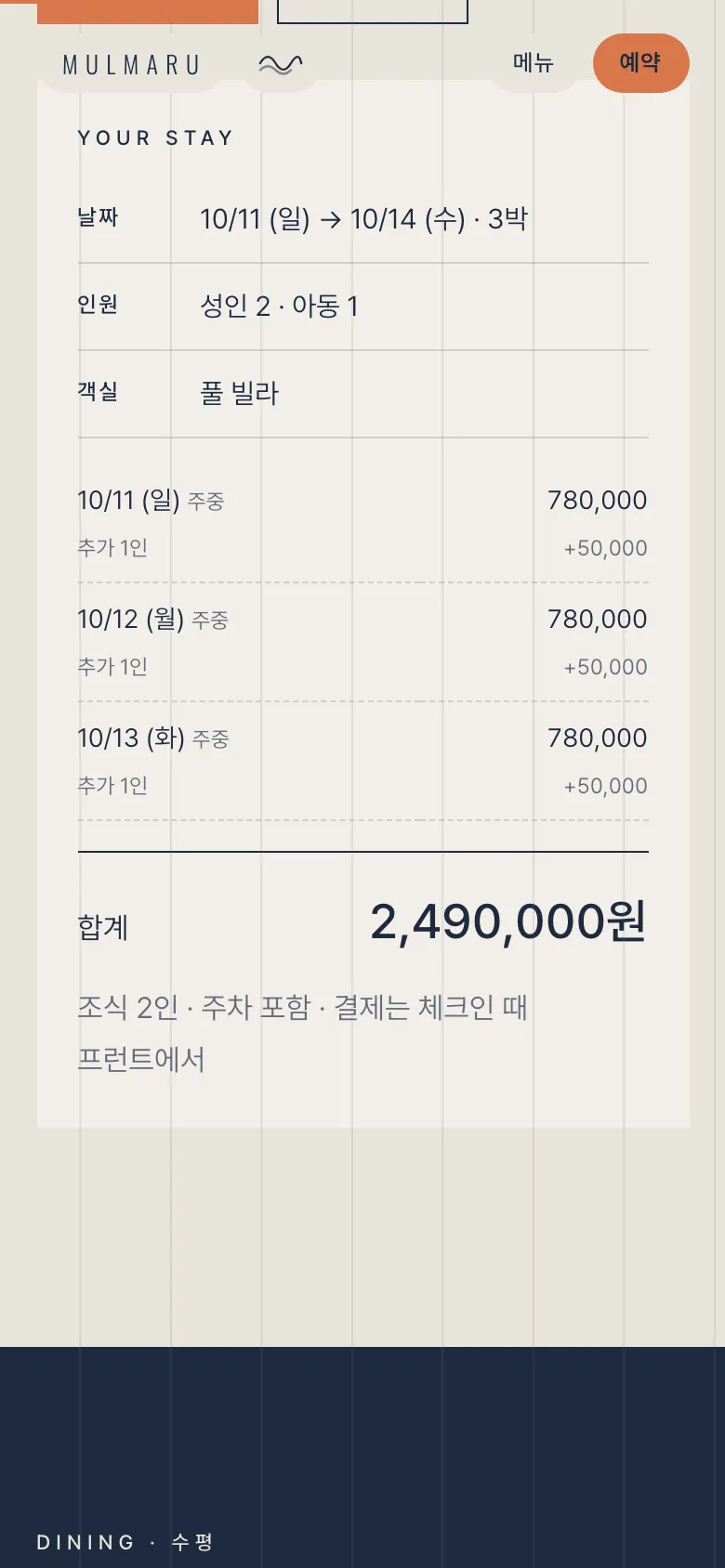
Automatic price calculation
Each night takes the weekday, weekend or peak-season (18 Jul–24 Aug) rate, and each guest over the base of 2 adds 50,000 won per night. The per-night breakdown and total in the summary change as guests choose.
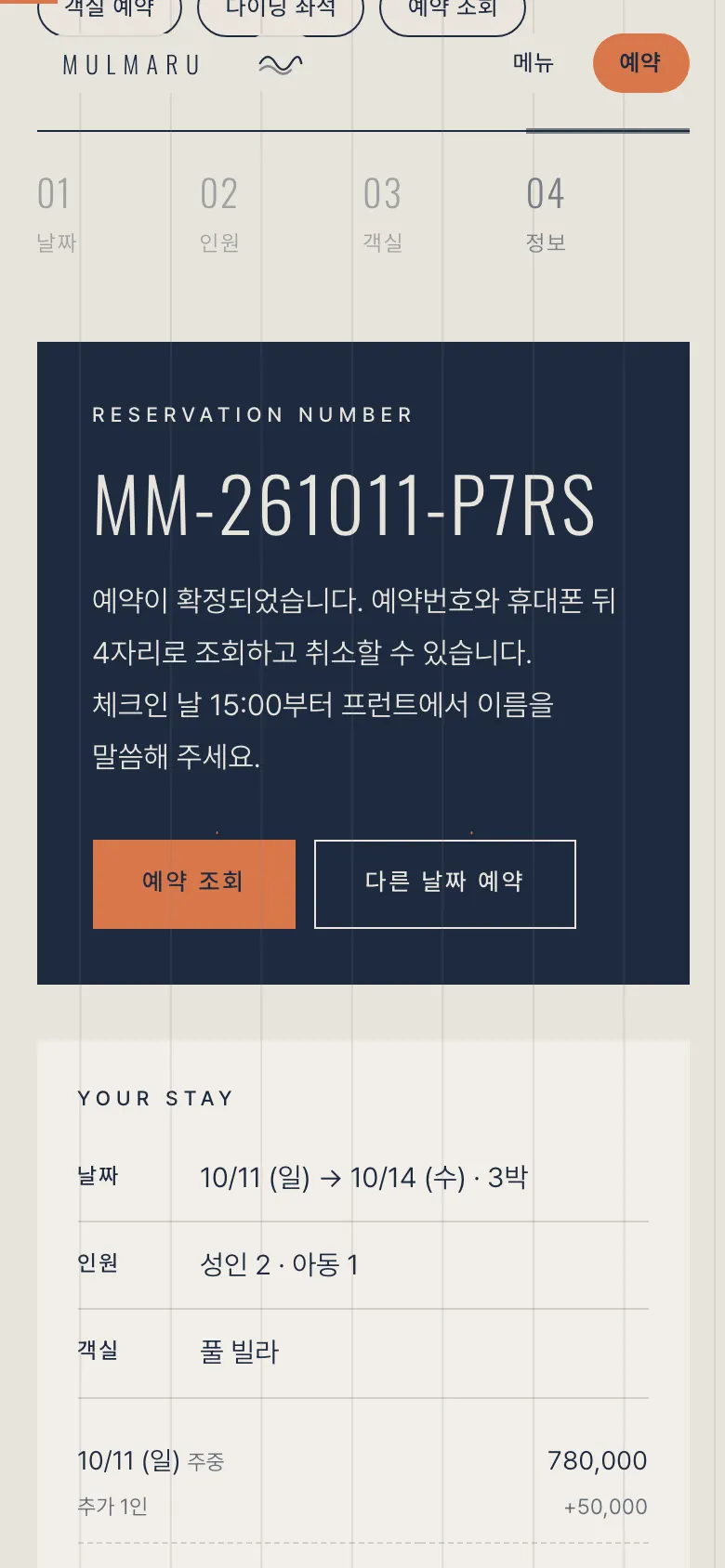
Booking number
Tapping "Confirm booking" on the review screen makes and saves an MM-check-in date-4 character number. Booking the same dates again shows one fewer room left of that type.
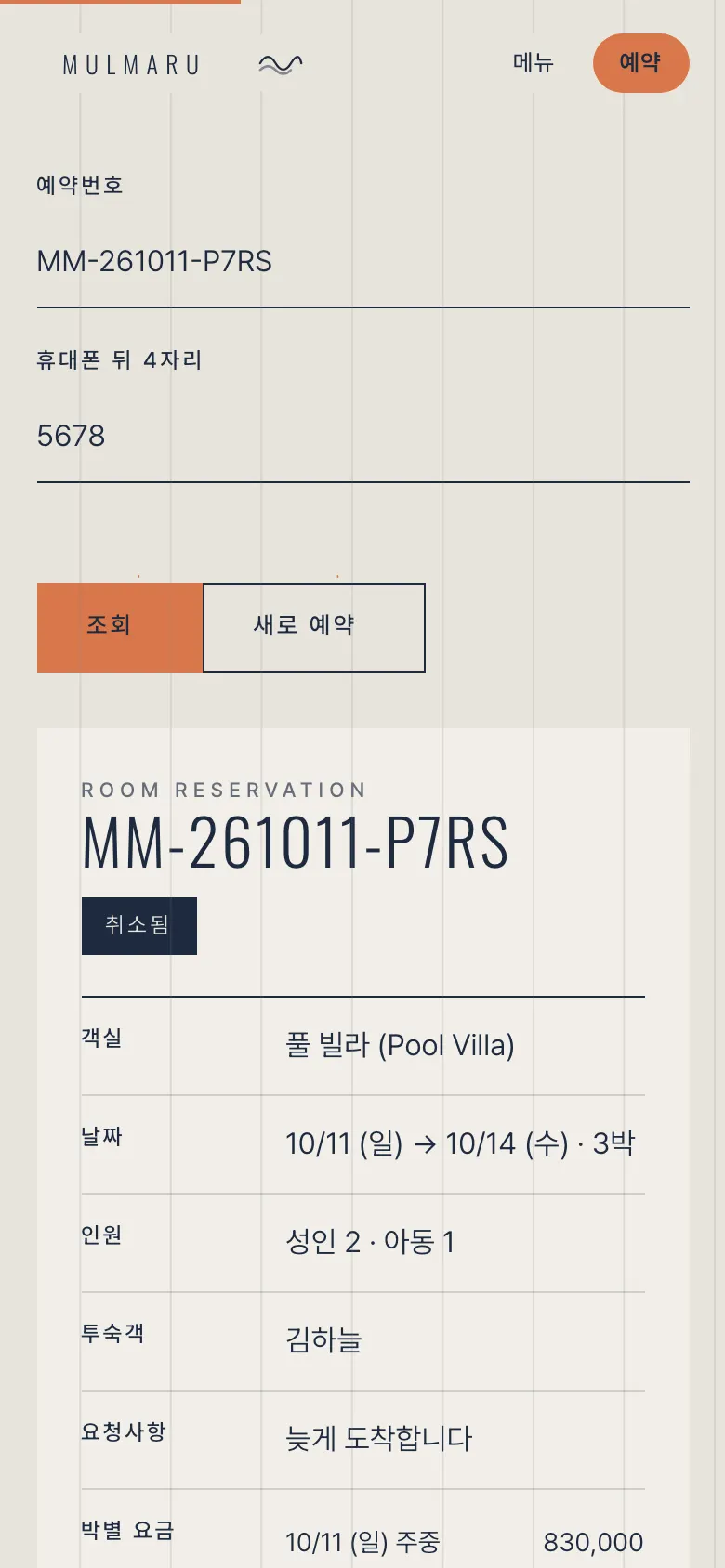
Booking lookup and cancellation
The booking appears only when the booking number and the last 4 digits of the mobile number both match, showing room, dates, guests, requests and the per-night price again. Cancelling asks once more, then saves the status as "Cancelled", and the cancelled room goes back into the available count on the booking calendar.
- Owner adminNew bookings appear on "Today" and in the booking list at once, and moving them to confirmed, completed, no-show or cancelled updates the guest’s booking lookup too. Closing room types, dining sittings or whole days, or lowering the number for sale, shows on the guest booking screen as full and as rooms left, and edits to room rates and photos, course menus, check-in times and the refund policy change the price calculation immediately. In this case study the owner and customer screens share the browser’s storage; in a real rollout this becomes an owner login with server storage.
- Rooms leftSaved bookings that overlap the chosen nights are counted to show how many of each room are left. Full rooms are blocked as "Full", and rooms that cannot take the party are blocked as "Max N guests".
- Guest limitsGuests choose the number of adults and children. When a room is already chosen, the plus button stops at that room's maximum and a note explains why.
- Required guest detailsName and mobile number are required. If either is empty or the number has the wrong length, the reason appears under the field and the step does not move on.
- Dinner seat bookingAfter choosing a date, time (18:00/20:00) and party size, guests see the seats left out of 16 per sitting. The booking is saved with an MD- number and can be looked up and cancelled on the lookup page along with room bookings.
- Rate calendar per roomEach room detail page shows the nightly rate for every day this month. Weekdays are sand-coloured, and Fridays, Saturdays and peak season are navy. "Book this room" moves to the booking page with that room already selected.
- Room panelsOn PC the three rooms sit side by side as photo panels, and hovering or moving keyboard focus onto a panel widens it to show size, guests and weekday/weekend rates. On phones they stack vertically with the first room open; tapping another room opens it, and tapping again goes to its detail page.
- Photo galleryRoom detail photos are browsed full width. Both the buttons and finger swipes work.
- Phone menuThe menu button opens a full-screen navy menu. It closes with the close button or Esc, and the page behind stops scrolling while it is open.
5. Build Notes
Show details
| Responsive | The layout is set for PC 1440, tablet (860 and below) and phone 390. Below 860px the header menu becomes a full-screen menu, the room panels stack vertically, and the comparison table turns into a list per room. |
| Fonts | Large headings in Oswald 200 (narrow capitals), room names and text in Cormorant Garamond (serif capitals and italics), Korean in Pretendard (all free open fonts). They are loaded from files on the site, with no external font requests. The Korean font is split into 92 character groups, and only the groups containing characters on the screen are downloaded (16 groups, 402KB on a first phone visit to the home page). |
| Images | 22 free real photos (JPG up to 1,600px wide, 2,000px for the first screen, 5,016KB in total). Phones get separate 800px-wide photos (22 files, 1,138KB in total), and photos outside the first screen load as they come into view. Every photo has its width and height set, so the page does not shift while images load. First phone visit to the home page: 0.9MB. |
| Motion | The first screen "lifts the sea fog": over a pinned stretch twice the screen height, two layers of fog photos pass in front of the text in opposite directions and fade, while the cliff photo behind slowly shrinks to fill the screen (tied to scrolling). Also: text rising line by line (1.2s), hand-drawn lines that draw as you scroll (SVG), photos slowly zooming, and a navy curtain that covers from bottom to top and lifts between pages. Seven faint vertical grid lines run across the whole screen. |
| Accessibility | Skip-to-content link, alt text on every image, buttons as button and inputs with label. The menu, panels, calendar and form all work by keyboard, the menu closes with Esc, and error messages are read by screen readers (aria-live). With the device's reduce-motion setting on, the pinned stretch, transitions and entrance motion are all switched off and content shows at once. |
| Stack | HTML, CSS and JavaScript, with GSAP 3.12 + ScrollTrigger and Lenis (smooth scrolling) — all bundled with the site, no external scripts. Room and dinner bookings and lookups go through one storage function wrapping browser storage (localStorage) in try/catch. |
6. QA
These results come from running all 11 pages on PC 1440 and phone 390 screens and tapping through in the order a real person would. We also checked that a saved booking can be looked up again after a refresh. External requests and broken links: 0. (2026-10-03)
| Item | PC 1440 | Phone 390 |
|---|---|---|
| Screen errors | 0 | 0 |
| Broken files | 0 | 0 |
| Horizontal overflow | 0 | 0 |
| Function tests | 13 / 13 passed | 15 / 15 passed |
The 15 function tests (phone menu and phone calendar run on phones only): open and close the phone menu · pick dates on the phone calendar and move on · page transition · room panels (widen on hover on PC; open room's rates and tap to detail on phones) · room rate calendar and room preselection · two-month calendar (past dates blocked, weekends marked, range selection) · room guest limit · rooms left and full rooms · per-night price calculation · required guest details · booking number issued and saved · booking lookup · cancellation and the room opening up again · dinner seat booking, seats left and lookup · photo gallery
Speed and quality scores (out of 100, measured on the public site on 2026-10-03; phone on a slow connection, median of three runs; PC on PC settings)
| Performance | Accessibility | Best practices | SEO | |
|---|---|---|---|---|
| Phone | 82 | 95 | 96 | 66 |
| PC | 91 | 95 | 96 | 66 |
Phone: first paint 0.9 s · largest element 4.7 s · layout shift 0.06 · input blocking 0 ms PC: first paint 0.3 s · largest element 0.9 s · layout shift 0.159 · input blocking 0 ms
The SEO score is low because the live demos are deliberately kept out of search results.
7. Result
Try it live ↗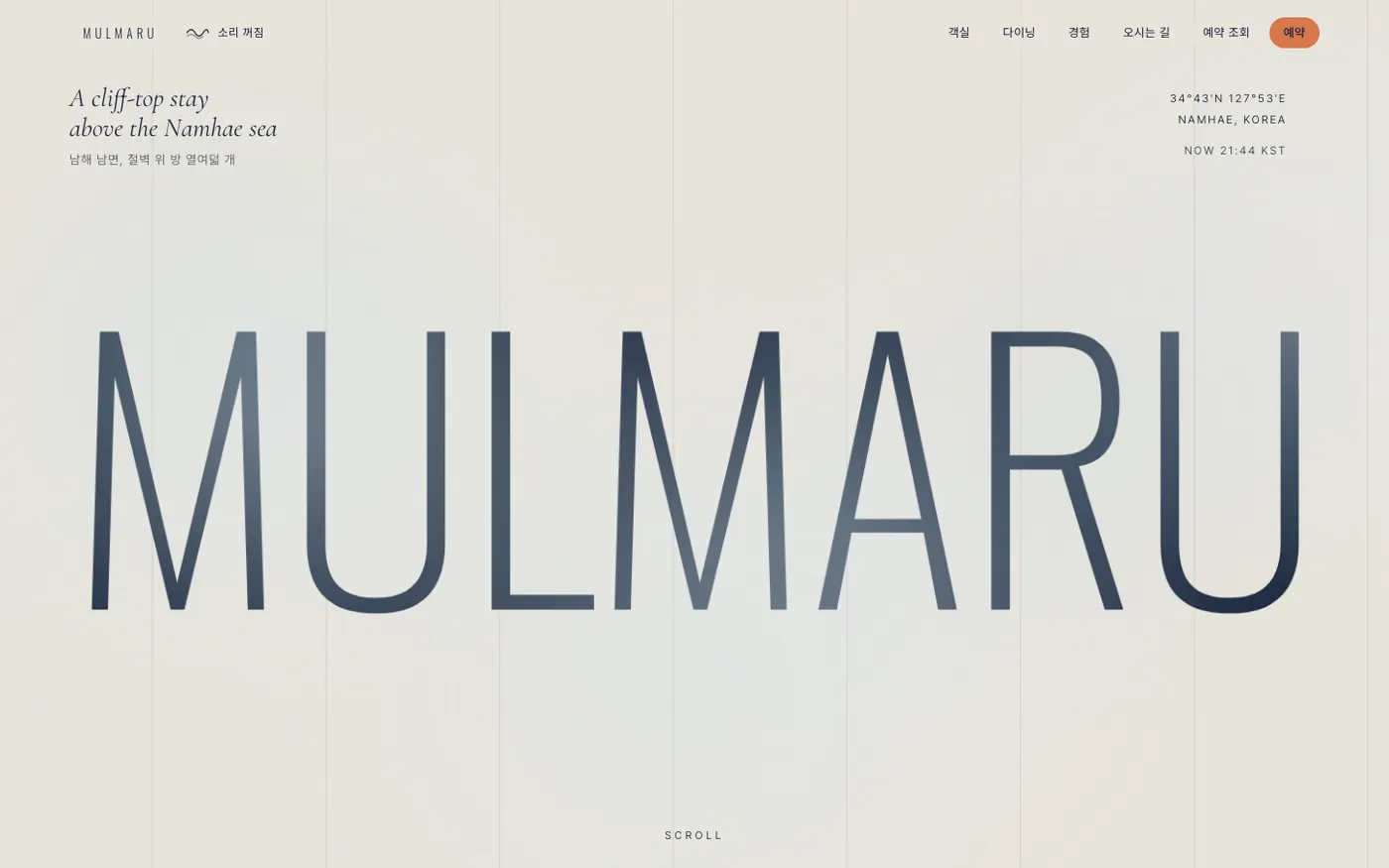

Privacy Policy