1. Overview
| Industry | Expense, purchase, leave and business trip approvals at a company of 10–50 employees (sales team, finance team, CEO) |
| Purpose | Bring approvals that circulated on paper and messenger into one place, so it is clear whose turn a request is stuck on, and rejection reasons and history are kept |
| Scope | 5 pages · 5 screens · 4 request types · 3 approver roles (team lead, finance, CEO) |
| Main flow | New request → Automatic approval chain → Team lead approves → Finance approves → (₩1,000,000 or more) CEO approves / Reject (with reason) → Edit and resubmit / Withdraw / Filter all → Download CSV |
Request documents, approval steps and stamps, comments and rejection reasons, activity history and the current viewer are saved in the browser. They stay after a refresh or a return visit. Switching "Current viewer" at the top lets you approve in turn as the requester, team lead, finance and CEO.
Connected at rollout: login with company accounts and a permissions server, attachment storage, approval notifications (email, messenger), accounting software integration, and legally binding e-signatures. At rollout these are connected to the company's environment.
2. Challenges
1. No one knows where an approval is stuck.
"Did you submit it?" "It hasn't reached me yet." This repeats. Each document should show whose turn it is, and each person should see only the items waiting on them.
2. Who needs to sign for which amount is confusing every time.
Small amounts go up to the team lead, large amounts up to the CEO. When the rule lives only in people's heads, approvals get skipped. The approval chain should be set the moment the type and amount are entered.
3. A rejection means writing it all over again.
If the reason for rejection is not kept, the same mistake repeats. The reason should stay on record, and the request should be editable and resubmitted with its content already filled in.
3. Structure
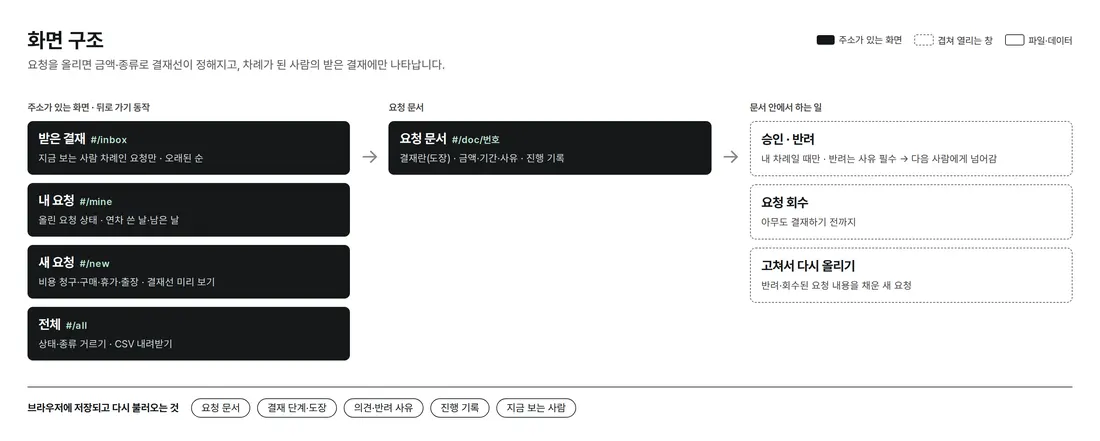
Inbox, my requests, new request and all are reached from the top menu. Clicking a request opens the document on the right on PC, and full screen on mobile. Each document has its own URL, so the back button works.
4. Key Features
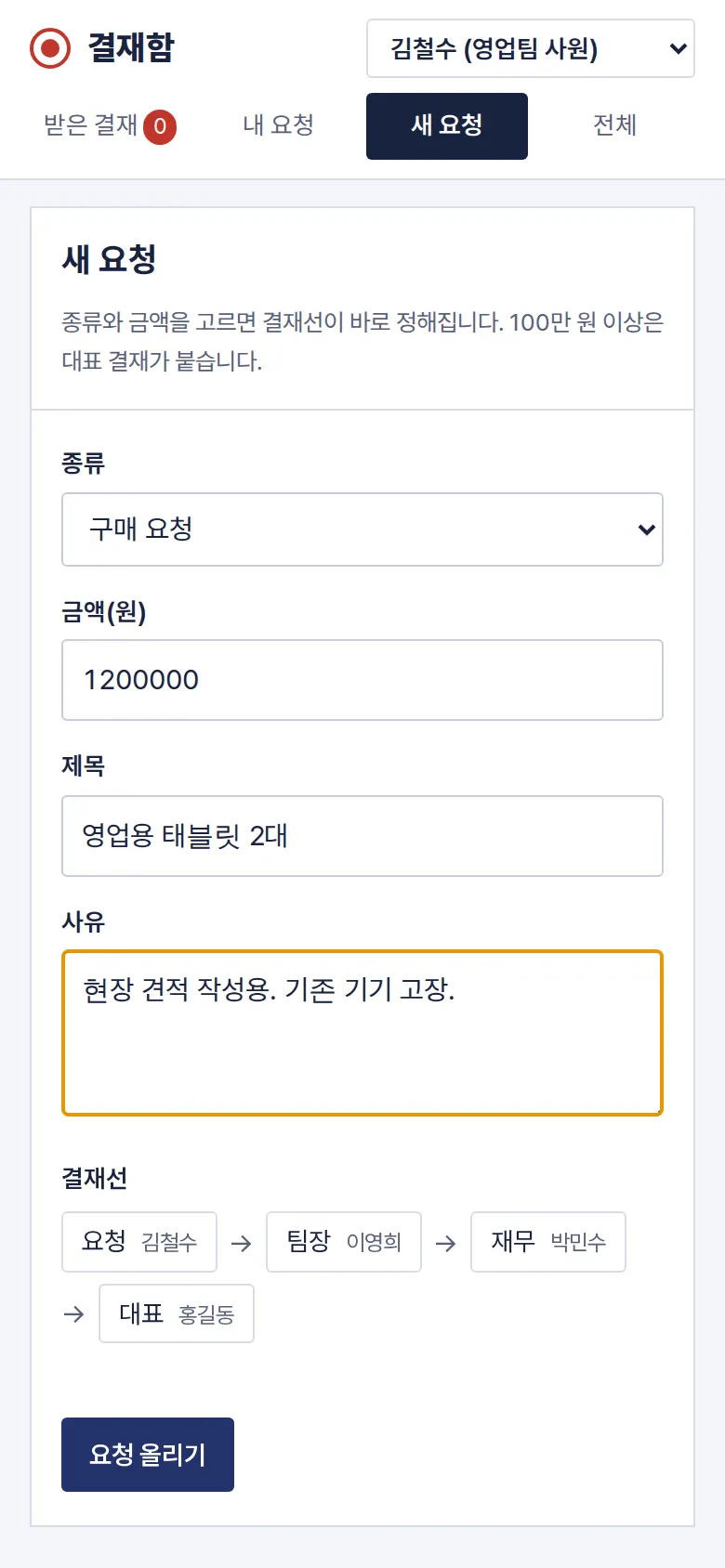
Automatic Approval Chain — CEO Added by Amount
Choose expense claim, purchase request, leave or business trip, and the approval chain changes as you type the amount. With an amount, it goes team lead → finance; at ₩1,000,000 (Korean won) or more, the CEO is added. Leave goes to the team lead only. If the requester is a team lead, their own step is skipped.
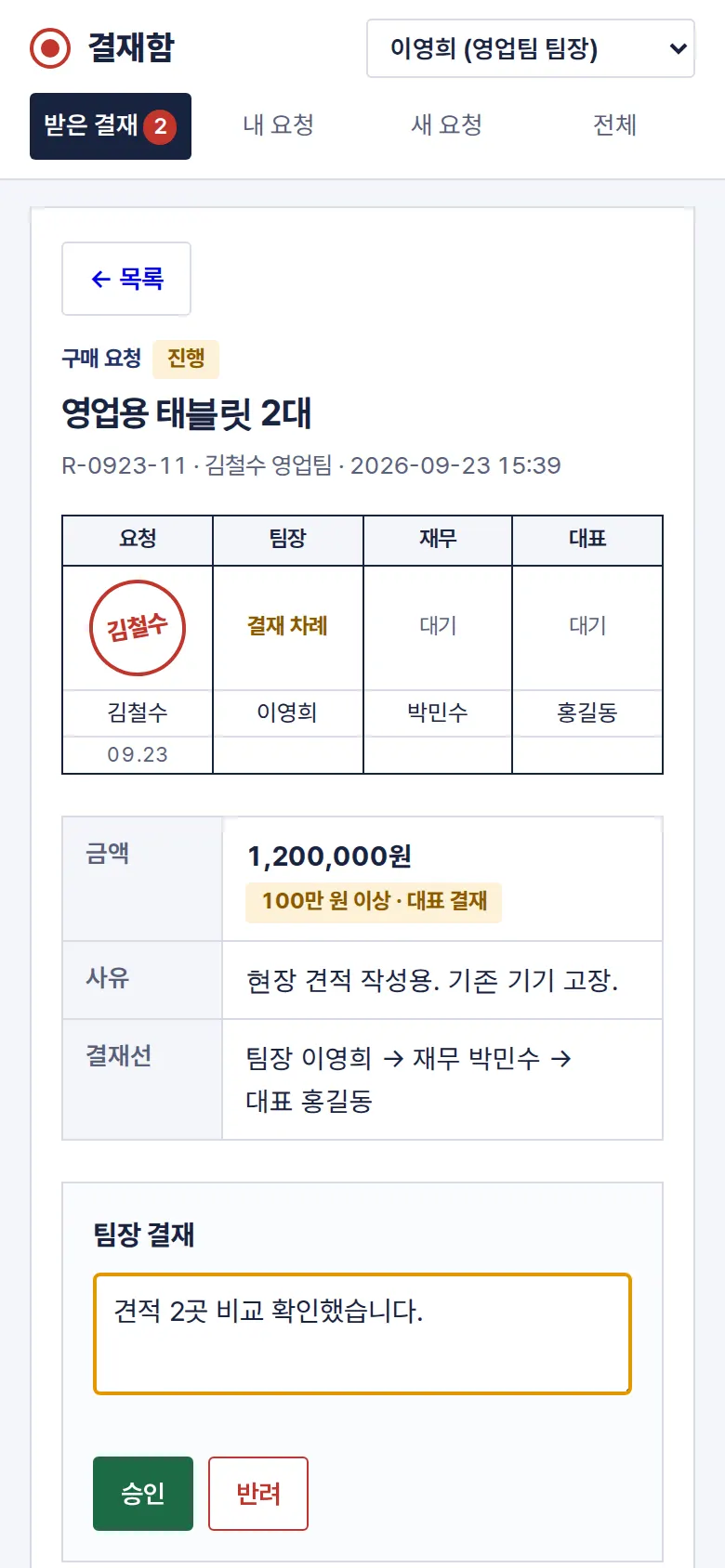
Approve and Reject — Rejection Requires a Reason
A document appears only in the inbox of the person whose turn it is, and only that person sees the approve and reject buttons. Approving with a comment passes it to the next person. A rejection saves only with a reason.
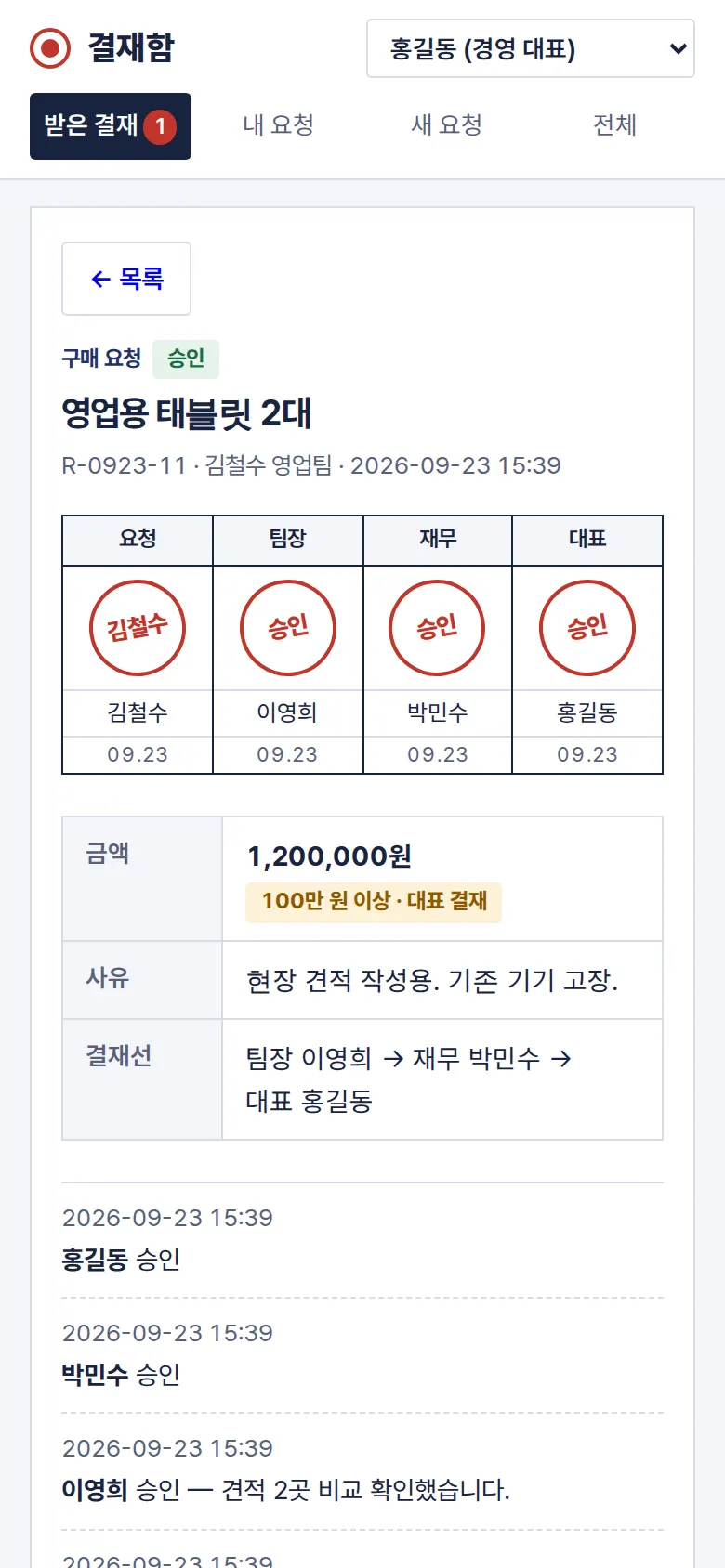
Approval Boxes and Activity History
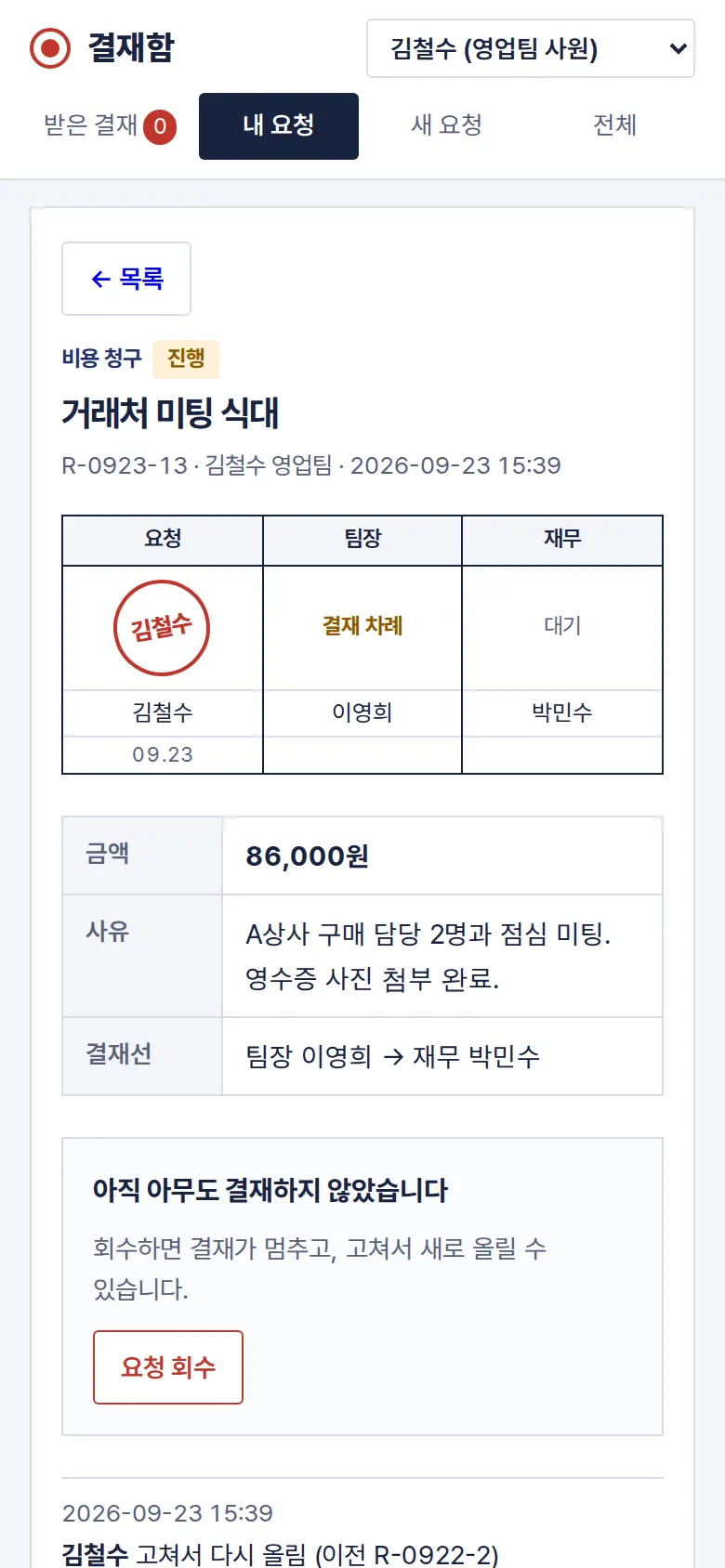
Approval boxes for requester, team lead, finance and CEO sit at the top of the document, and each approval adds a stamp and date. The box shows whose turn it is, and submissions, approvals, rejections and withdrawals are kept in time order.
Edit and Resubmit, and Withdraw
Rejected or withdrawn requests are resubmitted as a new request with the content filled in, and the history keeps the previous number. The requester can withdraw a request before anyone has approved it.
- InboxOnly requests waiting on the current viewer gather here, oldest first, with the count shown in the menu. On PC the first request opens right away, so the list and document are side by side.
- My Requests and Annual LeaveSubmitted requests stack newest first, each with its status: in progress, approved, rejected or withdrawn. Used and remaining annual leave are calculated from approved leave. Leave requests count weekdays only and are blocked if they exceed remaining leave.
- All — Filter and CSV DownloadFiltering by status and type shows the count and total amount right away. Approved expenses alone can be downloaded as a CSV for settlement.
5. Build Notes
Show details
| Responsive | Layout changes at 1000px and 760px. On PC there is a file folder on the left (400px list) and the approval document on the right; below 1000px the folder is 330px; below 760px the list and document switch as separate screens and the menu becomes four tiles. On mobile the approval boxes split the width to fit on one line. |
| Fonts | Headings and body in Gowun Batang (serif), input fields and dates in Pretendard (both free, open fonts). Hosted with the site, so no external requests, and subset to only the characters used: Gowun Batang in two weights 84KB · Pretendard 81KB. |
| Images | No photos. Stamps (seal-red double-ringed circle; rejection is a square stamp) and folder tabs are drawn in CSS without images. Total transfer is about 191KB including fonts. |
| Motion | No motion; screens change instantly. After an approval action, the result is shown in a notice at the bottom. |
| Accessibility | Every input has a label, and errors are shown with both a border and a sentence. The selected document and menu are also conveyed to screen readers, and notices appear in an area that is read aloud. Accessibility score 100. |
| Technology | HTML, CSS and JavaScript (no external libraries). Approval chain rules live in one function, so writing, preview and saving all use the same rules. Data is saved in browser storage (localStorage), and documents open directly by URL (#/doc/number). |
6. QA
Results from opening the site on PC 1440 and mobile 390 screens and clicking through in the order a real user would. We also checked that saved data is still there after a refresh. (2026-09-23) The same tests were also run on the Safari engine (WebKit) at PC and mobile sizes: 0 screen errors, all functions passed.
| Item | PC 1440 | Mobile 390 |
|---|---|---|
| Screen errors | 0 | 0 |
| Broken files | 0 | 0 |
| Horizontal overflow / clipped text | 0 | 0 |
| Function tests | 10 / 10 passed | 10 / 10 passed |
The 10 function tests: inbox (only my turn) · new request (empty-field check, chain by amount, CEO added at ₩1,000,000 or more) · leave request (weekdays only, remaining leave) and withdrawal · team lead rejection (reason required) and approval · final approval by finance then CEO (4 stamps) · edit and resubmit a rejected request · my requests and leave calculation · approval status kept after refresh · filter all and CSV download · back to list (mobile button and back button)
Speed & quality scores (out of 100; mobile measured three times on a slow connection)
| Performance | Accessibility | Best Practices | SEO | |
|---|---|---|---|---|
| Mobile | 98 | 100 | 100 | 100 |
| PC | 100 | 100 | 100 | 100 |
Mobile: First Contentful Paint 1.8–2.0s · Largest Contentful Paint 1.8–2.0s · Layout shift 0 · Blocking time 0ms PC: First Contentful Paint 0.4s · Largest Contentful Paint 0.4s · Layout shift 0.002 · Blocking time 0ms
7. Result
Try it live ↗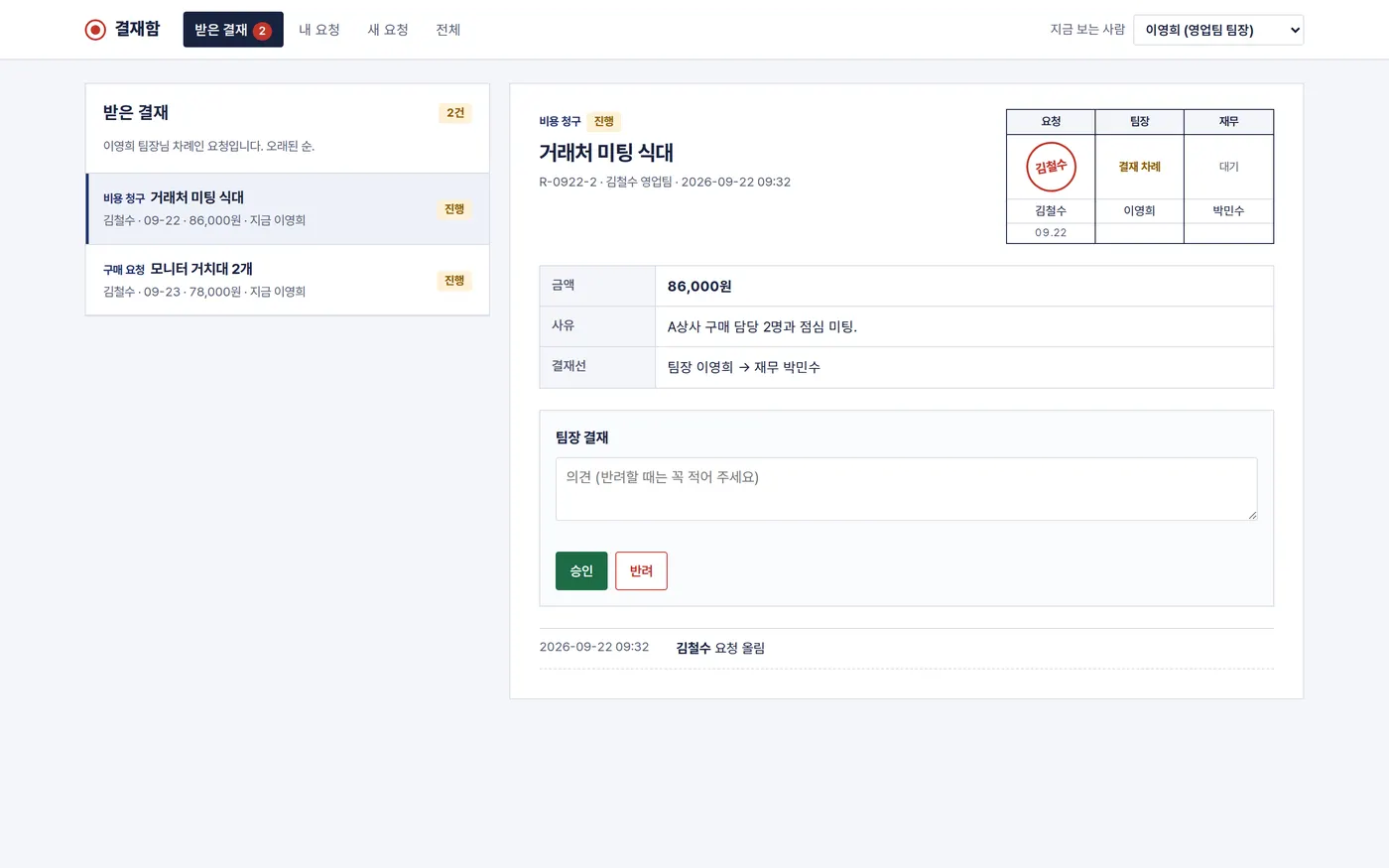

Privacy Policy