1. Overview
| Industry | A living brand that makes and sells its own furniture and home goods |
| Site goal | A store that shows the brand's mood and takes shoppers all the way to an order |
| Scope | 5 pages · 11 screens · 8 products (5 categories) |
| Main flows | Browse → add to cart → order / sign up → log in → view and cancel my orders / guest order lookup / leave an inquiry → check my inquiries |
The cart, recently viewed items, members, orders and inquiries are saved in the browser. They stay in place after a refresh or a return visit.
Connected at rollout: payment gateway, delivery tracking, admin screens, email and text messages, server storage so one account works across devices.
2. Challenges
1. Close the gap between mood and purchase.
For a living brand, the mood is the pitch. But if visitors only flip through photos and leave, nothing sells. The first screen has to show the brand, and one tap has to lead to the product list.
2. People don't buy furniture in one visit.
They browse, leave, and come back a few days later. Items in the cart and items they were viewing must still be there on the next visit for it to turn into an order.
3. Large orders make people hesitate.
Shipping fees, the free-shipping threshold and the build and delivery schedule must show before adding to cart. After ordering, lookup, cancellation and inquiries must be easy so people order with confidence.
3. Structure
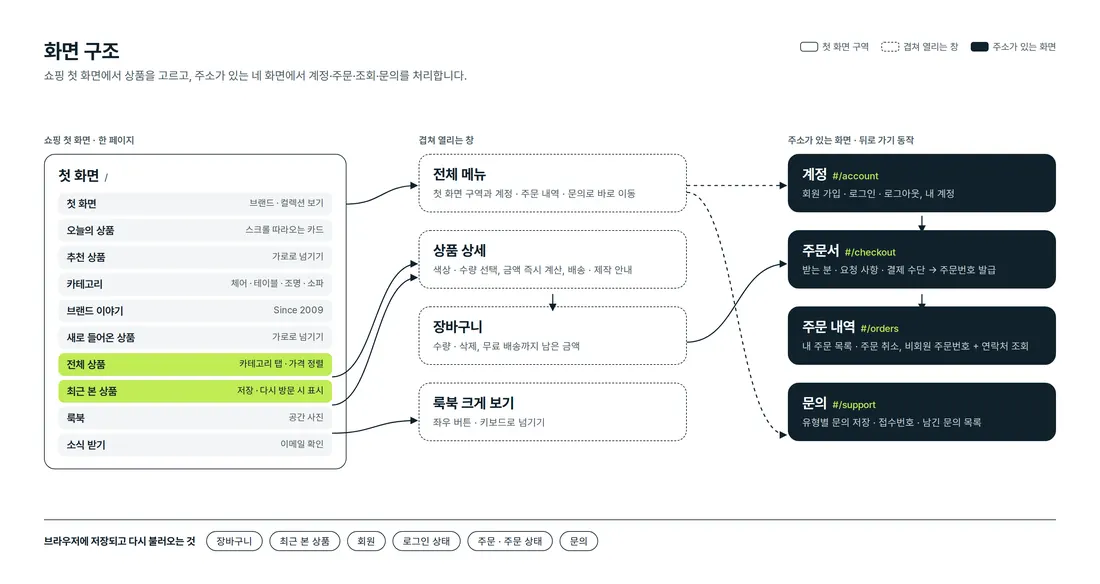
Shopping happens entirely on the first page. Product details, the cart, the full menu and the lookbook open on top without changing pages. Account, checkout, order history and inquiries each have their own address, so they stay in place on back navigation and refresh.
4. Key Features
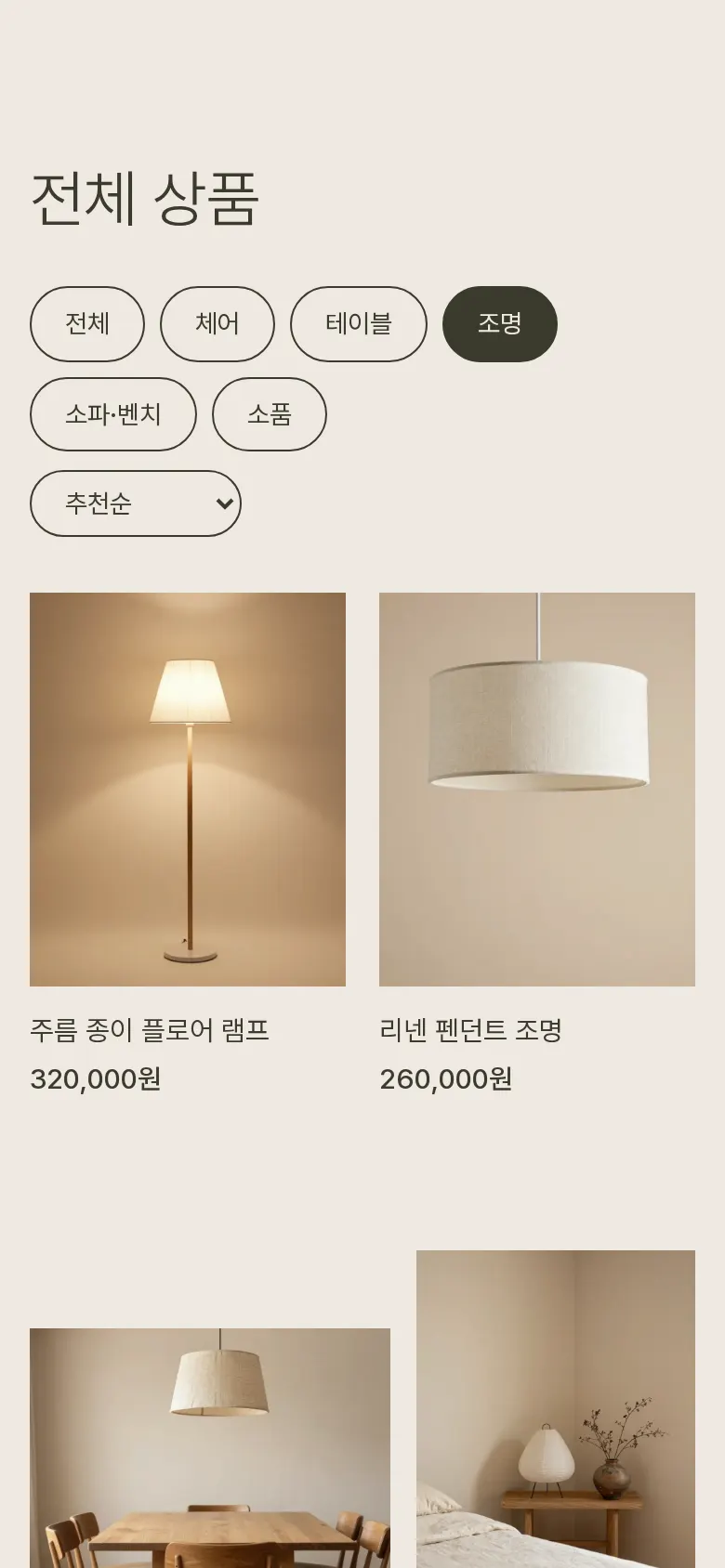
Categories and price sorting
Products are split into five groups: chairs, tables, lighting, sofas & benches, and accessories. Tapping a category block or a tab above the list shows only those products, and changing the sort reorders them by lowest or highest price.
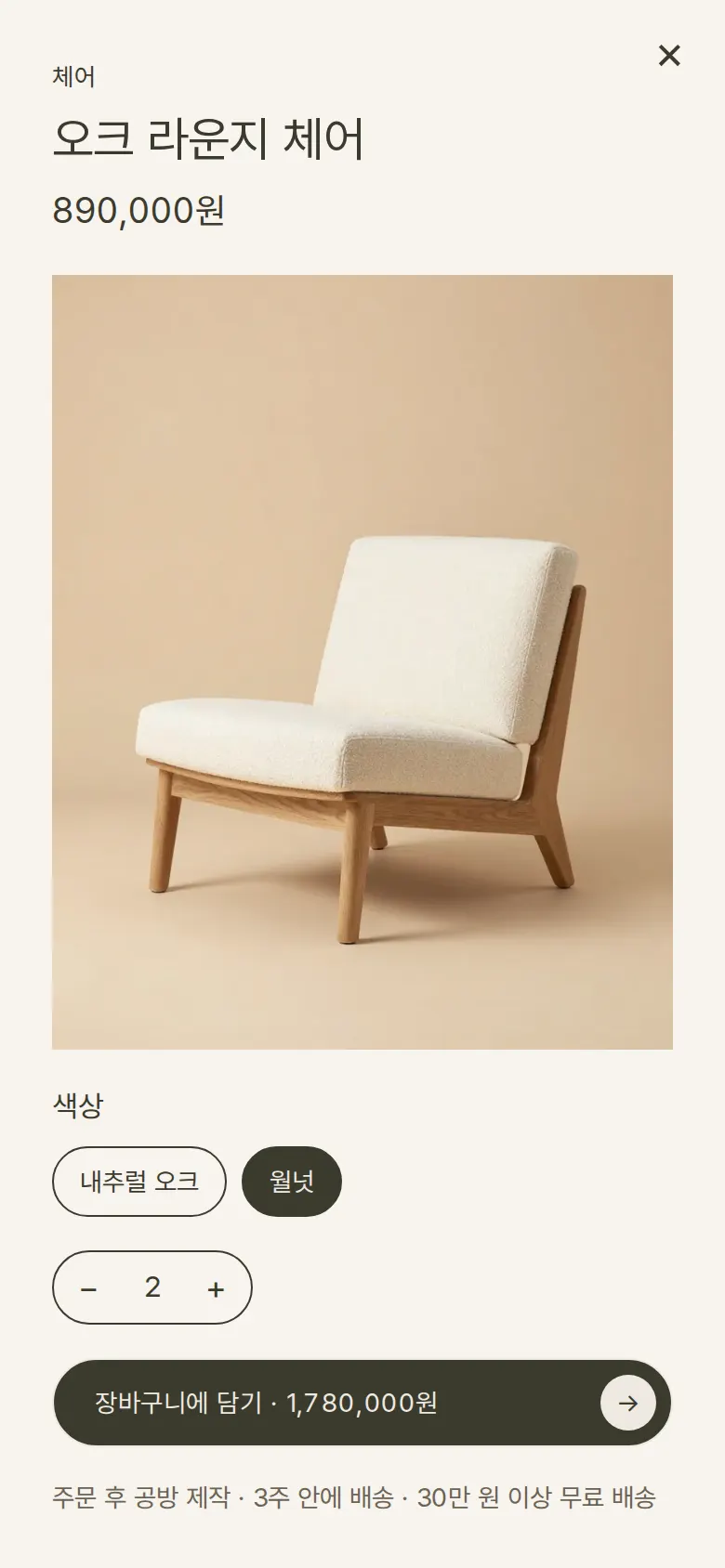
Product details — choose color and quantity
Tapping a product opens its details from the side. Choosing a color and quantity updates the amount on the add-to-cart button right away. The post-order build and delivery schedule and the free-shipping threshold sit in the same place.
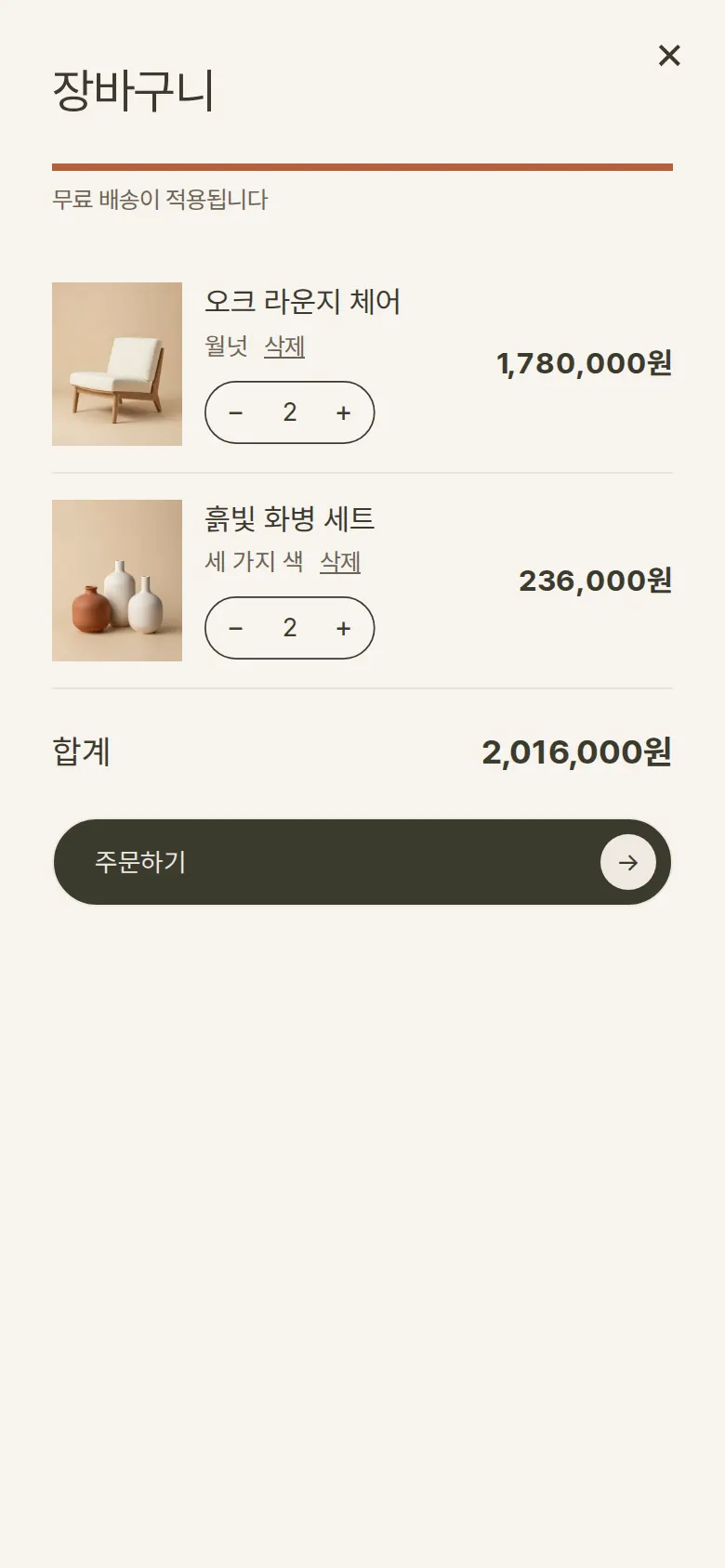
Cart — quantity, remove, free-shipping notice
The same product in a different color gets its own line, and each line's quantity can be changed or removed. A bar fills up with the total and shows how much is left until free shipping. The cart is saved and remains on a return visit.
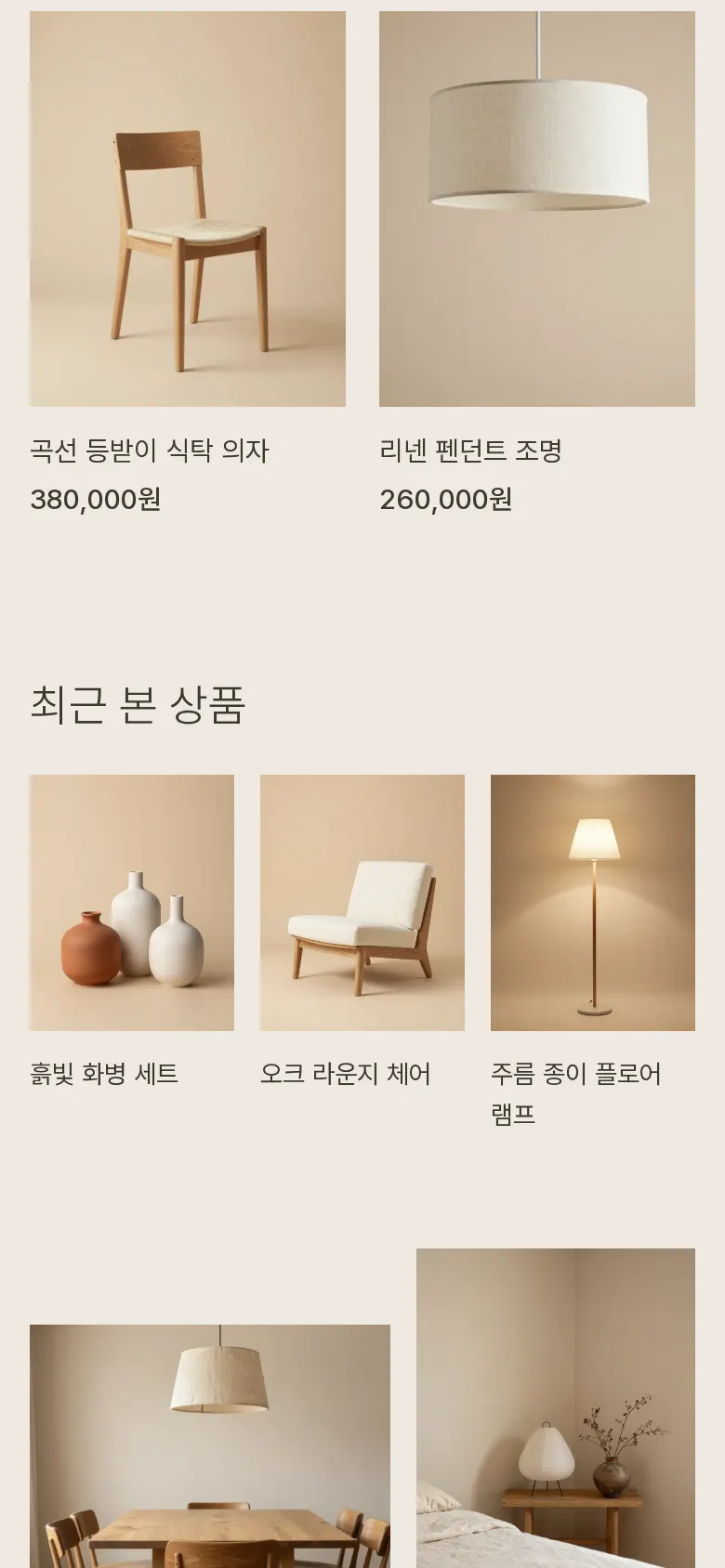
Recently viewed items
Products whose details were opened are saved, newest first, up to 6. On the next visit they can be reopened right below the full product list.
- Sign up and log inUsers create an account with name, email, mobile number and password; after login their name appears in the header. An email already in use, a badly formatted number, a password under 6 characters and unchecked terms each get their own message. Passwords are not stored as typed.
- Checkout and order number"Place order" in the cart leads to checkout; when logged in, name and contact are prefilled. Delivery requests can be picked from a list or typed, with product total, shipping fee and amount due alongside. Saving shows an order number (LV-date-sequence) and empties the cart.
- Order history and cancellationOrders from the logged-in account are listed newest first. Each order keeps its products, quantities, amount, recipient, address, requests and status. Orders awaiting payment can be canceled right away, and the new status holds after a refresh.
- Guest order lookupFor orders placed without an account, the order number and the phone number used at checkout must both be entered. If either one doesn't match, the screen says the order was not found.
- Leave an inquiry and view my inquiriesType, email, subject and message are saved, and a receipt number (Q-sequence) is returned. Submitted inquiries appear in the list beside it right away and remain on a return visit. Input is displayed as plain text only, so tags never run.
- Lookbook viewerRoom photos open full screen and move with the left/right buttons or keyboard arrows. The photo number and caption sit below.
- Full menuThe full-screen menu goes straight to shopping sections, my account, order history and contact.
5. Build Notes
Show details
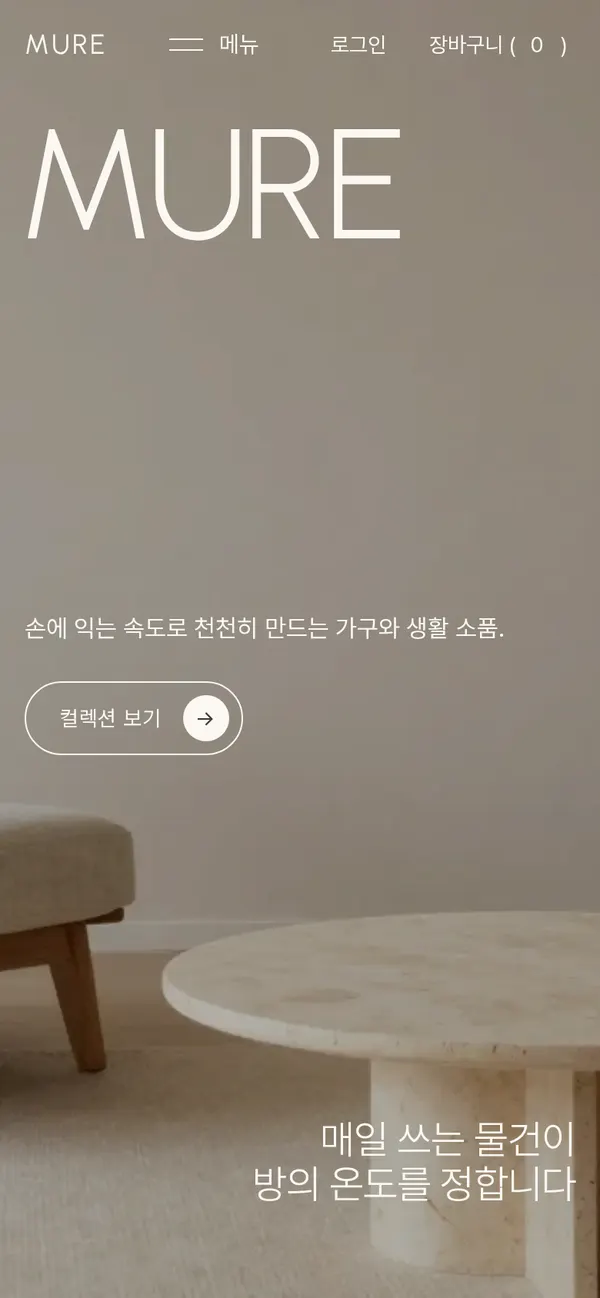
| Responsive | Layout changes at 900, 820 and 600px. On PC: 4-column products, 3-column categories, 2-column checkout. Below 900px: 2-column products and categories. Below 820px: 1-column checkout and inquiries. Below 600px: the header is rearranged and product name and price split into two lines. |
| Fonts | Body Pretendard, English headings Urbanist (both free, open fonts). Bundled with the site, so no external requests. The body font keeps only the characters used on this site, cut from 2,010KB to 87KB. |
| Images | 13 webp files, 293KB in total. Widths match their use: 800px for products, 832–1,344px for room photos. The first-screen photo loads first; the rest load as they come into view. |
| Motion | Built with CSS transitions and scroll-position math, no libraries. The first-screen photo slowly zooms, the product-of-the-day card follows the scroll, and product rows can be dragged. With reduced motion turned on in the device, animations stop. |
| Accessibility | Every icon button has a name. Esc closes windows and arrow keys move photos. Input errors are shown both with a field border and a message. Accessibility score 100. |
| Tech | HTML, CSS, JavaScript (no external libraries). Cart, recently viewed items, members, orders and inquiries are saved to and read from browser storage (localStorage). Account, checkout, order history and inquiries use separate addresses (#/account, etc.), so back navigation works. |
6. QA
These are results from running the site on PC 1440 and mobile 390 screens and tapping through in the order a real user would. We also checked that saved data is still found after a refresh. (2026-09-23)
| Item | PC 1440 | Mobile 390 |
|---|---|---|
| Screen errors | 0 | 0 |
| Broken files | 0 | 0 |
| Horizontal overflow · clipped text | 0 | 0 |
| Function tests | 18 / 18 passed | 18 / 18 passed |
The 18 function tests: open full menu · swipe recommended products · pick a category · sort by price · choose color and quantity · add to cart and free-shipping notice · increase quantity and remove · cart and recently viewed kept after refresh · sign up and block duplicate email · block wrong password and log in again · fill checkout and save order · view order history after refresh · guest order lookup · cancel order and keep status · save inquiry and check list · back navigation · flip through lookbook · newsletter signup
Speed and quality scores (out of 100; mobile measured three times on a slow connection, same result each time)
| Performance | Accessibility | Best Practices | SEO | |
|---|---|---|---|---|
| Mobile | 92 | 100 | 100 | 100 |
| PC | 100 | 100 | 100 | 100 |
Mobile: First Contentful Paint 1.4s · Largest Contentful Paint 3.4s · Layout shift 0.001 · Blocking time 0ms PC: First Contentful Paint 0.4s · Largest Contentful Paint 0.7s · Layout shift 0.001 · Blocking time 0ms
7. Result
Try it live ↗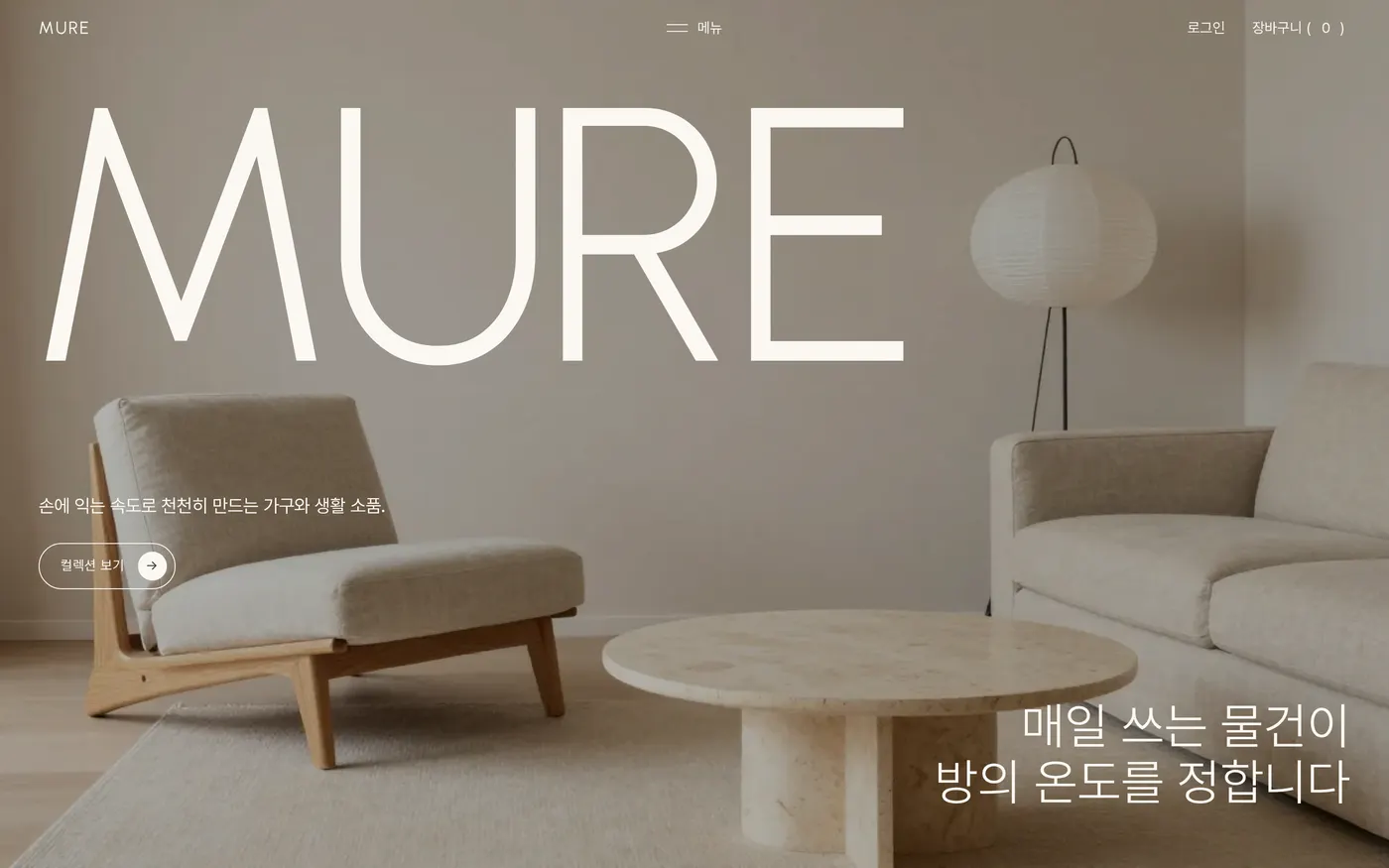
Privacy Policy