1. Overview
| Industry | A maths academy for middle and high school students in Yeongtong-gu, Suwon, Gyeonggi-do (8 students per class · 4 teachers · 12 classes) |
| Purpose | Let parents see the course for each year, the class timetable and the seats left → check with a level test whether the basic or advanced class fits → apply for that class or book a consultation. Tuition fees in the format the Korean academy law requires, the refund rules and a refund calculator are all on the same site. |
| Scope | 9 pages (Home · Courses · Classes & timetable · Level test · Apply & book a consultation · My application · Tuition · Notices · 404) · responsive for PC, tablet and phone |
| Main flow | Level test (choose a year → 10 questions · 20 minutes → marking · results by unit · recommended class) → apply for the recommended class → application number MN-YYMMDD-XXXX, one fewer seat left (a waiting-list application once the class is full) → change class or cancel in My application (the seat is returned) / book a consultation (date · 30-minute slot) → booking number |
Applications, bookings and test results are saved in the browser and loaded again in the same browser.
Connected at rollout: real text messages, payment, academy management software, and server storage.
2. Challenges
1. "Which class should my child join?" turns into a phone call.
Each year has a basic and an advanced class, but parents do not know where their child stands now. They should be able to check with real questions for each year on the site, and the result should lead straight to the class to apply for.
2. If the timetable and seats left are not visible, consultation calls pile up.
Several classes run at the same time in different rooms, and how many of the 8 seats are left keeps changing for every class. Parents need to filter by day and year, and full classes should take waiting-list applications on the spot.
3. If tuition and refund rules are vague, families put off enrolling.
The Korean academy law requires tuition fees and refund rules to be posted. Parents should be able to work out "how much do we get back if we stop halfway" themselves, and trust has to come from information such as teaching hours, fees and rules, without numbers that promise grades.
3. Structure
                 ┌──────────────────── index.html Home ─────────────────────┐
                 │ First screen (grid paper · hand-drawn notes · coordinates)│
                 │ Graph of year progress (Year 7 → Year 12)                 │
                 │ 3-part lesson (concept · practice · error notebook)       │
                 │ October classes · consultation and location               │
                 └──┬───────────┬────────────┬────────────┬──────────┬──────┘
                    │           │            │            │          │
          curriculum.html  classes.html   tuition.html  notice.html  leveltest.html
          year tabs ·        year · level ·  posted fees ·  type filter ·  choose a year → 10 questions
          units by term ·    day filters ·   refund rules · open to read ·  → marking · results by unit
          150-minute lesson  weekly timetable refund        closure days    → recommended class
          books · 4 teachers class cards ·   calculator
                    │        "Full" stamp                                │
                    │  level test│ apply / waiting list                  │ apply for this class · consult
                    └─────┐     ▼                                        ▼
                          └─▶ apply.html ── apply (application no.) │ consultation (date · time) ──▶ mypage.html
                                                                    lookup · change class · cancel
                                                                    view level test result again

  Every page: white floating pill menu (blue "Level test" button) · mouse X/Y coordinates · full-screen phone menu · footer · 404.html
From the home page the site splits into courses, the class timetable, tuition, notices and the level test. Both the level test result and the timetable lead to applying or booking a consultation, and after the application number is issued, the class can be changed or cancelled in My application.
4. Key Features
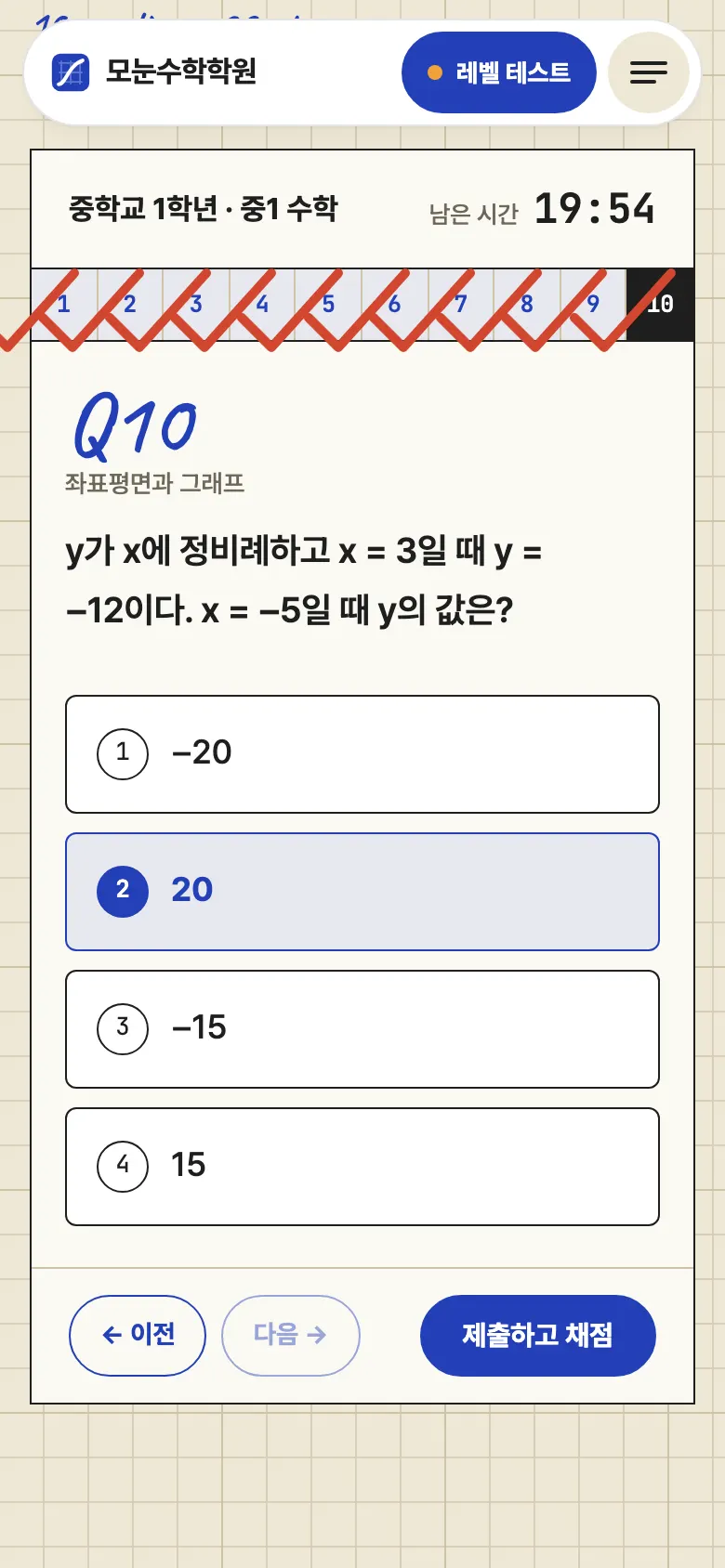
Level test
Choosing a year brings up 10 multiple-choice questions from that year's units (fractions, square roots, exponents, logarithms and integral signs are typeset with text and lines). It shows the 20 minutes remaining, moves back and forth by question number, and takes answers with the 1–4 number keys. If any answer is blank it warns once before submitting. All 60 questions are marked against real answers.
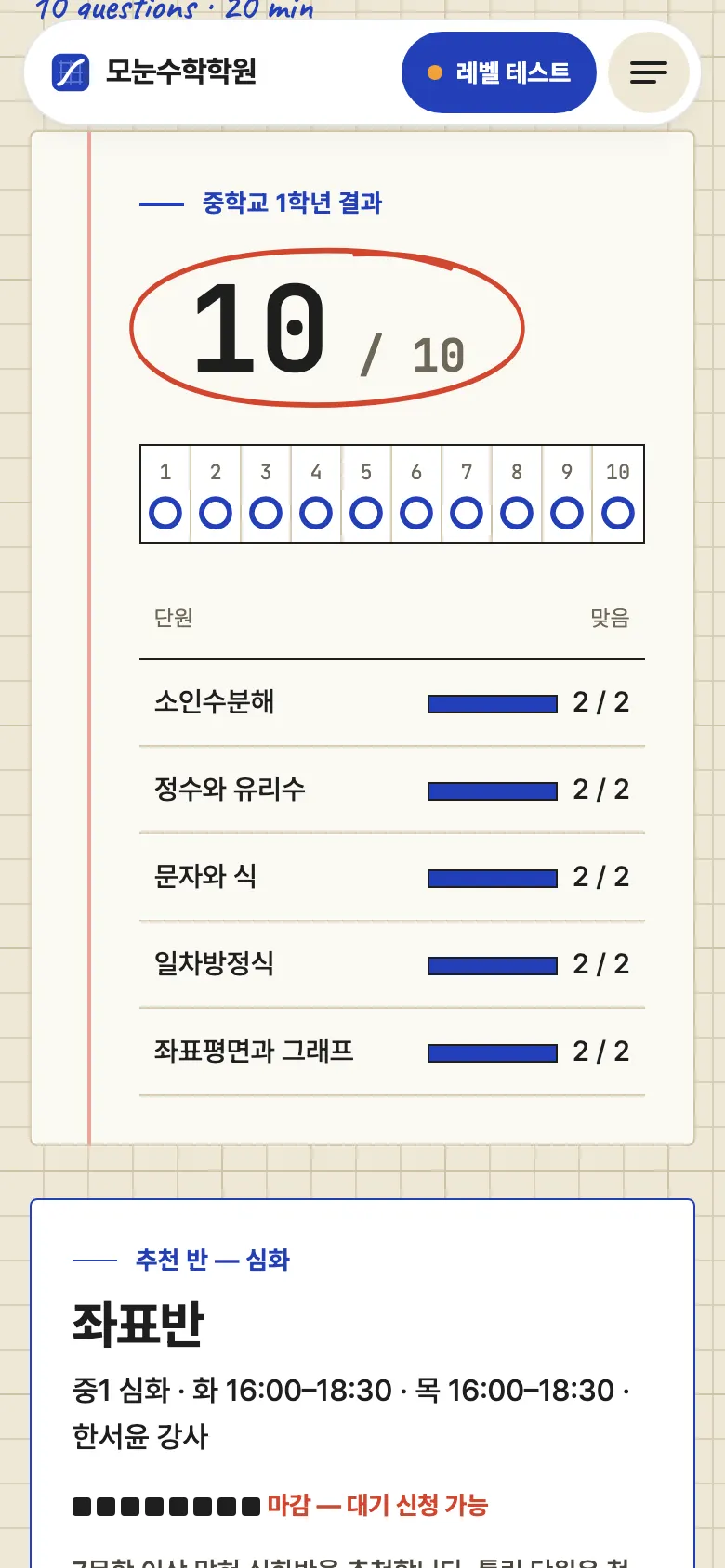
Results and recommended class
It shows the score, ○ / ✕ for each question, bars of correct answers by unit and the correct answer for each question, then recommends the advanced class for 7 or more and the basic class for 6 or fewer. It leads to "Apply for this class / Join the waiting list" with the seats left in the recommended class, and the result is saved so it can be seen again in My application.
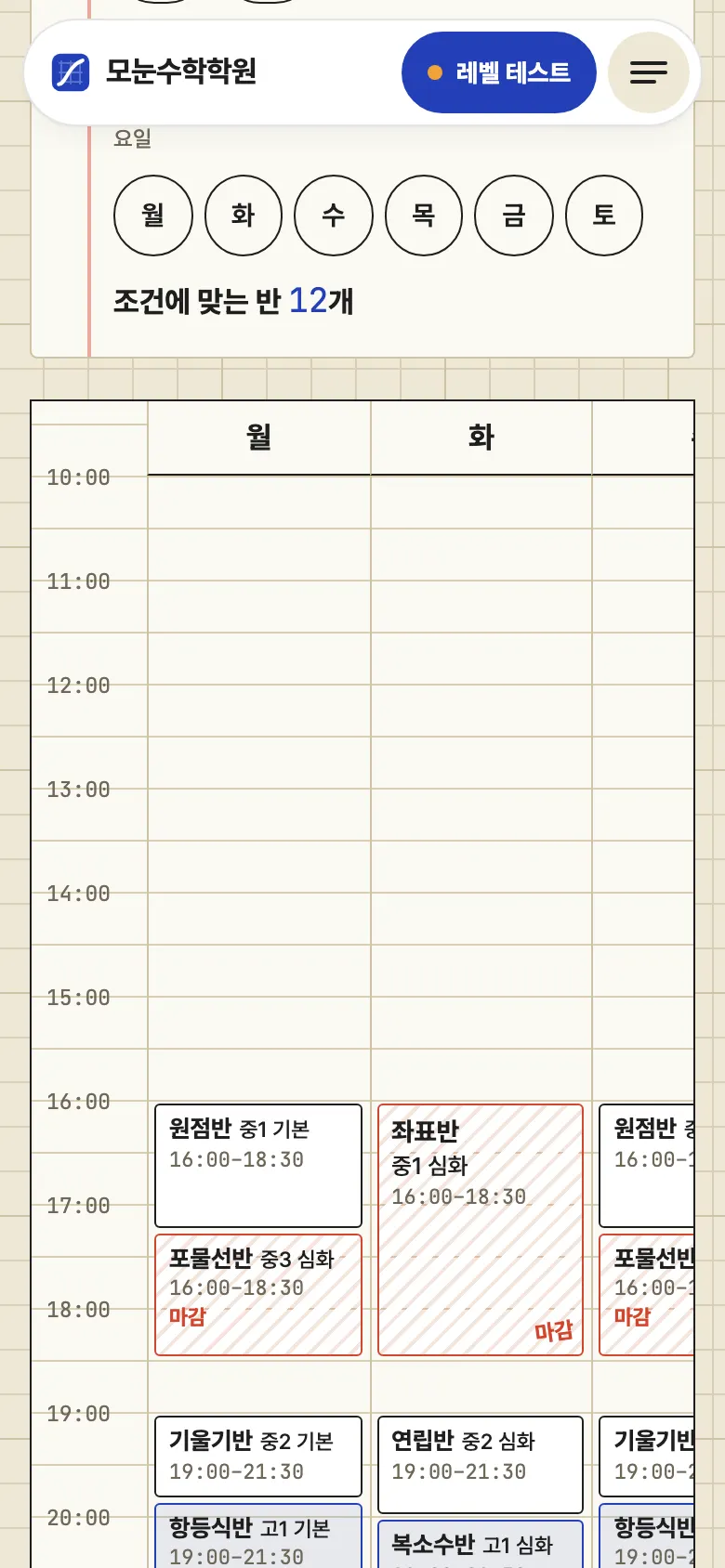
Timetable filters and seats left
Choosing a year, level (basic/advanced) and day narrows the 12 classes, and the count and weekly timetable (day × 30-minute notebook cells) change at once. Classes running at the same time (three classes at 19:00 on Monday, for example) share one cell. Class cards show taken and free seats out of 8, the teacher and the start date, and full classes carry a red-pen "Full" stamp and a waiting-list button.
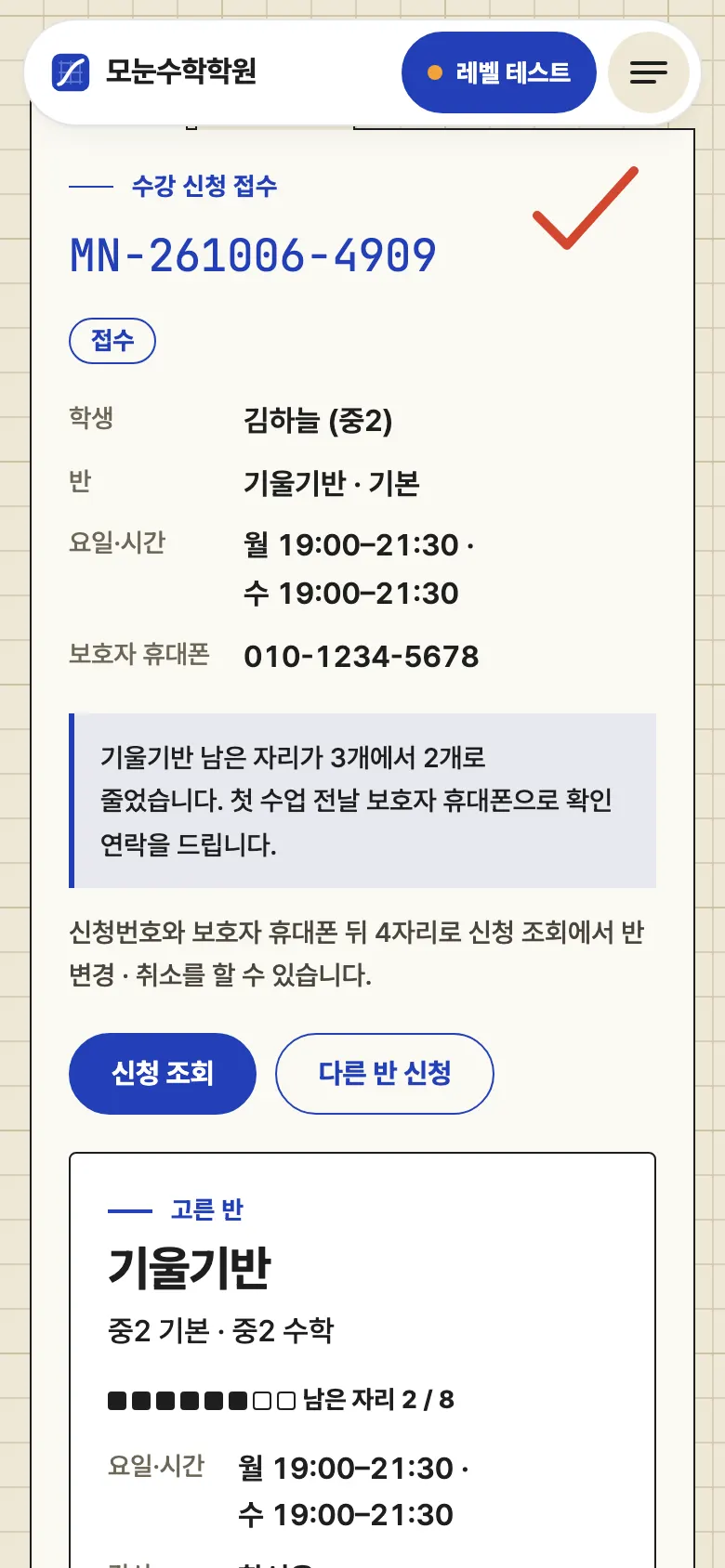
Applying and the application number
Choosing a year → a class shows the days, teacher, tuition and seats left on the right. The student's name, the parent's mobile number (010) and consent are checked; if anything is wrong the reason appears under the field and nothing is saved. On submitting, an MN-date-4-digit number is created and the class has one fewer seat. When no seats are left, the button changes to "Join the waiting list" and the application is taken as waiting.
- Owner adminToday’s classes and head counts, consultations and new applications sit on one screen; full classes take a waiting list, and when a place opens the applicant is moved up with one button. Changing a class’s capacity, start date or closing date updates the places left and closing notes on the application page, and edits to closed days, the notice, tuition fees and hours change the fee table and refund calculator too. In this case study the owner and customer screens share the browser’s storage; in a real rollout this becomes an owner login with server storage.
- Graph of year progressThe grid-paper screen on the home page stays pinned while the curve y = √x is drawn as if by pen, tied to scroll. Each time the curve passes one of 6 points from Year 7 (1, 1.00) to Year 12 (6, 2.45), a dot is marked and the card beside it changes to that year's course, key units and number of classes. At the end, a red-pen circle is drawn around the "Find your level with the test" button. On phones and with reduced motion, it shows the finished graph and a vertical list of year cards.
- Mouse coordinatesThe X / Y numbers at the top left follow the mouse, taking the centre of the screen as the origin and one grid cell (24px) as 1.
- Application lookup, class change and cancellationThe application opens only when both the application number and the last 4 digits of the parent's mobile number match. A class can be changed only to another class in the same year with seats left, and the seat in the previous class opens up again. Cancelling asks once more, then saves and returns the seat.
- Booking a consultationIn a two-week calendar from today, Sundays and public holidays (such as Hangeul Day) are blocked as "Closed". Weekdays 14:00–21:00 and Saturdays 14:00–18:00 are split into 30-minute slots, and times already past today or already booked are hatched and blocked. Just before confirming it checks once more, so the same slot cannot be booked twice.
- Consultation bookedIt shows the booking number, date, time (16:00–16:30) and topic. If there is a recent level test result, the year and topic are filled in beforehand.
- Tuition and refund calculatorA tuition table in the posting format the academy law requires (year · course · teaching hours · monthly tuition · other costs) and a refund rules table. Entering the course, that month's tuition, the total number of lessons and the lessons attended draws 1/3 and 1/2 lines on notebook cells, and shows the refund and its working under the rules: full refund before starting / 2/3 before one third / 1/2 before half / no refund after half.
- NoticesFilter by exam preparation, closures and materials, and select a title to open and read it. A list of upcoming closure days sits beside it.
- Phone menuThe button in the pill menu opens a full-screen grid-paper menu with a call button and opening hours. It closes with the close button or Esc, and the page behind stops scrolling while it is open.
5. Build Notes
Show details
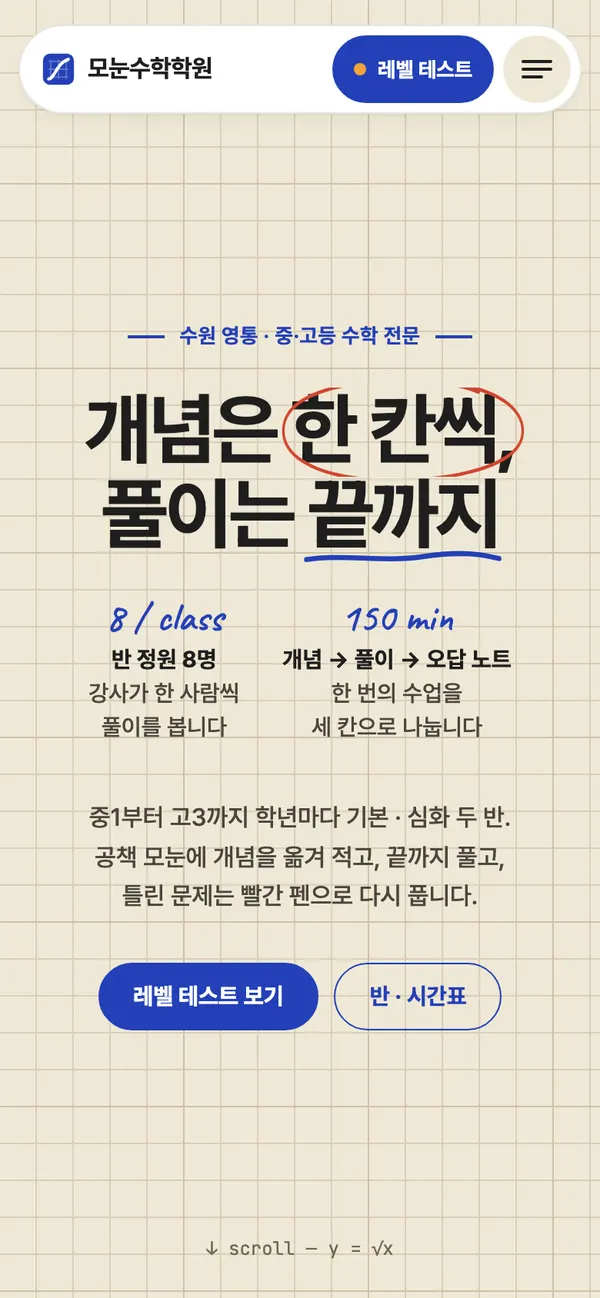
| Responsive | Based on PC 1440 · tablet 1100/900 and below · phone 390. On phones the pill menu stretches to the screen width and the handwritten notes move below the heading; the pinned graph scene becomes the finished graph + a list of year cards, the weekly timetable becomes a notebook you swipe sideways, and the tuition table becomes rows by year. |
| Text and line breaks | Korean text does not break in the middle of words (word-break: keep-all), headings use balanced lines (text-wrap: balance), and sentences are broken at natural phrases. Days and times such as "Mon 16:00–18:30" stay together when lines wrap, checked again on a 390px phone. |
| Fonts | Headings and body in Pretendard (500 · 700), coordinates, numbers and formulas in JetBrains Mono, and handwritten notes (Latin letters and numbers only) in Caveat (all free, openly licensed fonts). The handwritten feel for Korean comes from hand-drawn SVG underlines, circles and arrows rather than a font. All fonts load from files inside the site, so there are no external font requests. Pretendard is split into 92 character groups (2,888KB in total) and only the groups containing characters on screen are downloaded (19 groups, 479KB on a first visit to the home page on a phone). |
| Colour | Grid cream #EFE8D6 (grid lines #D9CFB8, 24px cells) · cobalt #2340B8 · ink #1E1E1E. Red pen #D2462E is used only for wrong answers, "Full" and "no refund". |
| Images | 17 free real photos (hands, notebooks, sheets of formulas, classrooms; people shown are East Asian only), reduced to JPG up to 1600px wide (2,207KB in total). Phones get separate 800px-wide photos (17, 871KB in total), and photos outside the first screen load as they come into view. Every image has width, height and alt text. The whole site is 6.8MB, and a first visit to the home page on a phone transfers 0.8MB. |
| Motion | For the graph, the curve length is measured first to work out what percentage of the curve each year point sits at; the line is drawn with scroll (stroke-dashoffset, GSAP ScrollTrigger scrub) and the dot, guide line and year card change as each point is passed. Hand-drawn underlines and circles are drawn as they come into view, and headings rise line by line. When moving between pages, 8 rows of grid cells cover the page one row at a time and lift away (0.5s). No 3D, dark screens, counting numbers, star ratings, cursor effects or loading screen. |
| Accessibility | Skip to content, alt text on every image, buttons are button and fields have label. Year tabs and application tabs use the tab role and arrow keys, test options use the radio role and number keys, notices are disclosure lists (details), and error messages use role=alert. With reduced motion, smooth scrolling, the pinned graph, transitions and reveals are all turned off and the finished state shows at once. |
| Technology | HTML · CSS · JavaScript, GSAP 3.12 + ScrollTrigger, Lenis (smooth scrolling) — all inside the site, with no external scripts. Years, classes, teachers, test questions, tuition, refund calculation and consultation slots are in one file (data.js), so the screens and the function tests use the same functions. Applications, bookings and test results go through a single save function wrapping browser storage (localStorage) in try/catch. |
6. QA
These results come from opening all 9 pages on PC 1440, phone 390 and phone 360 screens, and tapping through on PC and phone 390 in the order a real person would. We also checked that saved applications and consultations can be looked up, changed and cancelled again after opening a fresh page, with the clock fixed at Tuesday 15:10 to check closed days and past times. External requests and broken links are 0. (2026-10-03)
| Item | PC 1440 | Phone 390 | Phone 360 |
|---|---|---|---|
| Screen errors | 0 | 0 | 0 |
| Broken files | 0 | 0 | 0 |
| Horizontal overflow | 0 | 0 | 0 |
| Function tests | 12 / 12 passed | 12 / 12 passed | — |
The 14 function tests (mouse coordinates and graph drawing on PC only, phone menu and finished phone graph on phones only): phone menu · finished graph and year card list on phones · mouse coordinates · graph drawing and year cards · timetable filters, seats left and "Full" · level test all correct (advanced recommended) · partly correct (basic recommended, linked to applying, saved) · blank answers warned and marked · application, number, one fewer seat and waiting list · lookup, class change and cancellation · consultation closed days, past times and double booking · 5 refund calculator amounts · notice filters and opening · no script errors
Speed and quality scores (out of 100, measured on the public site on 2026-10-03; phone on a slow connection, median of three runs; PC on PC settings)
| Performance | Accessibility | Best practices | SEO | |
|---|---|---|---|---|
| Phone | 94 | 98 | 100 | 66 |
| PC | 100 | 98 | 100 | 66 |
Phone: first paint 2.1 s · largest element 2.1 s · layout shift 0 · input blocking 190 ms PC: first paint 0.4 s · largest element 0.4 s · layout shift 0 · input blocking 0 ms
The SEO score is low because the live demos are deliberately kept out of search results.
7. Result
Try it live ↗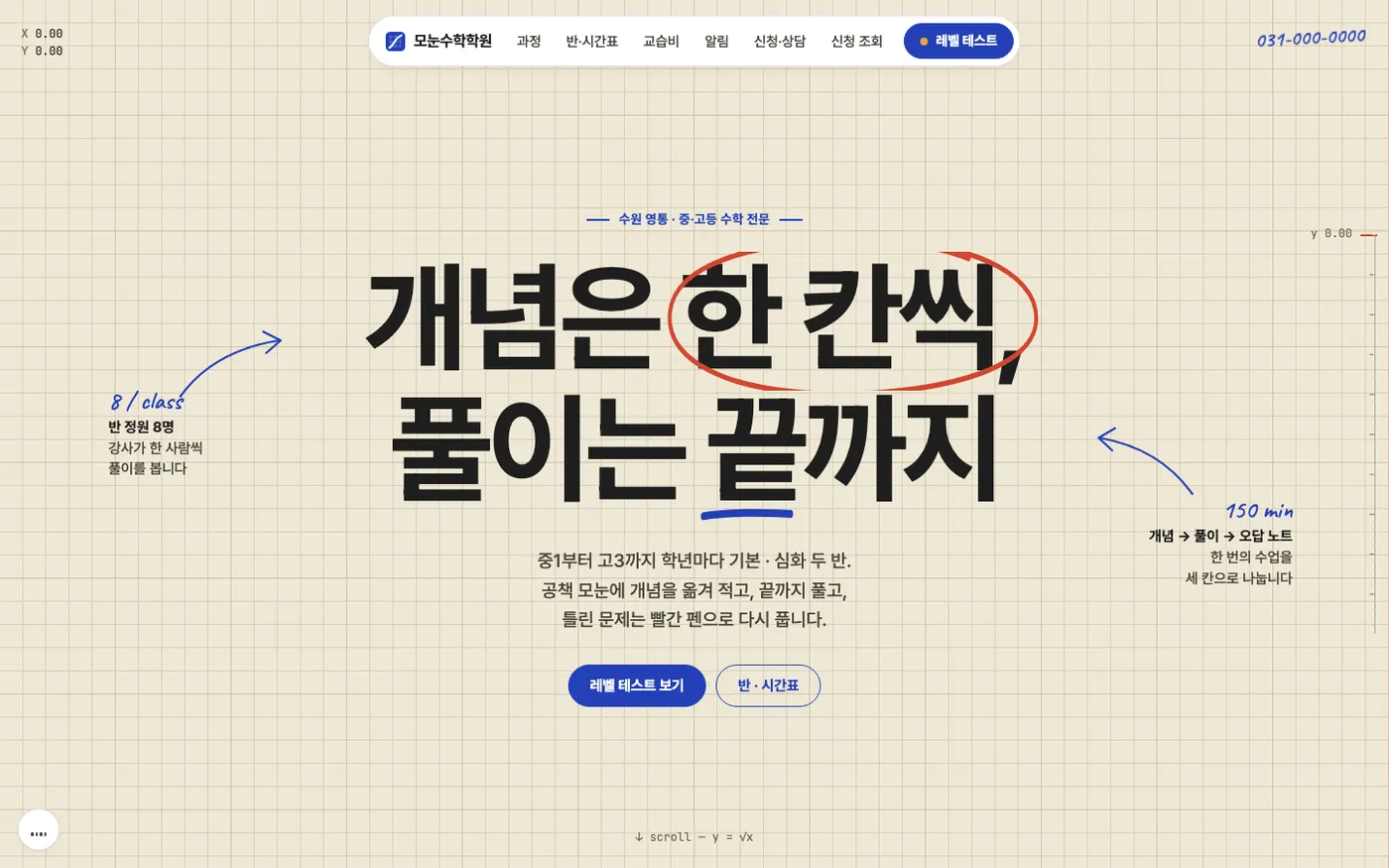
Privacy Policy