1. Overview
| Industry | An online seller that takes orders on several sales channels and receives settlement separately from each |
| Site goal | A work tool that turns the monthly line-by-line check of orders against settlements into uploading two files |
| Scope | 2 screens (reconcile · saved reconciliations) · 2 sample files (August orders 40 rows, settlements 38 rows) |
| Main flows | Upload two files → choose columns → reconcile → view by status → mark checked and add notes → download CSV / save reconciliation → reopen from saved reconciliations |
The current reconciliation result, per-row check marks and notes, and the list of saved reconciliations are saved in the browser. They stay in place after a refresh or a return visit. Uploaded files are read only inside this browser and are never sent anywhere.
Connected at rollout: automatic download of settlement files from marketplace admin screens, export to accounting software, server storage so several people can view the same reconciliation.
2. Challenges
1. Checking amounts line by line eats a whole day.
Each channel charges a different fee, so expected and actual settlement amounts drift slightly. Matching hundreds of rows by eye means wrong rows get missed.
2. A missing settlement doesn't show up in the table.
An order absent from the settlement file has no row at all, so it's hard to find. Orders with no settlement, and settlements with no order, have to be picked out separately.
3. Follow-up notes get scattered.
Notes on which items were raised with the marketplace end up spread across spreadsheets and messengers. The reconciliation result and check notes need to stay in one place and carry on into next month.
3. Structure
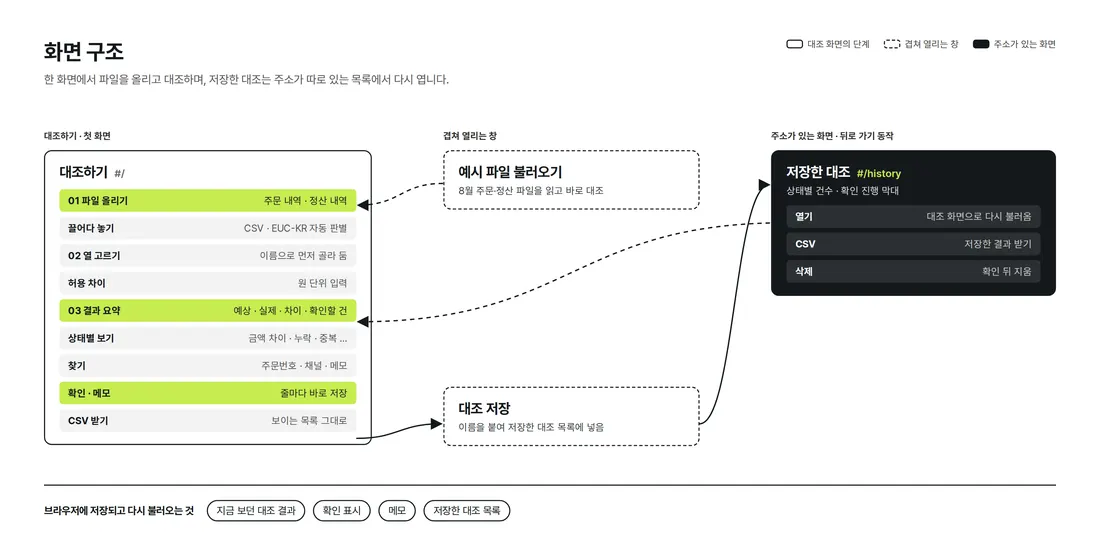
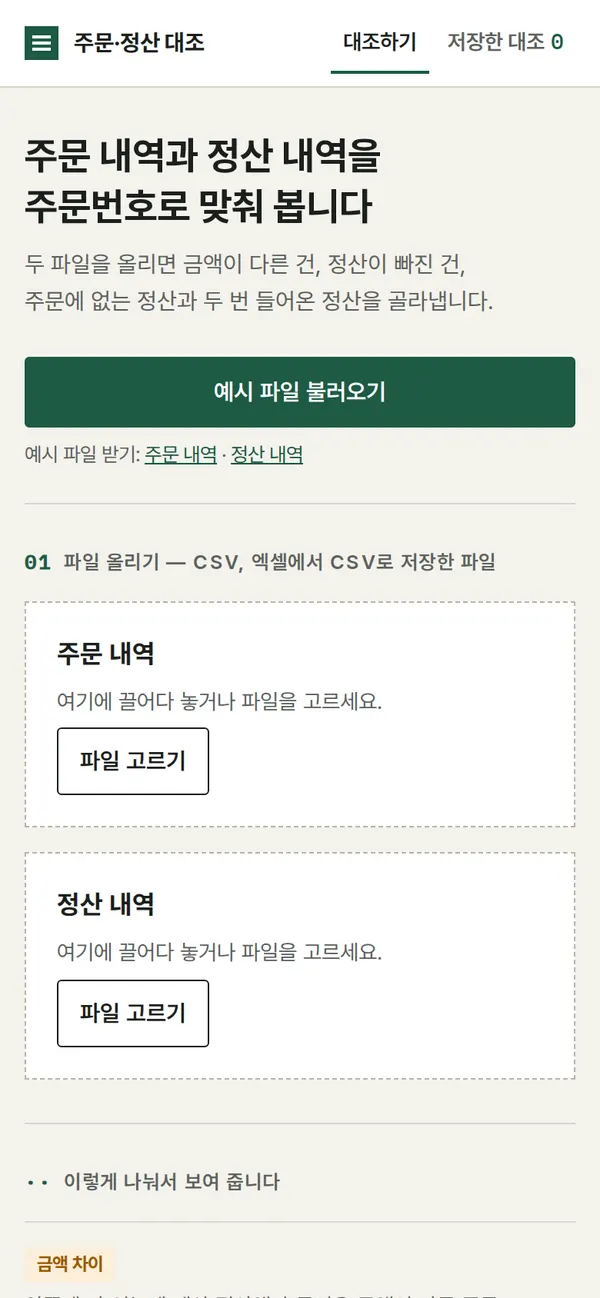
Reconciliation runs in one place on the first screen: upload files → choose columns → results. Saved reconciliations have their own address, so they stay in place on back navigation and refresh.
4. Key Features
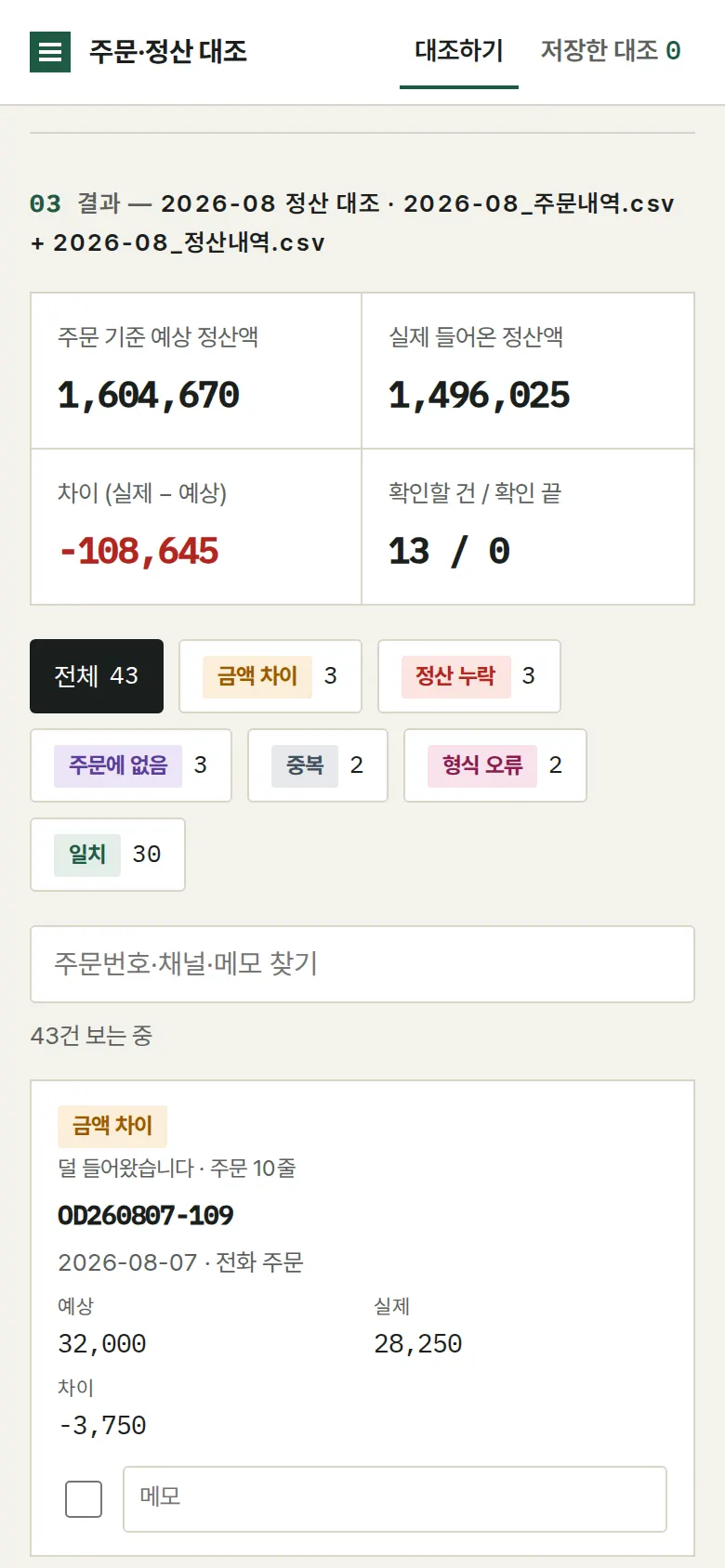
Reconciliation result — six categories
The two files are matched with order numbers treated alike regardless of surrounding spaces and letter case. Rows are split into amount gap · missing settlement · not in orders · duplicate · format error · match, with expected settlement, actual settlement and total difference shown on top.
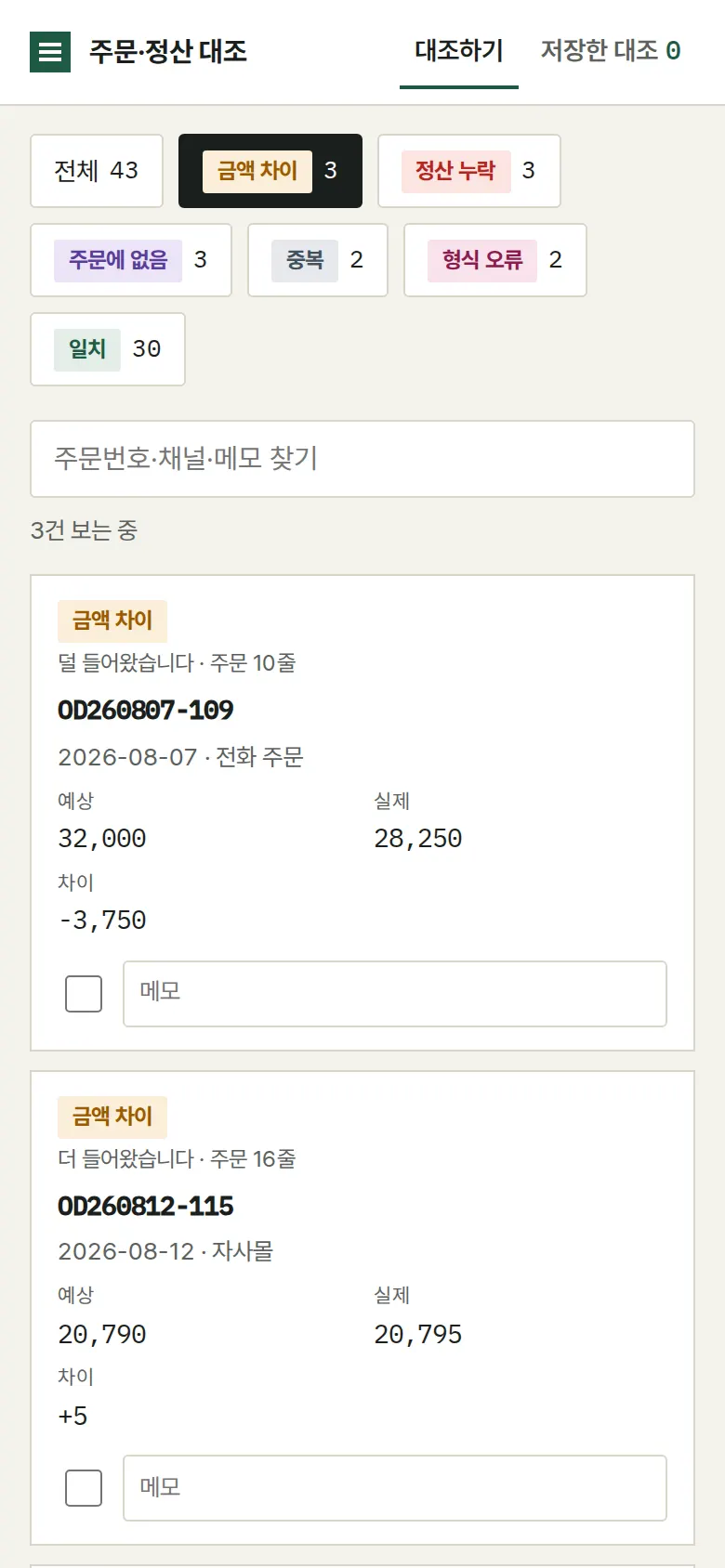
View and search by status
Tapping a status button leaves only those rows, and rows can be searched by order number, channel or note. Setting an allowed difference (in won) treats gaps within it as a match.
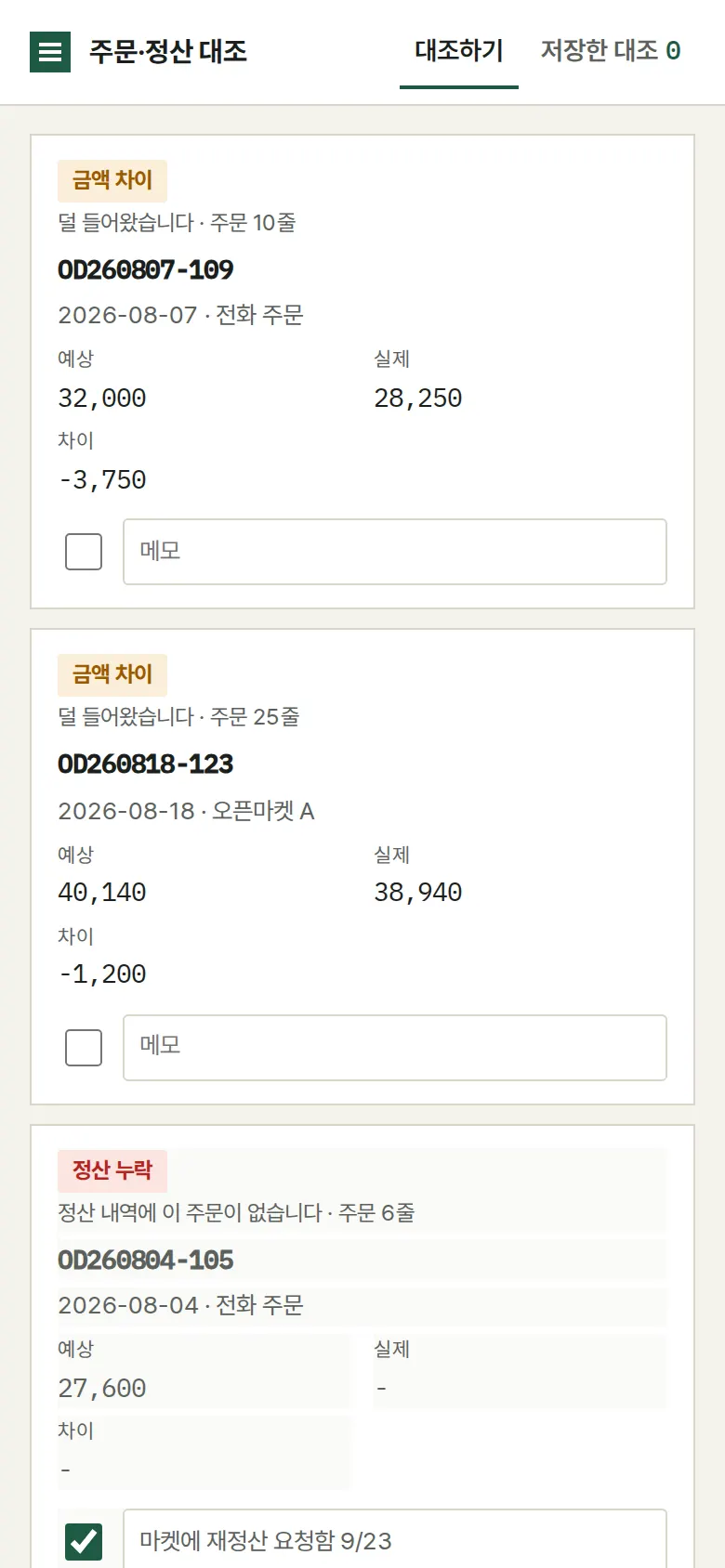
Check marks and notes
A check mark and note left on any row are saved immediately. They remain after a refresh, and the "to check / checked" counts update with them.
Saved reconciliations
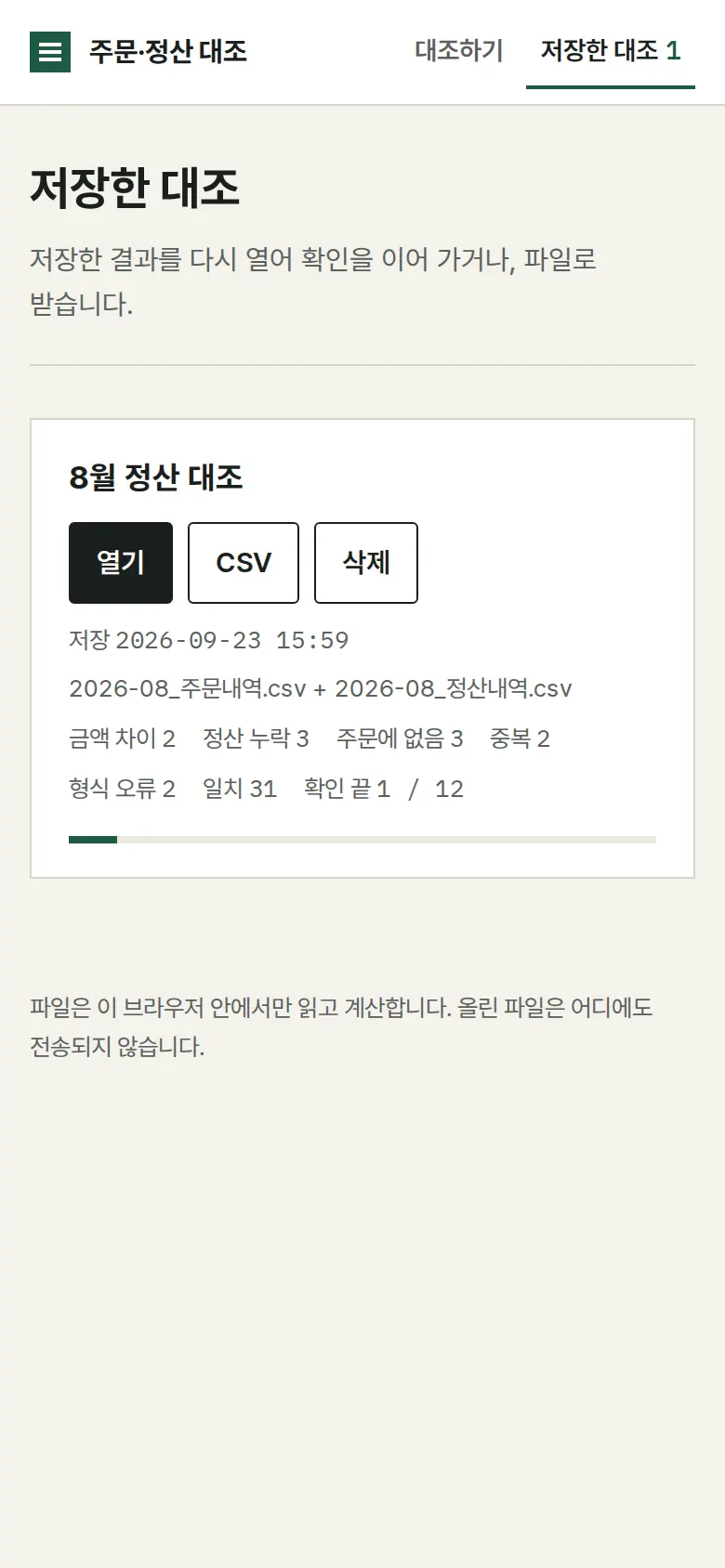
A reconciliation saved under a name is added to a list with its own address. Reopening it restores check marks and notes, and it can be downloaded as CSV or deleted.
- Column selection and Excel-saved filesOrder number and amount columns are preselected from the column names, and a wrong choice is flagged as a format error. EUC-KR files saved from Excel are read without broken characters, and empty files are rejected.
5. Build Notes
Show details
| Responsive | Layout changes at 900 and 640px. On PC, like an open ledger, the order ledger and settlement ledger sit left and right with a difference column in the middle. Below 900px, the input area becomes 2 columns. Below 640px, each row becomes a single ledger card (order expected ↔ settlement actual, difference in the middle), with no horizontal overflow. |
| Fonts | A ledger-style serif — Nanum Myeongjo for body and headings, and monospaced IBM Plex Mono for numbers and order numbers (all free, open fonts). Bundled with the site, so no external requests. The Korean font first loads only the characters used on this screen (116KB); Korean characters that appear only in a user's uploaded file are fetched when needed from a separate 2,350-character file (709KB). Number font 29KB. |
| Images | Built without photos. Icons are drawn in SVG and stay sharp on any screen. |
| Motion | CSS transitions only, no libraries. Kept to notices sliding up from the bottom; with reduced motion turned on in the device, transitions stop. |
| Accessibility | Every input has a name, and main buttons are 44px tall for easy tapping. Status is shown with both color and text, and notices are marked for screen readers. Buttons and inputs also work by keyboard. Accessibility score 100 on mobile · 100 on PC. |
| Tech | HTML, CSS, JavaScript (no external libraries). 65KB for screens and scripts combined. Files are opened with the browser's file reader, and EUC-KR files saved from Excel are detected and re-read in the right encoding. Results are saved to and read from browser storage (localStorage), and downloaded CSVs open directly in Excel. Screens use separate addresses (#/…), so back navigation works. |
6. QA
These are results from running the tool on PC 1440 and mobile 390 screens and tapping through in the order a real user would. We also checked that saved data is still found after a refresh. (2026-09-23)
| Item | PC 1440 | Mobile 390 |
|---|---|---|
| Screen errors | 0 | 0 |
| Broken files | 0 | 0 |
| Horizontal overflow · clipped text | 0 | 0 |
| Function tests | 13 / 13 passed | 13 / 13 passed |
The 13 function tests: load sample files → automatic reconciliation · view by status (amount gaps only) · reconcile again with a ₩10 allowed difference (₩ = Korean won) · change column selection (choosing the wrong settlement amount column shows a format error) · check mark and note → kept after refresh · search by order number and channel · download visible list as CSV · save reconciliation → saved list · view saved records after refresh · open a record → back navigation · upload your own file (EUC-KR settlement file saved from Excel) · reject empty file · delete a saved record
Speed and quality scores (out of 100; mobile measured three times on a slow connection, median shown)
| Performance | Accessibility | Best Practices | SEO | |
|---|---|---|---|---|
| Mobile | 98 | 100 | 100 | 100 |
| PC | 100 | 100 | 100 | 100 |
Mobile: First Contentful Paint 1.7s · Largest Contentful Paint 2.0s · Layout shift 0.00 · Blocking time 0ms PC: First Contentful Paint 0.4s · Largest Contentful Paint 0.5s · Layout shift 0.00 · Blocking time 0ms
7. Result
Try it live ↗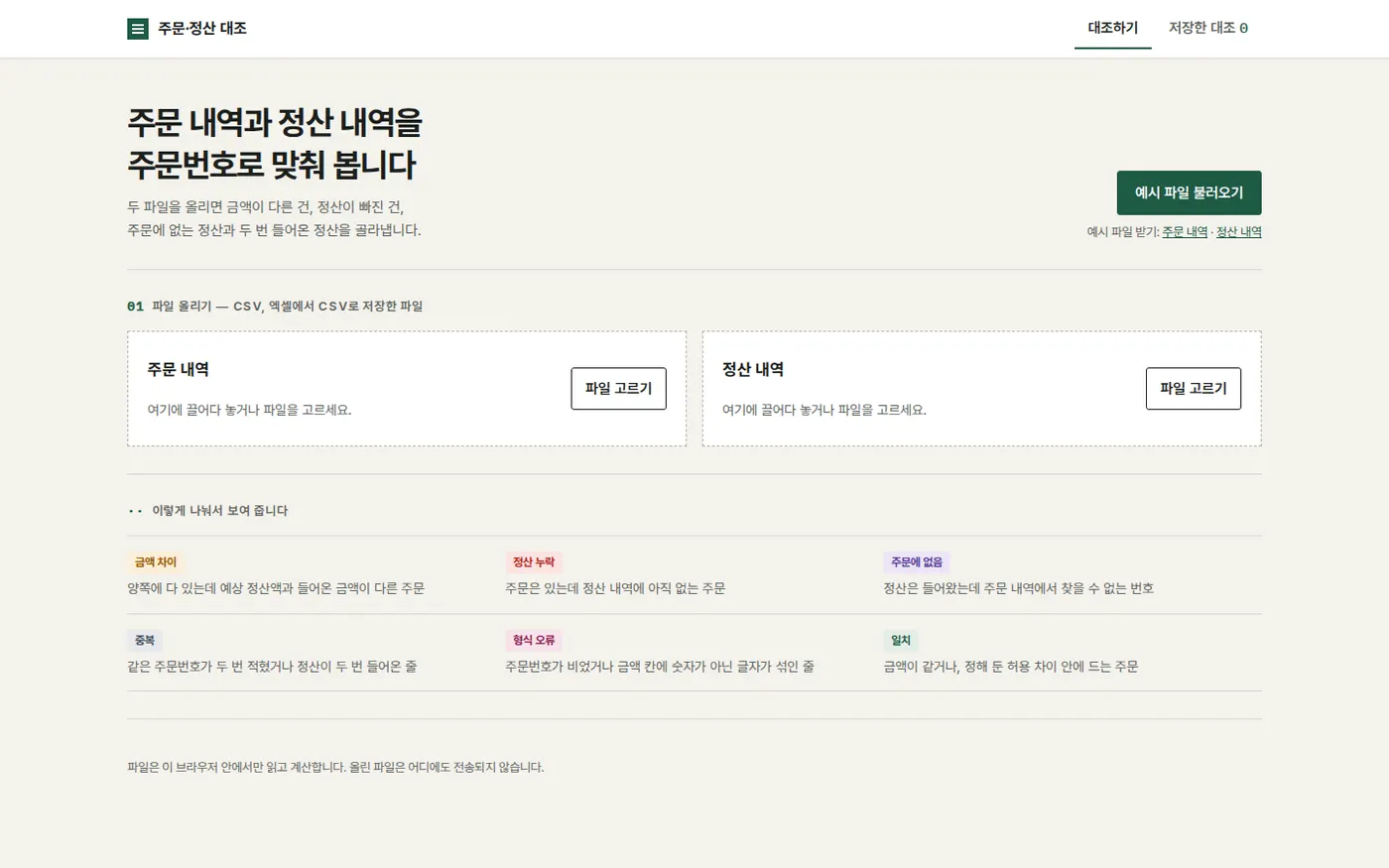
Privacy Policy