1. Overview
| Industry | Events and exhibitions. A limited-run photo exhibition of 30 photographs of Korean seas, tidal flats and harbours by 6 photographers (Warehouse 3, Yeongdo, Busan, 14 Nov 2026 – 28 Feb 2027, closed on Mondays) |
| Purpose | Convey the mood of the exhibition from the first screen, let visitors browse works, photographers and programmes, then book tickets by choosing a date and a 30-minute entry slot. Opening the mobile ticket to get in, and changing the slot or cancelling, all happen on the same site. |
| Scope | 9 pages (Home · About · Works · Photographers · Programme · Tickets · My ticket · Visit · 404) · responsive for PC, tablet and phone |
| Main flow | Home (countdown → 4 sections) → works and photographers → "Add to my schedule" in the programme → 4-step booking (date → entry slot → number of people by ticket type → booker) → booking number SM-YYMMDD-XXXX → My ticket (barcode · slot change · cancellation) |
Bookings and the personal schedule are saved in the browser and loaded again in the same browser.
Connected at rollout: real payment and text messages, a ticketing system, and server storage.
2. Challenges
1. In a photo exhibition the photos are the stars, yet the website easily gets louder than they are.
Bright backgrounds, cards and decoration bury the works. The photos need to glow on a dark screen, while "when, where and how much" still shows at a glance.
2. Timed-entry exhibitions get many calls asking "is there room at that time?"
40 people per 30-minute slot, closed on Mondays, slots already past, and an early-bird discount only until the day before opening — if these are not worked out on one screen, the venue and the bookings fall out of step.
3. The information people look for before and after a visit is scattered.
Whether it is open today, when the next docent tour is, where to open the booked ticket and how to change the slot — if these sit apart, visitors end up asking at the ticket desk.
3. Structure
                     ┌──────────────── index.html Home ────────────────┐
                     │ Title scene (blur → sharp) · opening countdown   │
                     │ 4 sections changing like an ebbing tide · about · │
                     │ open today and next docent tour · booking band    │
                     └──┬─────────┬─────────┬──────────┬─────────┬────┘
                        │         │         │          │         │
                  about.html  works.html  artists.html program.html visit.html
                  curator's    grid of 30 · 6 photographers 7-day tabs ·  opening hours ·
                  text ·       section /    open → that  type filter ·  open now or not ·
                  4 sections · photographer photographer's add to my    Yeongdo map
                  floor plan   filters ·    works        schedule
                               viewer
                     │ room number ──▶ works.html?s=N   │
                     │                                  ▼
                     └──────────────▶ tickets.html ◀─── Book tickets
                                     ①date ②slot ③people ④booker → booking number
                                              │
                                              ▼
                                     ticket.html My ticket
                                     booking number + last 4 digits of phone → barcode ticket · change slot · cancel

  Every page: header menu · full-screen phone menu · footer · page transition fading through black · 404.html
  All time calculations: Korea time; add ?at=YYYY-MM-DDTHH:MM to the address to fix the clock (kept across pages)
From the home page the site splits into about, works, photographers, programme and visit. Room numbers on the floor plan lead to that section's works, and from any page you can go to booking, get a booking number and open the barcode in My ticket.
4. Key Features
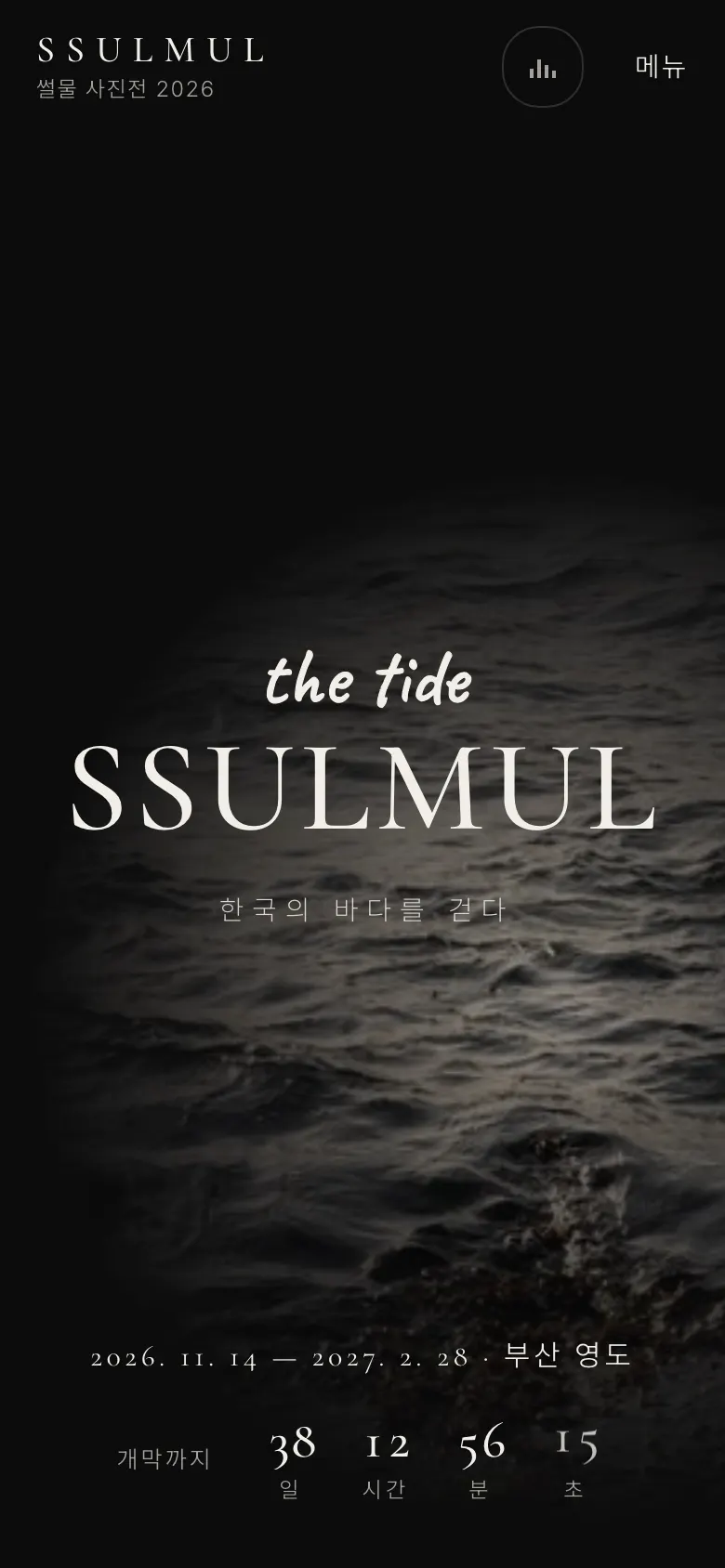
Opening countdown
Below the first screen, the days, hours, minutes and seconds to opening (14 Nov, 10:00) tick down every second. During the exhibition the text changes to "On now · N days to closing", and after it closes to "The exhibition has ended".
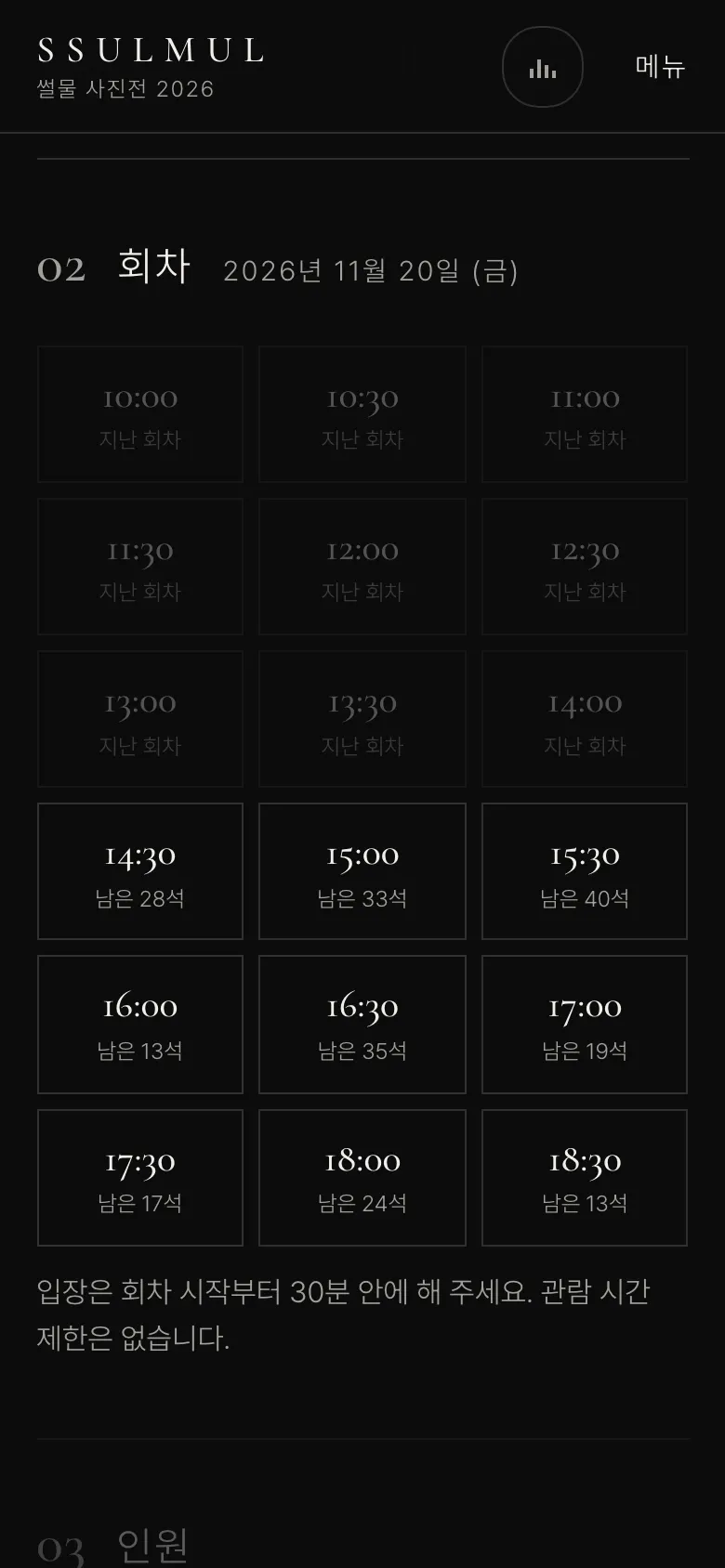
30-minute entry slots
Each slot from 10:00 to 18:30 shows the seats left, and slots already past in Korea time or sold out are blocked.
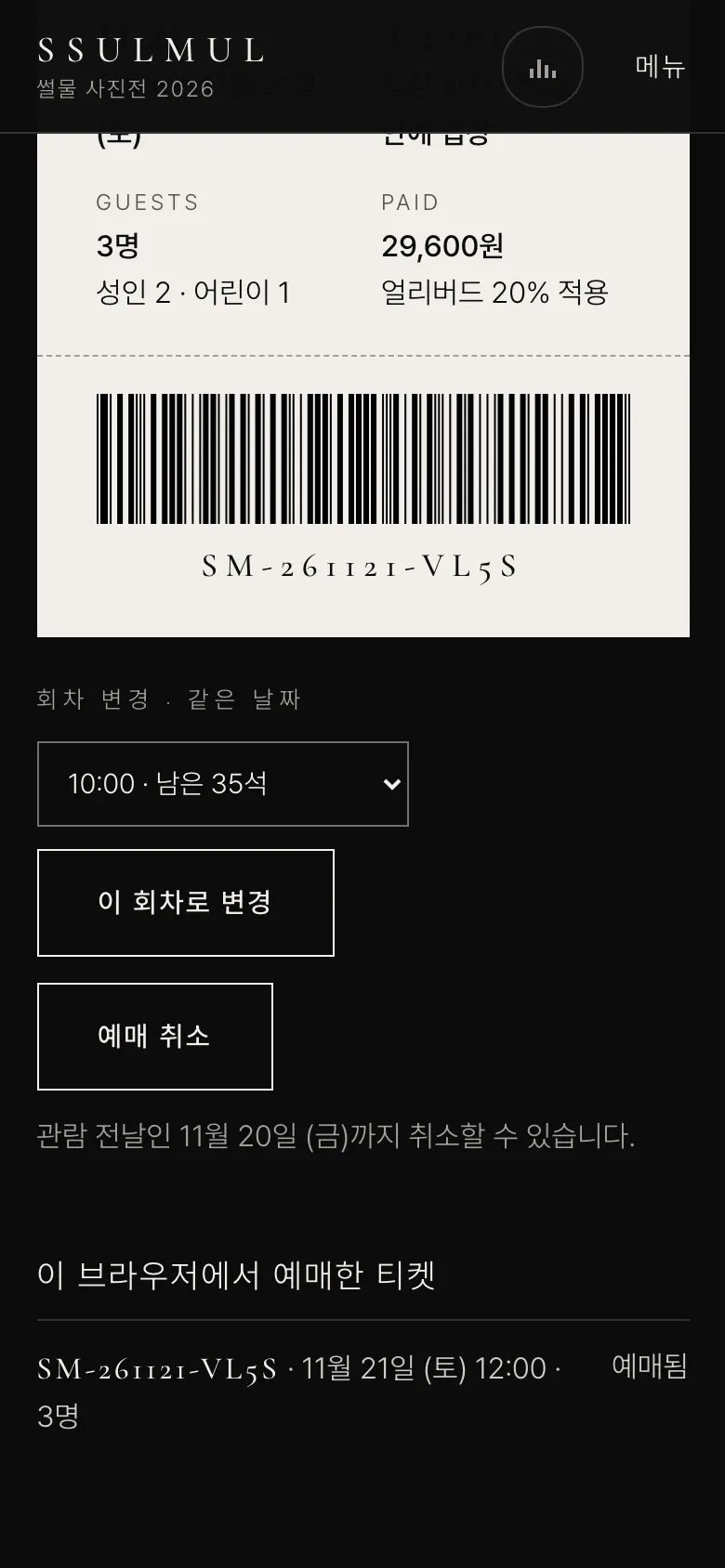
Mobile ticket
The ticket opens only when both the booking number and the last 4 digits of the phone number match. It shows the date, slot, people and amount paid, with a barcode (SVG) drawn from the booking number. The slot can be changed to another one on the same day.
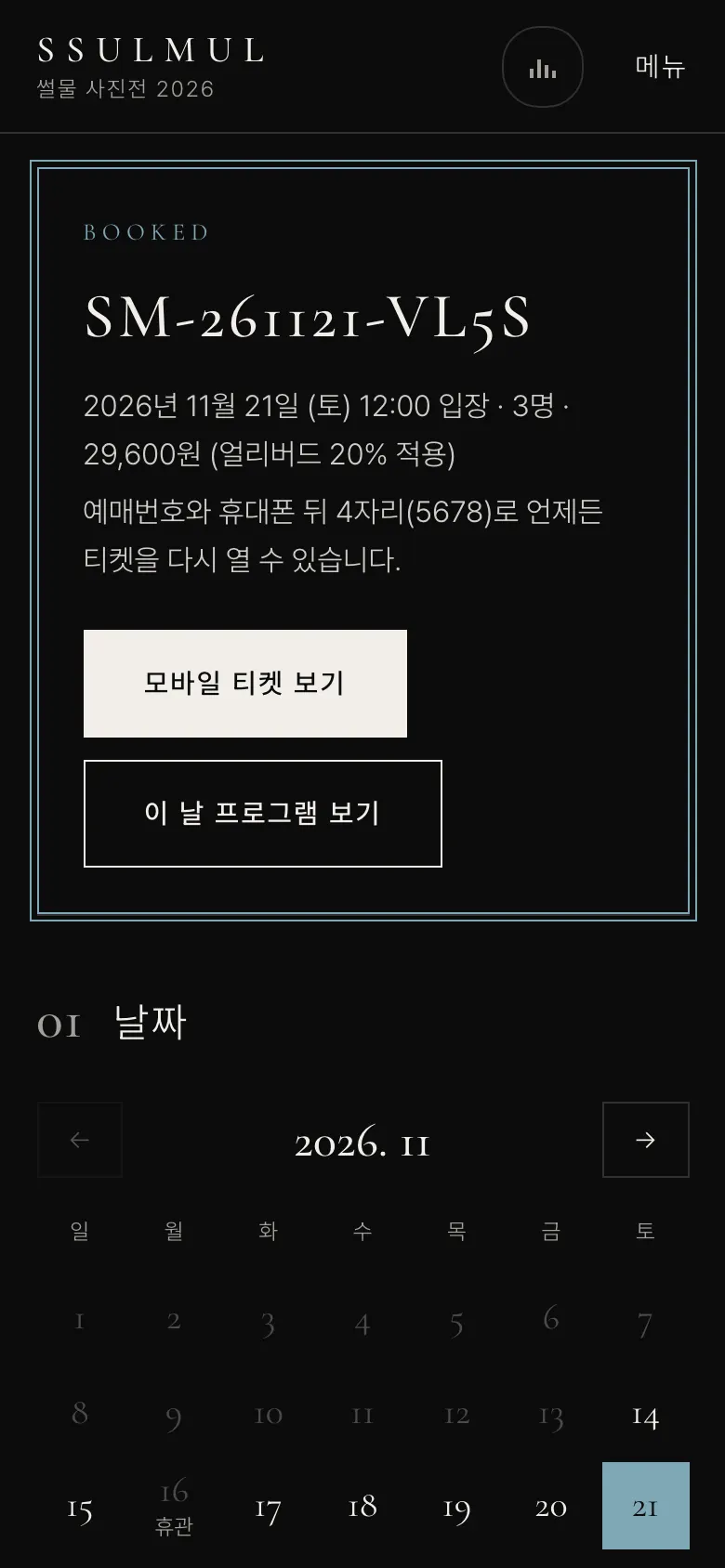
Booking number
After checking the name and phone number, an SM-YYMMDD-XXXX number is created and saved. Opening the same slot again shows the seats left reduced by the number of people booked.
- Owner adminToday’s bookings, expected visitors and sold-out sessions sit on one screen; entry is checked off on each session’s list, and when the organiser cancels a booking the visitor’s mobile ticket shows "Cancelled" and the seats reopen. Closing a session or a whole day blocks it on the booking calendar at once, and edits to ticket prices, the early-bird discount, session capacity, which works are shown and the notice change prices and notes together. In this case study the owner and customer screens share the browser’s storage; in a real rollout this becomes an owner login with server storage.
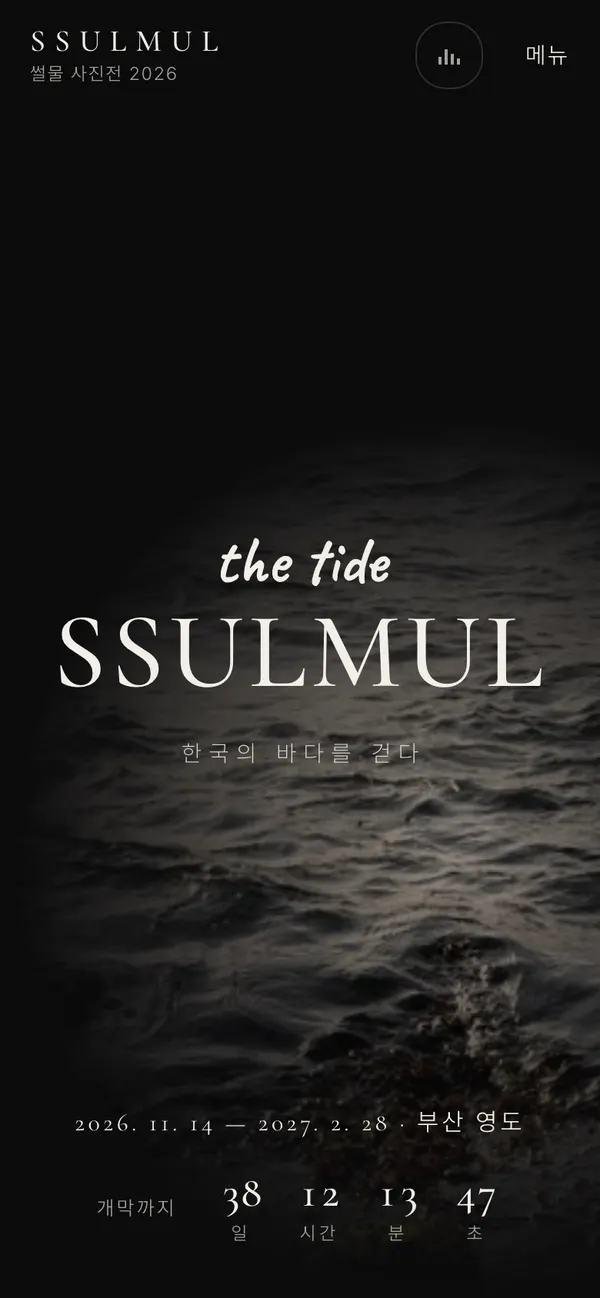
- Title from blur to sharpAfter the handwritten "the tide" is drawn as a line, the large serif "SSULMUL" comes into focus with scroll, from an 18px blur in grey to sharp white. Scrolling further blurs it again until it fades away.
- Section photos revealed like an ebbing tideWith the screen pinned, the 4 main section photos are revealed one after another from the bottom up (clip-path), with a thin wave line rising along the edge. The section number, title and "See N works" change with each photo. On phones they run down the page one after another, without blur.
- Works filtersThe 30 works narrow by 4 sections and 6 photographers, showing "N of 30" at once. Coming from the floor plan or a photographer page, the filter is preselected from the address (?s=, ?a=). On PC there is also a row of 8 highlights that moves sideways as you scroll down.
- Work viewerSelecting a work opens it fitted to the screen on black, with title, place, year, photographer and section. Arrow buttons and the ←·→ keys move through the works, and Esc closes the viewer. With a filter on, it moves only through the filtered works.
- My programme scheduleBrowse this week's 7 day tabs (closed on Monday) and type filters (artist talks · docent tours · workshops), and save events with "Add to my schedule". Adding events that overlap on the same day shows a warning, and the list stays after a refresh.
- Booking calendarMondays and dates outside the exhibition cannot be selected and are marked "Closed". Months can be moved back and forward.
- People limitChoose adults, youth, children and under-6s, from 1 to 8 people in total. Going over the seats left in the chosen slot blocks the + button and shows why.
- Early-bird discountBooking up to the day before opening (13 Nov) applies a 20% discount automatically, and the summary shows the amount by ticket type, the discount and the total. For 2 adults and 1 child it is 29,600 won before opening and 37,000 won after.
- CancellationTickets can be cancelled only up to the day before the visit, and cancelling returns the seats to that slot. On the day of the visit or for past tickets, the cancel button is blocked.
- Open now or notIn Korea time it works out "Before opening / Open now (N minutes to last entry) / Last entry passed today / Closed for today / Closed on Mondays / Exhibition ended" and gives the next opening day. The home page also shows the next docent tour time.
- Phone menuThe "Menu" button opens a black full-screen menu, which closes with the close button or Esc. The page behind stops scrolling while it is open, and when it is closed, keyboard focus does not go to the links inside it.
5. Build Notes
Show details
| Responsive | Based on PC 1440 · tablet 1020/860 and below · phone 760 and below (390 as the reference). On phones the pinned section scene and the sideways row of works become vertical lists, the booking summary moves below the steps, and the viewer's arrows move below the photo so they do not overlap the caption. |
| Text and line breaks | |
| Fonts | Latin and number headings in Cormorant Garamond 500, one handwritten word in Caveat, Korean in Pretendard 200 · 300 · 500 (large Korean headings in 200 with wide letter spacing). All are free, openly licensed fonts loaded from files inside the site, so there are no external font requests. The Korean font is split into 92 character groups (2,888KB in total) and only the groups containing characters on screen are downloaded (13 groups, 333KB on a first visit to the home page on a phone). |
| Colour | Black #0B0B0C · paper white #F2EFE8 · grey #6E6E6E. Water blue #7FA7B5 is used only for the current section and selections. |
| Images | 34 free real photos (30 exhibited works · 4 of the venue). The works are only Korean sea, tidal flat, harbour and rock landscapes without people, and no photo is used twice. They are reduced to JPG up to 1600px wide (2000px for the section photos on the first screen, 7,142KB in total); phones get separate 800px-wide photos (34, 2,464KB in total), and photos outside the first screen load as they come into view. Every image has width, height and alt text. The whole site is 13.5MB, and a first visit to the home page on a phone transfers 0.7MB. |
| Time calculation | Every date and time decision (countdown, open now, past slots, early bird, cancellation deadline, this week's programme) uses one Korea-time function. Adding `?at=YYYY-MM-DDTHH:MM` to the address starts the clock at that time, and the fixed time follows you across pages. |
| Motion | The title blur and colour, the section photo clip-path and the wave line position are tied directly to scroll progress (GSAP ScrollTrigger). The sideways row on the works page pins the screen and moves sideways on PC only. Text rises slowly line by line, and blocks appear as their blur clears. When moving between pages, the screen fades to black for 0.5s and sharpens on the next page. No loading screen, cursor effects or counting numbers. |
| Accessibility | Skip to content, alt text on every image, buttons are button and fields have label, the work viewer uses the dialog role and keyboard control (←·→·Esc), the phone menu shows its open state and closes with Esc, and status messages use role=status. With reduced motion, smooth scrolling, blur, pinned scenes and transitions are all turned off and the sharp screen shows at once. |
| Technology | HTML · CSS · JavaScript, GSAP 3.12 + ScrollTrigger, Lenis (smooth scrolling) — all inside the site, with no external scripts. Section, photographer, work, ticket and programme data are in one file (data.js), and time, seat and opening-status calculations in a shared file (site.js), so every page and the function tests use the same functions. Bookings and the personal schedule go through a single save function wrapping browser storage (localStorage) in try/catch. |
6. QA
These results come from opening all 9 pages on PC 1440, phone 390 and phone 360 screens, and tapping through on PC and phone 390 in the order a real person would. We also checked that bookings and the personal schedule can be looked up, changed and cancelled again after a refresh or on another page, with the clock fixed before opening, during the exhibition and after it to check the calculations at several times. External requests and broken links are 0. (2026-10-03)
| Item | PC 1440 | Phone 390 | Phone 360 |
|---|---|---|---|
| Screen errors | 0 | 0 | 0 |
| Broken files | 0 | 0 | 0 |
| Horizontal overflow | 0 | 0 | 0 |
| Function tests | 16 / 16 passed | 17 / 17 passed | — |
The 18 function tests (title blur and section photo reveal on PC only, phone menu and the sharp title with vertical photos on phones only): phone menu · no blur and vertical photos on phones · countdown before opening, during and after · title from blur to sharp and section photo reveal · works filter counts (preselected from the address) · viewer and keyboard navigation · adding programmes, overlap warning and keeping after refresh · calendar blocking Mondays and dates outside the run · past slots blocked · people limit · 2 early-bird price checks · booking number saved and seats reduced · ticket lookup, barcode and slot change · cancellation, seats returned and same-day cancellation blocked · open now and next docent tour · page transition and fixed time kept · floor plan → that section's works · no page errors
Speed and quality scores (out of 100, measured on the public site on 2026-10-03; phone on a slow connection, median of three runs; PC on PC settings)
| Performance | Accessibility | Best practices | SEO | |
|---|---|---|---|---|
| Phone | 100 | 98 | 96 | 66 |
| PC | 100 | 98 | 96 | 66 |
Phone: first paint 1.1 s · largest element 1.6 s · layout shift 0.011 · input blocking 0 ms PC: first paint 0.4 s · largest element 0.4 s · layout shift 0.016 · input blocking 0 ms
The SEO score is low because the live demos are deliberately kept out of search results.
7. Result
Try it live ↗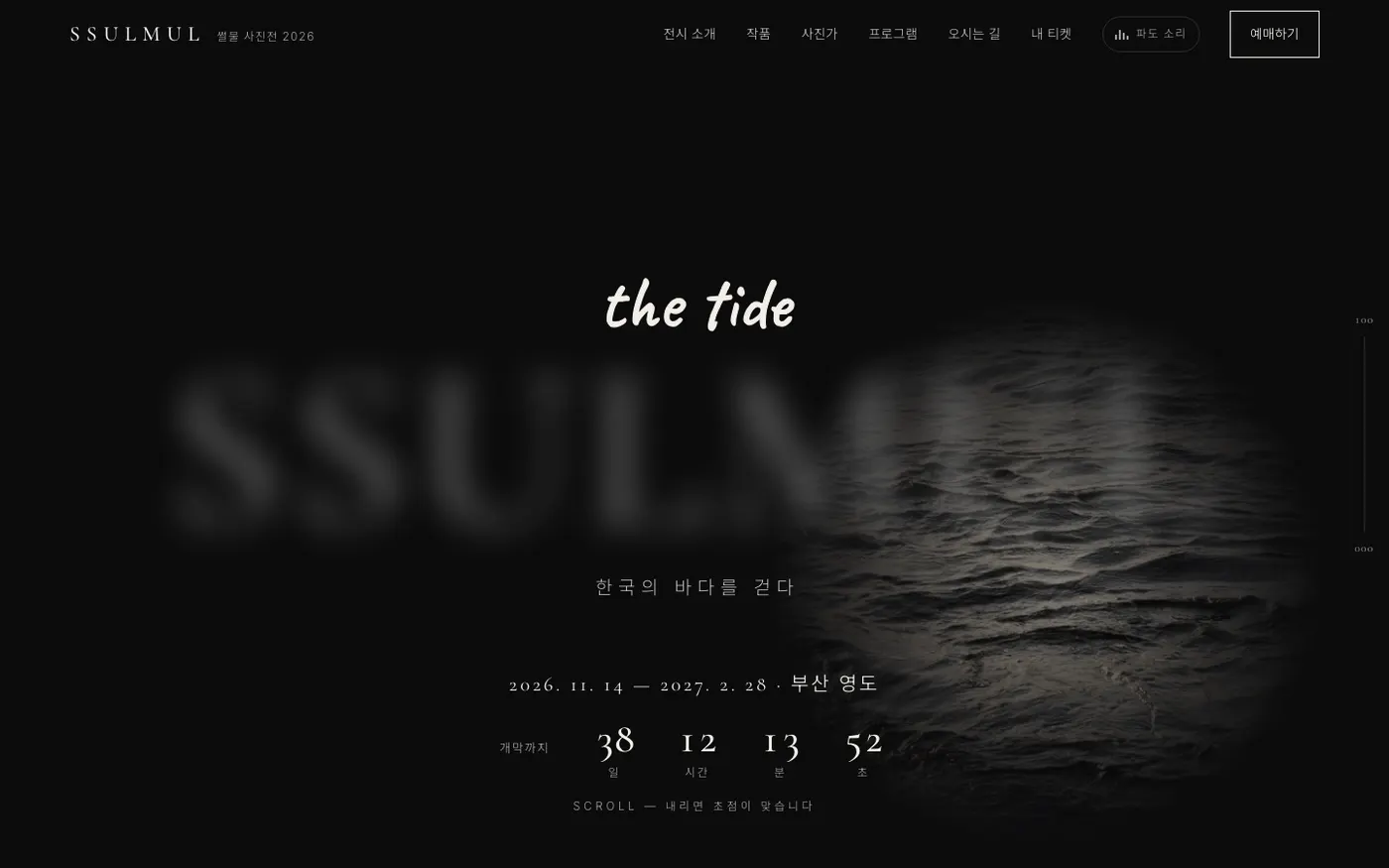
Privacy Policy