1. Overview
| Industry | Online sellers who receive product lists from several suppliers and list them on their own store and marketplaces |
| Purpose | A business tool that replaces fixing product names and options line by line and copying them into an upload form with a few rules |
| Scope | 2 screens (Clean Up · Saved Jobs) · 7 cleanup rules · 5 category rules · 1 sample list (26 products) |
| Main flow | Upload list → clean up with rules → compare before and after → check → fix cells → download store-upload CSV / save job → reopen |
Uploaded lists and column mapping, edited cells, cleanup rules, words to remove, category rules, and saved jobs are saved in the browser. They stay in place after a refresh or a later visit. Uploaded files are read only inside this browser and are never sent anywhere.
Connected at rollout: direct upload to stores and marketplaces, downloading and editing product photos, reading Excel (xlsx) files directly, and shared server storage for multiple users.
2. Challenges
1. Every supplier writes things differently.
2. One product is scattered across several lines.
Products that differ only by color or size come in as separate lines. They need to be grouped as option products to sell on a single product page.
3. Mistakes show up only after listing.
A wrong barcode digit, a missing image, or an empty stock field shows up only after upload. They must be caught before export to avoid rejection.
3. Structure
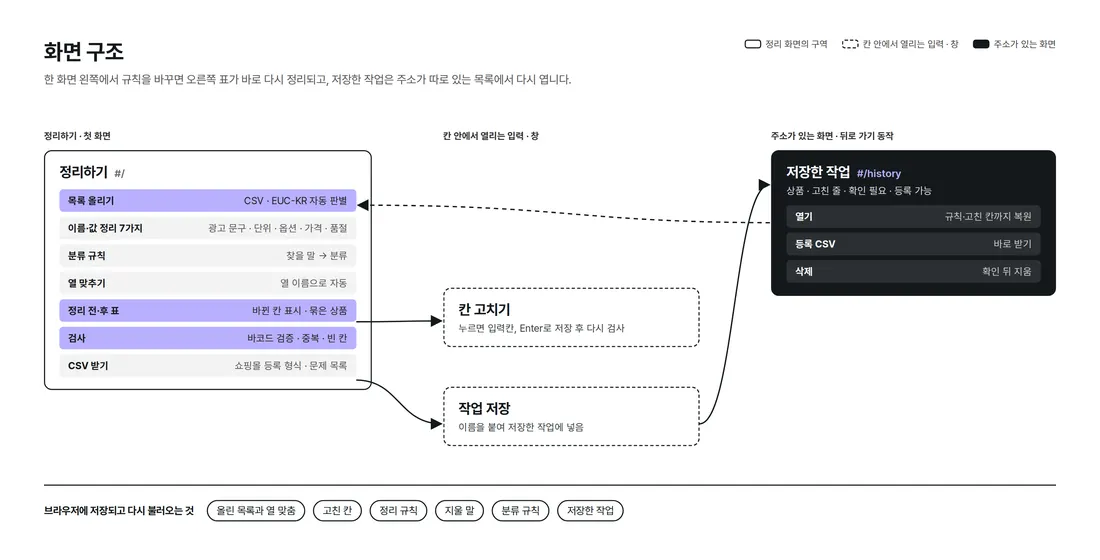
Cleanup happens on the first screen; change a rule on the left and the table on the right re-cleans at once. Saved Jobs has its own address, so the back button and refresh keep you on the same screen.
4. Key Features
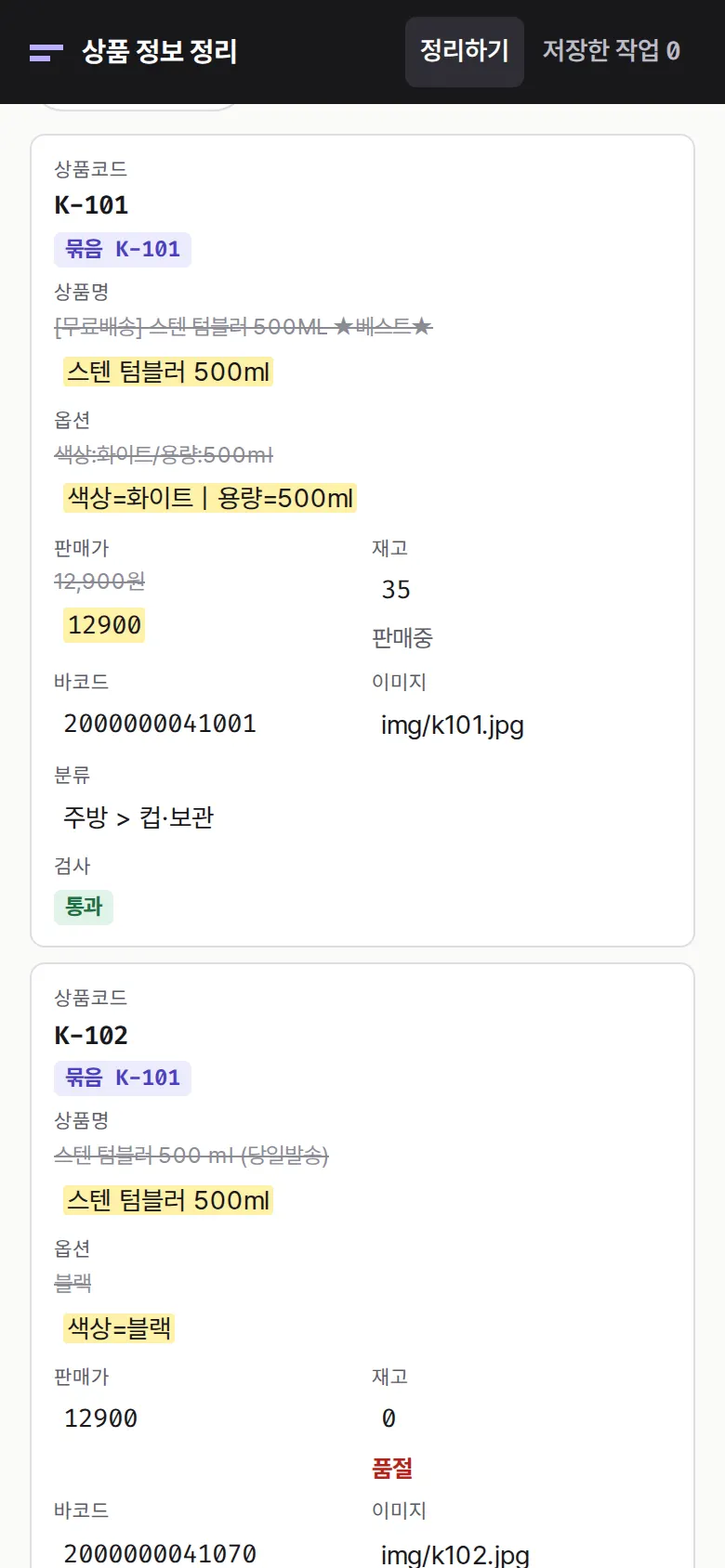
Before and After in One Table
Edited cells show the original value struck through next to the new, highlighted value. Removing ad tags · spacing · volume units (500ML → 500ml, 1000ml → 1L) · options as "name=value" · price as numbers only · matching sold-out status — all in one pass.
Grouping Identical Products
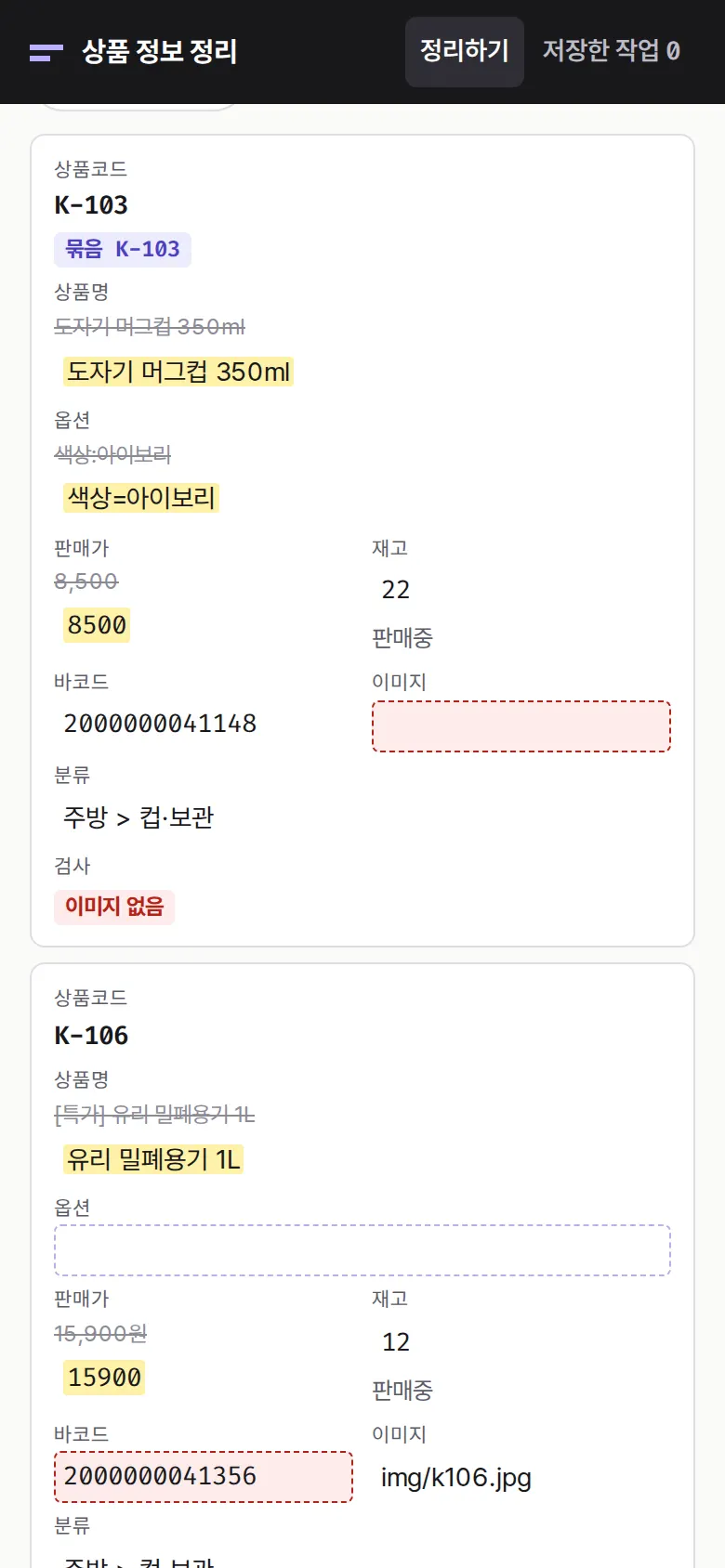
Checks — Barcodes, Empty Fields, Categories
Finds bad 13-digit barcode check digits, duplicate barcodes, empty barcode, image, price, or stock fields, and missing categories. Click a cell to fix it on the spot; fixing it re-runs the check.
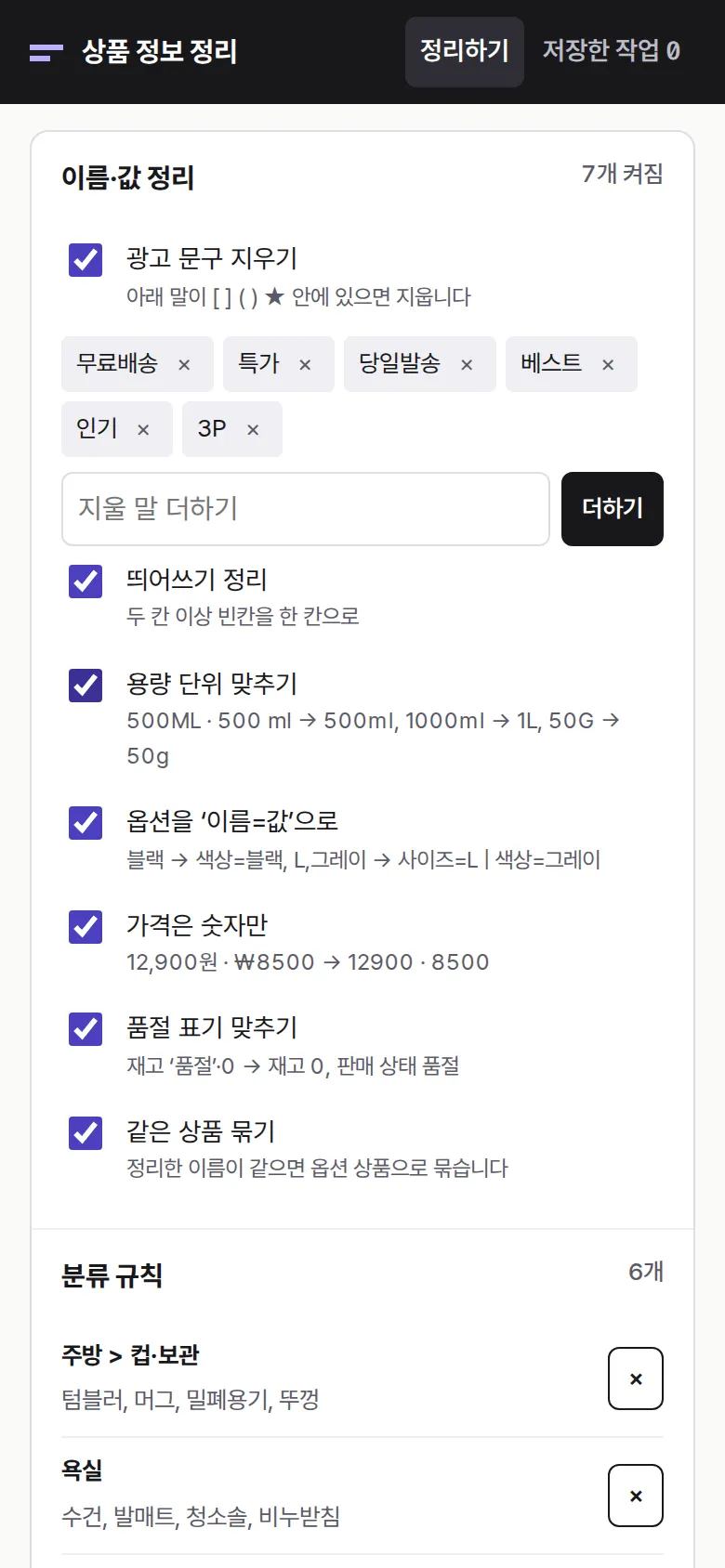
Changing Rules — Words to Remove and Categories
Add or remove words to strip and category rules (search term → category), and the whole table is cleaned again. Rules are saved and reused for the next list.
- Store-Upload CSV and Saved JobsEverything except lines that need review downloads in upload format, including parent product code, options, sale status, and category. The problem list downloads separately, and jobs are saved with their rules and edited cells to reopen later.
5. Build Notes
Show details
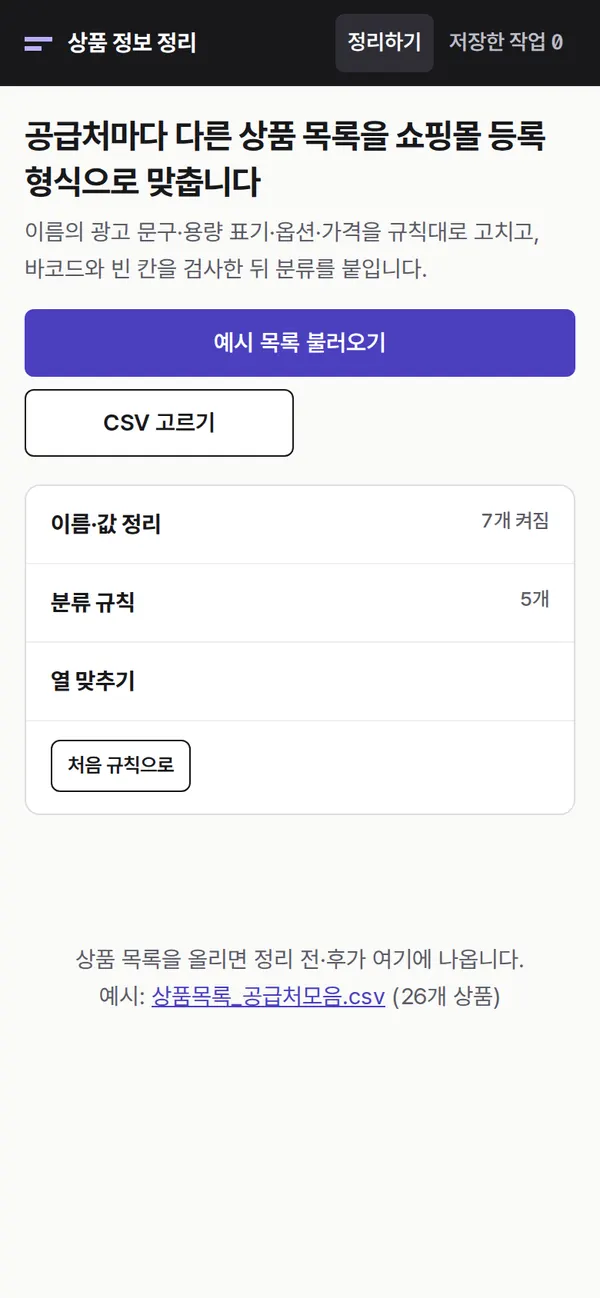
| Responsive | Layout changes at 980 · 640px. On PC, a rule panel on the left and a grid of product label cards on the right (several per row); below 980px the rules move to the top; below 640px label cards show one per row. |
| Fonts | A product-label feel — IBM Plex Sans KR for Korean, monospaced Space Mono for codes, prices, and barcodes (all free open fonts). Bundled with the site, so no external requests. The Korean font loads only the characters used on this screen first (117KB); Korean characters that appear only in files a user uploads load on demand from the remaining 2,350-character file (409KB). Number font 32KB. |
| Images | No photos. Icons are drawn in SVG, so they stay sharp on any screen. |
| Motion | CSS transitions only, no libraries. Kept to notifications sliding up from the bottom; transitions stop when the device's reduce-motion setting is on. |
| Accessibility | Every input has a label, and main buttons are 44px tall for easy tapping. Status is shown with both color and text, and notifications are marked for screen readers. Buttons and inputs work with a keyboard. Accessibility score: mobile 100 · PC 100. |
| Tech | HTML, CSS, JavaScript (no external libraries). Pages and scripts total 70KB. Files open through the browser's file reader, and EUC-KR files saved from Excel are detected and re-read with the right encoding. Data is saved to and read from browser storage (localStorage), and downloaded CSVs open directly in Excel. Screens are split by address (#/…), so the back button works. |
6. QA
Results from running the pages on PC 1440 and mobile 390 screens and clicking through in the order a real user would. We also checked that data is still there after saving and refreshing. (2026-09-23)
| Item | PC 1440 | Mobile 390 |
|---|---|---|
| Screen errors | 0 | 0 |
| Broken files | 0 | 0 |
| Horizontal overflow · clipped text | 0 | 0 |
| Function tests | 18 / 18 passed | 18 / 18 passed |
The 18 function tests: load the 26-item sample list and clean it at once · clean ad tags, volume units, and spacing · options as "name=value", numeric prices, sold-out matching · group identical products as options · checks: barcode validation, duplicates, empty fields, missing category · turning a rule off and on (options) · adding a word to remove (3P) · adding a category rule (chair → outdoor) · editing a cell directly → re-check · rules and edited cells kept after refresh · download store-upload CSV (lines needing review excluded) · download problem list CSV · save job → saved job after refresh · upload CSV from a saved job · uploading your own CSV (EUC-KR, different column names) · picking columns manually when names differ · reopen a saved job → back button · delete a saved job
Speed and quality scores (out of 100; mobile measured three times on a slow connection, median shown)
| Performance | Accessibility | Best Practices | SEO | |
|---|---|---|---|---|
| Mobile | 99 | 100 | 100 | 100 |
| PC | 100 | 100 | 100 | 100 |
Mobile: First Contentful Paint 1.7s · Largest Contentful Paint 2.0s · Layout Shift 0.01 · Blocking Time 0ms PC: First Contentful Paint 0.4s · Largest Contentful Paint 0.4s · Layout Shift 0.00 · Blocking Time 0ms
7. Result
Try it live ↗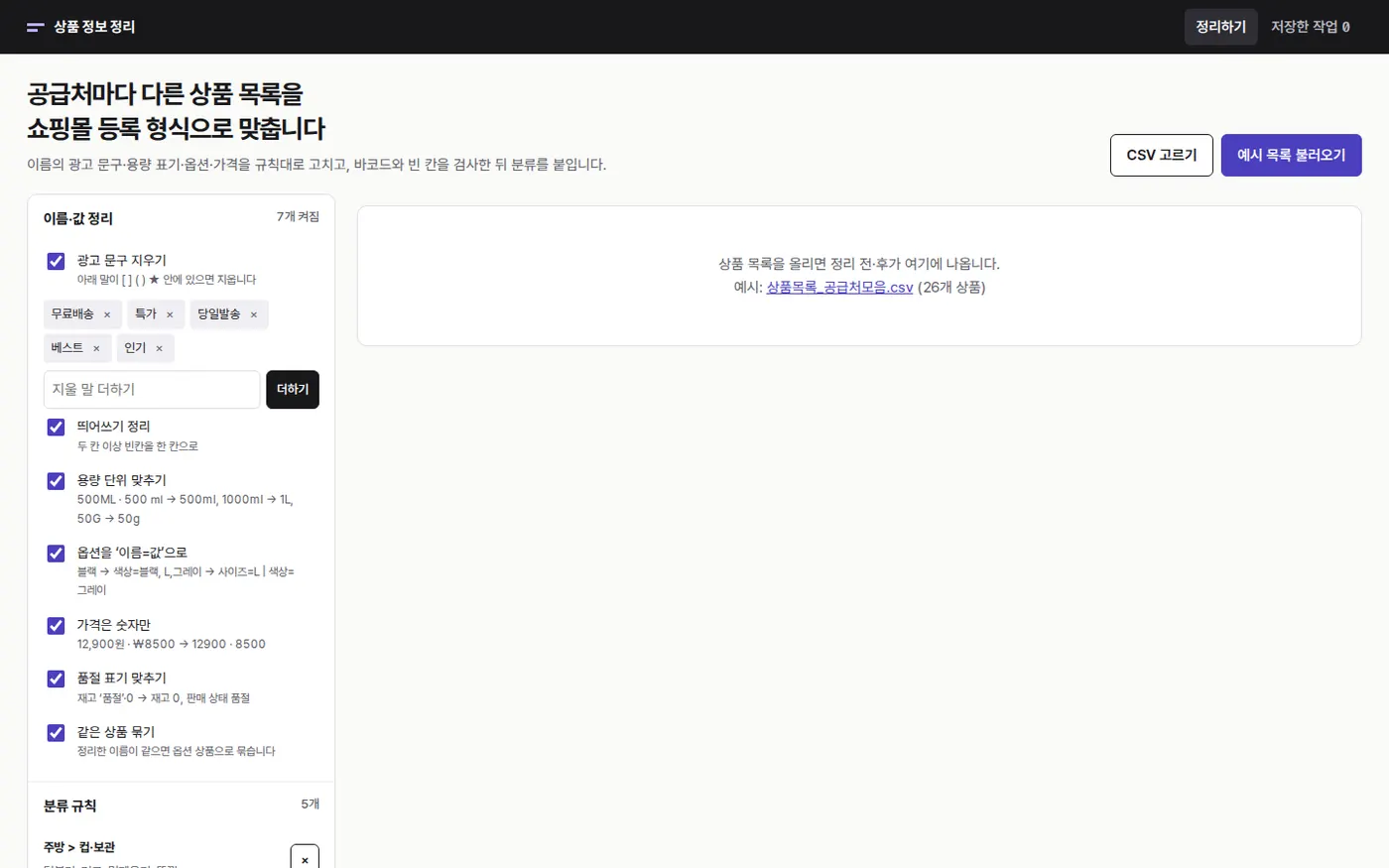
Privacy Policy