1. Overview
| Industry | A booking management SaaS for shops with 1–5 staff (hair salons, nail salons, craft studios, pilates) |
| Purpose | An introduction site that shows "link booking → automatic reminders → no-show prevention → customer records" through real product screens rather than copy, lets owners calculate the price for their shop size, and ends with an inquiry — all on one site. Visitors can try both sides themselves: the customer's booking page and the shop's admin screen. |
| Scope | 9 pages (home · features · pricing · try it (admin screen) · customer booking page · inquiry · help · updates · 404) · responsive for PC, tablet and phone |
| Main flow | Home product walkthrough → feature details → pricing calculator (recommended plan, monthly amount) → inquiry (receipt number) / booking on the customer page (booking number) → the booking appears on the admin calendar straight away → move, cancel, mark no-show, customer notes, reminder settings |
Bookings, customers, settings and inquiries are saved in the browser and loaded again on other pages in the same browser.
Connected at rollout: real payments and deposit confirmation, text and KakaoTalk notifications, shop login and member management, and server storage to see the same booking on several devices.
2. Challenges
1. "How would my shop's day change with this?" does not come across in text.
A SaaS introduction that only lists features does not reach an owner who answers calls mid-service. The moment a booking comes in and a reminder goes out has to be shown.
2. When pricing depends on "counts", it is hard to know what you will pay.
Once monthly bookings, reminder counts, deposit use and annual billing are mixed, a plan comparison table alone does not give an answer.
3. If the customer screen and the shop screen feel disconnected, trust suffers.
Owners need to see that a link booking really lands on the shop calendar and that two people cannot book the same time before they move on to an inquiry.
3. Structure
                      ┌──────────────── home ────────────────┐
                      │ first screen (industry word changes)   │
                      │ · 4-step product walkthrough           │
                      │ · 4 shop types · pricing summary · CTA │
                      └──┬───────┬────────┬────────┬──────────┘
             ┌───────────┘       │        │        └────────────┐
        features (4 features ·  pricing (table ·  help (3 start steps ·  updates
        product screen pieces · calculator)       FAQ)                  (6 dated entries)
        settings table)            │ inquire with this plan
                                  ▼
                            inquiry ── required fields → receipt number → saved

   Customer booking page (shop: Ongyeol Hair)      Try it (shop admin screen)
   ①service ②date, time (taken times blocked) ──▶  weekly calendar: add, move, cancel, mark no-show
   ③name, contact, consent → booking number  same  customers: search, no-show flag, notes
          │ "View on the shop admin screen"   storage reminders: on/off → next send times
          └──────────────────────────────────▶       reset to start

   Every page: header menu · phone menu · footer · 404
The introduction side (home, features, pricing, help, updates) leads through the pricing calculator to the inquiry, and on the product side the customer booking page and the shop admin screen share the same storage. After booking on the customer page, "View on the shop admin screen" opens the calendar on the week of that booking.
4. Key Features
Customer booking → shop calendar
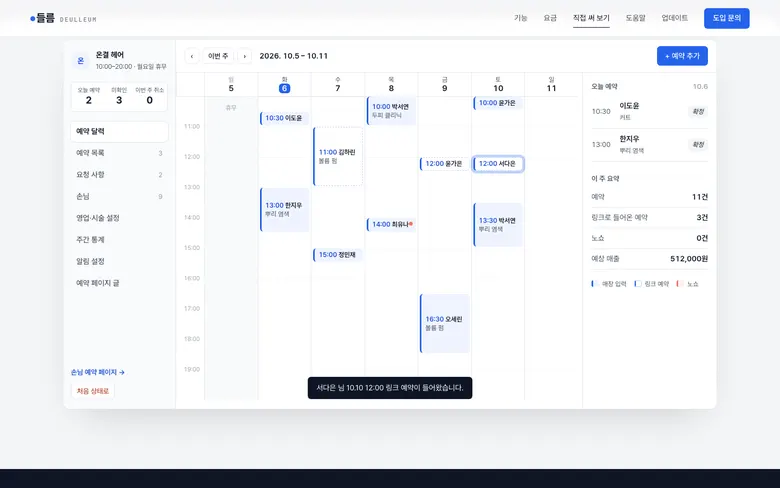
Pressing "View on the shop admin screen" on the confirmation opens the calendar on the week of that booking, where the link-booking block flashes its outline and a notice appears.
Customer booking — booking number
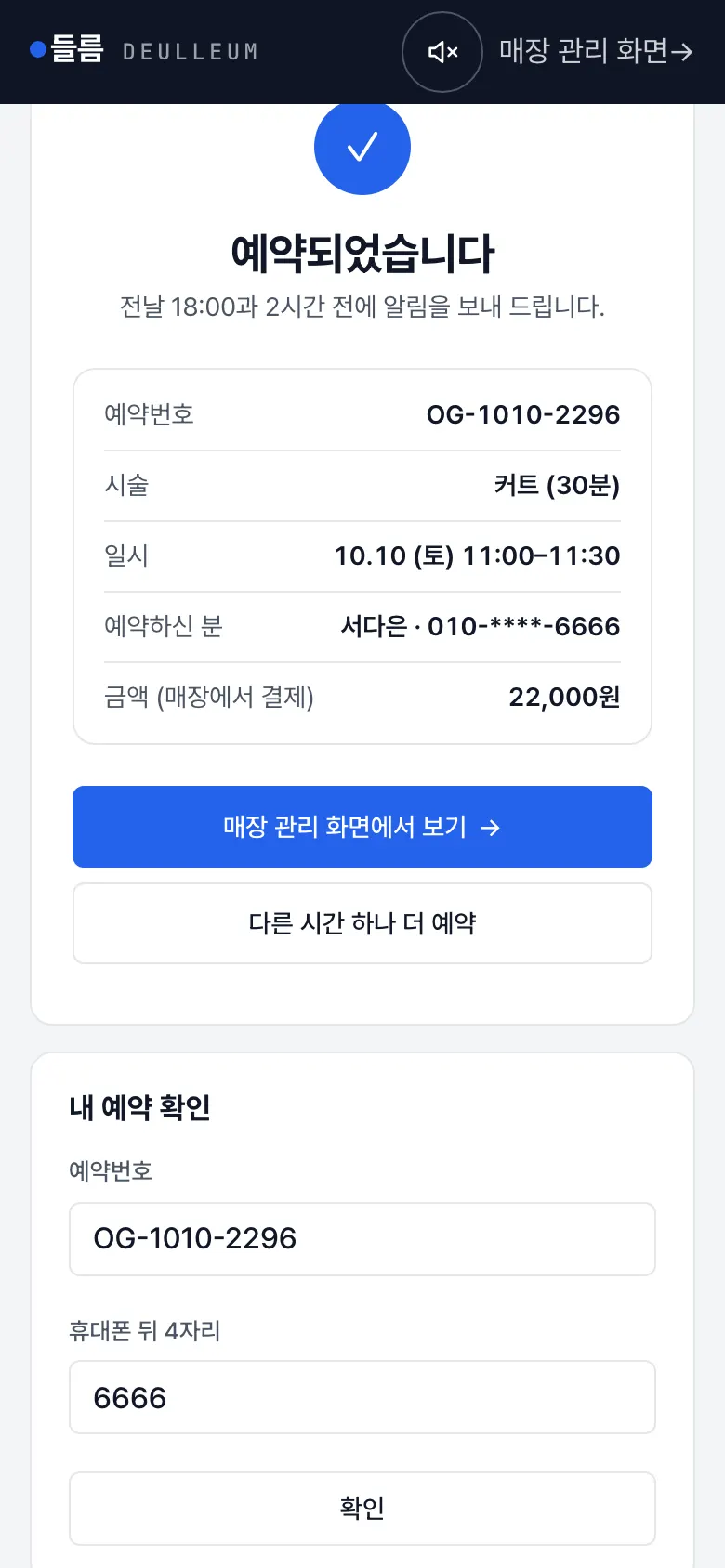
Without a name, mobile number and reminder consent, the reason appears under the field and the step does not move on. Right before booking, overlaps are checked once more, then an OG-date-4 digit number is made and saved and the customer record is updated.
Blocking overlapping bookings
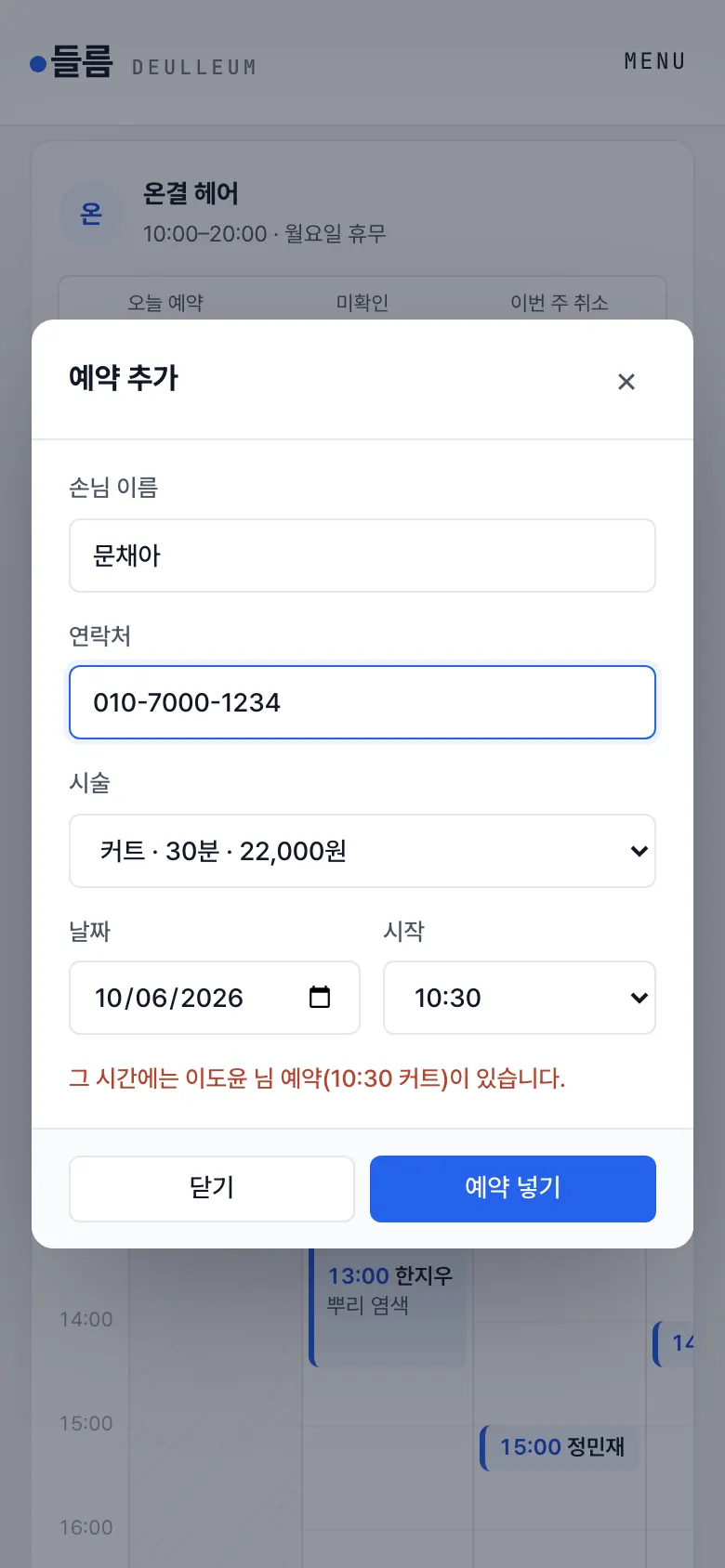
If service times overlap on the same day, the screen says "There is a booking for ○○ at that time (10:30 cut)" and does not save. The same rule applies when moving a booking.
Reminder settings · no-shows
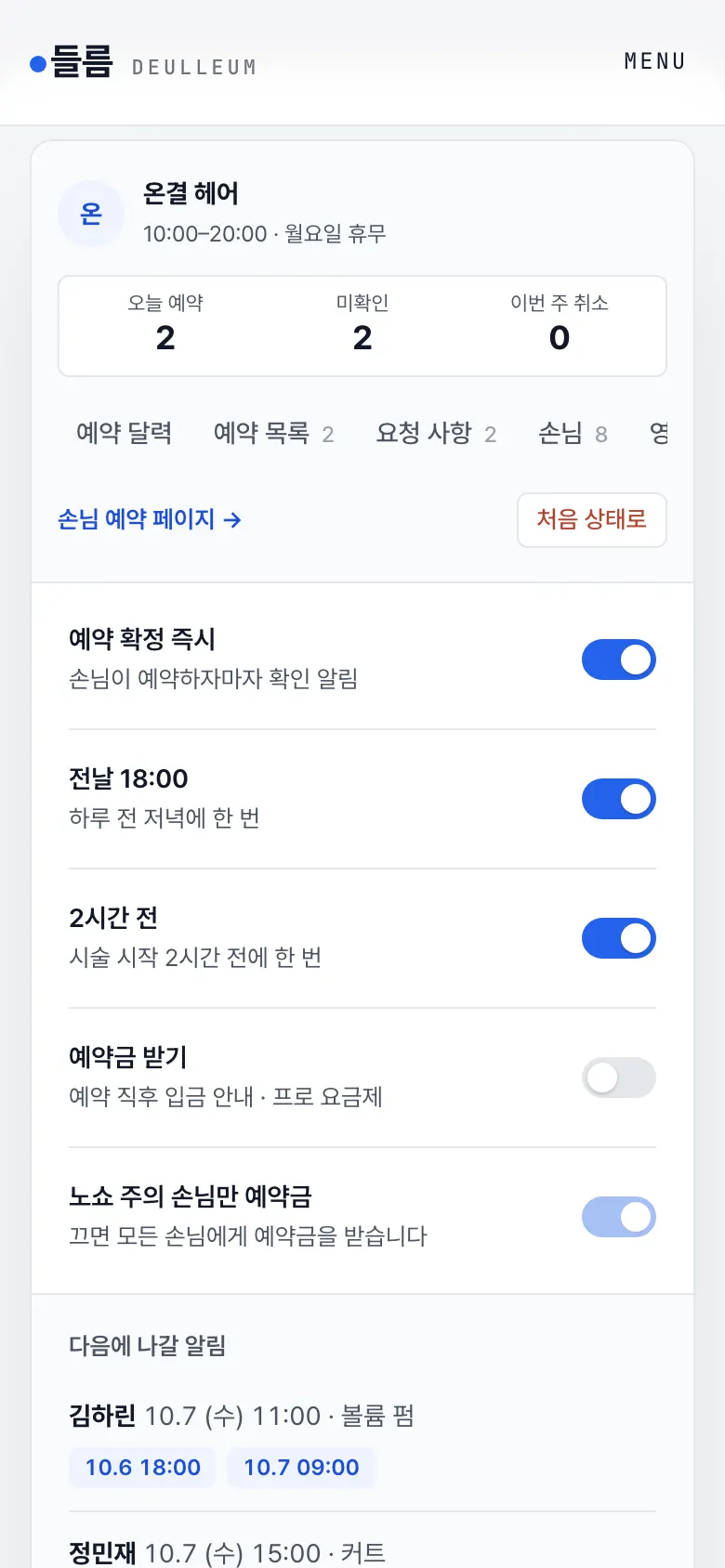
Immediate confirmation, 18:00 the day before, 2 hours before and deposit requests can be switched on and off. For every upcoming booking, the time each reminder goes out and whether a deposit applies are recalculated. "Mark no-show" in the booking window raises the customer's no-show count and adds a no-show flag from the second time, and "Reset to start" needs two presses to return to 10 bookings and 8 customers.
- Owner adminBookings from the customer booking page arrive as unconfirmed, and marking them as confirmed, visited, no-show or cancelled adds straight to the visit and no-show counts in the customer record. Replies to booking requests show in the customer’s "My booking", and changes to opening hours, temporary closures, blocked times, the daily booking limit, service prices and visibility, the shop intro, notice and booking policy update the customer booking page right away. In this case study the owner and customer screens share the browser’s storage; in a real rollout this becomes an owner login with server storage.
- Pricing calculatorEntering monthly bookings, reminder count, deposit use and billing cycle recommends the cheapest plan that meets the conditions, and the monthly amount counts up. Extra reminders cost 13 won each, annual billing is 10/12 of the base fee, and all three plans' amounts (or why one does not fit) are shown together. "Inquire with this plan" opens the inquiry form with that plan already chosen.
- Home product walkthroughAn admin screen built in HTML stays fixed on the right, and it works each time you scroll past one of the 4 feature names on the left. A booking block drops onto the calendar → a 2-hours-before reminder rises inside a phone frame → a no-show customer's block turns coral and requests a deposit → a customer card opens to show visit and service history. On phones, each feature gets one screen, stacked vertically.
- Customer booking — service and timeChoosing a service opens only start times with the whole service length free. Times already booked, times within the next hour today and Monday closures cannot be pressed.
- Adding a booking on the admin screenPressing an empty calendar slot opens a booking window with that date and time filled in. Saving puts the block on the calendar and updates the weekly summary (bookings, link bookings, expected sales).
- Customer search · no-shows · notesTyping part of a name or number narrows the list instantly. Turning on "No-show caution" adds a coral dot to that customer's bookings on the calendar, and notes are edited and saved in the row. Everything stays after a refresh.
- InquiryBusiness type, number of shops, current booking methods (several allowed), shop name, contact person, contact number and consent are required. The email format is checked only when one is entered, and a passing form gets a DL-date-number receipt number that is saved.
- FAQNine questions by topic — booking page, reminders, no-shows, pricing — open and close (keyboard works too).
- Phone menuPressing MENU opens a full-screen navy menu, and CLOSE or Esc closes it. The page behind stops scrolling while it is open.
5. Build Notes
Show details
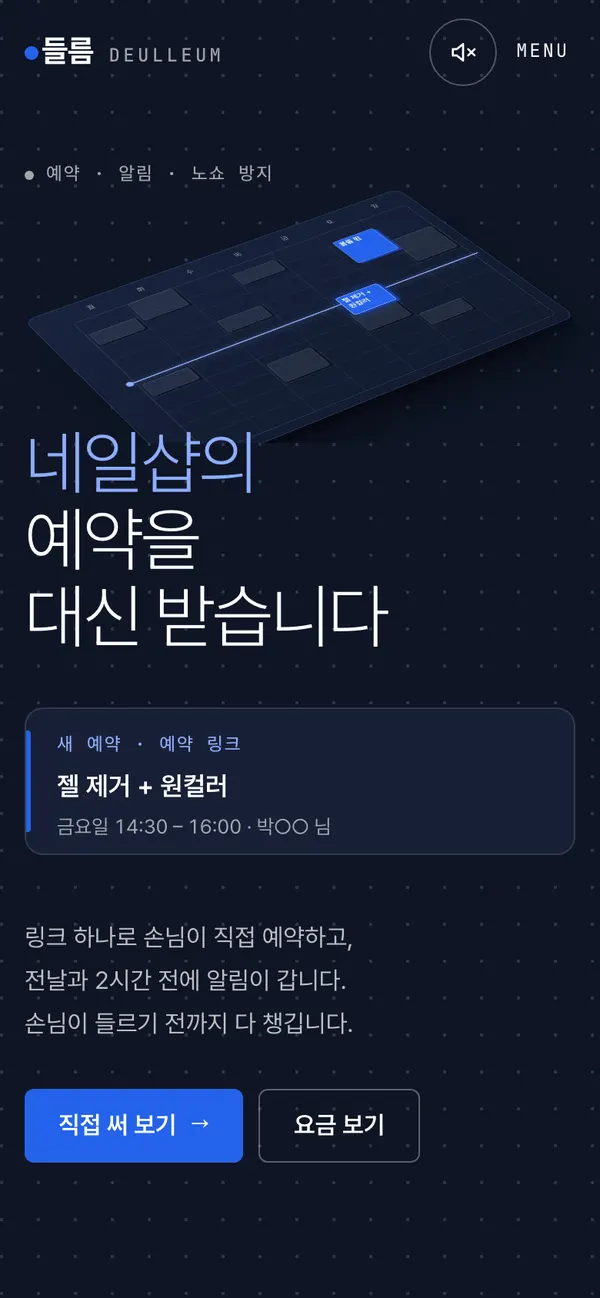
| Responsive | The layout is set for PC 1440, tablet (980 and below) and phone 390. Below 980px the home walkthrough switches from a pinned scene to one product screen per feature, the admin screen moves its menu to tabs on top, and the weekly calendar scrolls sideways. The pricing table scrolls sideways inside itself without making the page overflow. |
| Fonts | Korean in Pretendard variable weight (thin 250–300 for headings, 400 for body, 600–700 for emphasis), labels and numbers in JetBrains Mono capitals (all free open fonts). They are loaded from files on the site, with no external font requests. The Korean font is split into 92 character groups, and only the groups containing characters on that page are downloaded (15 groups, 396KB on a first phone visit to the home page). All numbers use tabular figures and are right-aligned. |
| Images | Product screens are admin screens built in HTML and CSS instead of photos (14px body text, 6 greys + blue #2563EB, 1px #E5E7EB borders, 6/12px corner radius, status badges on light backgrounds — blue for confirmed and link bookings, coral #F97362 for no-shows). There are 4 free real photos (drawing class, nail salon, pottery studio, appointment-only showroom; JPG 1,600px wide, 772KB in total), and the customer booking page header uses a shop mark instead of a photo. Phones get separate 800px-wide photos (4 files, 199KB in total), and photos outside the first screen load as they come into view. Every photo has its width and height set. First phone visit to the home page: 0.8MB. |
| Motion | The home walkthrough pins the admin screen on the right over a stretch 4.4 screens tall, picks one of 4 steps from the scroll position and runs CSS transitions for the block drop, phone rising, badge colour change and card opening (with reduce motion the steps still change, only instantly). The large first-screen word changes from "hair salon's → nail salon's → craft studio's → pilates studio's" from the bottom up, and the new-booking card beside it changes to the same business. Also: a dot grid on navy, a white panel with rounded top corners pushing up as you scroll, headings rising line by line, counting-up pricing results, and a short fade and lift between pages. |
| Accessibility | Skip-to-content link, image alt text, buttons as button and inputs with label. Admin tabs are a tablist (arrow-key navigation), toggles have the switch role and state, the booking window is a dialog (Esc closes it), and error messages are read by screen readers (aria-live). With the device's reduce-motion setting on, smooth scrolling, text entrances, word changes and transitions are all switched off and content shows at once. |
| Stack | HTML, CSS and JavaScript, GSAP 3.12 + ScrollTrigger, Lenis (smooth scrolling) — all bundled with the site, no external scripts. Pricing rules, the service list and overlap checks live in one shared data file used by both the customer booking page and the admin screen. Storage goes through one function wrapping localStorage in try/catch (prefix deulleum.). |
6. QA
These results come from running all 9 pages on PC 1440 and phone 390 screens and tapping through in the order a real person would. We also checked that a booking saved on the customer page appears on the admin calendar, and that moves, cancellations and customer notes stay after a refresh. External requests and broken links: 0. (2026-10-03)
| Item | PC 1440 | Phone 390 |
|---|---|---|
| Screen errors | 0 | 0 |
| Broken files | 0 | 0 |
| Horizontal overflow | 0 | 0 |
| Function tests | 14 / 14 passed | 14 / 14 passed |
Function tests: 14 on PC · 14 on phones (pinned home walkthrough and reduce motion on PC; phone menu and per-feature screens on phones): 4-step home walkthrough (PC) · per-feature product screens (phone) · phone menu (phone) · page transition · pricing calculator · customer booking required fields, booking number and taken times · customer booking → appears on the admin calendar · admin add and overlap block · move, cancel and keep after refresh · customer search, no-show flag and notes · no-show handling and reminder settings saved · reset to start · inquiry · FAQ · 404 · reduce motion (PC)
Speed and quality scores (out of 100, measured on the public site on 2026-10-03; phone on a slow connection, median of three runs; PC on PC settings)
| Performance | Accessibility | Best practices | SEO | |
|---|---|---|---|---|
| Phone | 100 | 94 | 100 | 66 |
| PC | 100 | 95 | 100 | 66 |
Phone: first paint 1.2 s · largest element 1.2 s · layout shift 0 · input blocking 10 ms PC: first paint 0.3 s · largest element 0.3 s · layout shift 0 · input blocking 0 ms
The SEO score is low because the live demos are deliberately kept out of search results.
7. Result
Try it live ↗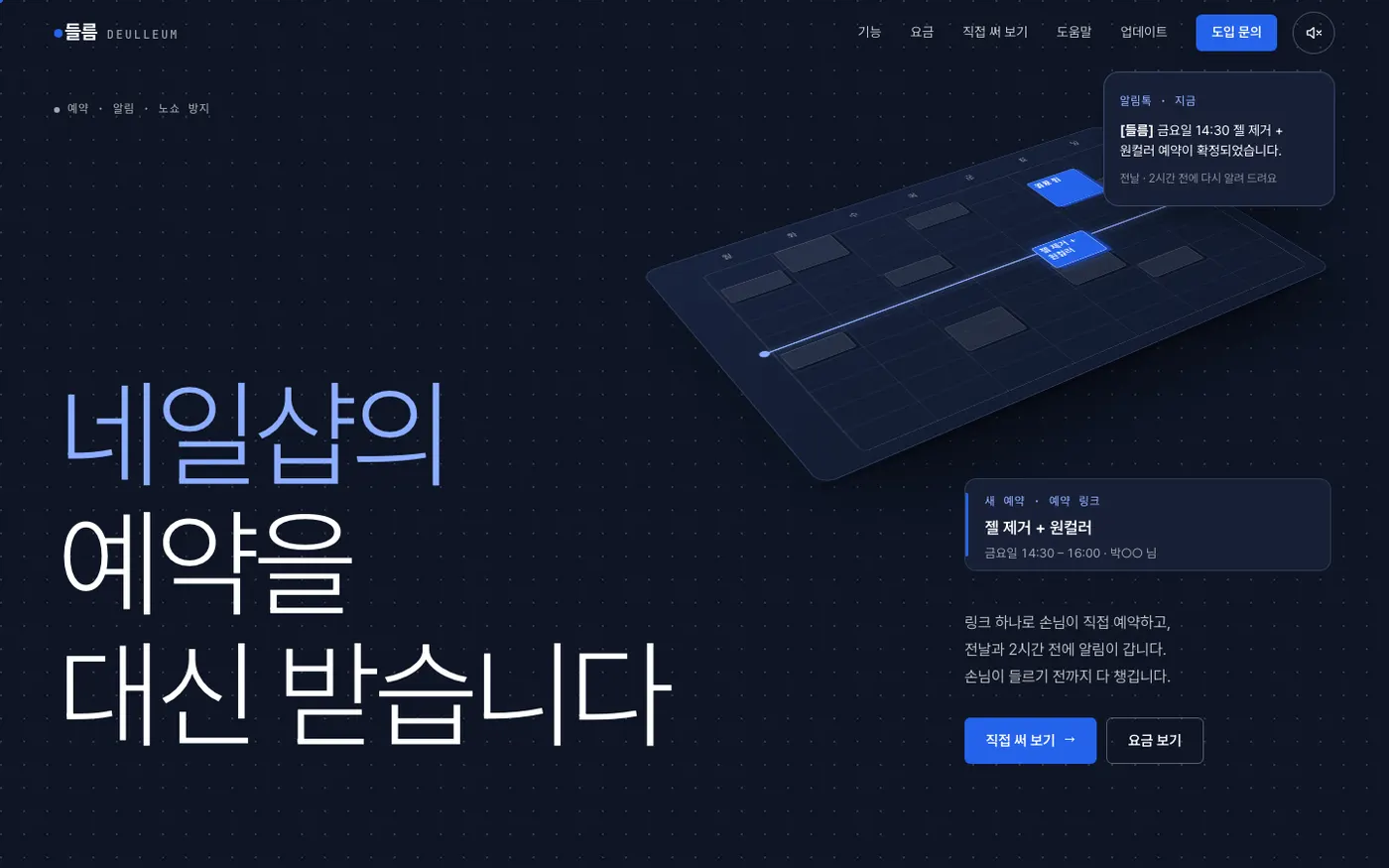
Privacy Policy