1. Overview
| Industry | A B2B sales team supplying consumables to factories and distribution centers (3 reps) |
| Purpose | Bring accounts and deal progress scattered across spreadsheets and messengers onto one screen, so no one misses who should contact whom, and when |
| Scope | 4 pages · 8 screens · 5 sales stages + on hold / lost |
| Main flow | Register deal → Move stage → Contact log and next follow-up date → Won or on hold (with reason) / Check follow-ups / Import account list file → Filter → Download CSV / Status by rep |
Deals, stage changes, contact logs, next follow-up dates, on-hold reasons and the current viewer are saved in the browser. They stay after a refresh or a return visit.
Connected at rollout: server storage and login so several people share the same data, email and text sending, click-to-call, and calendar sync. At rollout these are connected to the company's server and accounts.
2. Challenges
1. Progress lives only in each rep's head.
If you have to ask where each account stands, meetings run long. Deals should be visible by stage at a glance, with amounts totaled per stage.
2. Follow-up dates get missed.
"I'll get back to you next week" is the promise that slips most often. The next follow-up date should be set when a log is written, and overdue or upcoming follow-ups should be gathered in one place.
3. Existing account lists are hard to bring in.
Most teams already keep their account list in Excel. It should import in one go, while filtering out bad rows and deals that already exist.
3. Structure
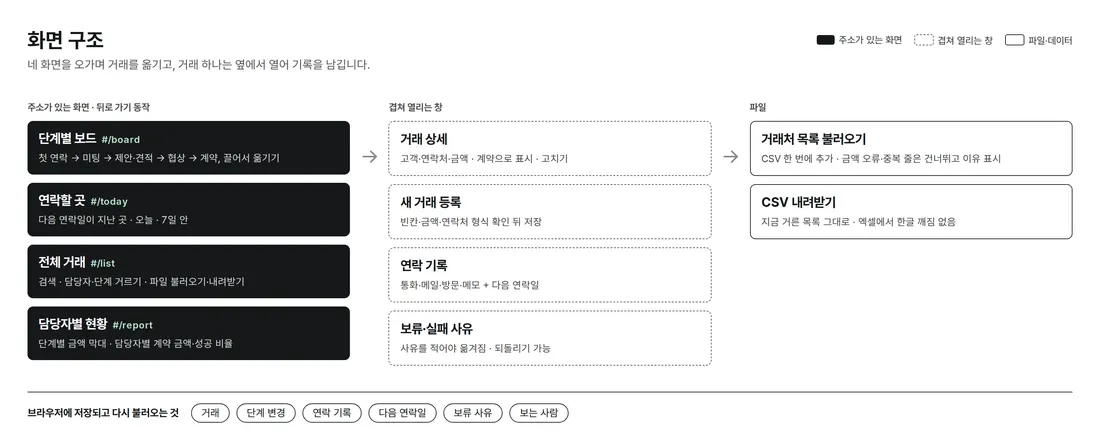
Board, follow-ups, all deals and status each have their own URL, so the back button works. Clicking a deal opens its detail on the side, where logging, stage changes and edits are all done in place.
4. Key Features
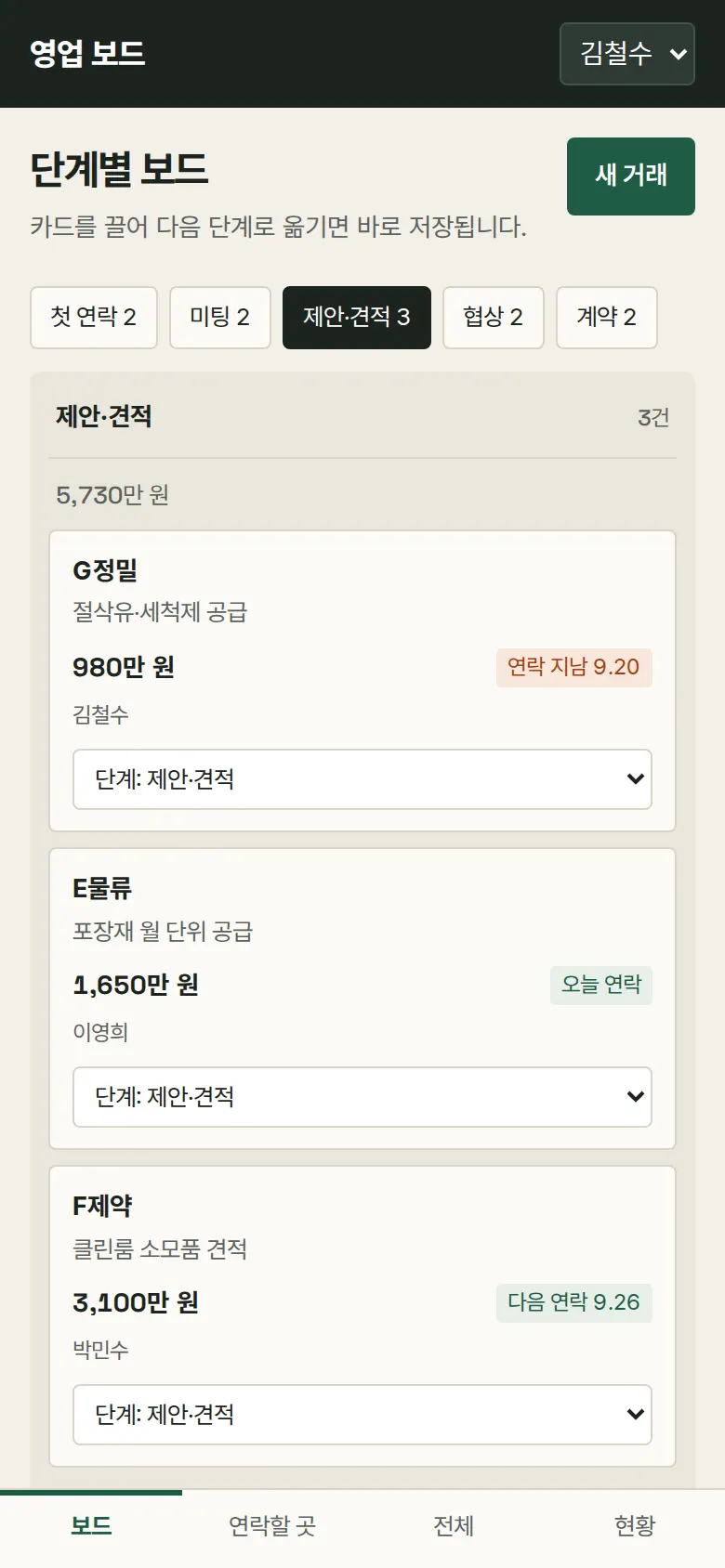
Stage Board — Drag to Move
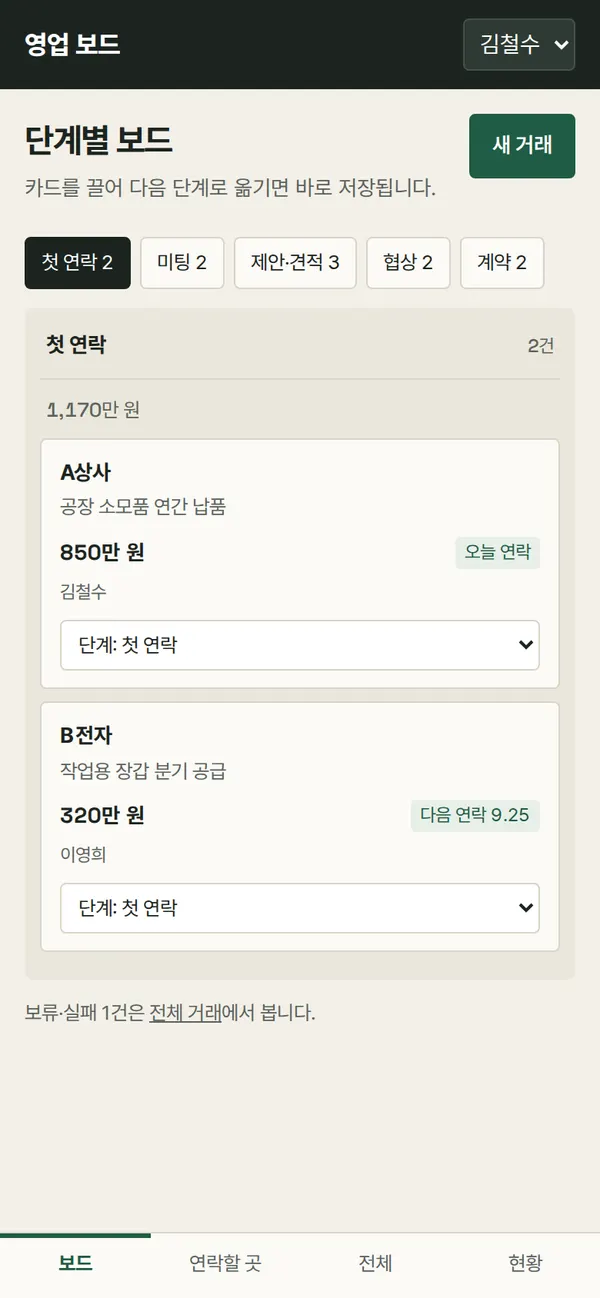
Deal cards sit in five columns: first contact, meeting, proposal/quote, negotiation and won. Each column shows the deal count and total amount. On PC, dragging a card to another column saves it. On mobile, you pick a stage to view one column at a time and move cards with the list under each card.
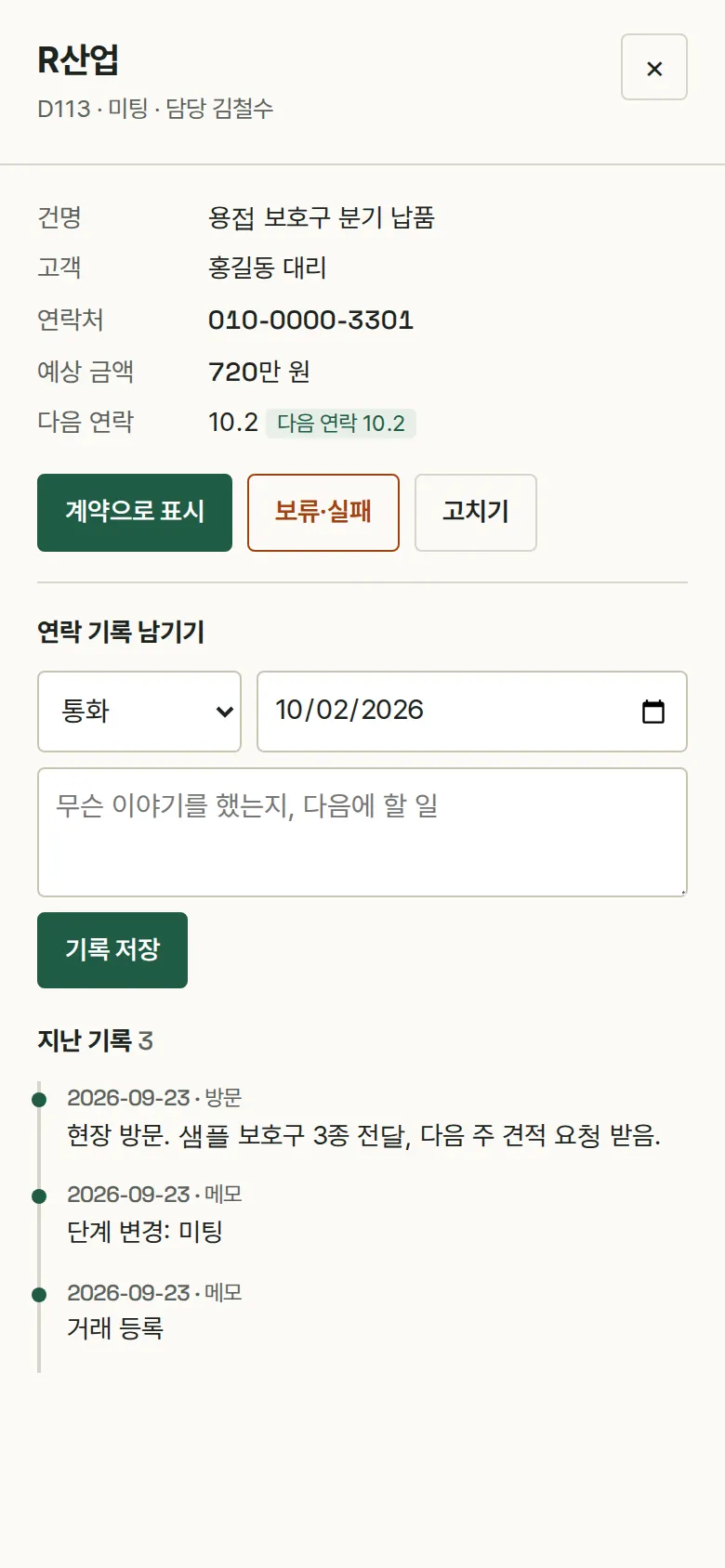
Contact Log and Next Follow-Up Date
Choose call, email, visit or note and write the details. Logs stack under the deal, newest first. The next follow-up date is set with each log, and cards are marked "Contact today" or "Follow-up overdue."

Follow-Ups
Shows overdue follow-ups, today's, and those coming up within 7 days, in separate groups. The number next to the menu is the count of deals to contact by today.

Account List Import
Upload a CSV saved from Excel and deals are added in one go. Rows where the amount is not a number, and deals that already exist, are skipped, with a note saying which row was left out and why.
- New Deal RegistrationIf the account, deal name or amount is empty, the amount is not a number, or the contact format is wrong, each field is marked and explained in a sentence. The rep field is pre-filled with the current viewer.
- On Hold / Lost and ReopenMoving a deal to on hold or lost requires a reason before it saves. The reason stays in the detail and in all deals, and the deal can be moved back to in progress when it picks up again.
- All Deals — Search, Filter, CSV DownloadSearch by account, customer name or deal name, and filter by rep and stage. The filtered list downloads as a CSV exactly as shown, and Korean text does not break when opened in Excel.
- Status by RepShows open deal amounts per stage as bars, and each rep's open deals, won amount and win rate in a table. Calculated on the spot from the saved deals.
5. Build Notes
Show details
| Responsive | Layout changes at 1100px and 760px. On PC there is a black menu bar at the top and five colored stage columns; below 1100px, three columns; below 760px, a title bar at the top and a menu bar at the bottom, and the board shows one stage at a time. Tables turn into one card per row on mobile. |
| Fonts | Headings in Black Han Sans, amounts and numbers in Oswald, body in Pretendard (all free, open fonts). Hosted with the site, so no external requests, and subset to only the characters used on these screens (headings 30KB · numbers 14KB · body 85KB). |
| Images | No photos, only interface elements. Each stage has one color (first contact blue · meeting green · proposal/quote yellow · negotiation orange · won black), used the same way on column headers, card side stripes and stage labels in tables. Total transfer is about 166KB including fonts. |
| Motion | Built with the browser's native drag and drop and CSS transitions, no libraries. The detail panel slides in from the side, and transitions stop when the device's reduce-motion setting is on. |
| Accessibility | Every input has a label, and errors are shown with both a border and a sentence. List rows can be selected with the keyboard and opened with Enter, and Esc closes the panel. A stage select list is provided alongside drag and drop for those who cannot drag. Accessibility score 100. |
| Technology | HTML, CSS and JavaScript (no external libraries). Data is saved to and read back from browser storage (localStorage). CSV reading and writing are built in-house and handle fields containing quotes and commas. Screens are split by URL (#/board etc.) so the back button works. |
6. QA
Results from opening the site on PC 1440 and mobile 390 screens and clicking through in the order a real user would. We also checked that saved data is still there after a refresh. (2026-09-23) The same tests were also run on the Safari engine (WebKit) at PC and mobile sizes: 0 screen errors, all functions passed.
| Item | PC 1440 | Mobile 390 |
|---|---|---|
| Screen errors | 0 | 0 |
| Broken files | 0 | 0 |
| Horizontal overflow / clipped text | 0 | 0 |
| Function tests | 13 / 13 passed | 13 / 13 passed |
The 13 function tests: stage board display · new deal registration (saved after empty-field and amount checks) · moving stages (drag and drop on PC, stage select on mobile) · contact log and next follow-up date · on-hold / lost reason check and reopening · deals and logs kept after refresh, and Esc to close · follow-up groups · search, rep and stage filters · account list import (bad rows skipped) · CSV download content check · status by rep calculation · switching viewer is saved · back button
Speed & quality scores (out of 100; mobile measured three times on a slow connection)
| Performance | Accessibility | Best Practices | SEO | |
|---|---|---|---|---|
| Mobile | 99–100 | 100 | 100 | 100 |
| PC | 100 | 100 | 100 | 100 |
Mobile: First Contentful Paint 1.1s · Largest Contentful Paint 1.8s · Layout shift 0 · Blocking time 0–10ms PC: First Contentful Paint 0.3s · Largest Contentful Paint 0.4s · Layout shift 0 · Blocking time 0ms
7. Result
Try it live ↗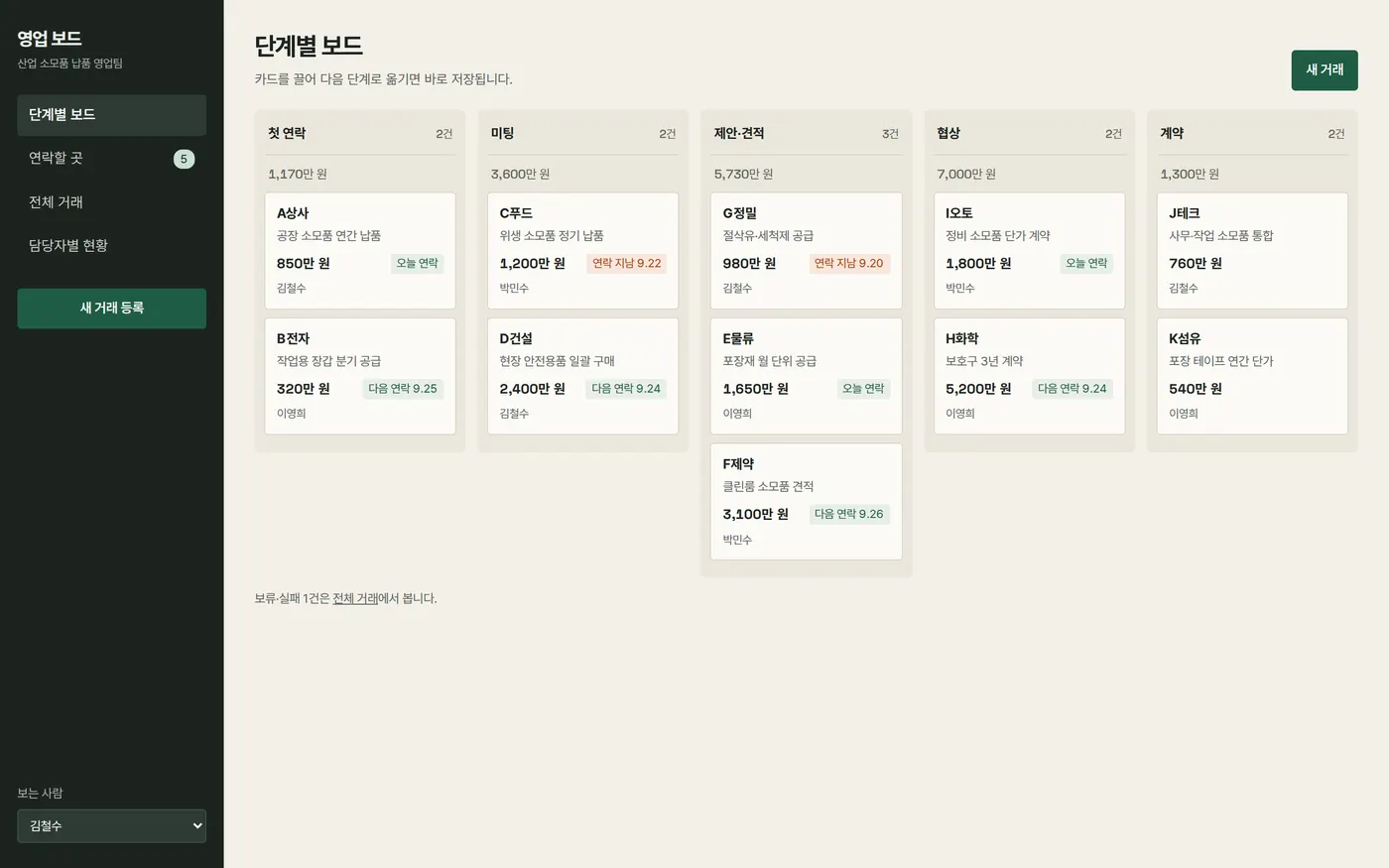
Privacy Policy