1. Overview
| Industry | A retailer that gathers online store, marketplace and in-store sales into one file and reports sales every month |
| Site goal | A work tool that replaces rebuilding the monthly report with pivots and charts from the sales Excel file with a single upload |
| Scope | 3 screens (create · saved reports · single report) · 1 sample Excel file (July–August, 538 rows, 2 sheets) |
| Main flows | Upload Excel → choose sheet and month → review report → add notes → save → open saved report → CSV or print |
Uploaded files, column matches, the chosen month, monthly notes and saved reports are saved in the browser. They stay in place after a refresh or a return visit. Uploaded files are read only inside this browser and are never sent anywhere.
Connected at rollout: automatic collection of store and marketplace sales data, Excel (xlsx) export (currently CSV download), emailing reports, server storage for shared team use.
2. Challenges
1. The same calculation is redone by hand every month.
Removing cancellations and refunds from the sales log and splitting by channel and product means rebuilding the pivots every month.
2. Odd rows in the file throw off the totals.
3. A report needs a comparison with last month.
A single number doesn't say whether it's good or bad. Month-over-month change and the daily trend should be visible on one page.
3. Structure
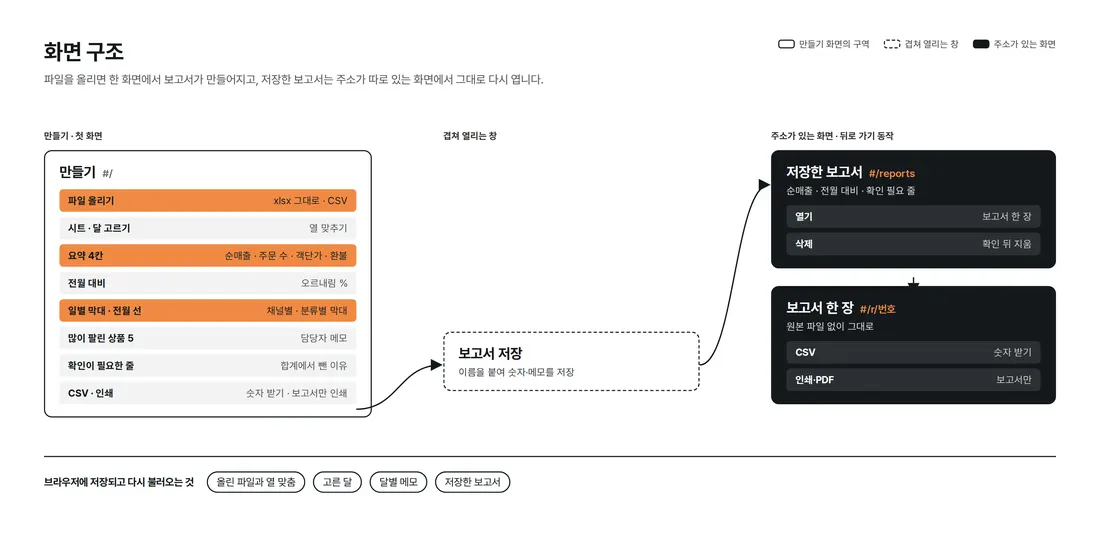
The report is created as soon as a file is uploaded, in one place on the first screen. Saved reports and the single report view have their own addresses, so they reopen even without the original file.
4. Key Features
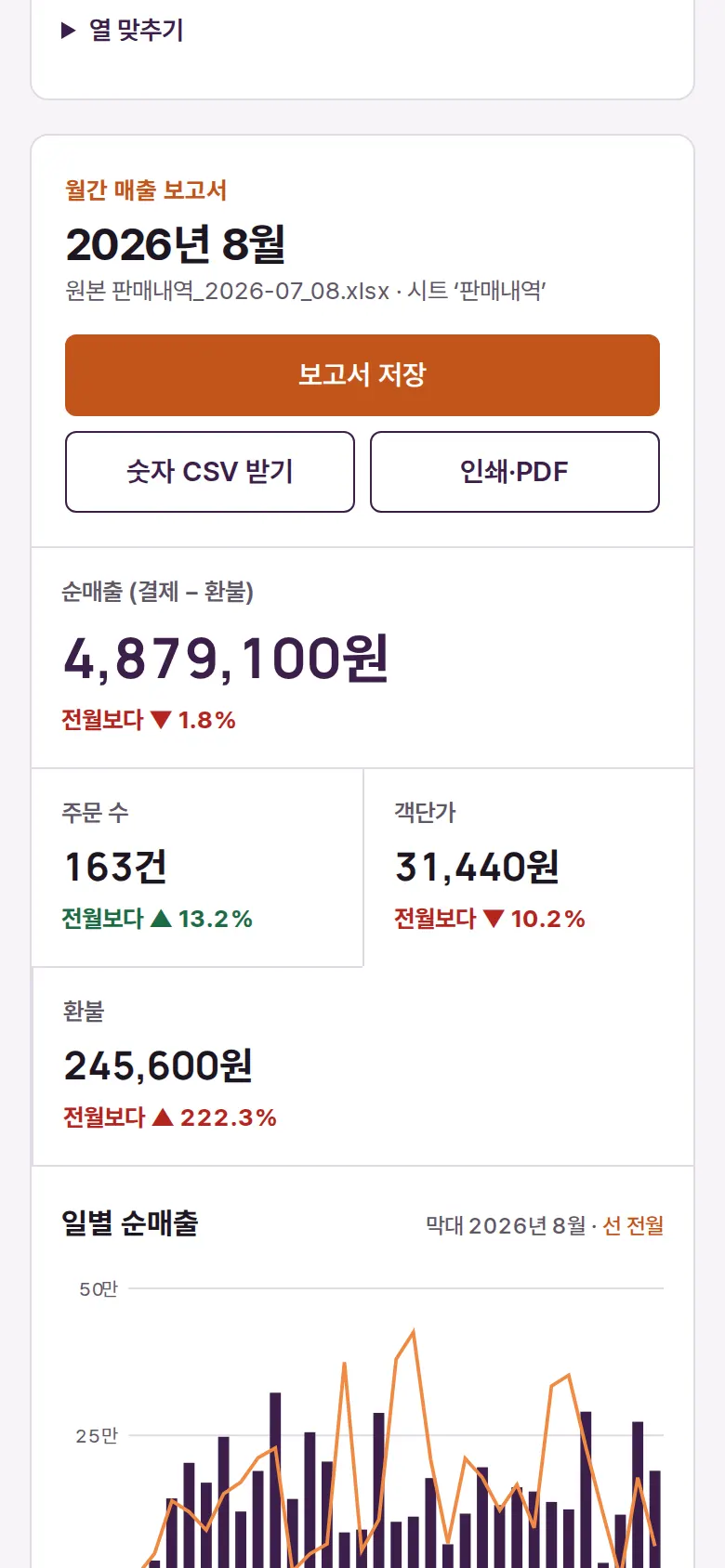
Build a report straight from Excel
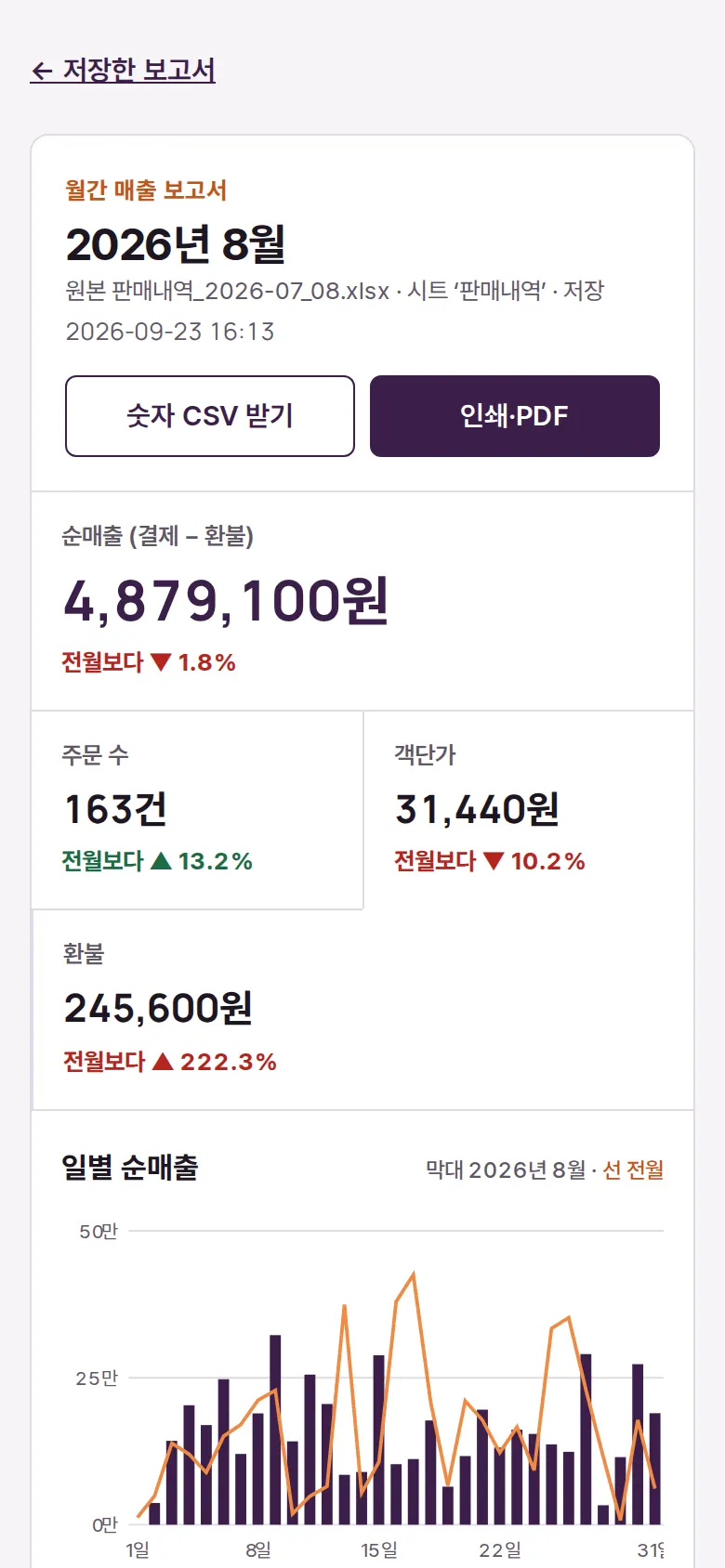
The xlsx file is unpacked and read directly in the browser, and the sheet with sales rows is picked. Four figures — net sales (payments − refunds), order count, average order value and refunds — each show the change from the previous month.
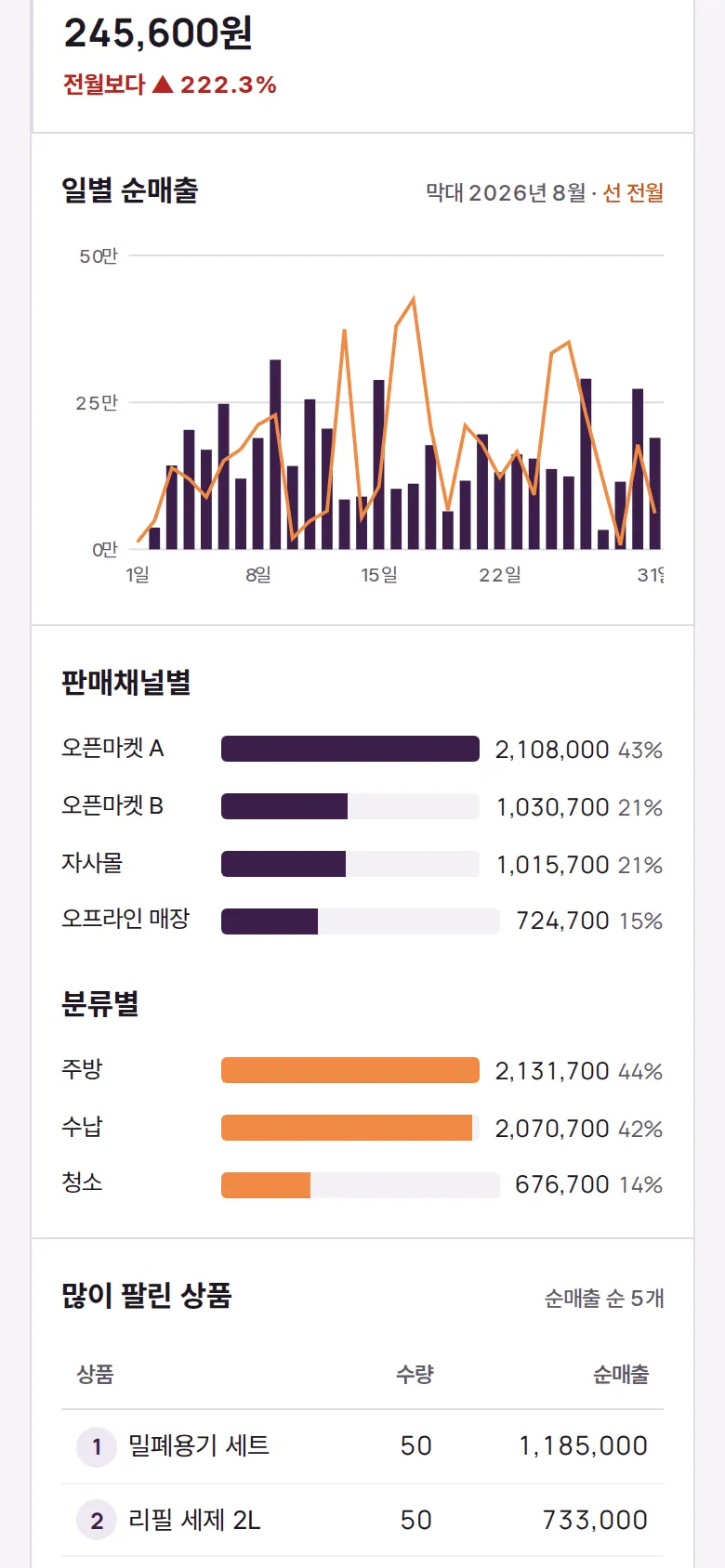
Charts by day, channel and category
Daily net sales bars are overlaid with a line for the previous month to compare the trend. Bars by sales channel and by category show their share (%), and the top 5 products are listed in a table.
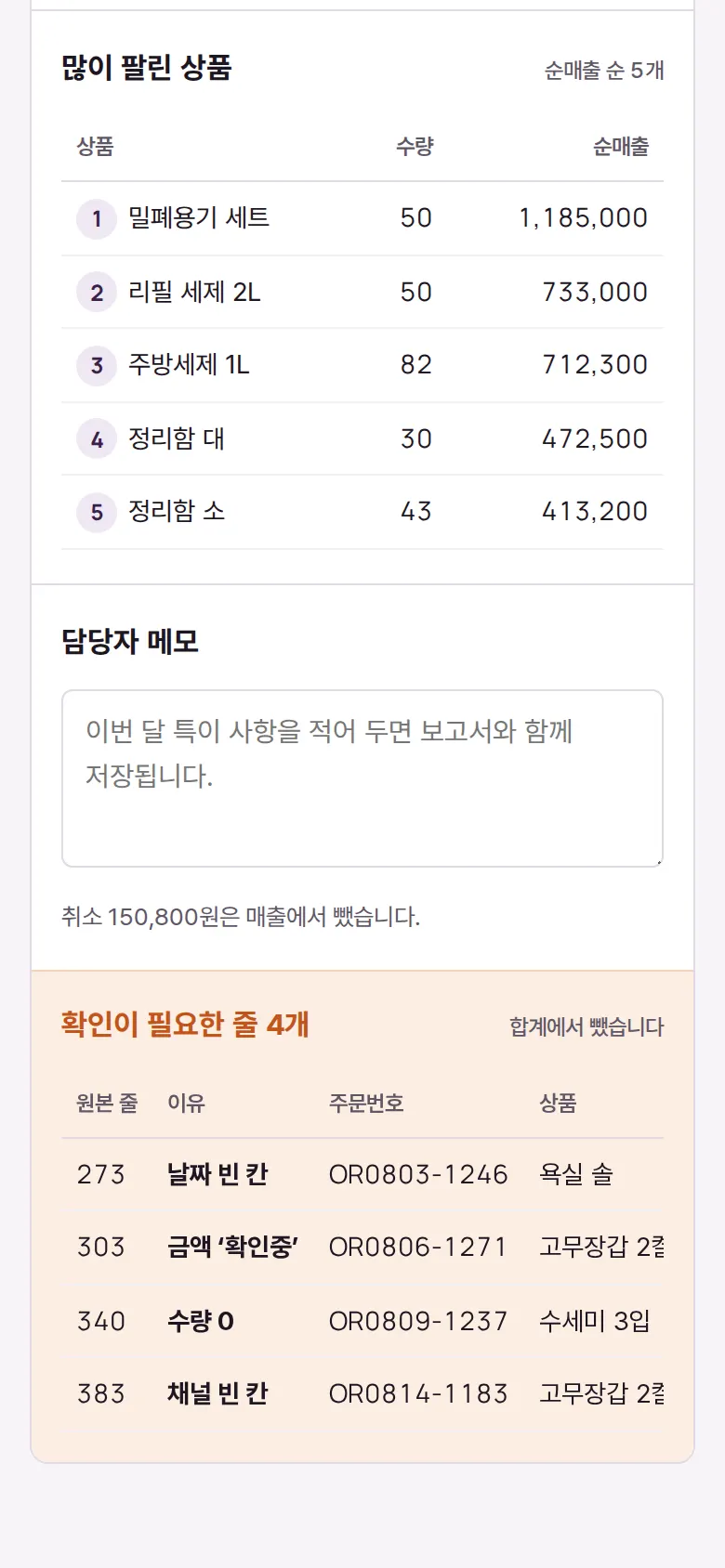
Rows that need checking
Rows with a blank date, letters in the amount, zero quantity or a blank channel are left out of the totals, and the original row number and the reason are listed below the report. Dates written as text (2026.08.14) are read and used.
Saved reports
Saved together with the staff note, a report reopens with the numbers exactly as they were when saved. Each report's numbers can be downloaded as CSV, and printing shows only the report, without the header or buttons.
- Change sheet, month and columnsWith several sheets, the one with sales rows is chosen first; changing the month recalculates with that month and the one before. If column names differ, they can be chosen by hand in column matching. CSV files (including EUC-KR) are read the same way.
5. Build Notes
Show details
| Responsive | Layout changes at 900 and 640px. On PC, an A4-width page holds a large net-sales headline, three metrics, and charts and rankings in 2 columns. Below 900px: 1 column. Below 640px: charts are redrawn to phone width and buttons wrap onto two lines. When printing, only the report page remains. |
| Fonts | Styled like a business newspaper page — Black Han Sans for headings and large numbers, Noto Serif KR for body, Libre Caslon Text for table numbers (all free, open fonts). Bundled with the site, so no external requests. The Korean fonts first load only the characters used on this screen (86KB, headings 26KB); Korean characters that appear only in a user's uploaded file are fetched when needed from a separate 2,350-character file (280KB). Number font 49KB. |
| Images | Built without photos. Icons are drawn in SVG and stay sharp on any screen. Charts are also SVG drawn directly from the computed values. |
| Motion | CSS transitions only, no libraries. Kept to notices sliding up from the bottom; with reduced motion turned on in the device, transitions stop. |
| Accessibility | Every input has a name, and main buttons are 44px tall for easy tapping. Status is shown with both color and text, and notices are marked for screen readers. Buttons and inputs also work by keyboard. Accessibility score 100 on mobile · 100 on PC. |
| Tech | HTML, CSS, JavaScript (no external libraries). 68KB for screens and scripts combined. Files are opened with the browser's file reader, and EUC-KR files saved from Excel are detected and re-read in the right encoding. Results are saved to and read from browser storage (localStorage), and downloaded CSVs open directly in Excel. Screens use separate addresses (#/…), so back navigation works. xlsx files are unpacked with the browser's built-in decompression and read directly. |
6. QA
These are results from running the tool on PC 1440 and mobile 390 screens and tapping through in the order a real user would. We also checked that saved data is still found after a refresh. (2026-09-23)
| Item | PC 1440 | Mobile 390 |
|---|---|---|
| Screen errors | 0 | 0 |
| Broken files | 0 | 0 |
| Horizontal overflow · clipped text | 0 | 0 |
| Function tests | 16 / 16 passed | 16 / 16 passed |
The 16 function tests: build a report straight from the sample Excel (xlsx) · month-over-month display · read dates written as text (2026.08.14) and leave 4 odd rows out of the totals · charts: 31 daily bars + previous-month line · change month (July) · change sheet and columns (removing the status column counts refunds as sales) · write a note → kept after refresh · download numbers as CSV · print view (header and buttons hidden) · save report → saved reports · open saved report after refresh · saved report CSV · back navigation · your own CSV (EUC-KR, different column names) · read your own xlsx · delete a saved report
Speed and quality scores (out of 100; mobile measured three times on a slow connection, median shown)
| Performance | Accessibility | Best Practices | SEO | |
|---|---|---|---|---|
| Mobile | 99 | 100 | 100 | 100 |
| PC | 100 | 100 | 100 | 100 |
Mobile: First Contentful Paint 1.5s · Largest Contentful Paint 1.8s · Layout shift 0.00 · Blocking time 0ms PC: First Contentful Paint 0.4s · Largest Contentful Paint 0.4s · Layout shift 0 · Blocking time 0ms
7. Result
Try it live ↗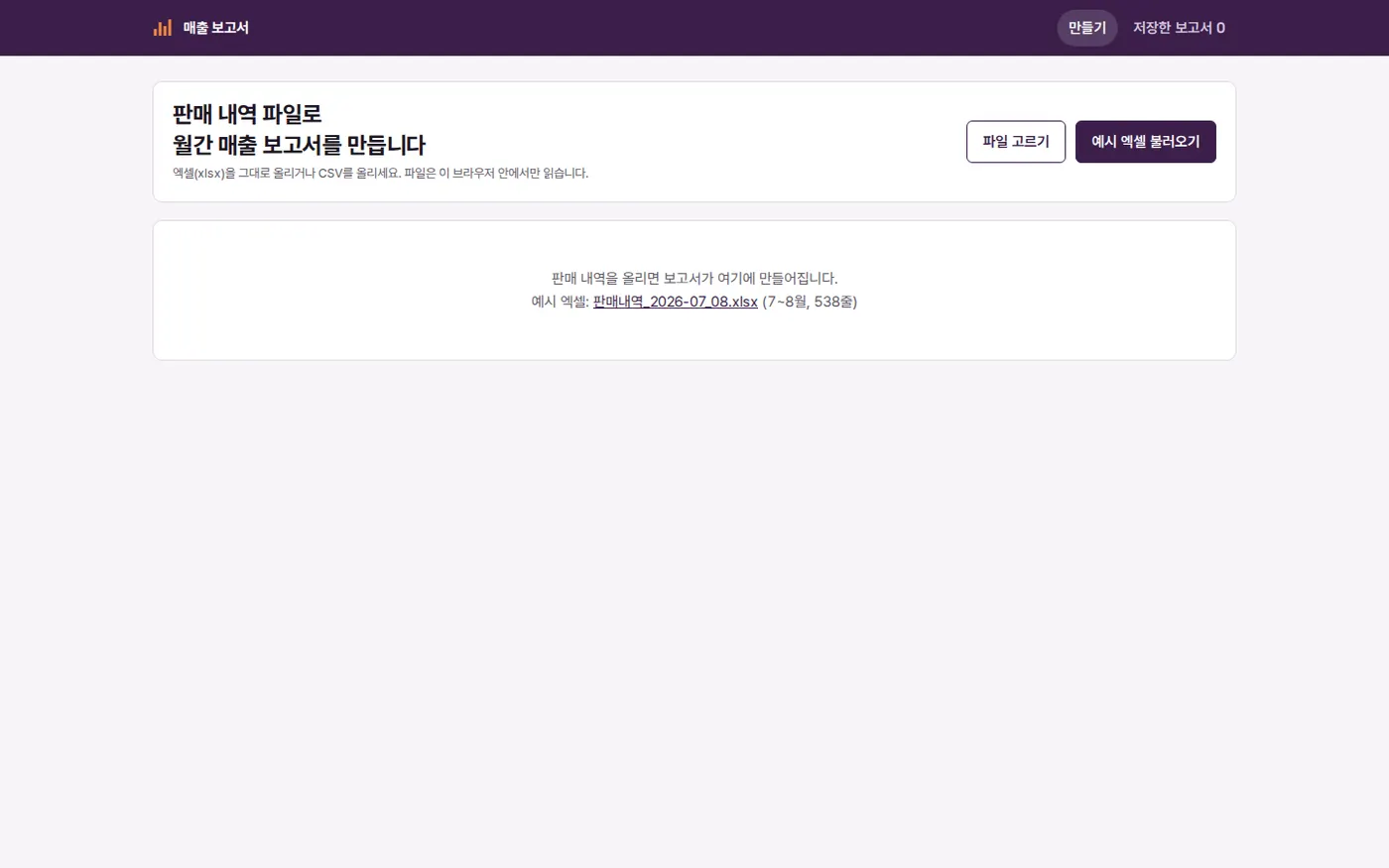

Privacy Policy