1. Overview
| Industry | Online sellers selling across several channels, such as open marketplaces, their own store, and live commerce |
| Purpose | A checking tool that pulls only the orders a person must follow up from the order file, sorts them into four types, and keeps a status and memo for each order |
| Scope | 1 main screen · 1 order detail panel · 4 issue types (unshipped · missing tracking · delayed return · pending refund) · 33 sample orders (4 channels) |
| Main flow | Load order file → set reference date and day thresholds → check the four lanes → open an order → save status and memo → issue list CSV |
The order file, reference date, channel and day thresholds, and each order's status, memo, and history are saved in the browser. They stay in place after a refresh or a later visit.
Connected at rollout: automatic sync with sales channels and courier software, tracking lookup, sending texts or notifications to customers, issuing refunds, and server storage for sharing the same records across devices.
2. Challenges
1. Problem orders are buried among all orders.
Most orders in a day ship without trouble. Only a few have problems, yet finding them means scanning the full list every day. Only the orders to follow up should remain.
2. "How many days has it been" is counted differently.
Shipping is counted in business days, excluding weekends; returns and refunds in calendar days. Thresholds also differ by seller. You need to view the list while changing the reference date and number of days.
3. No record of who handled what, and how far.
If whether the courier was called or the warehouse is checking only goes back and forth in a messenger, the next person does the same work again. Each order needs its status, memo, and change history.
3. Structure
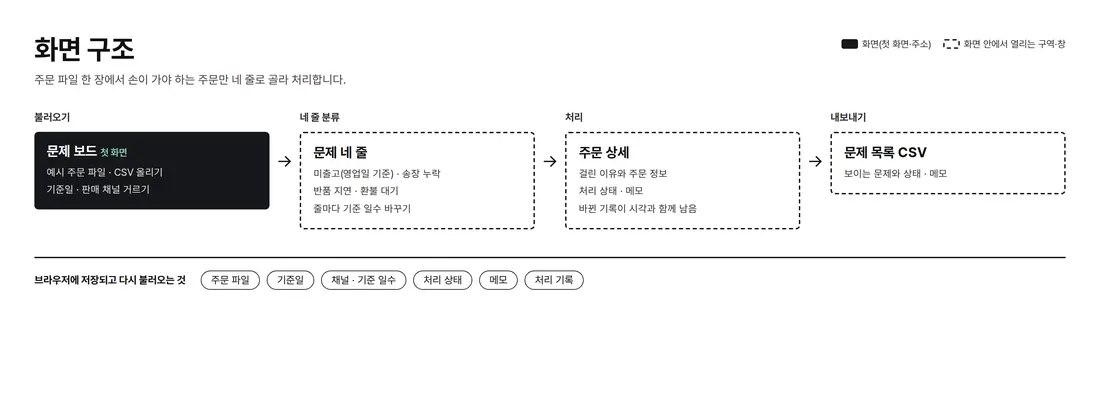
Everything happens on one screen. Pick the file, reference date, and channel at the top; problem orders sit in four lanes in the middle, oldest first. Tap an order and a detail panel opens beside it to show the reason and record the status and memo.
4. Key Features
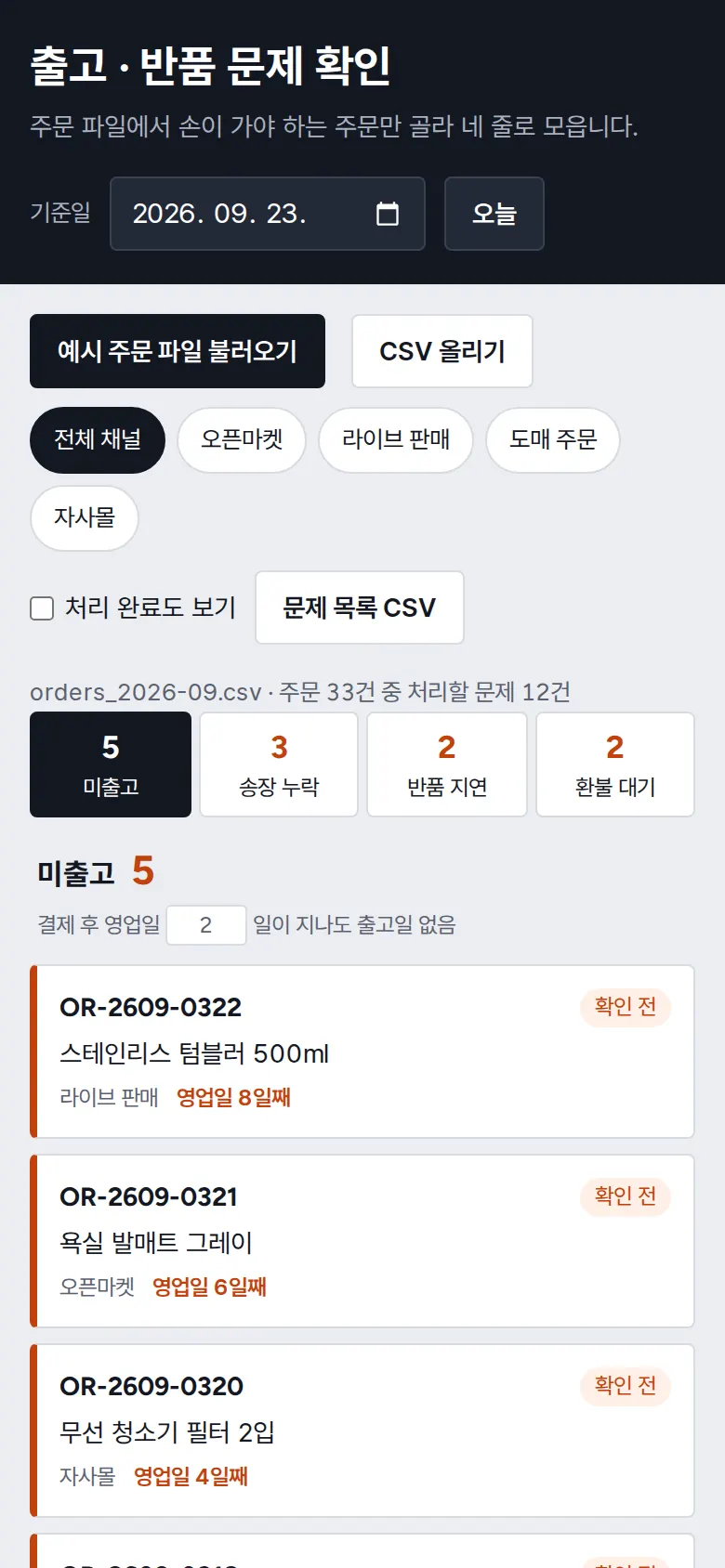
Sorting Problem Orders into Four Lanes
Of 33 orders, only the 12 that need attention are sorted: unshipped 5 · missing tracking 3 · delayed return 2 · pending refund 2. Unshipped is counted in business days after payment (weekends excluded), returns and refunds in calendar days, and canceled orders are left out. Change a lane's day threshold and the orders re-sort at once.
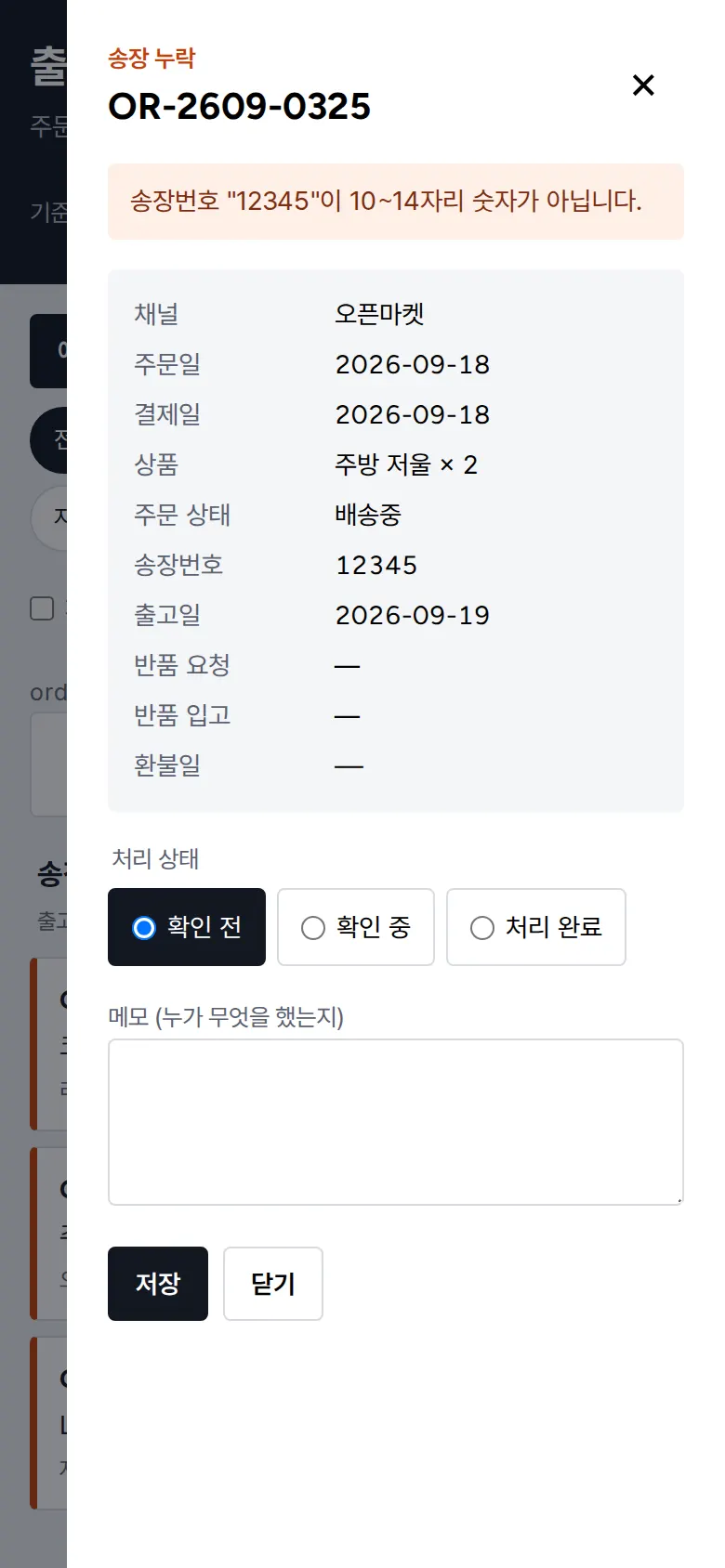
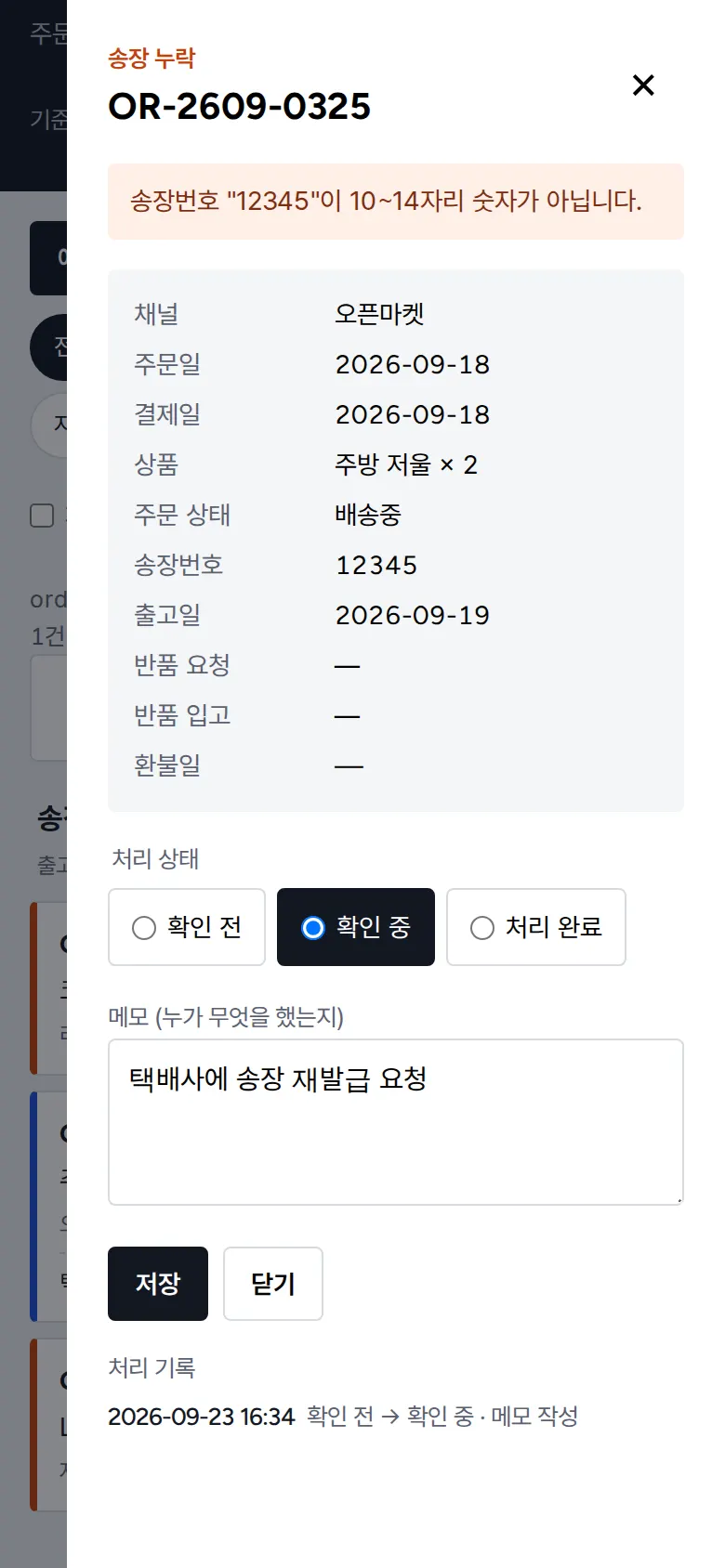
Open an Order to See the Reason
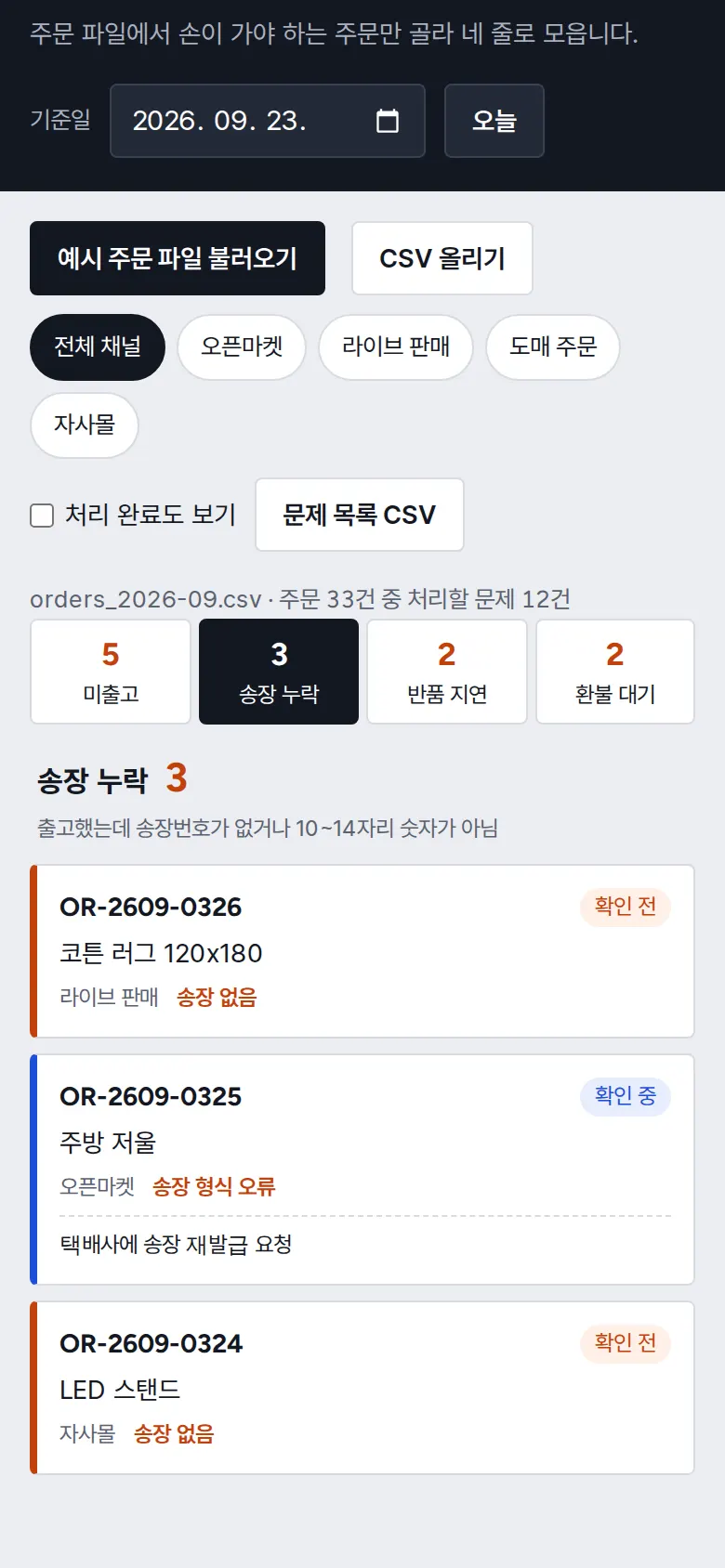
Status and Memo
Choose Not checked → Checking → Done and add a memo; it shows on the card right away. Done orders drop off the list and reappear when "Show done" is turned on.
Handling History
Every status change or memo edit adds a record with the time and a change such as "Not checked → Checking". It stays after a refresh or when reopened the next day.
- Filter by Sales ChannelTap open marketplace, live commerce, wholesale orders, or own store to see only that channel's orders, and the issue list CSV downloads the visible orders with their status and memo.
5. Build Notes
Show details
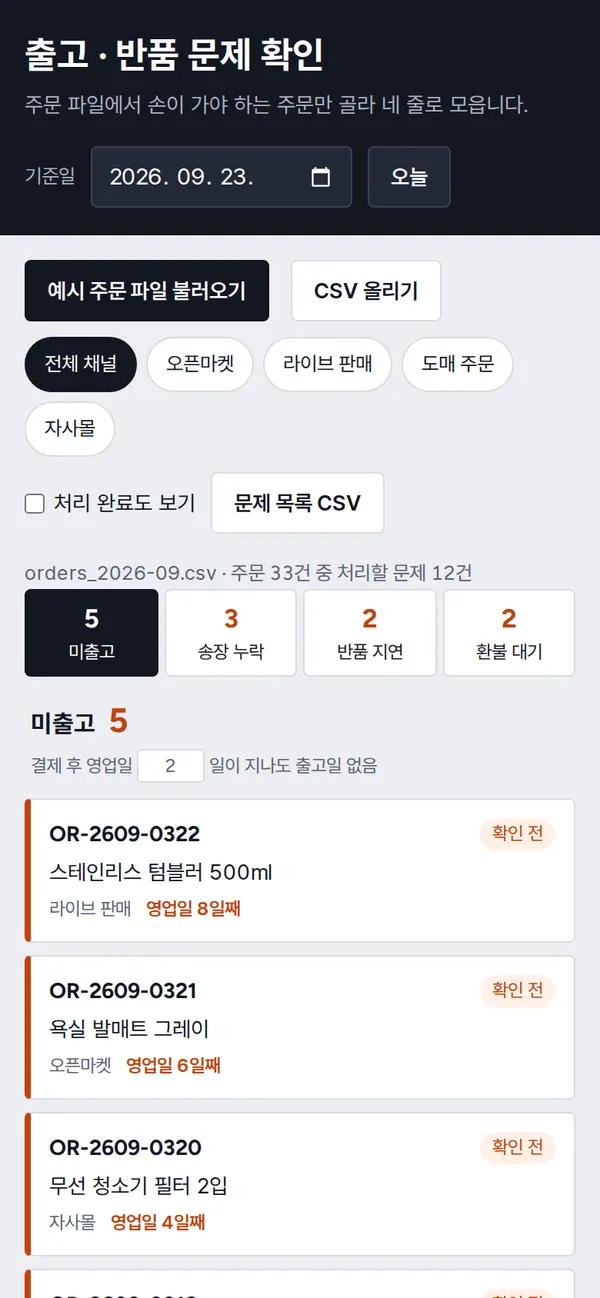
| Responsive | Layout changes at 1100 · 640px. On PC the four lanes sit side by side; below 1100px two per row; below 640px the four lanes become tabs at the top, shown one at a time, and order details open full screen. |
| Fonts | NanumGothicCoding throughout — monospaced like a shipping label (a free open font). Trimmed to only the characters used on this screen, 83KB in total. |
| Images | A business screen with no photos. Lanes, cards, and status marks are drawn with CSS. |
| Motion | No motion except notification text that briefly appears and fades. Even that stops when the device's reduce-motion setting is on. |
| Accessibility | Issue-type tabs and channel buttons announce their pressed state, and every day-threshold field has a label. Status uses both color and text, and Esc closes the detail panel. Accessibility score 100. |
| Tech | HTML, CSS, JavaScript (no external libraries). Files are read only inside the browser and never sent anywhere. Files with mismatched headers are rejected, with the missing column names shown. Status, memos, and history are stored in browser storage (localStorage), and entered text is rendered as plain text only. |
6. QA
Results from running the pages on PC 1440 and mobile 390 screens and clicking through in the order a real user would. We also checked that data is still there after saving and refreshing. (2026-09-23)
| Item | PC 1440 | Mobile 390 |
|---|---|---|
| Screen errors | 0 | 0 |
| Broken files | 0 | 0 |
| Horizontal overflow · clipped text | 0 | 0 |
| Function tests (Chrome) | 12 / 12 passed | 12 / 12 passed |
| Function tests (Safari engine) | 12 / 12 passed | 12 / 12 passed |
The 12 function tests: first-visit screen display · loading the sample order file and sorting into four lanes · filtering by sales channel · changing day thresholds · changing the reference date · opening an order to see the reason · saving status and memo · done orders drop off the list · status, memo, and history kept after refresh · issue list CSV · blocking files with different headers · uploading your own order file
Speed and quality scores (out of 100; mobile measured three times on a slow connection, median shown)
| Performance | Accessibility | Best Practices | SEO | |
|---|---|---|---|---|
| Mobile | 100 | 100 | 100 | 100 |
| PC | 100 | 100 | 100 | 100 |
Mobile: First Contentful Paint 1.1s · Largest Contentful Paint 1.5s · Layout Shift 0.000 · Blocking Time 0ms PC: First Contentful Paint 0.3s · Largest Contentful Paint 0.4s · Layout Shift 0.000 · Blocking Time 0ms
7. Result
Try it live ↗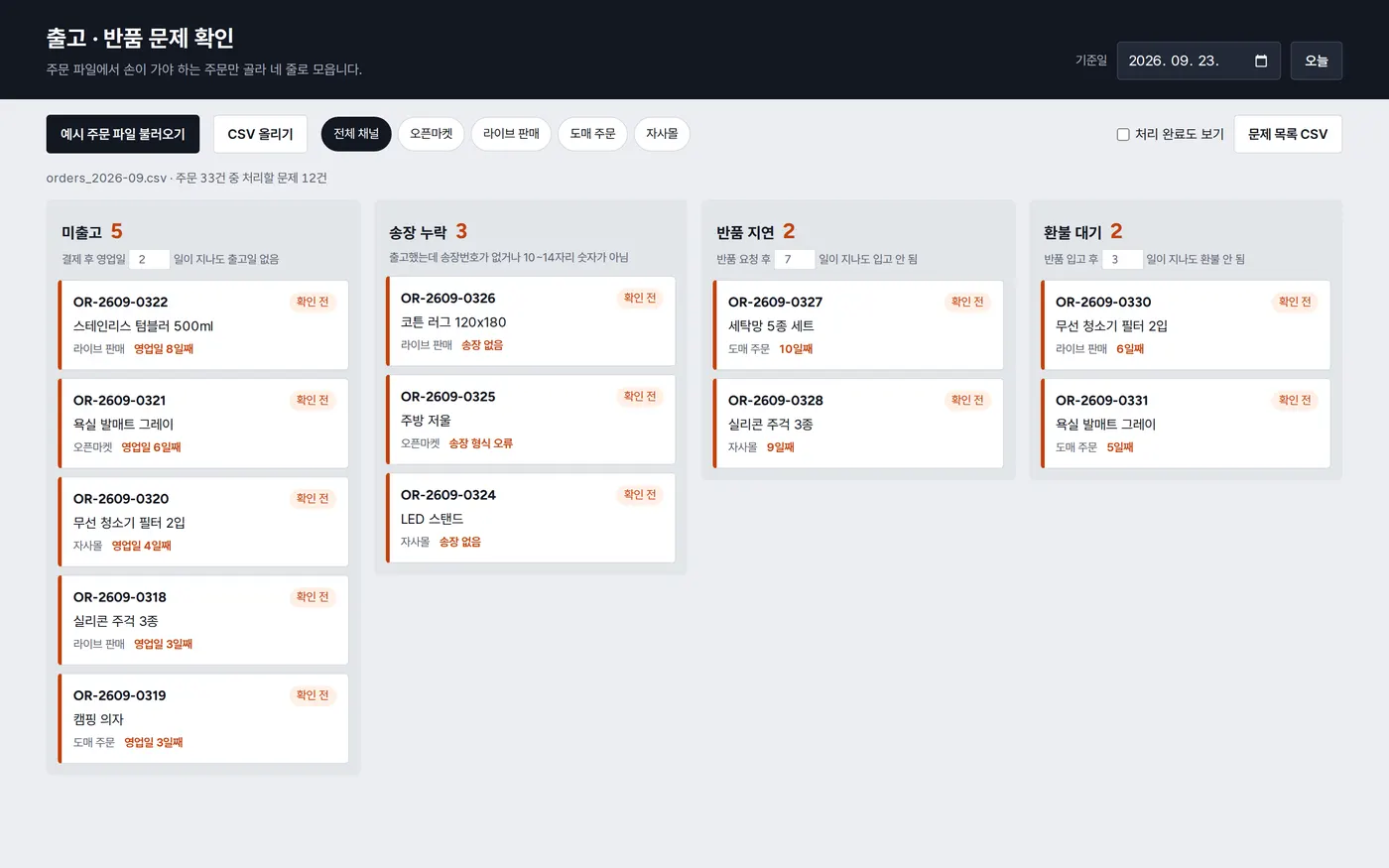
Privacy Policy