1. Overview
| Industry | A neighbourhood dental clinic in Balmain, Sydney's Inner West (3 general dentists) — an English website for a dental clinic in Sydney, Australia |
| Purpose | Let patients see treatments and dentists, check whether the clinic is open right now, and get a booking number for their chosen dentist's days and times. Fees and health fund claiming, the pre-visit medical history form, and booking lookup, changes and cancellation are all handled on the same site. |
| Scope | 10 pages (Home · Treatments · Treatment detail (5 treatments in one page layout) · Our dentists · Fees & health funds · Hours & location · Book an appointment · My booking · New patients (first visit, medical history) · 404) · responsive for PC, tablet and phone · English (Australian spelling), dates DD/MM/YYYY, 12-hour time, Australian dollars, Sydney time |
| Main flow | Treatment detail → "Book this treatment" → 4-step booking (treatment → dentist → date and time → patient details) → booking number SG-YYMMDD-XXXX → medical history form → check the form, change the date or cancel in My booking |
Bookings and medical history forms are saved in the browser and loaded again in the same browser.
Connected at rollout: real text and email messages, practice management software and HICAPS terminal integration, and server storage to see the same booking on several devices.
2. Challenges
1. "Can I be seen if I go now?" turns into a phone call.
With late Thursdays (until 8:00pm), short Saturdays (8:30am–1:00pm), closures on Sundays and NSW public holidays, and practice closure days all mixed together, the timetable alone is hard to read. Because the site is viewed from overseas too, the time has to be worked out in Sydney time, not the visitor's device time.
2. Each dentist works different days and takes different treatments.
Clear aligners are with one dentist, children with another, yet a generic booking form lets people pick any day and the clinic has to call back.
3. When costs and claiming are unclear, patients put off the first visit.
Australian patients check fees with their health fund by ADA item number, and first ask whether on-the-spot health fund claiming (HICAPS) is available and whether their child is eligible for the Child Dental Benefits Schedule. All of this has to be said within the Australian health advertising rules (AHPRA), without promotional language, and surgical treatments such as implants need the required risk statement.
3. Structure
                    ┌──────────────── index.html Home ───────────────┐
                    │ first screen (today's status) · 5 treatments ·  │
                    │ stacking care-step cards · choose a dentist ·   │
                    │ hours and map · booking band                    │
                    └──┬──────────┬──────────┬──────────┬─────────┬───┘
                       │          │          │          │         │
             treatments.html  doctors.html  fees.html  visit.html  firstvisit.html
             5 treatments     3 dentists ·  item-number hours ·     first-visit steps · FAQ
                │             days table    table ·    SVG map            │
                │                  │ Book with …  claiming                │ medical history
                ▼                  ▼                                      │ (linked to booking number)
       treatment.html?id=…   reserve.html?d=…                             │
       who it's for · steps ·      │                                       │
       precautions · related fees ·│                                       │
       (surgical) risk statement   │                                       │
                │ Book this treatment                                      │
                ▼                  ▼                                        ▼
          reserve.html?t=…  ── ①treatment ②dentist ③date, time ④details → booking number ──→ mybooking.html
                                                                   lookup, change, cancel + medical history

  Every page: floating pill menu · full-screen phone menu (with today's status) · footer · 404.html
The home page shows today's status first, then branches into treatments, dentists, fees, hours and first-visit information. Moving to booking from a treatment page or a dentist's profile starts with that treatment or dentist already chosen, and after the booking number come the medical history form and My booking.
4. Key Features
Today's status
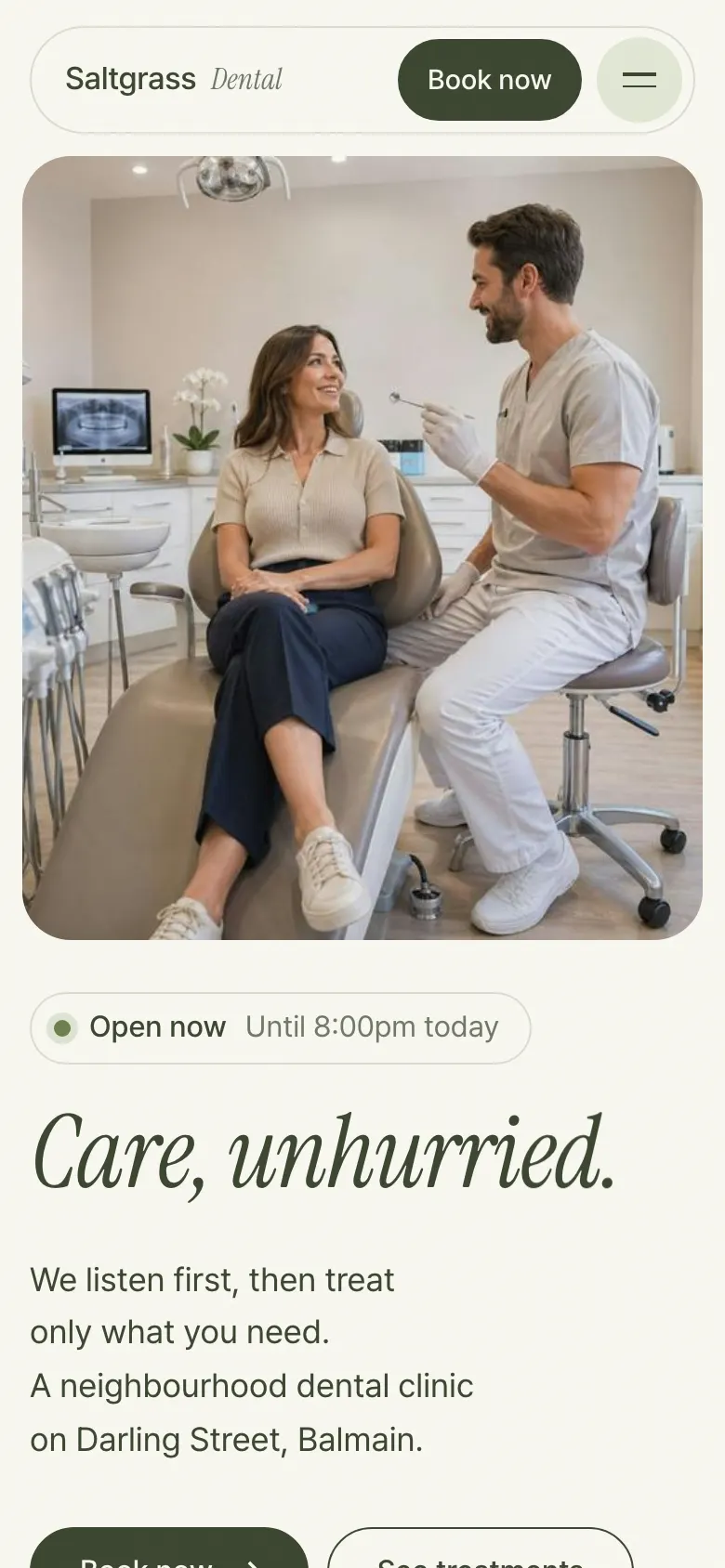
The current time is worked out in Sydney time to show "Open now (Until 6:00pm today) / Not open yet / Closed for the day (Next open tomorrow, 8:00am) / Closed today (Labour Day)" on the first screen, the phone menu and the hours page. Thursday switches to 8:00pm and Saturday to 1:00pm, and there is no lunch closure. Today's row is marked on the timetable, and the status is recalculated every 30 seconds.
Dentist days
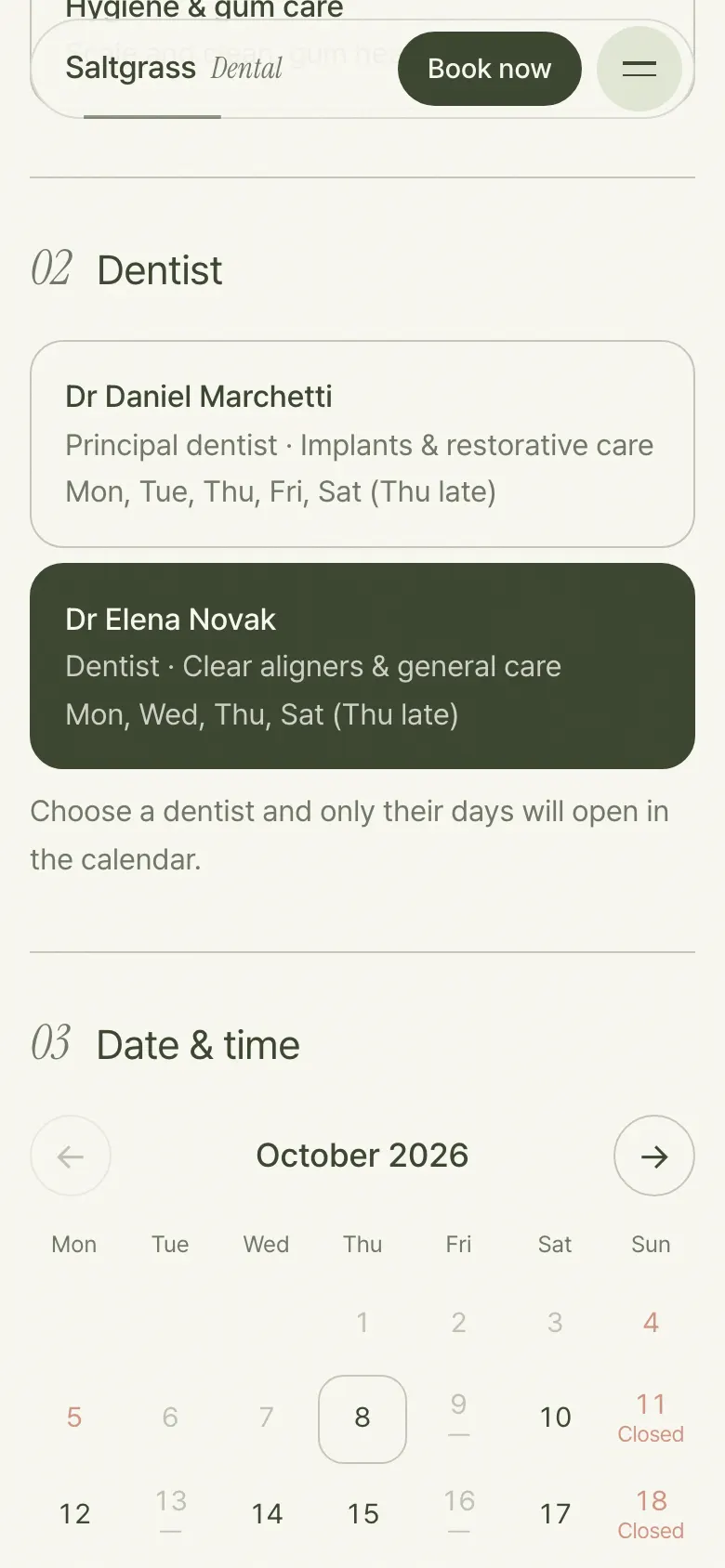
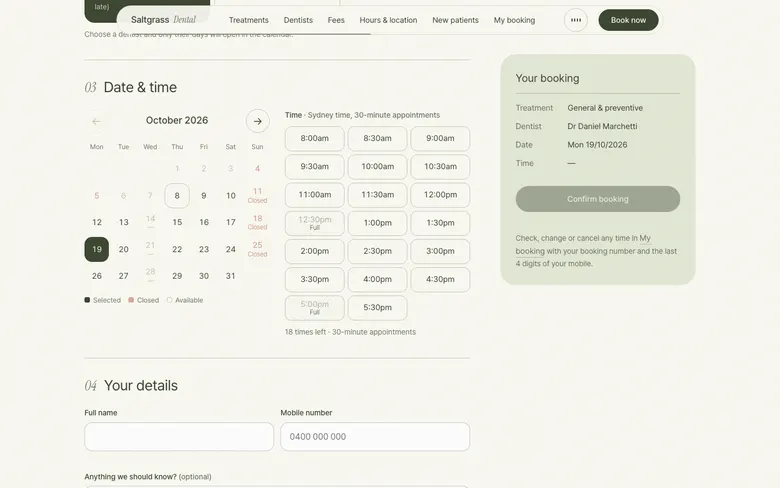
Choosing a treatment shows only the dentists who provide it. Choosing a dentist blocks the days that dentist does not work on the calendar. The calendar starts on Monday, as in Australia.
30-minute time slots
Times already past today and times taken by other patients are hatched and blocked. Lunchtime can be booked, Thursday has slots until 7:30pm and Saturday has 8:30am–12:30pm slots. Times are shown in 12-hour format.
Booking number
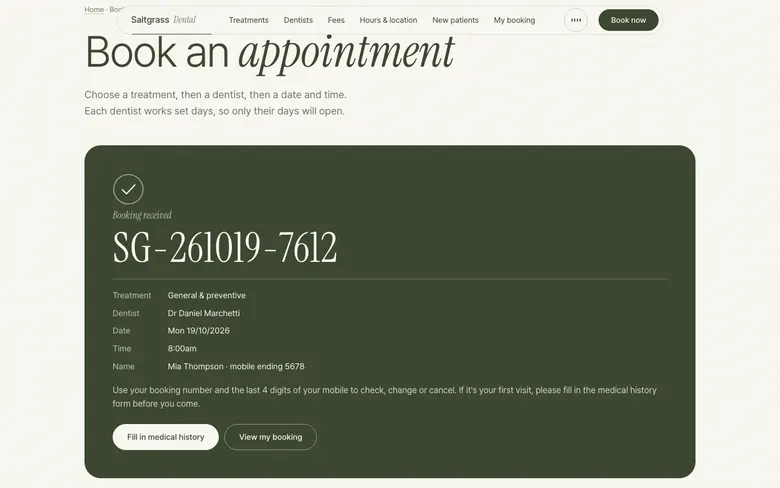
Confirming the booking makes and saves an SG-date-4 character number and shows the treatment, dentist, date (Mon 19/10/2026) and time again. It links straight on to the medical history form and booking lookup.
- Owner adminBookings move to confirmed, attended, no-show or cancelled and the patient’s booking lookup changes at once, with each row showing whether the medical history form is in. Each date shows every dentist’s 30-minute slots, blocking a free slot turns it to "Full" for patients, and edits to the notice, opening hours and closures, dentists’ working days and fees update the booking calendar and fee table immediately. In this case study the owner and customer screens share the browser’s storage; in a real rollout this becomes an owner login with server storage.
- Medical history formThe form saves only when the booking number and the last 4 digits of the mobile match. It takes medications, allergies, 8 medical conditions, 6 areas of discomfort on a mouth diagram (tap or Enter), 8 symptoms and a note, and reopening it fills in the saved answers.
- Booking lookupThe booking appears only when the booking number and last 4 digits both match. It also shows the completed medical history and when it was saved (DD/MM/YYYY, Sydney time).
- Changing a bookingOn a calendar that opens only the same dentist's working days, choosing a new date and time saves it and marks it "Changed". The previous time opens up again for other bookings.
- Cancelling a bookingAfter a second confirmation, the booking is saved as "Cancelled". The cancelled time can be booked again, and a cancelled booking cannot take a medical history form.
- Blocking double bookingsSaved bookings are read so that the same dentist, day and time is blocked as "Full". Another dentist's slot at the same time stays open, and the check runs once more right before confirming.
- Closed daysSundays, NSW public holidays, practice closure days and past dates cannot be tapped, and show "Closed" with the reason. Bookings are taken from today up to 60 days ahead.
- Patient details · required fieldsName, an Australian mobile number (starting 04, with +61 converted too) and privacy consent are checked, and any problem is explained under the field without saving. Landline numbers are not accepted as mobiles.
- Treatment detail → booking preselected"Book this treatment" opens booking with that treatment selected, and if only one dentist provides it, the dentist is chosen automatically too. Implant and general treatment pages carry the required risk statement.
- Choosing a dentistPressing a name on the home page switches the photo, qualifications (such as BDS (Syd)), 4 interest tags and working days (arrow keys work too). The Our dentists page has a dentist × day timetable and Dental Board of Australia registration details.
- Stacking care-step cardsLarge numbered cards from "/01 Talk & check-up" to "/05 Ongoing care" pin one after another as you scroll and stack up, with the cards underneath shrinking and darkening a little. Each card has a step photo and duration, and on treatment pages they switch to that treatment's steps and times.
- Fees · health funds29 items are listed by ADA item number with amounts in Australian dollars, and search by name or item number (such as 114) and 6 categories narrow the list with an instant count. HICAPS on-the-spot claiming, Child Dental Benefits Schedule eligibility, a note that "fees are a guide and a written quote is given before treatment" and the risk statement sit alongside, and arriving from a treatment page link preselects that category.
- Phone menuThe button in the pill menu opens a cream full-screen menu with today's status and a call link. It closes with the close button or Esc, and the page behind stops scrolling while it is open.
5. Build Notes
Show details
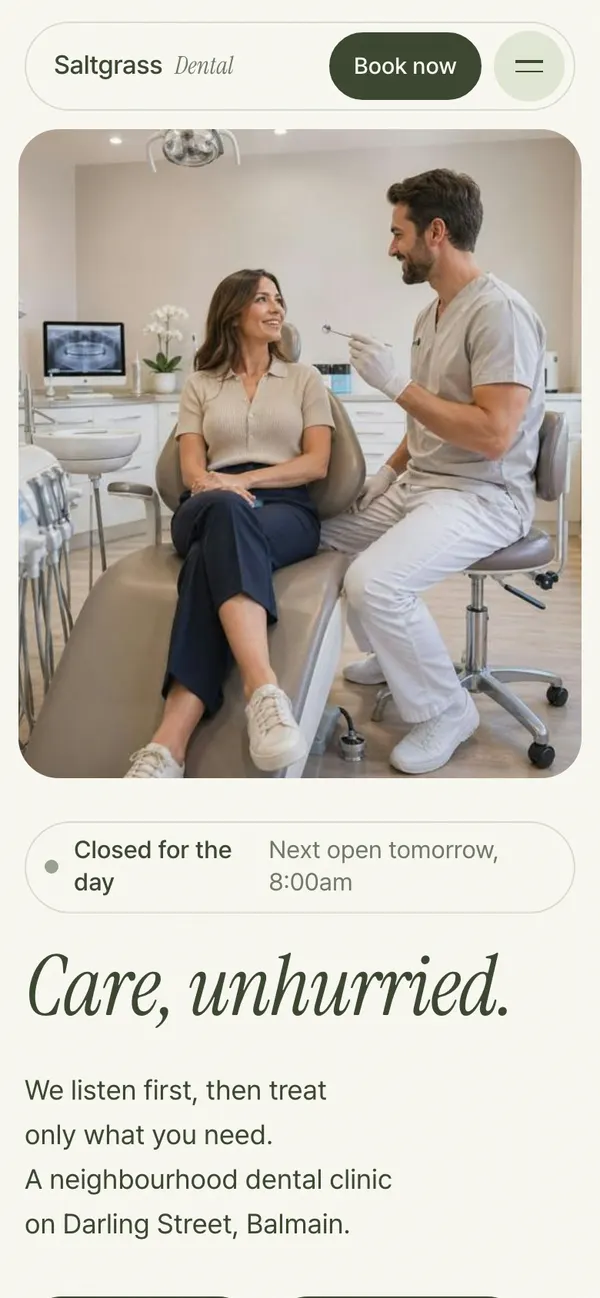
| Responsive | The layout is set for PC 1440, tablet (1080/860 and below) and phone 390. On phones the first-screen photo moves up into a rounded frame with the text below, the fees table becomes rows per item (category and item number / name and amount / unit), and dentist names become horizontal buttons. |
| Fonts | One heading line and numbers in Instrument Serif italic (narrow serif), headings and body in Pretendard |
| Images | Colours: cream #FBFAF3 · olive #3A4530 · pale sage #E3E8D6 (card surfaces), with #B5543C only for closures and cautions. 15 free real photos (JPG up to 1,800px wide, 2,060KB in total). Phones get separate 800px-wide photos (15 files, 875KB in total), and photos outside the first screen load as they come into view. Every photo has its width, height and English alt text set. First phone visit to the home page: 0.7MB. |
| Motion | The care-step cards pin with CSS sticky, each 14px lower than the last, and as the next card rises the size and darkness of the one before change with scrolling (GSAP ScrollTrigger). The first screen only has the photo slowly brightening and a serif line rising from below. The pill menu narrows as you scroll down, and a cream layer softly covers and lifts between pages. No loading screen, cursor effects or counting numbers. |
| Accessibility | Skip-to-content link, alt text on every image, buttons as button and inputs with label. Choosing a dentist uses the tab role and arrow keys, mouth areas are chosen by keyboard (Enter, Space), questions are disclosure lists (details), and error messages are read via role=alert. With the device's reduce-motion setting on, smooth scrolling, card shrinking, transitions and entrance motion are all switched off and content shows at once. |
| Stack | HTML, CSS and JavaScript, GSAP 3.12 + ScrollTrigger, Lenis (smooth scrolling) — all bundled with the site, no external scripts. The browser's built-in time zone support (Intl, Australia/Sydney) gives the current Sydney time, and the same value drives the status, past time slots and past-booking checks, with daylight saving changes handled automatically. Hours, NSW public holidays, dentist days, booking slots and fee calculations are gathered in one file (data.js), and bookings and medical history forms go through one storage function wrapping browser storage (localStorage) in try/catch. |
6. QA
These results come from running all 10 pages on PC 1440 and phone 390 screens and tapping through in the order a real person would. We also checked that saved bookings and medical history forms can be looked up, changed and cancelled again after opening a fresh page. The opening status was checked across several days and times with the clock fixed, and external requests and broken links are 0. (2026-10-03)
| Item | PC 1440 | Phone 390 |
|---|---|---|
| Screen errors | 0 | 0 |
| Broken files | 0 | 0 |
| Horizontal overflow | 0 | 0 |
| Function tests | 16 / 16 passed | 18 / 18 passed |
The 18 function tests (phone menu and phone booking screen run on phones only): today's status (Sydney time, several days and times) · stacking cards and pill menu · page transition · choosing a dentist and days table · treatment preselection and risk statement · dentist days and Monday-start calendar · closed days · past, late and Saturday time slots · booking number, required fields and Australian mobile numbers · double booking blocked · medical history form · lookup · change · cancel · fee search and categories · banned advertising words and no Korean text · phone menu · no overflow on the phone booking screen
Speed and quality scores (out of 100, measured on the public site on 2026-10-03; phone on a slow connection, median of three runs; PC on PC settings)
| Performance | Accessibility | Best practices | SEO | |
|---|---|---|---|---|
| Phone | 95 | 95 | 96 | 66 |
| PC | 100 | 95 | 92 | 66 |
Phone: first paint 2.0 s · largest element 2.4 s · layout shift 0.016 · input blocking 20 ms PC: first paint 0.3 s · largest element 0.6 s · layout shift 0.002 · input blocking 0 ms
The SEO score is low because the live demos are deliberately kept out of search results.
7. Result
Try it live ↗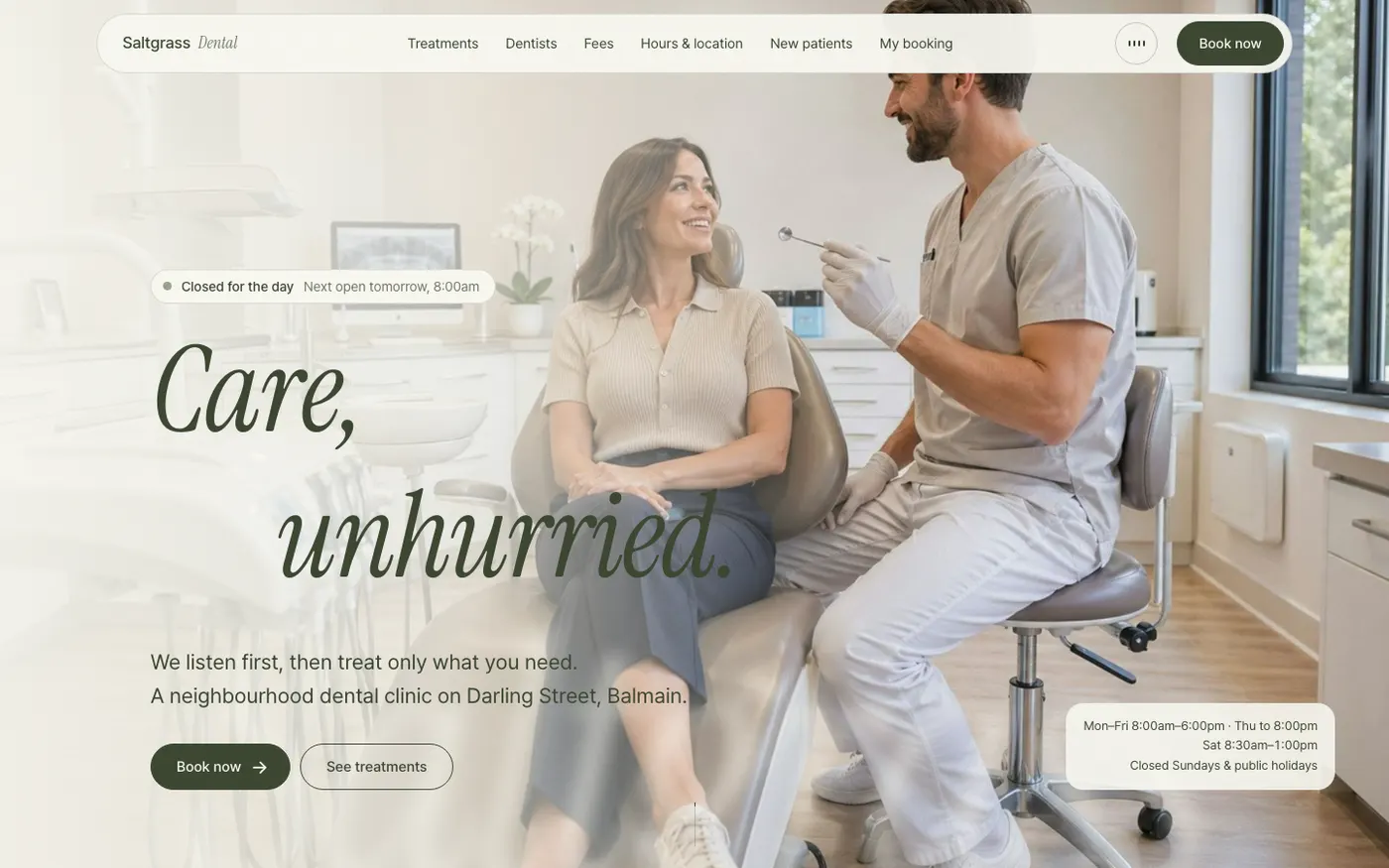
Privacy Policy